Honeywell HR92 Electronic Radiator Thermostat

Scope of delivery
The radiator controller packaging contains:
- Radiator controller with valve baseplate M30 x 1.5; batteries included
- Display support
- Valve adapter type Danfoss RA
- Screws for securing radiator controller and battery compartment

Brief description
HR92 is an electronic radiator controller with a modern design. Because of the wireless communication with a frequency of 868 MHz the controller can be easily integrated in heating systems such as evohome to control the room temperature.
User-friendly
- Large adjustable display with backlight.
- Display of information in the display using symbols and text.
- Parameters can be set individually.
- Manual temperature modification (effective until the next switching point) possible at any time.
Mounting
- The radiator controller fits on the most common radiator valves of the type M30x1.5.
- Further adapters are available as accessories.
- An external window contact can be connected optionally.
Energy saving features
- With the window function, the radiator valve is closed when ventilating the room.
- If an external window contact is used, the radiator valve is closed when a window is open
Device overview
Operating elements and display
- Adjustment dial
- Displays that the room temperature is being measured by an external sensor and being transferred to the HR92.
- Displays that the room setpoint was changed manually
- Operation lock
- Battery status
- Temperature display/parameter information
- Text display, 9 characters
- Radio signal (field strength)
- Radio communication display
- Radio communication error
- Info button, for displaying the room (zone) information;
- Function button, for binding and configuring

Battery display
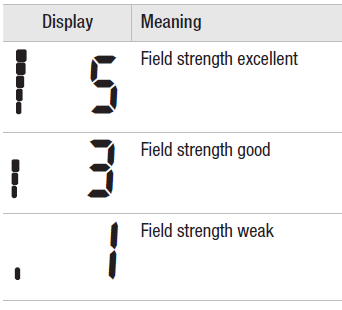
Radio signal display
Mounting
Ready to operate in three steps:
- Insert batteries and set language
- Establish radio connection
- Mount on radiator controller – FINISHED
Inserting/changing batteries
The radiator controller is set for the following battery type:
- 2 alkaline cells 1.5 V; type LR6, AA, AM3
- You can instead use the following batteries or accumulator cells:
- Lithium 1.5 V; type LR6, AA, AM3
- NiMH 1.2 V; type LR6, AA, AM3

Steps
- Pull off the adjustment dial. To do so, start at the notch on the bottom of the device.
- If used, unscrew any fastening screws from the battery compartment.
- Release the lock and fold out battery spring.
- The battery compartment is now accessible.
- Insert the batteries.
- Ensure that the polarity “+” and “–” is correct.
- Fold down the battery spring and latch it in.
- Option: Secure the battery spring with the fastening screws to secure the batteries against theft.
- Place the adjustment dial back on.
- First the software version number and then the language english is displayed.
- If desired, use the adjustment dial to select a different language.
- Confirm the selected language with the
 button.
Establishing radio connection
The radiator controller HR92 communicates with the central operating device by radio using the frequency of 868 MHz. To this purpose the connection between the HR92 and the central operating device has to be established first. This process is called BINDING. In the case of preconfigured devices binding has already been carried out in the factory Binding must first be activated at the HR92 so that the radio signal can be received. Subsequently, binding has to be activated at the central operating device
Activating binding at the HR92
- Press the button briefly. unbound is displayed.
- Hold the button pressed for 5 seconds. bind is displayed.
- Press the button briefly. binding is displayed and the radio symbol appears.
Activating binding at the central control device
To activate binding at the central control device: see the associated instructions
Binding at the HR92
The radio symbol flashes during binding. If binding was successful, success is displayed. Afterwards the main display is shown. When sync is shown in the display, the radiator controller is synchronizing with the central operating device. HR92 receives the data from the central operating device.
Failed binding/insufficient data transfer
Binding has failed when the radio symbol disappears and failed is displayed. The data transfer output may be insufficient. This can be caused by metallic objects or further radio devices.
- Ensure that the distance to radio devices such as radio headphones, cordless phone, etc. amounts to at least 1 m.
- Ensure that the distance to metallic objects is sufficient.
- If radio interference cannot be eliminated, select a different mounting location for the room unit and repeat binding.
Clearing binding at the HR92
- Press the button briefly.
- Hold the button pressed for 5 seconds.
- Select bind using the adjustment dial and keep the button pressed until cleared is displayed. The binding is deactivated.
Radio test
- Press the button briefly.
- Hold the button pressed for 5 seconds.
- Select RF check using the adjustment dial and confirm with the button checking is displayed (flashing) in the display
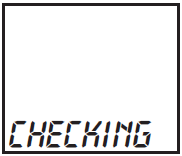
The radiator controller is ready to receive radio signals from the central operating device The field strength is displayed as a bar and a number while the radio signal is being received.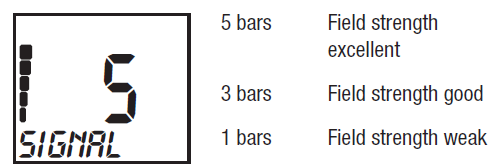
Radio test at operating devices with 2-way communication
If the central operating device can transmit and receive (2-way communication), like the evotouch, the field strength can be queried directly at the radiator controller without activating the radio test in the central operating device.
- Press the button briefly.
- Hold the button pressed for 5 seconds.
- Select rf check using the adjustment dial and confirm with the buttonchecking is displayed (flashing) in the display.
- Press the button again.
- The field strength is displayed as a bar and a number while the radio signal is being received.
Interrupting the radio test
The radio test is terminated automatically after approx. 10 minutes.
– or –
Select exit using the adjustment dial and confirm with the button.
Radio communication error
If the exclamation mark! and the radio symbol flash during normal operation, an error has occurred during radio communication.
- The room setpoint temperature of the HR92 radiator controller is changed automatically to 20 °C.
- Restore radio communication to the central operating device, see Section 7.
Mounting the radiator controller
The radiator controller can be mounted on all common thermostatic valves with an M30 x 1.5 connection without draining system
Removing the old thermostat head
- Turn the old thermostat head counter-clockwise until it stops and loosen the mounting ring.
- Remove the old thermostat head from the radiator valve.

Mounting the radiator controller
The radiator controller can be mounted on all common thermostatic valves with an M30 x 1.5 connection without draining system.
Removing the old thermostat head
- Turn the old thermostat head counter-clockwise until it stops and loosen the mounting ring.
- Remove the old thermostat head from the radiator valve.
Selecting the adapter
The radiator controller fits on common radiator valves of the type M30 x 1.5. Adapters are required for some valve types.
- Check whether an adapter is required and, if necessary, select the appropriate adapter

- Slide the adapter onto the radiator valve and turn it until you feel it click into place.
- If necessary, screw the adapter tight with a screw.
Mounting the valve baseplate
- Separate the valve baseplate from the radiator controller. To do so, push the slide towards
 .
.
- Turn the adjustment dial of the valve baseplate counter-clockwise until it stops.
- Put the valve baseplate onto the radiator valve or the adapter and tighten by hand (without tools!).
Mounting the radiator controller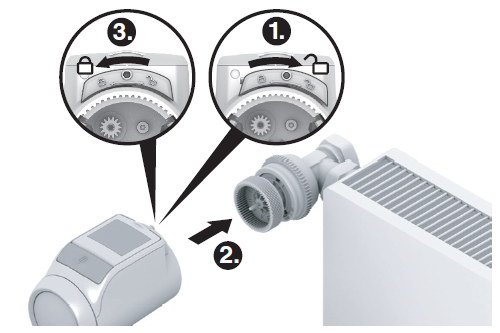
- Ensure that the slide on the radiator controller is in the open position.
- Put the radiator controller onto the valve baseplate so that the indentation latches in and is no longer visible.
- Lock the radiator controller in the end position. To do so, push the slide towards
 .
. - After approx. 1 minute cycl (self-test) is displayed.
- Afterwards the radiator controller changes to normal operation.
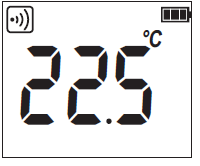
FINISHED! – The radiator controller now controls the room temperature in accordance with the specification of the central operating device
Securing the radiator controller
The radiator controller and the batteries can be secured against removal by using the supplied screws.
Setting the position of the display
In order to improve the legibility the display of the radiator controller can be tilted to different positions (10°, 20°, 30°, 40°). The angle of 40° can be fixed with the supplied display support.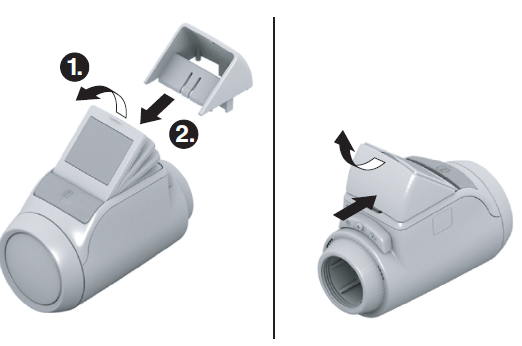
Mounting
- Lift the display and set it to the desired angle.
- If desired, tilt the display by 40° and slide the display support from above between the display and the housing until it latches in.
Unmounting
Press the display support in at the back and remove it upwards
Connecting an external window contact
The floating external window contacts HCA30 can be connected to the HR92 radiator controller.
Operation with window contact
- When the window is opened, the window contact is opened and the radiator valve closes. When the window is closed again, the radiator controller returns to normal operation.
- The frost-protection function ensures that the radiator valve opens when the temperature drops below 5 °C.
Cable connection
Connect cable ACS90 as follows to the window contact HCA30: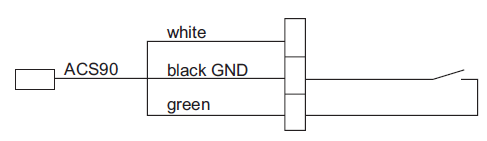
Connecting the cable to the radiator controller HR92
- Remove the side cover from the radiator controller.
- Insert the cable ACS90 into the radiator controller HR92.
- The radiator controller recognises the connected window contact automatically
Basic settings
Overview
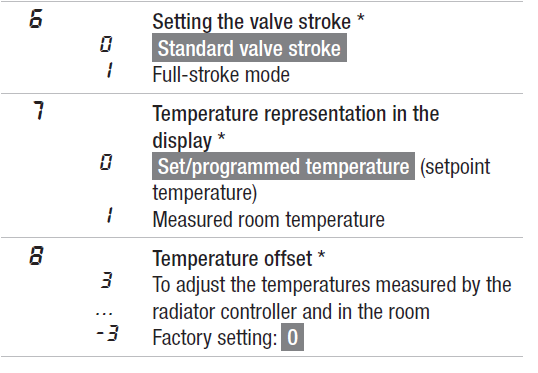
If required, the 12 basic settings (parameters) can be adjusted. Factory settings have a grey background. Parameters marked with an * are described in more detail below
Changing parameters
- Keep the button pressed for approximately 5 seconds until Parameter 1 flashes (left-hand digit).
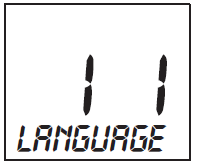
- Use the adjustment dial to select the desired parameter (left-hand digit).
- Press the button to edit the parameter.
- The current setting of the parameter flashes (right hand digit).
- Use the adjustment dial to set the desired setting (right-hand digit) and confirm with
- The parameter being edited flashes (left-hand digit).
- For the further parameters repeat Steps 2 to 4.
- To exit the menu, select exit using the adjustment dial and confirm with the button.
Description of the parameters
Parameter 2 – Backlight
- The display has a backlight for reading the information.
- The backlight is ON when the adjustment dial is turned or a button is pressed.
- The backlight switches OFF if no action is carried out at the radiator controller for approx. 7 seconds in order to save battery power.
Parameters 3 to 5 – Window function
In order to save energy the radiator controller closes the radiator valve when you open a window resulting in a large drop of the temperature. When you close the window so that the temperature rises the radiator controller opens the radiator valve again. When the duration of the window function (factory setting: 30 minutes) has expired, the system controls to the current room setpoint temperature again. Frost protection is ensured during the window function.
Parameter 6 – Valve stroke
The radiator controller operates with the optimum valve stroke set in the factory. If the entire valve stroke is to be used or if the valve does not open completely, activate the full-stroke mode.
Parameter 7 – Temperature representation in the display
- In the factory setting the room setpoint temperature is displayed.
- With the setting “measured temperature” the measured room temperature is displayed. A changeover to the set temperature is carried out by turning the adjustment dial or pressing the button.
- If required, the temperature can now be reset. The display returns to the measured temperature after approx. 3 seconds.
- Due to the heat influence of the radiator the “measured temperature” displayed at the radiator controller can differ from the temperature measured at another point in the room.
Parameter 8 – Temperature offset
Since the radiator controller measures the room temperature in the area of the radiator, it is possible that this temperature deviates from the temperature measured at a different point in the room. If, for example, 20 °C is measured in the room and 21.0 °C at the radiator, this effect can be compensated by an offset of –1.0 °C.
Parameter 10 – Display of the valve position
- When this parameter is activated (setting “1”), the calculated valve position (0 … 100% opened) is displayed momentarily.
- The main display is shown again after approx. 3 minutes.
- To cancel, select exit and press the button.
Parameter 11 – Window open function
- If a window contact is connected, the parameter is set automatically to “2” (cabled). The window function is controlled by the window contact.
- If no window contact is connected, the setting “0” or “1” has to be selected.
Further functions
Manual changing of the room setpoint temperature
The room setpoint temperature can be changed at any time by means of the adjustment dial. The changed room setpoint temperature remains in effect until the next switching point.
The symbol shows that the temperature was changed manually. The symbol extinguishes when the next setpoint is reached. By turning the adjustment dial anti-clockwise until off is displayed, the valve will be closed permanently. With this setting the time program of the central operating device is no longer active for this radiator controller, but frost protection is guaranteed if the heating is switched on.
Display of the room name
If the central operating device can transmit the room name (zone name), like the evotouch, the room name is displayed at the radiator controller (max. of 9 characters).
- Press button.
The room name (zone name) is shown briefly in the display.
Automatic monitoring functions
Window function
- If you open a window causing the temperature to drop, the radiator controller closes the radiator valve in order to save energy. window is displayed.
- When the temperature rises again, but at the latest after the set period (factory setting: 30 minutes), the radiator controller opens the radiator valve again.
- You can also open the radiator valve beforehand by turning the adjustment dial.
- The sensitivity of the radiator controller to a temperature drop or temperature rise can be set, see Section 5, Parameters 3 to 5.
- If a window contact is connected, the window function reacts directly to the opening and closing of the window, see Parameter 11.
Valve protection
If the radiator valve has not been opened once completely within the period of 2 weeks, a self-test (forced operation) is carried out. The radiator controller opens the radiator valve briefly on the subsequent Monday in order to prevent seizing. cycl is displayed.
Frost protection
If the temperature drops below 5 °C, the radiator controller opens the radiator valve until the temperature rises above 6 °C again. This prevents the heating system from freezing up. frost is displayed.
Help with problems
Error table

Emergency operation when batteries are flat
- Unlock the radiator controller. To do so, push the slide at the radiator controller towards
- Pull the radiator controller off the valve baseplate.
- Operate the radiator valve by hand using the adjustment dial on the baseplate.

Restoring the factory setting
- Keep the button pressed for approximately 5 seconds until Parameter 1 flashes (left-hand digit).
- Use the adjustment dial to select Parameter 12 (lefthand digit) and Setting 1 (right-hand digit).
- Press the button to restore the factory setting. The binding is retained.
- Use Exit to return to normal operation.
Technical data
Disposal
The radiator controller has to be disposed of in accordance with WEEE directive 2002/96/EC – Waste Electrical and Electronic Equipment directive.
Declaration of Conformity
Hereby Honeywell declares that this HR92UK is in compliance with the essential requirements and other relevant provisions of Directive 1999/5/EC.
Binding and radio test – Overview

References
DOWNLOAD MANUALS:
Honeywell HR92 Electronic Radiator Thermostat User Manual
OTHER MANUALS:
HONEYWELL HR92 Wireless Radiator Controller Thermostat Product Specification SHEET