Comfortheat ETN Electric Programmable Thermostat
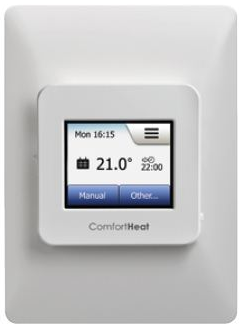
Operations Manual
A hydronic floor heating system has been installed in your floor. Underfloor heating will warm you from the floor up giving you an unparalleled feeling of comfort. This heating system is controlled by an electronic thermostat that has a floor or air sensor for optimum temperature control.
PRIOR TO TURNING ON
The sub-floor and screed have to be fully cured before turning the heating on. For sand & cement screeds you must wait at least 3 weeks before turning them on. When turning on the floor for the first time, increase the floor temperature gradually over 2-3 days
PRODUCT WARRANTY TILE CABLE
- 10 years SLAB CABLE
- 10 years CARPET MATS
- 5 years TIMBER MATS
- 5 years THERMOSTAT & SENSOR
- 2 years
SUGGESTED TEMPERATURE SETTINGS
- BATHROOM – 24 ~ 28ºC
- LARGE TILED AREA – 21 ~ 22ºC
- CARPET – 19 ~ 21ºC
- TIMBER – 24ºC
- SLAB – 21ºC
TECHNICAL DATA
- Supply Voltage: 240Vac, 50/60hz
- Output Relay: 16A SPST, 3600W max
- Switching Differential: 0.4 degC
- Built-in Switch: 2 pole 16A
- Temperature Range: 0/+50 degC
- Housing/protection: IP20 & IP21
- Dimensions (HxWxD): 115mm x 84mm x 58mm
- Sensor Length: 3m
- Warranty: 2 years
- Mounted: Vertically/DIN rail mounted
BASIC SET UP
Temperature Settings
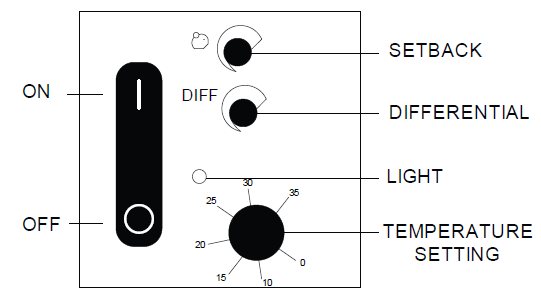
ETN has a temperature range of 0 to 35°C known as ‘set point’.
Light
The light indicates when the floor is drawing power ( heating ). When the red light is off this indicates that the floor is at your set temperature and will switch back on once the floor drops to your differential setting.
Differential
The differential is the temperature span between switching the thermostat on and off. Eg if the ‘set point’ is set to 25°C and the differential set to 3°C, the thermostat will switch off at 25°C and turn back on when the floor temperature reaches 22°C.
Setback
Setback allows you to remotely switch the thermostat to a default temperature by utilizing a home automation system (C-bus). Eg, if the ‘set point’ is set to 25°C and the setback temperature at 10°C, when the remote time clock switches the thermostat to the default setting the temperature will sit at 15°C. (with the same differential)
Set-Up
Initially, adjust the ‘set point’ to maximum temperature and leave on until the desired floor temperature is achieved. At this stage turn the ‘set point’ control back until the red led just goes out. (this will help you get a feel for your ideal temperature setting) Monitor this situation for 24 hours to achieve the correct floor temperature.
INSTRUCTIONS
APPLICATION OF THE THERMOSTAT
ETN is an electronic thermostat with a built-in relay for switching heating cables, contactors, pumps, solenoid valves, fans etc. The setback temperature is activated via an external time switch.
ETN IS AVAILABLE IN SEVERAL VARIATIONS
With 16 amp S.P.S.T. contact, fed from the thermostat supply voltage, with a built-in interrupter
- ETN-2P-1441 without sensor
- ETN/F-2P-1441 incl. floor sensor
- ETN/F-2P-1449 incl. room sensor
- With 16 amp S.P.S.T. contact, fed from the thermostat supply voltage.
- ETN-1442
- (setback temp. 6-20°C) without sensor With 10 amp voltfree change-over contacts.
- ETN-1441P without sensor
- ETN/F-1441P incl. floor sensor
- ETN/F-1449P incl. room sensor
CE MARKING
OJ Electronics A/S declare under their own responsibility that this product meets the requirements of the European Council’s directive 89/336 and successive modifications as to electro-magnetic compatibility and the Council directive 73/23 as to electrical equipment to be applied within certain voltage ranges.
Standards applied
- EN 61000-6-3 EN 61000-6-2, EN 60 730-1 and EN 60 730-2-9.
- The product may only be energised when the entire installation meets the current directive requirements.
- When the product is installed according to this instructions guide and the current installation guidelines, it is covered by factory guarantee.
- If the product has been exposed to damage e.g. in transport, it must be checked and overhauled by qualified staff before the product is connected to the power.
TECHNICAL DATA
- Voltage . . . . . . . . . . . . . . . . . . . . . . . .230V AC
- Power consumption . . . . . . . . . . . . . . . . . .3VA
- S.P.S.T. switch ETN, ETN-2P . . . . . .16A / 250V
- S.P.C.O. switch (volt-free) ETN-P .10A/250V AC
- Temperature scale . . . . . . . . . . . . . . . .0/+35°C
- Temperature differential . . . . . . . . . . .+0,3/+6°C
- Setback temperature . . . . . . . . . . . . . .+3/+10°C
- Setback temperature (ETN-.442) . . . . .+6/+20°C
- Ambient temperature . . . . . . . . . . . .-20/+50°C
- Housing/protection . . . . . . . . . . . . . . . . . . .IP20
- ETN thermostat is maintenance free
- ETN is also available for 24V.
Accessories
- Cover box for wall . . . . . . . . . . . . . . . . . . .ETNK
- Room sensor . . . . . . . . . . . . . . . .ETF-944/99-H
- Floor sensor . . . . . . . . . . . . . . . . . .ETF-144/99A
MOUNTING OF SENSOR
Floor sensor: The floor sensor is placed in a conduit which is embedded in the floor. The pipe is sealed at the end and placed as high in the concrete layer as possible.
Room sensor: The room sensor is mounted on a standard wall box, or directly in the wall. NB! Avoid placing the room sensor on an outside wall, above a radiator, or where it can be affected by direct sunlight. The sensor cable may be extended by up to 50 m with separate cable. Two conductors in a multi-conductor cable, for example such as setting used for supply for a connected heat cable, may not be used. Avoid laying the sensor cable parallel to cables which can induce signals/noise on the sensor signal, and thus disturb the thermostat’s function. If the cable is used with screen, the screen may not be connected to the ground, but must be connected to terminal 8. The best installation is achieved with a separate cable for the sensor.
INSTALLATION OF THE THERMOSTAT
ETN is suitable for mounting on DIN rail. To cover the terminals, use ETNK wall box. The power supply, load, and sensor cables should be connected as shown in fig. 1-3. All supplies must be taken from a single phase, with suitable fusing.
TEMPERATURE SETTING
ETN has a scale range of 0 to 35°C. To help the setting, the ETN has a red LED which is lit when the relay is energised (calling for heat). Move the setpoint to the maximum until the required room or floor temperature is reached. Then turn the setpoint knob back until the LED goes off. Fine adjustments may be required after 24/28 hours once the heating system has stabilised.
ADJUSTMENTS OF DIFFERENTIAL
The differential is the temperature span between the OFF switching of the thermostat and the temperature at which it switches ON again. This temperature span can be adjusted by the DIFF knob. The differential setting will always operate below the setpoint. Thus, if the setpoint is 24°C, and the differential is set at 5°C, the thermostat will switch OFF at 24°C and back ON at 19°C. We recommend that for floor heating, which generally has a slow response time, the differential is set to a low figure. For fast heat response systems, the differential can be set to a higher figure.
SETBACK TEMPERATURE
This is activated by the closing of an external contact e.g. from a time switch. The time switch can setback more than one ETN, see fig. 4. (NB! The time switch contact must be volt-free). The amount of setback is selected on the knob marked with a moon (or piggy bank).
FIGURES
Thermostats for DIN-rail with Setback Mode
- On/off control up to 3,600 W, 16A.
- Built-in setback mode for automatic comfort and setback temperature via remote timer
- Electronic thermostat for accurate temperature regulation ensuring a high comfort of the floor surface or the room temperature.
- Versions with floor sensor or remote room sensor.
- For DIN-rail mounting.
ETN
- With built-in interrupter for convenient switching off at airing the room or at summer times.
- +3/+10ºC adjustable setback temperature.
- 0.3/6ºC adjustable differential
ETV
- 5ºC fixed setback temperature.
- 0.4ºC fixed differential.
PRODUCT PROGRAMME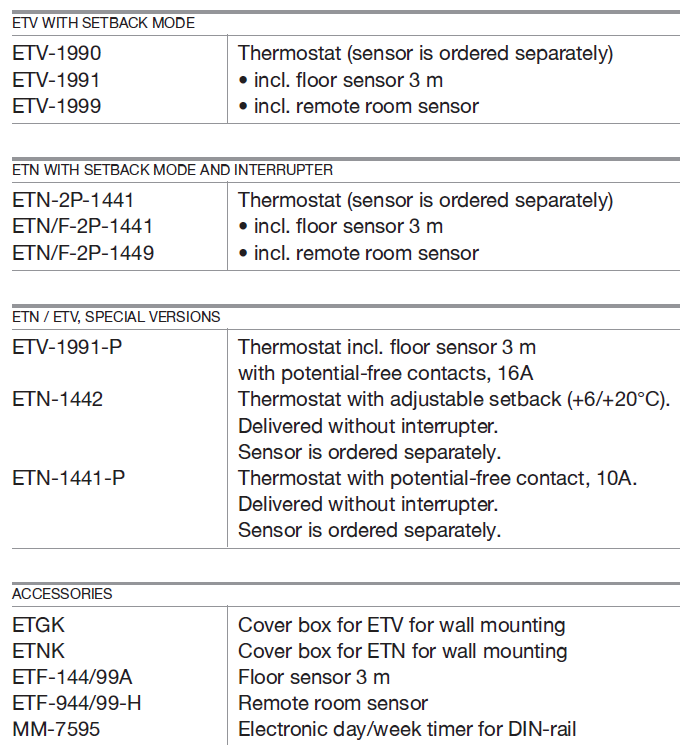
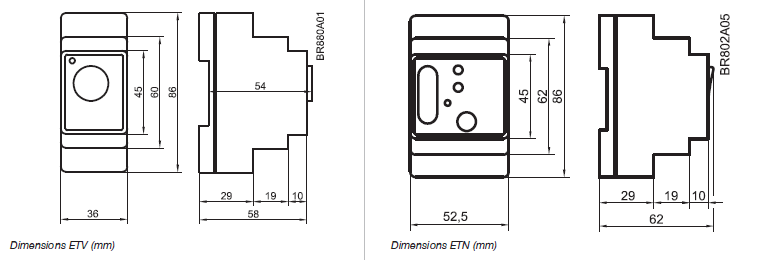
Dimensions
Thermostat control
Type ETV and ETN are electronic on/off thermostats with control of temperature by means of an NTC sensor. Red LED indicates when heating is on.
Temperature setback
- Type ETN and ETV are with setback mode, which is activated with a day/week timer, e.g. MM-7595.
- The timer is programmed with the required comfort and setback periods.
- Setback mode of type ETV is fixed 5°C.
- Setback mode of type ETN can be adjusted to +3/+10°C.
Built-in 2-pole interrupter
Type ETN is with built-in 2-pole interrupter.
Differential
- Type ETV is fixed at 0.4ºC.
- Type ETN is adjustable 0.3/6ºC.
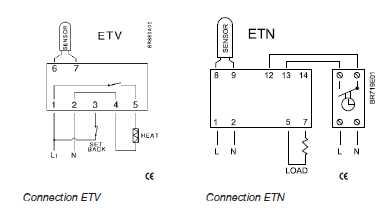
TECHNICAL DATA
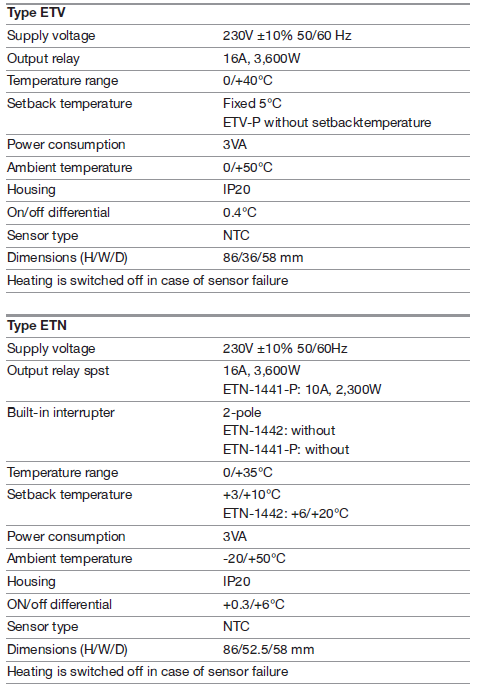
REFERENCE:
DOWNLOAD MANUALS:
Comfortheat ETN Electric Programmable Thermostat Setup Manual
OTHER MANUALS:
Comfortheat ETN Hydronic Programmable Thermostat Operating Manual
Comfortheat ETN Programmable Thermostat User Manual
Comfortheat ETN THERMOSTAT Wiring Diagram

Comfortheat ETN Electric Programmable Thermostat Setup Manual