
WATTS BT-CT02-RF Touchscreen Thermostat

Description
WATTS®Vision® enables you to programme and display the settings for each multi-zone heating and/or cooling system (up to 50 zones). It is a wireless system that requires the use of Watts 02 RF Series RF thermostats to control the temperature of the individual rooms and remote contacts. The WATTS®Vision® system includes a series of web pages that provide full remote control of the system using any browser (from your PC, tablet, smartphone, etc.) or the dedicated app (for iOS and Android) by means of the system’s WiFi connection.
BT-CT02 RF-WiFi
The WATTS®Vision® Central control Unit manages water-based and electric underfloor HVAC systems, radiators, lights and other electrical devices. Thanks to a built-in WiFi module, you can manage and monitor all the control parameters of your home via an app on your smartphone, tablet or PC.

- Operating temperature (220V): -30÷40°C. Operating temperature (battery): 0÷40°C.
- IP rating: IP30. Protection class: II. Display accuracy: 0.1°C.
- Temperature setting range: Comfort 5÷10°C with sensitivity of 0.5°C; Reduced 5÷30°C with sensitivity of 0.5°C; Anti-freeze 5÷10°C.
- Power supply (flush-mounting): 85-265VAC 50-60 Hz. Power supply (desk stand): USB power supply unit (optional). Radiofrequency 868 MHz, <10mW, range <40m internal <100m open space.
- Compliant with: EMC 2014/30/EU, RED 2014/53/EU, LVD 2014/35/EU, GPSD 2001/95/EC, RoHS 2011/65/EU.
| Type | Part No. | Description |
| BT-CT02 RF-WiFi | P07255 | White screen |
| BT-CT02 RF-WiFi | P07256 | Black screen |
- 4.3” colour capacitive touchscreen display.
- Web-based interface (WiFi). Can be connected to the internet.
- Wall-mounting with power supply of 85-265V, 50-60 Hz.
- Desk stand with power supply cable (0-5V) sold separately.
- Operates with batteries (for setting phase only).
- RF communication with other devices belong to WATTS®Vision® Series
- Controls heating and lighting devices and On/Off sockets.
- Updates with micro SD card.
- User-friendly menus for device management.
- 50 master heating devices (thermostats) and 50 slave heating devices (receivers).
- 25 ON/OFF devices with weekly programme with increments of 15 min.
- 50 lighting devices (by means of ON/OFF).
N.B: It may be necessary to use a Watts RF repeater to extend the range of the Central Unit RF signal.
| Technical specifications | |
| Operating temperature (220V power supply) | -30÷40°C |
| Operating temperature (battery) | 0÷40°C |
| IP rating | IP30 |
| Protection class | Class II |
| Temperature control accuracy | 0.1°C |
| Temperature ranges (use) | PID |
| – Comfort | 5÷30°C (increments of 0.5°C) |
| – Reduced | 5÷30°C (increments of 0.5°C) |
| – Anti-freeze | 5÷10°C |
| Power supply (flush wall-mounting) | 85-265V 50-60 Hz |
| Radio Frequency | 868 MHz, <10mW |
| Firmware version | Shown on main page V xxx |
|
Directives |
EMC 2014/30/EU |
| LVD 2014/35/EU | |
| RED 2014/53/EU | |
| GPSD 2001/95/EC | |
| RoHS 2011/65/EU | |
Operation
Start screen
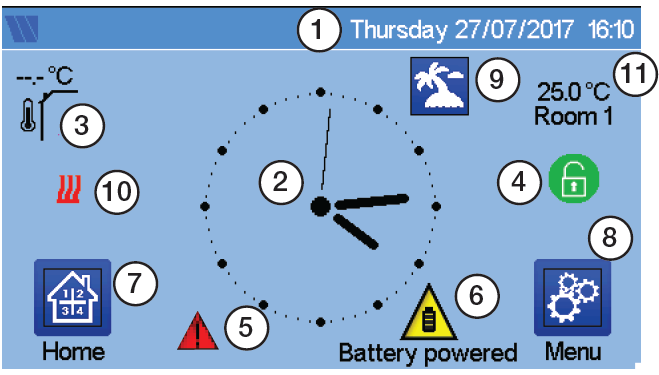
- Date
- Display the time or the ambient T° of the room or zone. Make your choice by pressing on the central part of the screen
- Outside sensor temperature
- Screen lock. Long press toggles between locking / unlocking.
- Error flag – press to access RF, limits, alarms, battery anomalies.
- The device is working on battery (! only for settings and pairing).
- Rooms access (if Central is locked – cannot change settings).
- Main menu.
- Holidays mode status.
- Boiler status displayed if connected to the Central.
- Display the ambient temperature in one room
Brief instructions – Managing heating devices
Press on in the main screen and after selecting the room, press on
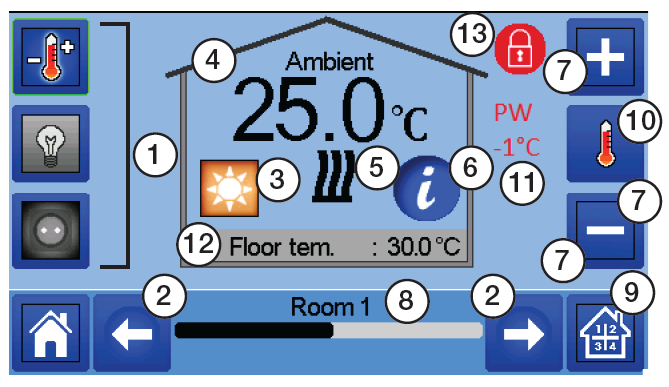
- Device type choice (heating/cooling, lighting, On/Off). These buttons are only displayed if one device type is installed in the room (colored if active).
- Room changing.
- Current mode, press on this icon to enter in the menu where you can change the current operating mode.
- Ambient temperature or setting temperature (setpoint) or humidity after one press on 10.
- Heating/cooling indicator (animated if demand).
- Information about the heating/cooling devices installed in the room.
- Set the current setpoint (deactivated if the screen is locked).
- Current room name.
- Quick access to the desired room.
- To display either the ambient or setting temperature or Humidity in 4.
- Pilot wire status.
- Floor temperature if floor regulation.
- Only displayed if the screen is locked.
Installation
Type 1
(Room with thermostat and one or more thermostatic heads)
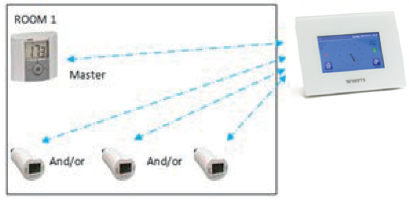
- Pair the thermostat (if present) with the central control unit before setting the other devices.
- The actuators proceed with system control on the basis of thermostat temperature.
Type 2
(Room with thermostat and one or more receiver or thermostatic head)
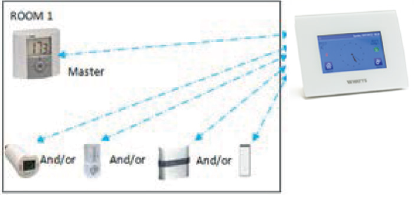
- Pair the thermostat with the central control unit before pairing the other devices.
- The other devices proceed with system control on the basis of thermostat temperature.
Type 3
(Room without thermostat/only receiver)

- The flush-mounted receiver switches to floor temperature control mode because there is no thermostat in the room.
- The radiator head is paired as a heating device only.
- BT-WR, BT-PR and BT-FR can be configured as On/Off or lighting devices.
Type 4
(Underfloor system)
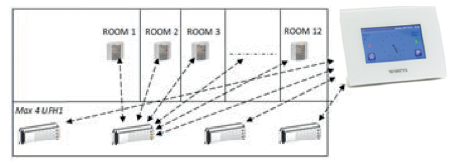
- Each UFH1 is paired with the central control unit, and the thermostats are paired with the UFH systems (pull-boxes). Pair the thermostat with UFH1 before pairing the other devices.
- During pairing, the central control unit automatically creates rooms according to the number of thermostats (rooms) of UFH1. Default names are assigned to the rooms. You can change these in the “House creation” menu (you can identify these rooms with different setpoint temperatures).
Remote control
The central control unit needs to be connected to the WiFi network: refer to the WiFi settings. Check that the central control unit is connected to the WiFi network with an IP address (check the WiFi status). If not, connect it to the WiFi network. Go to the dedicated web pages for managing the central control unit: www.wattswater.eu or download the Watts®Vision® app to your smartphone from the Apple Store or Google Store. Create an account. Validate your email address. Request a pairing code to connect your central control unit to your account. The pairing code (valid for 24hrs) is sent to your email address. Enter your pairing code in the central control unit menu relating to WiFi network status. The configured central control unit will appear in the app or on the web page within a few minutes. Now you can manage your central control unit from any location.
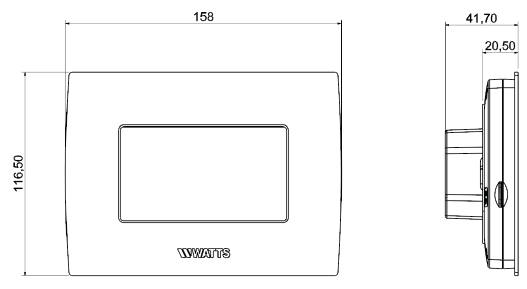
Overall dimensions (mm)
BT-CT02 RF
Specification text
BT-CT02 RF Series
Touchscreen central control unit WATTS brand BT-CT02 RF Series for managing the Watts®Vision® RF system for local control of radiators, radiant panel systems, programmable room thermostats, 02 Series RF thermostats, and RF electrical contacts for managing boilers and various other electrical devices. Backlight 4.3’’ colour touchscreen display with the icon-based menu. Power supply by means of flush-mounted 220V unit or micro USB. Supplied with desk stand. Protected programming menu. RF 868MHz, <10mW. IP rating: IP30.
Compliant with: EMC 2014/30/EU, RED 2014/53/EU, LVD 2014/35/EU, GPSD 2001/95/EC, RoHS 2011/65/EU.
The descriptions and photographs contained in this product specification sheet are supplied by way of information only and are not binding. Watts Industries reserves the right to carry out any technical and design improvements to its products without prior notice. Warranty: All sales and contracts for sale are expressly conditioned on the buyer’s assent to Watts terms and conditions found on its website at www.wattsindustries.com. Watts hereby objects to any term, different from or additional to Watts terms, contained in any buyer communication in any form, unless agreed to in a writing signed by an officer of Watts.
CONTACT
Watts Industries Italia S.r.l.
- Via Brenno, 21 • 20853 Biassono (MB) • Italy
- Tel: +39 039 4986.1
- Fax: +39 039 4986.222
- [email protected]
- www.wattsindustries.com
- WattsIndustries.com
BT-CT02RF-NEW-TS-IT-W-UK-01-18-Rev.0
© 2017 Watts
Reference
DOWNLOAD MANUAL:
WATTS BT-CT02-RF Touchscreen Thermostat Technical Data Sheet
OTHER MANUALS:
WATTS BT-CT02-RF Touchscreen Programmable Thermostat INSTALLATION INSTRUCTIONS
WATTS BT-CT02-RF Touchscreen Thermostat Technical Data Sheet