Venstar T2700 Programmable Thermostat

- Control up to 3 Heat &
- 2 Cool Stages
- 3 Configurable Outputs
- Adjustable 2nd & 3rd Stage
- Timers & Deadbands Backlit
- Display & Button Legends
- Aux Heat Indicator
- Outdoor Sensor Ready with High/Low Readouts for the Day
- Accepts Optional
- Humidity Module: Controls Humidification and Dehumidification
- Accepts EZ Programmer
- Accepts Optional IR Remote Control
- Accepts Comfort Call
- Phone Control Accessory
- use with most Air Conditioning & Heating Systems including 1 or 2 Stage Electric Cooling & 3 Stage Gas Heating, Heat Pump, and Electric or Hydronic Heat.
CAUTION
Follow the Installation Instructions before proceeding. Set the thermostat mode to “OFF” prior to changing settings in setup or restoring Factory Defaults.
CAUTION
NEVER PUT MORE THAN ONE JUMPER ON THE SAME MISC JUMPER BLOCK! THIS MAY DAMAGE YOUR THERMOSTAT AND VOID YOUR WARRANTY.

NOTE: Due to variations in environmental conditions, it is not always possible to achieve the desired humidification or dehumidification setpoint. This device complies with Part 15 of the FCC Rules. Operation is subject to the following two conditions: (1) this device may not cause harmful interference, and (2) this device must accept any interference received, including interference that may cause undesired operation.
SECTION 1 Preparation
 Proper installation of the thermostat will be accomplished by following these step-by-step instructions. If you are unsure about any of these steps, call a qualified technician for assistance.
Assemble tools

- Make sure your Heater/Air Conditioner is working properly before beginning the installation of the thermostat.
- Carefully unpack the thermostat. Save the screws, bracket, and instructions.
- Turn off the power to the Heating/Air Conditioning system at the main fuse panel. Most residential systems have a separate breaker for disconnecting power to the furnace.
SECTION 2
Remove & Replace the Old Thermostat
- Remove the cover of the old thermostat.
- If it does not come off easily check for screws.
- Loosen the screws holding the thermostat base or subbase to the wall, and lift away.
- Disconnect the wires from the old thermostat. Tape the ends of the wires as you disconnect them, and mark them with the letter of the terminal for easy reconnection to the new thermostat.
- Keep the old thermostat for reference purposes, until your new thermostat is functioning properly.
SECTION 3
Configuring the MISC Outputs
Configuring the Jumpers
For additional flexibility, your thermostat has three configurable outputs. These outputs are designed to have different functions depending on how the jumpers are set (below).
 Each output, labeled MISC1, MISC2, and MISC3 may be set for one of the five choices available. In the diagram below, the MISC3 jumper has been set for HUM* (humidification) operation, the MISC2 jumper has been set for DEHUM* (dehumidification) operation, and the MISC1 jumper has been set for W3 (3rd stage of heat) operation.

CAUTION
NEVER PUT MORE THAN ONE JUMPER ON THE SAME MISC JUMPER BLOCK! DOING SO MAY DAMAGE YOUR THERMOSTAT AND VOID THE WARRANTY.

Explanation of Jumper Settings
W3 JUMPER SETTING
If the jumper for MISC1, MISC2, or MISC3 is set to W3, the corresponding MISC screw
terminal on the backplate will control a third stage of heat. W3 MULTI-STAGE OPERATION EXPLAINED – SECTION 13 of the Owner’s Manual The 3rd Stage of Heat is turned on when:
- (A) The 1st and 2nd stages have been on for the time required (steps #22 and #23, page 13.6). It is adjustable from 0-60 minutes and the default is two minutes.
- (B) The temperature from the set point is equal to or greater than the set- point plus the 1st stage deadband (step #19, 13.5), plus the 2nd stage deadband (step #20, 13.5) plus the 3rd stage deadband (step #21, 13.5). This 3rd stage deadband is adjustable from 0-10 degrees and the default is two degrees.

HUM JUMPER SETTING If the jumper for MISC1, MISC2, or MISC3 is set to HUM, the corresponding MISC screw terminal on the backplate will control a humidification system.
HUMIDIFICATION OPERATION – SECTION 9 of the Owner’s Manual
If your HVAC unit is equipped with a humidification system and the Humidity Module (sold separately) has been installed, the thermostat will provide power to the MISC1, MISC2, or MISC3 terminal of the thermostat when the humidity in the home falls below the humidity setpoint you have chosen. The value for this setpoint ranges from 0% to 60%. If no humidity is desired or if a humidification system has not been installed, set the value to OFF.
Explanation of Jumper Settings (continued)
DEHUM JUMPER SETTING If the jumper for MISC1, MISC2, or MISC3 is set to DEHUM, the corresponding MISC screw terminal on the backplate will be connected to the dehumidification terminal of a furnace board.
NOTE: Not all furnaces have a dehumidification terminal.
DEHUMIDIFICATION OPERATION – SECTION 10 of the Owner’s Manual
If your HVAC unit is equipped with a dehumidification system the thermostat will operate in one of two ways.
- normally Closed (NC): The thermostat will de-energize the MISC1, MISC2, or MISC3 terminal of the thermostat (this MISC terminal is connected to the DEHUM terminal on your furnace) to allow the fan to run in low speed when the humidity in the home is above the dehumidify setpoint you have chosen and there is a call for 1st stage cooling.
- normally Open (NO): The thermostat will energize the MISC1, MISC2, or MISC3 terminal of the thermostat (this MISC terminal is connected to the DEHUM terminal on your furnace) to allow the fan to run in low speed when the humidity in the home is above the dehumidify setpoint you have chosen and there is a call for 1st stage cooling.
Y2 JUMPER SETTING
If the jumper for MISC1 is set to Y2 the second stage of cooling. MISC1 screw terminal on the backplate will control a Y2 OPERATION – SECTION 13 of the Owner’s Manual Control up to two Cool stages.
The 2nd Stage of heat or cool is turned on when:
- The 1st Stage has been on for the time required (step #22, page 13.6). It is adjustable from 0-60 minutes and the default is two minutes.
- The temperature spread from the setpoint is equal to or greater than: the setpoint plus the deadband (step #20, page 13.5), plus the 2nd deadband (step #20, page 13.5). This 2nd deadband is adjustable from 0-10 degrees and the default is two degrees.
SECTION 4
Wire Connections 4
If the terminal designations on your old thermostat do not match those on the new thermostat, refer to the chart below, or the wiring diagrams that follow.

O/B is used if your system is a Heat Pump. For instructions on connecting these terminals see page 14.2 of the Owner’s Manual
SECTION 5
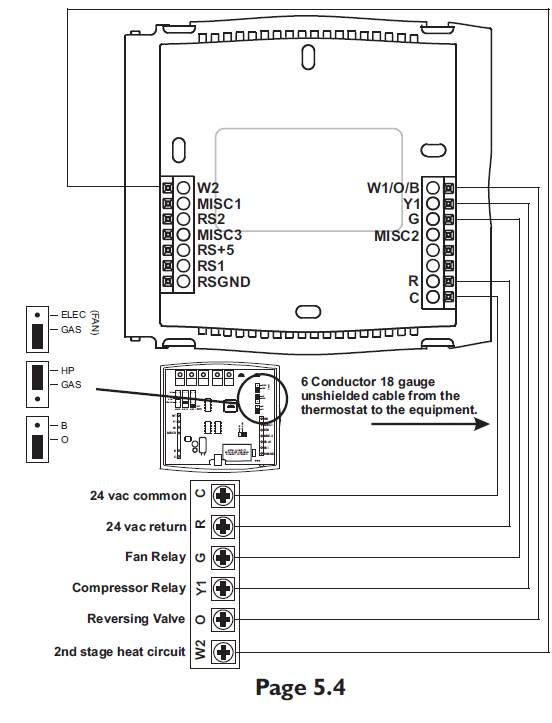
Sample Wiring Diagrams
Wire, 1 Stage Cooling, 1 Stage Heat Residential & Commercial 1 Stage Cooling, with 1st stage Gas Heat Residential & Commercial 1 Stage Cooling, with 1st stage Gas Heat Commercial Heat Pump 1 Stage Cooling with 2 Stage Heat
6 Wire, 1 Stage Cooling, 1 Stage Heat Residential & Commercial 1 Stage Cooling, with 1st stage Electric Heat

6 Wire, 1 Stage Cooling, 2 Stage Heat Residential Heat Pump with O Reversing Valve 1 Stage Cooling, with 2 stage Heat

6 Wire, 1 Stage Cooling, 2 Stage Heat Residential Heat Pump with b Reversing Valve 1 Stage Cooling, with 2 stage Heat

Adding a 2nd Stage of Cooling (MISC1) and 3rd Stage of Heating (MISC3)
Adding a Humidification System (MISC1) and Dehumidification System (MISC2)*.
SECTION 6 Test Operation
- Turn the power on to the Heating/Air Conditioning system.
- Press the MODE button repeatedly until the HEAT icon appears on the display. Press the Up or Down buttons until the set temperature is 10 degrees above room temperature. The furnace should turn on. Press the MODE button repeatedly until the COOL icon appears on the display. Press the Up or Down buttons until the set temperature is 10 degrees below room temperature.
- The air conditioner should turn on. NOTE: Most equipment has a time delay of 5 minutes between cool cycles. This feature is defea table on the thermostat. Consult the Owner’s Manual under Setup, cycles per hour.
- Press the UP button until the setpoint is equal to the room temperature. Press the FAN button to Fan On. The fan should turn on and run continuously.
SECTION 7
Calibrating the Thermostat Sensors
Under normal circumstances, it will not be necessary to adjust the calibration of the temperature and humidity sensors. If calibration is required, please contact a trained HVAC technician to correctly perform the following procedure.
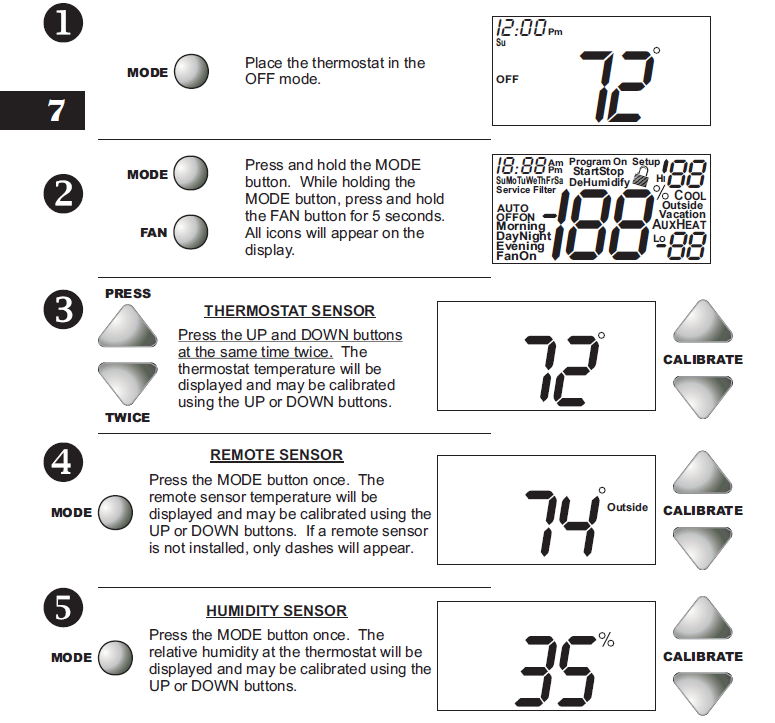
After the calibration is complete, press the MODE button once to return to normal operation.
SECTION 8 TroubleShooting
- SYMPTOM: The air conditioning does not attempt to turn on.
- CAUSE: The compressor timer lockout may prevent the air conditioner from turning on, for a period of time.
- REMEDY: Consult the Owner’s Manual in the Setup section to defeat the cycles per hour and compressor time guard.
- SYMPTOM: The display is blank.
- CAUSE: Lack of proper power.
- REMEDY: Make sure power is turned on to the furnace and that you have 24vac between R & W. If C is used, 24vac between R & C.
- SYMPTOM: The air conditioning does not attempt to turn on.
- CAUSE: The cooling setpoint is set too high.
- REMEDY: Consult the Owner’s Manual in the Setup
section to lower the cooling setpoint limit. - SYMPTOM: The heating does not attempt to turn on.
- CAUSE: The heating setpoint is set too low.
- REMEDY: Consult the Owner’s Manual in the Setup section to raise the heating setpoint limit.
- SYMPTOM: When controlling a residential heat pump, and asking for cooling, the heat comes on.
- CAUSE: The thermostat reversing valve jumper is set for “b”.
- REMEDY: Set the reversing valve jumper for “O”. See pages 5.4 and 5.5.
- SYMPTOM: When calling for cooling, both the heat and cool come on.
CAUSE: The thermostat equipment jumper is configured for “HP” and the HVAC unit is Gas/Electric. - REMEDY: Set the equipment jumper for “Gas”. See pages 5.2 and 5.3.
REFERENCE:
Venstar T2700 Programmable Thermostat Installation Instructuion
Download Manual:
Venstar T2700 Programmable Thermostat Owner Manual

Venstar T2700 Programmable Thermostat Thermostat Installation Instruction