Siemens RDF300.02 Flush Mount Room Thermostat

- RDF/RDU… – the room thermostat that allows you to set the ideal room temperature you want.
- The thermostat provides Comfort mode, Economy mode and Protection.
- The fan operates either in automatic mode or at the selected speed when using manual mode.
- You can either rely on the factory settings or make adjustments that suit your individual needs.
Display
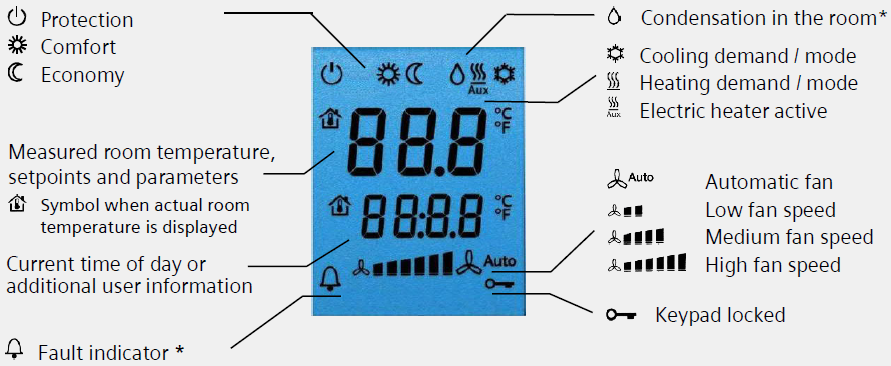
Operation and settings

- if configured by your HVAC installer.
Operating Instructions
Change room temperature
- +/-: Press + or – to increase or decrease the current room temperature setpoint for Comfort mode. The thermostat changes to Comfort
 .
. - The setting range is from 5…40 °C, unless limited by parameters P09 and P10.
Adjust fan speed / fan mode
 Press the button until you reach the desired fan mode.
 In Auto mode, the fan speed is automatically selected by the thermostat and depends on the setpoint and the actual room temperature. When the room temperature has reached the setpoint, the fan remains in fan speed low (factory setting)
- In manual mode the fan operates independently and always runs at the same speed: Low, medium or high.
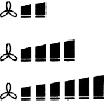
- Low fan speed
- Medium fan speed
- High fan speed
- For a single-speed fan, the mode can be changed between and
 .
.
Set the thermostat to Protection
 Press the operating mode button several times until the display shows the
 symbol to indicate that Protection is selected.
- In Protection, only frost protection is active (factory setting = 8˚C), unless your HVAC installer has adjusted the factory settings.
Changes by installer
- Frost protection: ________ ˚C
- Heat protection: ________ ˚C
Change the thermostat to Economy mode
 The thermostat can be set to Economy mode either via pressing the operating mode button if enabled (see parameter P02), or via an external contact such as window switch, key card switch etc.
 If the external contact is activated the thermostat changes from Comfort mode or Protection to Economy mode. Any operation by the user has no influence.
 In Economy mode, the automatic fan control is active.
Note: If the thermostat is configured for manual heating/cooling changeover, the Economy mode can not be selected via operating mode button.
Change from heating to cooling mode
 The changeover between cooling and heating is done either automatically by a heating/cooling changeover sensor or a remote changeover switch, or manually by pressing the operating mode button. If the thermostat is configured for cooling only or heating only, no changeover is possible (see parameter P01)
Display for automatic changeover or continuous heating/cooling:
 Heating valve is open
- Cooling valve is open
 Display for manual changeover:
- A thermostat is in heating mode
- Thermostat is in cooling mode
Button lock
- Press operating mode button for 7 seconds to lock or unlock the buttons if manual button lock is configured (parameter P14 = 2).
- The thermostat automatically locks the buttons 30 seconds after the last adjustment if “Auto lock” is configured (P14 = 1).
 The key symbol indicates locked buttons.
Reminder to clean filters
 FIL: This message reminds you to clean the filter on your HVAC equipment.
- It will appear after __________ “fan operating hours” and disappear when the thermostat is set to Protection ( ). This reminder must be configured by your HVAC installer.
External faults
This alarm message tells you an external alarm has occurred:
- AL1: AL1: ______________________
- AL2: AL2: ______________________
The alarms are configured by your HVAC installer
Commissioning (by qualified HVAC installer)
To adapt the thermostat to your system and optimize the control performance, a number of control parameters can be adjusted. This can also be made during operation without opening the thermostat.
 Control sequence
The thermostat can be used in systems either for heating only or cooling only, manual selection of heating or cooling, or automatic heating/cooling changeover. Depending on the selected application, the relevant modes are available and can be adjusted by commissioning parameter P01 if needed. The factory setting for 2-pipe and single duct application is “Cooling only”, and for 4 pipe application “Heating and Cooling”
 Recalibrating the sensor
If the room temperature displayed by the thermostat does not agree with the temperature effectively measured (after min 1 hour of operation), the temperature sensor can be recalibrated. With parameter P05 the temperature can be adjusted by + or – 0.5 °C up to a maximum of + / – 3 °C.
Note: Economy mode
 The Economy setpoints are factory-set to 15 °C for heating and 30 °C for cooling. Use parameters P11 and P12 to adjust the values.
 Important: You can set these setpoints to OFF; the thermostat then is inactive, i.e. no protective heating or cooling function.
  Risk of frost!
Control parameters
Proceed as follows to change the most important control parameters:
(Your HVAC installer can set additional parameters)
- Set the thermostat to Protection
- +/- Press – and + simultaneously for a minimum of 3 seconds.
- Release them and, within 2 seconds, press + again for 3 seconds. “P01” is displayed.
- +/- Repeatedly press the + or – button to select the required parameter.

- +/- Press + and – simultaneously, the current value of the selected parameter starts to flash, allowing you to change the value by repeatedly pressing + or –.
- +/- The next parameter is displayed when you press + and – again simultaneously.
- Repeat steps 3 to 5 to display and change additional parameters.
- Press + or – until “End” is displayed, and then press + and – simultaneously to save the change and exit parameter entry mode. 10 seconds after the last display or setting, all changes are saved and the thermostat will leave parameter entry mode.
| Para-
meter |
Description | Factory setting | Setting range | |
| P01 | Control sequence | 2-pipe, Single duct: [0…3] 1 (Cooling only)
4-pipe:. [2…4] 4 (Heating & Cooling) |
0 = Heating only 1 = Cooling only 2 = Manual H or C
3 = Auto Changeover 4 = Heating & cooling |
|
| P02 | Mode selection by user via operating mode button | 1 (Protection, Comfort) | 1 = Protection, Comfort, 2 = Protection, Comfort,
Economy |
|
| P04 | Selection of °C or °F | °C | °C or °F | |
| P05 | Sensor calibration | 0.0 K | – 3 … +3 K | |
| P06 | Standard temperature display | 0 (Room temp.) | 0 = Room temperature 1 = Setpoint | |
| P07 | Additional user information | 0 (no display) | 0 = no display
1 = Temp in °C / °F |
|
| P08 | Comfort basic setpoint | 21 °C | 5 … 40 °C | |
| P09 | Minimum setpoint limitation in Comfort (WminComf) | 5 °C | 5 … 40 °C | |
| P10 | Maximum setpoint limitation in Comfort (WmaxComf) | 35 °C | 5 … 40 °C | |
| P11 | The setpoint of heating in Economy mode (WheatEco) | 15 °C | OFF, 5 °C…WcoolEco | |
| P12 | The setpoint of cooling in Economy mode (WcoolEco) | 30 °C | OFF, WheatEco…40°C | |
| P13 | Electric heater in cooling mode | ON | OFF = Disabled ON = Enabled | |
| P14 | Button lock
(Press the operating mode button |
0 (Disabled) | 0 = Disabled 1 = Auto-lock
2 = Manual lock |
Please record all changes you make!
(All temperature settings can be made in increments of 0.5 K)
REFERENCE:
DOWNLOAD MANUALS:
Siemens RDF300.02 Flush mount room thermostat Operating Instruction
OTHER MANUALS:
Siemens RDF300.02 Flush mount room thermostat Product Specifications Guide

Siemens RDF300.02 Flush Mount Room Thermostat Operating Instruction