
Rayotec FH-01 Digital Programmer Thermostat
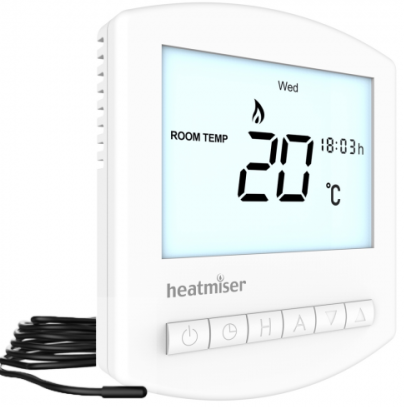
Installation Procedure
- Do’s
- Mount the thermostat at eye level
- Read the instructions fully to get the best from our product.
- Don’ts
- Do not install near a direct heat source as this will affect the workings of the thermostat
- Do not push hard on the LCD
Installation
The thermostat should be mounted in a 35mm (min) deep back box.
- Step 1 Carefully separate the front half of the thermostat from the back plate by placing a small flat head terminal driver into the slots on the bottom face of the thermostat.
- Step 2 Place the thermostat front somewhere safe. Terminate the thermostat as shown in the diagram at the back of this booklet.
- Step 3 Clip the front of the thermostat to the back plate
Display
- Day Indicator
- Power Delivery Indicator – Displayed when power is being delivered to the floor
- Frost Protection – Displayed when the heating system is off and the system is protecting against frost only
- Room/Floor Temp – Indicates the current sensor mode
- Current Temp – Indicates the current sensor temperature
- Set – Indicates when changes are being made to programs or temperature set points
- Program Cycle Indicator – Displayed during programming, only, to show which period is being altered
- Holiday Indicator – Displayed when the programmer is in holiday mode
- Floor Temp Achieved Indicator – Displayed when the floor set point temperature is reached
- Temperature Hold – Displayed when manually overriding the program, “HOLD FOR” and the time period are displayed.
- Units of Temperature – Degrees Celsius or Fahrenheit
- Keypad Lock Indicator – Displayed when the keypad is locked

Temperature Display
This thermostat can be setup to use an air sensor, floor sensor, or both. On the display, it will clearly show which sensor is being displayed by showing either “Room Temp” or “Floor Temp” before the temperature.
Note: Air sensors only MUST not be used to control underfloor heating. Floor Sensor or Both should be used.
When the thermostat is set to use both sensors, the room temperature will normally be shown. To view the floor temperature, press and hold the A key until the Floor Temperature is shown.
Setting The Clock
To set the clock, follow the steps below.
- With the thermostat turned on, press the Clock button twice
- You are now able to set the minutes using the Up/Down keys
- Press H to accept
- You are now able to set the hours using the Up/Down keys
- Press H to accept
- You are now able to set the day of the week using the Up/Down keys
- Press A to store and exit
Comfort Levels Explained
The thermostat provides Weekday/Weekend or 7 Day Programming. You should consult the “Configuration Menu” section to select the required mode. The thermostat is supplied with comfort levels already programmed, but these can be changed easily. The default times are;
- 08.00 – 21°C (Wake)
- 09.30 – 16°C (Leave)
- 16.30 – 22°C (Return)
- 23.00 – 17°C (Sleep)
If you only want to use 2 levels, you should program the unused levels to –.–
- To begin programming the comfort levels, press Clock Once
- If your thermostat is setup for Weekday/Weekend Programming, you will see Mon-Fri shown. For 7 day programming you will see Monday
- Using the Up/Down arrow keys, enter the required Wake time
- Press H
- Using the Up/Down arrow keys, enter the required Wake
Temperature
- Press H
- You will now see “Leave”
- You should repeat the programming for each period, entering–.—for unused periods.
Note: For weekday/weekend Programming, the 4 comfort levels are the same for all weekdays. For 7 day programming, each day can have 4 different comfort levels
Locking The Thermostat
The thermostat has a key-lock facility. To enable follow these Steps
- Press and hold the A and Down Key for 10 seconds
- You will see the lock symbol appear
- To unlock, repeat the steps above
Temperature Hold
The temperature hold function allows you to manually override the program and set a temperature for a desired period.
- Press H
- Using the Up/Down arrow keys enter the required hold time
- Press H
- Using the Up/Down arrow keys enter the required hold temperature
- Press A to accept
- You will see the Hold indication is displayed which will countdown the hold duration.
- To cancel, reduce the Hold time to 00 hours
Temperature Set
Using the Up or Down arrow keys allows you to adjust the set temperature. When you press either of these keys, you will see the word SET and the desired temperature. Press A to accept.
Holiday
The thermostat has a holiday function. This allows you to enter a holiday setting. During a holiday, the thermostat will maintain the frost set temperature. At the end of your holiday, the thermostat will revert back to the programmed setting ensuring that your home is warm on your arrival.
- Press H three times (Until you see the suitcase)
- Using the Up/Down arrow keys enter the number of days holiday
- Press A to accept
Heat On/Off
Frost Protect Mode: Pressing the Power button once will place the thermostat in frost protect mode. In this mode, the thermostat will display the frost icon and will only turn the heating on should the room temperature drop below the set frost temperature (see page 17 ). Should the heating be turned on whilst in frost mode, the flame symbol will be displayed. To cancel the frost protection mode, press the On button. Thermostat Off: To turn the thermostat off completely, press and hold the Off button. The display and heating output will be turned off. To turn the thermostat back on, press the On button.
Factory Reset
The thermostat has a factory reset function. This will reset all settings back to their factory default. To perform a factory reset, follow these steps:
- Turn the thermostat off (See above)
- Press and hold the Power and Up arrow key until the LCD powers up. All of the icons will be displayed. When they have disappeared, the thermostat has been reset
Operating Mode
The thermostat has 4 main operating modes
| Mode | Description |
| 00 | Non-programmable with air sensor only |
| 01 | Non-programmable with floor/air sensors options |
| 02 | Programmable with air sensor only |
| 03 | Programmable with floor/air sensors options (default) |
Select the mode that best suits your needs
- Turn off the thermostat by pressing and holding the power button.
- Press and hold the H key for 10 seconds.
- Using the Up/Down keys, you should select the mode Required.
- Press A to accept
Optional Features Explained
- Feature 01 – Temperature Format: This function allows you to select between °C and °F
- Feature 02 – Switching Differential: This function allows you to increase the switching differential of the thermostat.
- The default is 1°C which means that with a set temperature of 20°C, the thermostat will switch the heating on at 19°C and off at 20°C. With a 2°C differential, the heating will switch on at 18°C and off at 20°C.
- Feature 03 – Frost Protect: You can set whether the thermostat will maintain the frost temperature when the thermostat display is turned off. As a default, this is enabled.
- Feature 04 – Frost Protect Temperature: This is the temperature maintained when the thermostat is in frost mode.
- The range is 07 – 17°C. The default is 12°C and is suitable for almost all applications.
- Feature 05 – Output Delay: To prevent rapid switching, an output delay can be entered. This can be set from 00-15 minutes. The default is 00 which means there is no delay.
- Feature 06 – Communication Address: Non-functional on the 230V model.
- Feature 07 – Temperature Up/Down Limit: This function allows you to limit the use of the up and down temperature arrow keys. This limit is also applicable when the thermostat is locked and so allows you to give others limited control over the heating system.
- Feature 08 – Sensor Selection: On this thermostat, you can select which sensor should be used. You can select between air temperature only, floor temperature, or both. When you enable both sensors, the floor sensor is used as a floor-limiting sensor and is designed to prevent the floor from overheating.
- Feature 09 – Floor Temp Limit: This function is available when mode 08 is set to 03 or 04. You can set a floor limiting temperature between 20-45°C (28°C is the default).
- Feature 10 – Optimum Start: Optimum start will delay the start up of the heating system to the latest possible moment to avoid unnecessary heating, so that the dwelling is comfortably warm by the programmed time. The thermostat uses the rate of change (see below) setting to calculate how long the buildingneeds to take to raise the building 1°C (With a rate of change of 20, the thermostat has calculated the building needs 20 minutes to raise the building 1°C). On this thermostat, optimum start works on the Wake and Return comfort levels.
- Feature 11 – Rate of Change: For information only.
- Feature 12 – Weekday/Weekend or 7 Day Programming: The thermostat offers two programming methods. Weekday/ Weekend allows you to program 4 comfort levels for the weekday and 4 different comfort levels for the weekend. In 7 day program mode, each day has 4 comfort levels that can be programmed independently
Adjusting the Optional Settings
- To access the configuration menu, turn off the thermostat by pressing and holding down the Power Button. Then, press and hold the Clock button until the display lights up.
- The small number is the feature number, the large number is the setting value.
- Use the clock button to cycle through the features
- Use the Up/Down keys to change the setting
- Press A to accept and store
Feature Table
| Feature | Description | Setting |
| 01 | Temperature Format | 00=°C 01=°F |
| 02 | Switching Differential | 01-03°C 00°C Default |
| 03 | Frost Mode | 00 = Enabled
01 = Disabled (00 = Default) |
| 04 | Frost Temperature | 07-12°C (12°C Default) |
| 05 | Output Delay
(00 Default) |
00-15 Minutes |
| 06 | – | – |
| 07 | Up/Down Temp Limit | 00-10°C (00°C Default) |
| 08 | Sensor Selection Mode 00 MUST not be used for Underfloor heating | 00 = Built In Air Sensor 01 = Remote Air Sensor 02 = Floor Sensor Only 03 = Floor Sensor and
Built in Air Sensor 04 = Floor Sensor and Remote Air Sensor |
| 09 | Floor Temp Limit | 20-45°C 28°C Default |
| 10 | Optimum Start | 00-03 (00 hours default) |
| 11 | Rate of change | Information only |
| 12 | Weekday/Weekend | 00 = Weekday/Weekend
00 = 7 day programming |
Model: FH – 01
- Floor Sensor Live
- Sensor Neutral
- Remote Air Sensor (Optional)
- Heating Element Neutral
- 230V Supply Neutral
- Heating Element Live
- 230V Supply Live

Reference
Download manual:
Rayotec FH-01 Digital Programmer Thermostat User Guide