
Honeywell Home RTH3100C Non-Programmable Digital Thermostat

Introduction
This is a legacy product document supported by Resideo. It is no longer manufactured

Need Help?
For assistance with this product please visit https://www.honeywellhome.com/us/en/support/ or call Honeywell Customer Care toll-free at 1-800-468-1502.
Read and save these instructions. Copyright © 2006 Honeywell International Inc. All rights reserved.
About your new thermostat
Congratulations on the purchase of your new Honeywell thermostat. It has been designed to give you many years of reliable service and easy-to-use, push-button climate control.
Features
- One-touch temperature controls
- Large, clear backlit display is easy to read, even in the dark
- Switchable fan control (auto or continuous fan)
- Displays both room temperature and temperature setting
- Built-in compressor protection
A quick reference to controls
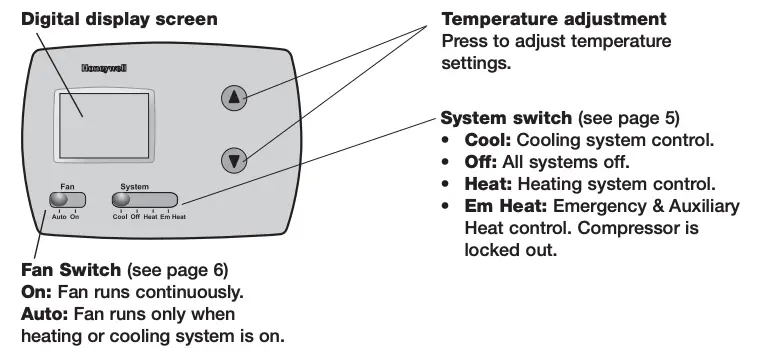
Quick reference to display screen

System switch
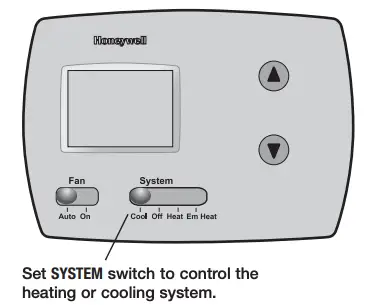
The SYSTEM switch can be set to control your heating or cooling system, depending on the season.
- Cool: Cooling system control.
- Off: All systems are off.
- Heat: Heating system control.
- Em Heat: Emergency & Auxiliary Heat control. Compressor is locked out.
 CAUTION: EQUIPMENT DAMAGE HAZARD. Do not operate cooling system when outdoor temperature is below 50°F (10°C).
Fan switch
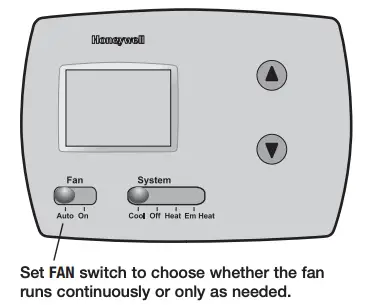
Set the FAN switch to Auto or On.
In “Auto” mode (the most commonly used setting), the fan runs only when the heating or cooling system is on. If set to “On,” the fan runs continuously. Use this setting for improved air circulation, or for more efficient air cleaning.
Temperature controls

Press the temperature adjustment buttons until the temperature you want is displayed in the upper right portion of the screen.
Note: Make sure the SYSTEM switch is set to the system you want to control (Heat or Cool).
Built-in compressor protection
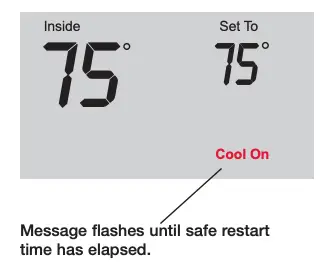
This feature helps prevent damage to the compressor in your air conditioning or heat pump system. Damage can occur if the compressor is restarted too soon after shutdown. This feature forces the compressor to wait for a few minutes before restarting. During the wait time, the display will flash the message Cool On or Heat On. When the safe wait time has elapsed, the message stops flashing and the compressor turns on.
Battery replacement

Batteries are optional if your thermostat was wired for AC power when installed. Install fresh batteries immediately when the REPLACE BATT warning begins flashing. Even if the warning does not appear, you should replace batteries once a year, or before leaving home for more than a month. Batteries provide backup power to the display during power interruptions. All settings are permanently stored in memory, and do not require battery power.
In case of difficulty
If you have difficulty with your thermostat, please try the following suggestions. Most problems can be corrected quickly and easily.
Display is blank
- Check circuit breaker and reset if necessary.
- Make sure power switch at heating & cooling system is on.
- Make sure furnace door is closed securely.
- Make sure fresh AA alkaline batteries are correctly installed (see page 9).
Heating or cooling system does not respond
- Set system switch to Heat (see page 5). Make sure the temperature is set higher than the Inside temperature.
- Set system switch to Cool (see page 5). Make sure the temperature is set lower than the Inside temperature.
- Check circuit breaker and reset if necessary.
- Make sure power switch at heating & cooling system is on.
- Make sure furnace door is closed securely.
- Wait 5 minutes for the system to respond.
Temperature settings do not change
Make sure heating and cooling temperatures are set to acceptable ranges:
- Heat: 40° to 90°F (4.5° to 32°C).
- Cool: 50° to 99°F (10° to 37°C).
“Cool On” or “Heat On” is flashing
- Compressor protection feature is engaged. Wait 5 minutes for the system to restart safely, without damage to the compressor (see page 8).
“Heat On” is not displayed
- Set the System switch to Heat, and set the temperature level above the current room temperature (see page 7).
“Cool On” is not displayed
- Set the System switch to Cool, and set the temperature level below the current room temperature (see page 7).
Customer Assistance

For assistance with this product, please visit https://www.honeywellhome.com/us/en/support/.Or call Honeywell Customer Care toll-free at 1-800-468-1502.
To save time, please note your model number and date code before calling.
Accessories/replacement parts
To order, please call Honeywell Customer Care toll-free at 1-800-468-1502.
Cover plate*……………….Part No. 50002883-001
Use to cover marks left by old thermostats.
Automation and Control Systems
Honeywell International Inc.
1985 Douglas Drive North
Golden Valley, MN 55422
https://www.honeywellhome.com/us/en/support/
Honeywell Limited-Honeywell Limitée
35 Dynamic Drive
Scarborough, Ontario M1V 4Z9
 Printed in U.S.A. on recycled paper containing at least 10% post-consumer paper fibers.
® U.S. Registered Trademark.
Copyright © 2006 Honeywell International Inc.
69-1892ES-1 M.S. Rev. 04-06
Reference
Download manual:
Honeywell RTH3100C Digital Non-Programmable Heat-Cool Pump Thermostat Instruction Manual
Other manuals:
Honeywell Home RTH3100C Non-Programmable Digital Thermostat Operating Manual
Honeywell Home RTH3100C Non-Programmable Digital Thermostat User Guide
Honeywell Home RTH3100C Non-Programmable Digital Thermostat Installation Instruction