
Comfortheat MWD5 ELECTRIC Programmable Thermostat
MWD5 MANUAL – ELECTRIC
A Comfort Heat floor heating system has been installed in your floor. Floor heating warms from the ground up providing an unparalleled feeling of comfort. This heating system is controlled by an electronic thermostat and floor sensor for optimum temperature control.
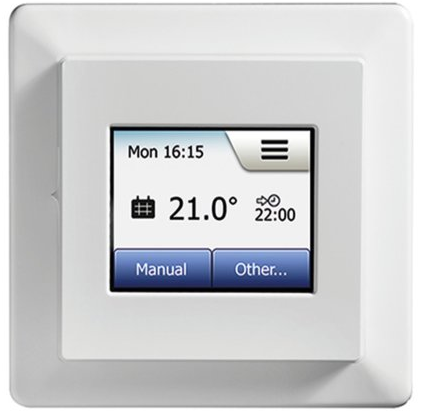
MWD5 DETAILS
The MWD5 WiFi touch screen thermostat has a built in programmable time-clock to automatically turn the floor heating system UP and DOWN at selected times. During the DOWN periods the floor does not turn OFF but programs the floor temperature to a setback temperature. The floor is heating when the LCD display temperature turns red. Thermostats can be vertically or horizontally flush mounted and have a 2 pole isolator with 16A output relay.
PRIOR TO TURNING ON
Concrete slabs, screeds and tile glues must be fully cured before turning the heating system on. Wait at least 3 weeks and when turning on for the first time, increase the floor temperature gradually over 2-3 days. Under carpet and timber systems can be turned on once installation is complete
CABLE WARRANTY & TEMPERATURE SETTINGS [FLOOR SENSING]
| AREAS | TILE [BATH] | TILE [LARGE AREA] | INSLAB | CARPET | TIMBER |
| SUGGESTED FLOOR TEMP. | 24-28ºC | 21-22ºC | 21ºC | 19-21ºC | 24ºC |
| CABLE WARRANTY | 10 years | 10 years | 10 years | 5 years | 5 years |
TECHNICAL DATA – MWD5
- Supply Voltage : 240V AC, 50/60hz
- Output Relay : 16A SPST, 3600W max
- Switching Differential : 0.4 degC
- Built-in Switch : 2 pole 16A
- Temperature Range : 0/+40 degC
- Clock Function : Up to 7 different 4 or 6 event
- program combinations
- Display : 220 x 176 pixel TFT – colour touch
- Housing/protection : IP21
- Dimensions (HxWxD) : 114mm x 84mm x 40mm
- Mounted : Vertical or Horizontal
- Thermostat Warranty : 2 years
OPERATION SETTINGS
PRESET HEATING SCHEDULE
- Monday – Friday [Work Days] ON at 6am – 25°C Setback at 9am – 20°C
- ON at 5pm – 25°C
- Setback at 10.00pm – 20°C
- Saturday – Sunday [Home Days] ON at 8am – 25°C
- Setback at 11pm – 20°C
MENU STRUCTURE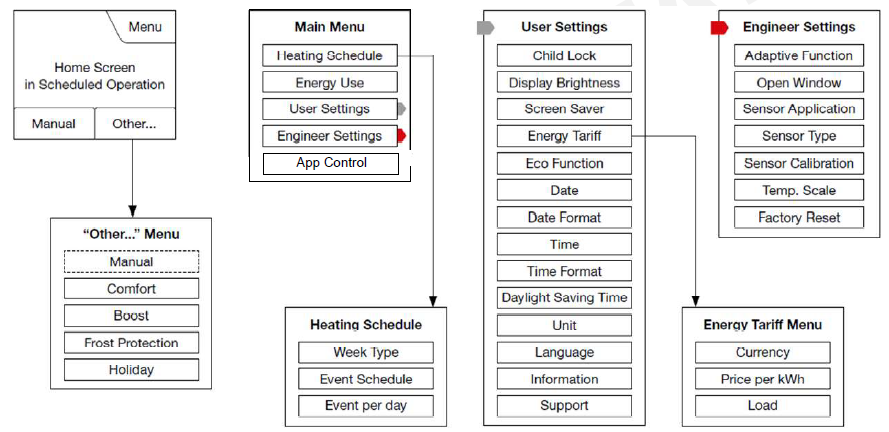
MANUAL HEATING
The MWD5 will always default to the programmed settings. You can override these settings by turning the thermostat to manual mode. Manual mode will heat to the set temperature then turn ON/OFF, maintaining the temperature indefinitely.
To override programmed setting and operate the thermostat in manual mode
Press;
- > Manual
- > Adjust temperature up and down with arrow keys. [Red numbers indicates heating. Black indicates at temperature]
- > To exit manual mode press X.
FACTORY RESET
This option allows you to restore the thermostat to factory settings. Note! This action cannot be undone, and all your settings will be lost
- Press;
- > Menu
- > Engineer Settings
- > Factory Reset
- > Reset
YOUTUBE TUTORIALS
For step by step tutorials on setting up your thermostats, please visit our youtube page. https://www.youtube.com/user/ComfortHeat
IMPORTANT SETTINGS TO ADJUST & CHECK WITH EVERY MWD5
Adaptive Function – Recommend turning OFF
- This feature enables the room to reach the set temperature at a set time.
- Adaptive function calculates the heat up time and will turn the system on or off to achieve the set temperature at the set time.
- Eg. Thermostat calculates it must turn on at 5.00am to be at 25°C at 6am, as opposed to turning on at 6am to heat to 25 °C.
Press ;
- > Menu
- > Arrow down
- > Engineer Settings
- > Adaptive Function
- > Turn OFF
- > Tick
Open Window – Recommend turning OFF The thermostat can detect an open window by registering a rapid drop in room temperature. With the function enabled, the thermostat shuts off the floor heating for 30 minutes.
Press ;
- > Menu
- > Arrow down
- > Engineer Settings
- > Open Window
- > Turn OFF
- > Tick
Temp Scale – Recommend adjust to 5°C – 40 °C This option allows you to set the minimum and maximum temperature to which the thermostat can be set.
Press ;
- > Menu
- > Arrow down
- > Engineer Settings
- > Temp.Scale
- > Tick [Set the min & max temperature]
- > 5 °C [Min Temp Scale]
- > Tick
- > 40 °C [Max Temperature Scale]
- > Tick
- > 5 °C [Min Temperature Limit]
- > Tick
- > 40 °C [Max Temperature Limit]
- > Tick
CHILD LOCK
The child lock prevents children and others from tampering with the thermostat and changing any of its settings.
ACTIVATING CHILD LOCK
Press;
- > Menu
- > User Settings
- > Child Lock
- > Toggle ON
- > Tick to Confirm
- > Arrow back to Home Screen
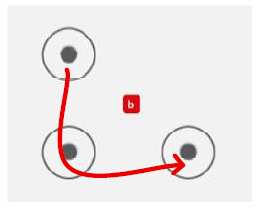
OPEN WHEN CHILD LOCK IS ON
- > Draw an ‘L’ on the screen in a single stroke without lifting your finger.
TROUBLESHOOTING
- If an error message occurs, the thermostat will display one of the following errors;
- E0 : Internal failure. The thermostat is defective. The thermostat must be replaced.
- E1 : Internal sensor defective or short-circuited. The thermostat must be replaced.
- E2 : External wired floor sensor disconnected, defective or short-circuited. Requires sensor reconnection or replacement.
- E5 : Internal overheating. Installation requires inspectIon.
THERMOSTAT HEATING SCHEDULE GUIDES
UNDER TILE [in-screed & thin-mat] installations typically heat up in around 1-2 hrs. Screeds retain the heat for some time but heating during off peak times only is not suitable. You can programme the under-tile heating to run only when at home, at any electricity rate, based on your lifestyle. Alternately, based on your [time of use] electricity rates, you can heat during shoulder rate times only. Keeping doors closed and windows shut, retain the warmth for an efficient and comfortable room temperature.
BATHROOMS – SAME TIME EVERY DAY WITH TWO HEAT CYCLES [GUIDE ONLY]
Press;
- > Menu button

- > Heating Schedule
- > Week Type
- > Work days/home days > Arrow right
- > Tick all work days [every day is dark blue] > Arrow right
- > Tick to confirm [no home days are ticked] > Arrow left[back]
- > Events per Day > Arrow right
- > Tick 4 events per day > Tick to confirm
- > Event Schedule
- > Work Day : Wake Up [24-28°C @ 5.30]
- > Touch to adjust temperature > Tick > Adjust time > Tick to confirm
- > Arrow right
- > Work Day : Leave Home [17°C @ 8.30]
- > Touch to adjust temperature > Tick > Adjust time > Tick to confirm
- > Arrow right
- > Work Day : Come Home [24-28°C @ 17.00]
- > Touch to adjust temperature > Tick > Adjust time > Tick to confirm
- > Arrow right
- > Work Day : Go To Sleep [17°C @ 22.00]
- > Touch to adjust temperature > Tick > Adjust time > Tick to confirm
- > Arrow right
IN-SLAB installations are typically large and ideally heated during off peak times only. Time of use electricity rates allow you to programme the MWD5 to heat during low cost times and based on the thermal mass of the slab, create an all day warmth. If heating during off peak times only is not enough, you can top up the slab temperature during shoulder rate periods. Check with your electricity provider for your time of use rates and times. When turning on for the first time at the beginning of winter the slab will take a few days to warm up.
IN-SLAB AREAS – SAME TIME EVERY DAY DURING OFF PEAK TIMES ONLY WITH ONE HEAT CYCLE [GUIDE ONLY]
Press;
- > Menu button
- > Heating Schedule
- > Week Type
- > Work days/home days > Arrow right
- > Un-tick all work days [every day is light blue] > Arrow right
- > Tick to confirm [every home day is ticked] > Arrow left[back]
- > Events per Day > Arrow right
- > Tick 4 events per day > Tick to confirm
- > Event Schedule
- > Home Day : Wake Up [5°C @ 7.00**]
- > Touch to adjust temperature > Tick > Adjust time > Tick to confirm
- > Arrow right
- > Home Day : Go To Sleep [21°C @ 22.00**]
- > Touch to adjust temperature > Tick > Adjust time > Tick to confirm
- > Arrow right
- > Arrow left to exit menu
IN-SLAB AREAS ALTERNATE PROGRAM – SAME TIME EVERY DAY DURING OFF PEAK AND SHOULDER TIMES ONLY WITH TWO HEAT CYCLES [GUIDE ONLY]
Press;
- > Menu button
- > Heating Schedule
- > Week Type
- > Work days/home days> Arrow right
- > Tick all work days [every day is dark blue] > Arrow right
- > Tick to confirm [no home days are ticked] > Arrow left[back]
- > Events per Day > Arrow right
- > Tick 4 events per day > Tick to confirm
- > Event Schedule
- > Work Day : Wake Up [5°C @ 7.00**]
- > Touch to adjust temperature > Tick > Adjust time > Tick to confirm
- > Arrow right
- > Work Day : Leave Home [21°C @ 11.00**]
- > Touch to adjust temperature > Tick > Adjust time > Tick to confirm
- > Arrow right
- > Work Day : Come Home [5°C @ 14.00**]
- > Touch to adjust temperature > Tick > Adjust time > Tick to confirm
- > Arrow right
- > Work Day : Go To Sleep [21°C @ 22.00**]
- > Touch to adjust temperature > Tick > Adjust time > Tick to confirm
- > Arrow right
- > Arrow left to exit menu
UNDER TILE [in-screed & thin-mat] installations typically heat up in around 1-2 hrs. Screeds retain the heat for some time but heating during off peak times only is not suitable. You can programme the under-tile heating to run only when at home, at any electricity rate, based on your lifestyle. Alternately, based on your [time of use] electricity rates, you can heat during shoulder rate times only. Keeping doors closed and windows shut, retain the warmth for an efficient and comfortable room temperature.
LARGE TILED AREAS [SCREED/THIN] – SAME TIME EVERY DAY WITH TWO HEAT CYCLES [GUIDE ONLY]
Press;
- > Menu button
- > Heating Schedule
- > Week Type
- > Work days/Home days > Arrow right
- > Tick all work days [every day is dark blue] > Arrow right
- > Tick to confirm [no home days are ticked] > Arrow left[back]
- > Events per Day > Arrow right
- > Tick 4 events per day > Tick to confirm
- > Event Schedule
- > Work Day : Wake Up [21-22°C @ 5.30]
- > Touch to adjust temperature > Tick > Adjust time > Tick to confirm > Arrow right
- > Work Day : Leave Home [5°C @ 8.00]
- > Touch to adjust temperature > Tick > Adjust time > Tick to confirm > Arrow right
- > Work Day : Come Home [21-22°C @ 17.00]
- > Touch to adjust temperature > Tick > Adjust time > Tick to confirm > Arrow right
- > Work Day : Go To Sleep [5°C @ 21.00]
- > Touch to adjust temperature > Tick > Adjust time > Tick to confirm > Arrow right
LARGE TILED AREAS [SCREED/THIN] ALTERNATE PROGRAM – SAME TIME EVERY DAY DURING OFF PEAK AND SHOULD RATE TIMES ONLY WITH THREE HEAT CYCLES [GUIDE ONLY]
Press;
- > Menu button
- > Heating Schedule
- > Week Type
- > Work days/Home days > Arrow right
- > Tick all work days [every day is dark blue] > Arrow right
- > Tick to confirm [no home days are ticked] > Arrow left[back]
- > Events per Day > Arrow right
- > Tick 6 events per day > Tick to confirm
- > Event Schedule
- > Work Day : Wake Up [21-22°C @ 5.00**]
- > Touch to adjust temperature > Tick > Adjust time > Tick to confirm > Arrow right
- > Work Day : Leave Home [5°C @ 7.00**]
- > Touch to adjust temperature > Tick > Adjust time > Tick to confirm > Arrow right
- > Work Day : Come Home [21-22°C @ 12.00**]
- > Touch to adjust temperature > Tick > Adjust time > Tick to confirm > Arrow right
- > Work Day : Go To Sleep [5°C @ 14.00**]
- > Touch to adjust temperature > Tick > Adjust time > Tick to confirm > Arrow right
- > Work Day : Come Home [21-22°C @ 20.00**]
- > Touch to adjust temperature > Tick > Adjust time > Tick to confirm > Arrow right
- > Work Day : Come Home [5°C @ 22.00**]
- > Touch to adjust temperature > Tick > Adjust time > Tick to confirm > Arrow right
- > Arrow left to exit menu
UNDER CARPET mats warm in around 15 mins and best programmed to turn on when at home.
UNDER TIMBER must NOT be heated over 27°C and best programmed to turn on when at home.
CARPET AREAS – SAME TIME EVERY DAY WITH TWO HEAT CYCLES [GUIDE ONLY
Press;
- > Menu button
- > Heating Schedule
- > Week Type
- > Work days/Home days > Arrow right
- > Tick all work days [every day is dark blue] > Arrow right
- > Tick to confirm [no home days are ticked] > Arrow left [back]
- > Events per Day > Arrow right
- > Tick 4 events per day > Tick to confirm
- > Event Schedule
- > Work Day : Wake Up [22-27°C @ 6.00]
- > Touch to adjust temperature > Tick > Adjust time > Tick to confirm > Arrow right
- > Work Day : Leave Home [5°C @ 7.30]
- > Touch to adjust temperature > Tick > Adjust time > Tick to confirm > Arrow right
- > Work Day : Come Home [22-27°C @ 17.00]
- > Touch to adjust temperature > Tick > Adjust time > Tick to confirm > Arrow right
- > Work Day : Go To Sleep [5°C @ 20.00]
- > Touch to adjust temperature > Tick > Adjust time > Tick to confirm > Arrow right
TIMBER AREAS – SAME TIME EVERY DAY WITH TWO HEAT CYCLES [GUIDE ONLY]
Press;
- > Menu button
- > Heating Schedule
- > Week Type
- > Work days/Home days > Arrow right
- > Tick all work days [every day is dark blue] > Arrow right
- > Tick to confirm [no home days are ticked] > Arrow left[back]
- > Events per Day > Arrow right
- > Tick 6 events per day > Tick to confirm
- > Event Schedule
- > Work Day : Wake Up [24°C @ 5.30]
- > Touch to adjust temperature > Tick > Adjust time > Tick to confirm > Arrow right
- > Work Day : Leave Home [18°C @ 8.00]
- > Touch to adjust temperature > Tick > Adjust time > Tick to confirm > Arrow right
- > Work Day : Come Home [24°C @ 17.00]
- > Touch to adjust temperature > Tick > Adjust time > Tick to confirm > Arrow right
- > Work Day : Go To Sleep [18°C @ 22.00]
- > Touch to adjust temperature > Tick > Adjust time > Tick to confirm > Arrow right
SETTING UP WIFI CONTROL
The MWD5 thermostat allows you to remotely control your floor heating from any location, providing total comfort control. The MWD5 must be ON, requires a strong local WiFi connection and internet access, for remote control.
CONNECTING MWD5 TO WIFI
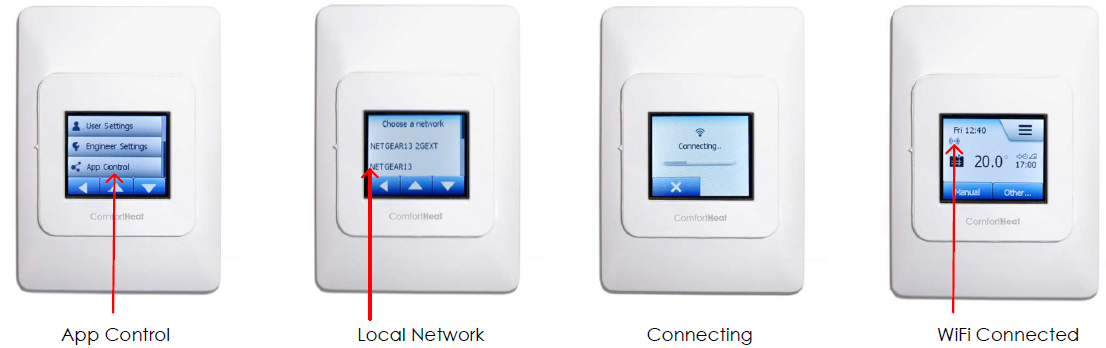
- Press Menu & arrow down to App Control
- Press WiFi Connection and arrow right
- Press Manual
- [the thermostat will now search your WiFi area to detect available networks. If your WIFI network does not appear, turn your router on/off and repeat this process until your network appears on the list.]
- Select your WiFi network and arrow right.
- Enter WiFi password
- [Left button flips between upper case, lower case, numbers and symbols. Press up and down arrow buttons to scroll and press highlighted character to select.]
- Press the Tick to complete
- [Thermostat will begin connecting to WiFi network.]
- Once connected to network, screen displays ‘Status’
- WiFi: Connected
- Server: Connected
- WiFi symbol will highlight on your home page once connected.
- Arrow back to App Control screen
- Press Select to App
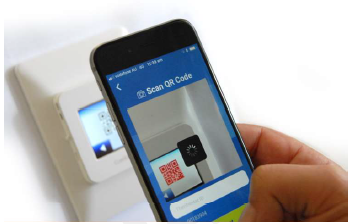
- Press QR Code
INSTALLING THE APP
- Download ‘SWATT’ App on Apple or Android devices. Go to App Store or Playstore and search ‘Swatt OJ’

- Press Install then Open app
- Press Get Started
- Tick all Terms and Conditions boxes & Press Accept
- Press Next to Connect Thermostat
- Scan the QR code on the thermostat
- Enter a thermostat name i.e Master EnSuite
- Enter a heating zone name i.e Bathrooms
- Press Next
CREATE A LOGIN PROFILE
- Enter a user name
- Enter a password and re-enter password
- Press Create Account
- Press OK if prompted to remember password
- On thermostat – Tick to Accept Connection to App
- Press Next on App for final connection
- Leave Mode? To start adjusting temperature and settings press Leave if prompted.
ADD ZONES & THERMOSTATS
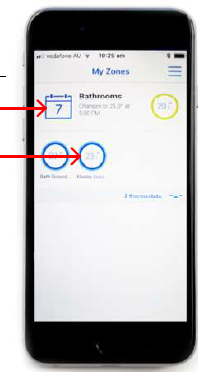
- SWATT App divides your heated areas into zones and within each zone is one or multiply thermostats. You can programme the same schedule and set the temperature of the whole zone or control each thermostat temperature independently.
- Press Menu in App
- Press Manage Zones
- Press Add New [Thermostat in new Zone or Thermostat in existing zone]
- You will be prompted to scan the QR code of each thermostat and complete some of the above set-up steps. If adding many thermostat we recommend planning your zoning thoughtfully as this can function can be very useful if set up correctly.
SETTING MANUAL TEMPERATURES
- Press Zone Name [ie Bathrooms] to manually adjust the temperature of a whole zone
- Press Thermostat Name [ie Master EnSuite] to manually adjust temperature of a single thermostat
PROGRAMMING SCHEDULER
Press Menu
- > Set Up Schedule
- > Select Zone [Can only program zones – not a single thermostat]
- > Press M on top row to select Monday
- > Event > Start time [5.30AM @ 24-28°C]
- > Event > Activate toggle > Start time [8.30AM @ 17°C]
- > Event > Activate toggle > Start time [5.00PM @ 24-28°C]
- > Event > Activate toggle > Start time [10.00PM @ 17°C]
- > Press Copy Schedule
- > Tick Tues/Wed/Thurs/Fri/Sat/Sun
- > Press OK to confirm days
- > Press OK to confirm Schedule

HEATING ONE AREA ONLY
If you have only one bathroom being heated, we recommend keeping it simple and naming as follows;
- Zone Name : Home
- Thermostat Name : Bathroom
TROUBLESHOOTING
For a successful remote connection you must have the following;
- Logged into your SWATT app account on your device.
- Each thermostat connected to your WiFi network. If no WiFi connection is available, try turning your router off/on.
- Thermostats may be too far away from the router to join the WiFi network.
- WiFi network connected to the internet.
- In some cases you may be successfully connected to your WiFi network but your internet is down. Check internet connection with another device.
- Successful server connection [automatic]
- If your server is not connecting it is either your WiFi, internet or the SWATT server is down.
- Any questions please feel free to contact Comfort Heat Australia 02 9979 8600
APP MENU
| Set Up Schedule | Allows you to programme a heating schedule for each zone.
[Schedules can be created for each zone only – not a singular thermostat] |
| Holiday | Programme away times for a pause in your heating schedule.
[Set the start and end date for inactiv e heating period] |
| Frost Protection | Keep your floor abov e freezing point. |
|
Manage Zones |
Allows you to create, mov e, delete and rename zones and thermostats.
[Drag and drop thermostats into different zones and tap zones and/or thermostats to re- name. Drag and drop zones and/or thermostats into the bin to delete.] |
| Energy Use | View usage for each thermostat [Using noted in kWh] |
| Thermostat Information | Details of each Thermostat |
| My Profile | Log out or Delete profile/change password |
Comfort Heat
- Comfort Heat Australia Pty Ltd ABN 64 089778941
- 8/11 Ponderosa Parade Warriewood NSW 2103
- PO Box 220 Mona Vale 1600
- Telephone +61 9979 8600
- [email protected]
- www.comfortheat.com.au
- Local call 1300 13WARM
REFERENCE:
DOWNLOAD MANUALS:
Comfortheat MWD5 ELECTRIC Programmable Thermostat User Manual
OTHER MANUALS:
Comfortheat MWD5 HYDRONIC Programmable Thermostat Operating Manual
Comfortheat MWD5 Programmable Thermostat User Manual
Comfortheat MWD5 WiFi THERMOSTAT General Wiring Diagram
Comfortheat MWD5 ELECTRIC Programmable Thermostat User Manual