
Meitay-tec ETN24-SUPER-3S-FP-PROG Programmable Thermostat

Installation
The ETN2~ is designed for wall mounting in the room to be controlled 11 should be located where the occupant can easily read the LCD display and use the controls If the built-in temperature sensor is being used to measure room temperature the module should be placed where the temperature is representative of the general room conditions Cold or warm air draughts radiant heat and direct sunlight should be avoided
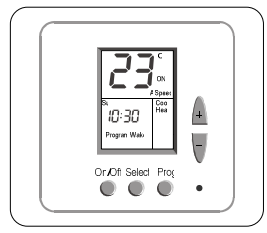
General points to follow:
- Disconnect power to the main board before installing the unit
- The unit should not be installed on an outside wall or where there is an air draft
- The unit must not be exposed to a direct sunlight
- The standard height to install this unit is 1 5 meters (5 feet: from the floor
Installation procedure
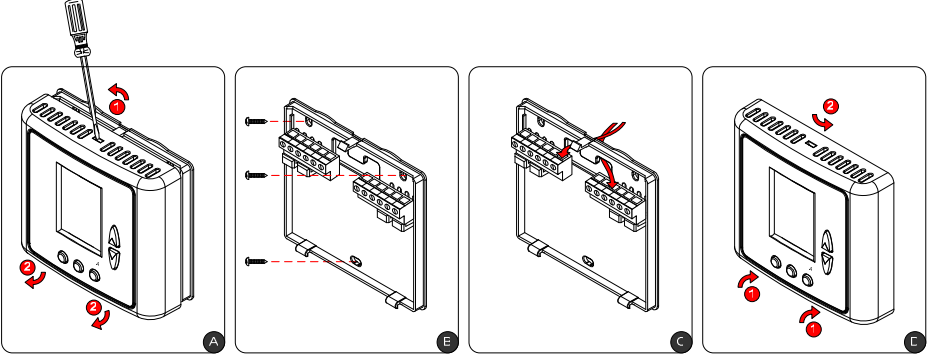
- Separate the front panel from the back panel by pressing the tongue located in the top of the unit and pulling the back panel out
- Line the back panel up against the wall or flat surface Install three screws as required
- Make electrical connections as shown on the enclosed electrical wiring diagram
- Install the cover to the back panel first the two tabs on the bottom and then the top tongue
- Push until tight against the wall
Wiring
Before connecting or disconnecting any wires ensure that all power supplies have been switched off and all wires are potential -free to prevent equipment damage and avoid electrical shock All wiring to the thermostat is low (safe( voltage and must be separated from power line voltage wirin~ Do not run wiring close to transformers or high frequency generating equipment Complete and verify all wiring connections before applying power to the controller to which the module is connected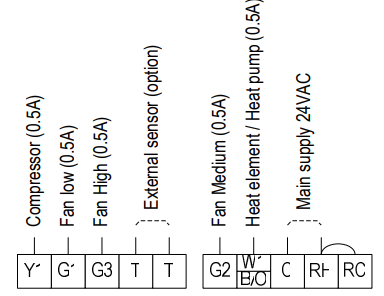
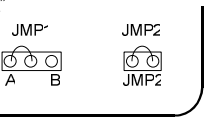
DIP Switch and Jumpers Configuration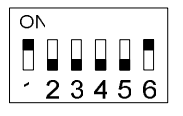
For complete reset of the unit use JMP1 (3 pins’ as follows move the jumper from “A position to “B” position wait 3C seconds and move the jumper back to “A’ position JMP2 (2 pins, is not in use and must always stay shorted
External sensor Connection ~option)
Connecting the external sensor
- Disconnect power to the thermostat
- Move switch 5 to the ON position and switches 1 and E to the OFF position
- Connect the temperature sensor to the T-T terminals
- Reconnect power to the thermostat
Freeze Protection
When the temperature drops below the freeze protection cutin temperature’ the thermostat will turn on the Heat and Fan outputs in order to protect the system from freezing This function will be activated when the thermostat is either in On or Off position The display will alternate between “AL” and the room temperature The thermostat will return to normal mode when the temperature rises above the freeze protection cut-off temperature* ‘adjustable – refer to the technician settings section of the operating manual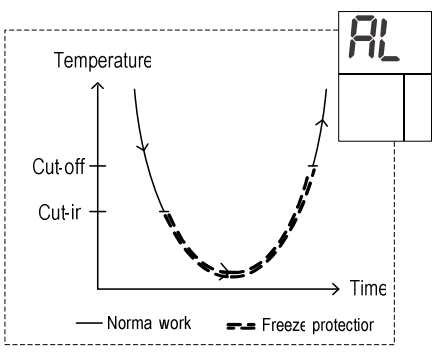
Operating instructions
On/Off
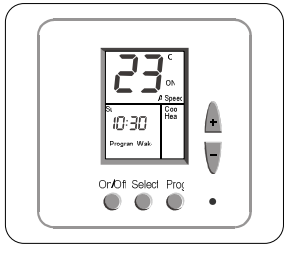
- Press the [On/Off] button to turn the thermostat ON
- Press and hold the [On/Off] button (‘1 sec.; to turn the thermostat OFF
Setpoint
Press the [+: or [-] button – the set point temperature will appear on the display Adjust using the [+:and[-] buttons
Modes/ Auto fan/ Fan speeds
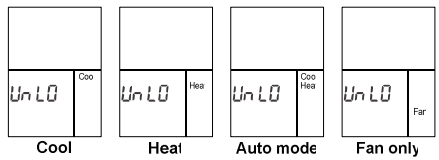
- Press the [Select] button once to enter the Modes selection
- Use the [+: and [-] buttons to switch between mode::
- “Cool” ……………….. Cooling
- “Heat” ……………….. Heating
- “Cool” & “Heat”. Auto mode
- “Fan”.. Fan only
- Press the [Select] button again to enter the Auto fan selection
- Use the [+: and [-] buttons to switch between
- “Fan” ……………….. The fan is on continuously
- “Auto Fan”. ‘Fan cycles on with demand
- Auto Fan is not available ir “Fan only” mode
- In Heat mode with Oil/Gas heat configuration ( e furnace)
- Auto Fan – The fan will never be activated
- Fan – The Fan will work continuously
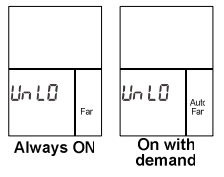
- Press the [Select] button again to enter the Fan speeds selection
- Use the [+: anc [-] buttons to switch between
- FanLo” ……………… Low speed
- “FanMe” …………….. Medium speed
- “FanHi” ………. …….. High speed
- “A Speed”.. Auto speed
- “Auto Fan”. ‘Fan cycles on with demand
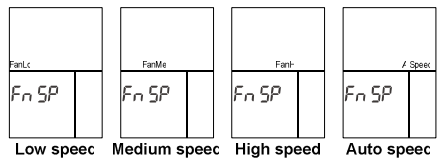
- Press the [Select] button again to return to the normal display
Lock Buttons
Use the Lock option to prevent users from making unwanted changes When the thermostat is located the [Select] [+:and[-] buttons are disabled however, the users can turn the thermostat ON or OFF The display will alternate between “Loe” and real-time clock
- Make sure both temperature set points are different than 10°c
- Lock the thermostat – Press and hold the [Select] button (2( second::: until “Loe” appears on display
- Unlock the thermostat – Press and hold the [Select] button again (2( seconds; unit “UnLo” appears on the display
Weekly Program
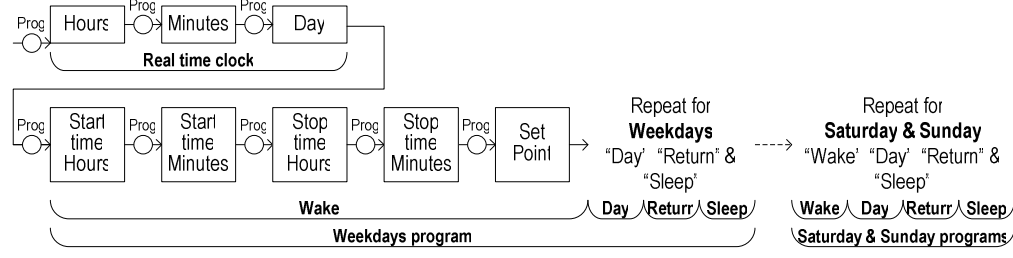
The thermostat can be programmed with up tc 12 different programs with start time / stop time and setpoint for each of the programs:: 4 different programs for the weekdays I Monday to Friday; 4 different programs for Saturday anc 4 different programs for Sunday Daily programs are named Wake Day Return and Sleep
Enable/Disable/Override the weekly program
- Pres:: & Hold the [Prag] button 110 sec.: to enable/disable the program When the word “Program’ appears on display the weekly program is enabled and can be modified When the word “Program’ does not appear on display the weekly program is disabled and cannot be modified
- The occupant can temporarily change the set point temperature to be different than the set point temperature specified by the program Changes will be effective until the next program event begins
- To exit programming mode press the [On/Off] button until normal display is reached or wait for 3C seconds:
Technician Settings
- Adjust the set point temperature to 10°C Wait until the display stops flashing
- Press and hold the [Select] button (5 sec.: to enter technician settings
- Use the [Select] button to switch between different configurable parameters::
- Use the [+: and [-] buttons to make adjustments or switch between options
Set point temperature limit for cooling
The indication “Cool” and the set point Temperature limit for cooling Range 10 .. 3C°C default 10°C
Set point temperature limit for heating
Indication “Heat” and the set point temperature limit for heating Range 10.. 3C °C default 3C °C
Enable / Disable auto change-over mode
Indication “AO” – enable! default; “AF” – disable
Offset for calibration of the measured temperature
Indication “Offs” and a number between (-E: and (+E) Range -6 … +6°C default 0°C
Freeze protection cut-in issue explanation:
The indication “FPOn” Range 10 .. 19°C default 12°c
Freeze protection cut-off see explanation]
The indication “FPOf’ Range 12 .. 2- °C default 14°C
Enable / Disable Freeze protection
The indication “FO’ – enable (default; “FF’ – disable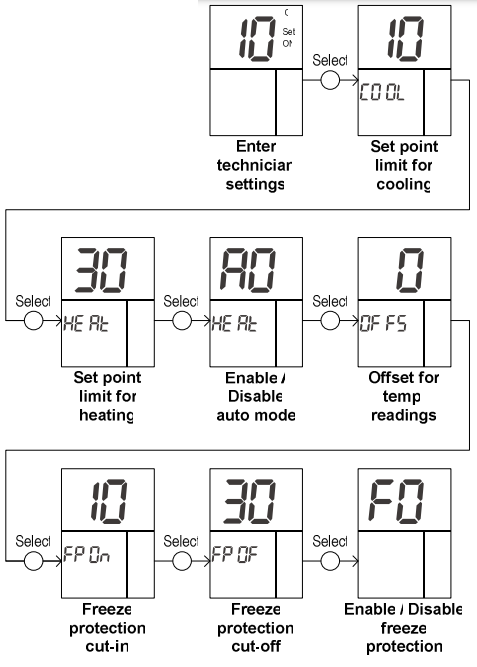
Meitay-tec
- Tel: +972-3-9626462
- Fax: +972-3-9626620
- www.meitavtec.com
- [email protected]
REFERENCE:
Download manuals:
Meitay-tec ETN24-SUPER-3S-FP-PROG Programmable Thermostat Owner Manual
other manuals:
Meitay-tec ETN24-SUPER-3S-FP-PROG Programmable Thermostat Product Specification Guide
Meitay-tec ETN24-SUPER-3S-FP-PROG Programmable Thermostat Wiring Diagram
Meitay-tec ETN24-SUPER-3S-FP-PROG Programmable Thermostat Owner Manual