Xavax 111935 Raditors Thermostat
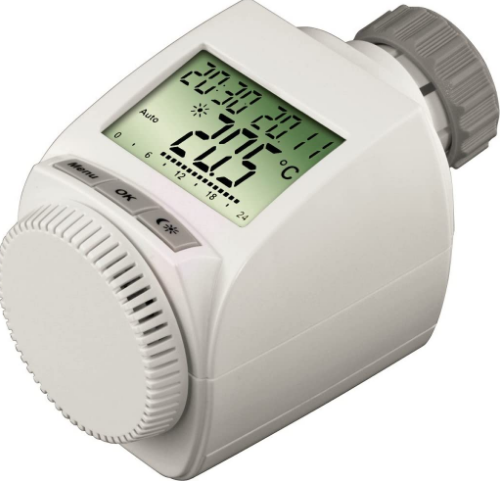
Operation and display
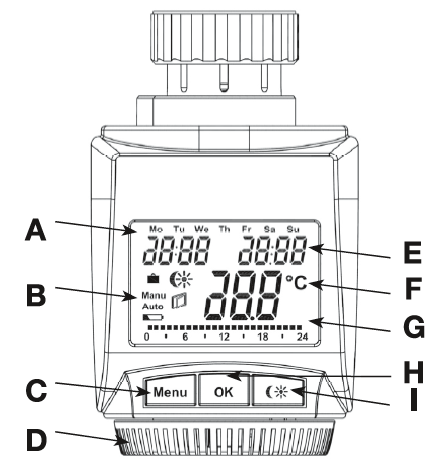
- Day of the week
- Holiday function
 , manual operation (Manu), automatic operation (Auto), “battery empty” symbol
 , set-back/comfort temperature
 , “window open” symbol
- Menu button: Press and hold down the button for more than 3 seconds to open the configuration menu
- Setting wheel: For making adjustments (e.g. temperature)
- Time and date indicator, menu items, functions
- Current temperature setting
- Switching periods set within weekly program
- OK button: For confirming/saving, teaching in
- button: For switching between set-back and comfort temperatures
Intended use
The energy-saving controller has been designed for the purpose of controlling a standard heating appliance valve. The device may only be operated indoors and must be protected from the effects of damp and dust, as well as solar radiation and sources of radiant heat. Using the device for a purpose or in a manner other than that described in this operating manual constitutes a breach of the “intended use” and shall invalidate the warranty and any liability claims. The same shall apply in the event of any conversion or modification work. The devices are intended exclusively for domestic use.
Safety instructions
The devices concerned are not intended for children and must not be used as toys. Do not leave packaging material lying around, as children might be tempted to play with it, which is extremely dangerous. Do not open the device: it does not contain any components that need to be serviced by the user. In the event of an error, please return the device to our service department.
General function
This energy-saving controller for radiators can be used to control room temperature on the basis of time. The actuator moves a valve, thereby allowing the amount of heat flowing to the heating appliance to be controlled. The controller is compatible with all standard heating appliance valves. The large illuminated display ensures user-friendly operation. A wireless receiver allows the device to receive commands from taught-in system components. Installation can be achieved in 3 easy steps.
Inserting {replacing} the batteries
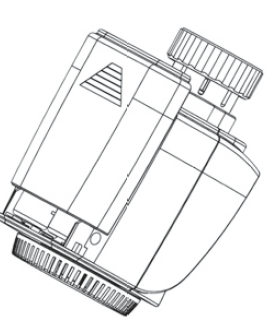
- Remove the battery compartment cover.
- Insert 2 new LR6 batteries (Mignon/AA) into the battery compartment, ensuring they are the right way round.
- Reattach the battery compartment cover and click into place.
- New alkaline batteries have a life of approximately two years.
- A battery symbol will indicate when the batteries need to be replaced. After removing the old batteries, please wait approximately 1 minute before inserting the new ones. This device does not support operation with rechargeable batteries.
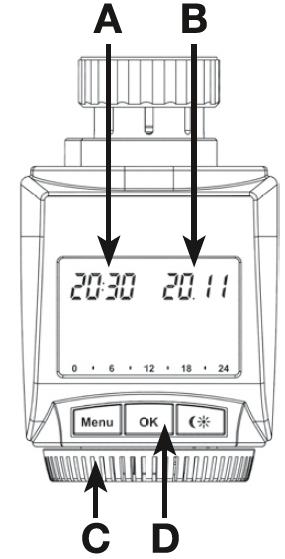
Setting the date and time of dayThe firmware version number will be displayed briefly once you have inserted/replaced the batteries and then you will be automatically prompted to set the A B date and time of day.
- Use the setting wheel (C) to set the year (B).
- Confirm with OK (D).
- Use the setting wheel (C) to set the month (B).
- Confirm with OK (D).
- Use the setting wheel (C) to set the day (8).
- Confirm with OK (D).
- Use the setting wheel (C) to set the hour (A).
- Confirm with OK (D).
- Use the setting wheel (C) to set the minute (A).
- Confirm with OK (D).
The motor will start moving back the control pin while the entries are still being made.
- If “lnS” is displayed with a rotating “TT” symbol, this indicates that the motor is still moving back. Once the device is ready for the actuator to be installed on the valve, just “lnS” will appear on the display.
- The weekly program and other settings can be customised prior to installation.
- To do this, press the menu button when “lnS” is shown on the display. For further details, please see “11. Configuration menu”.
- Once programming is complete, “lnS” will reappear on the display and installation (Step 3) can commence.
- When “lnS” is visible on the display, you can activate the teach-in function prior to installation by pressing the button briefly.
Installing the energy-saving controller
The actuator can be installed on all standard heating valves. There is no need to drain away water or fiddle around with the heating system before doing this. First, you need to remove the old thermostat dial: ::,
- Turn the thermostat dial anticlockwise as far as it will go (A). ~
- Release the thermal ring of the thermostat (8).
- Remove the thermostat from the valve (C).
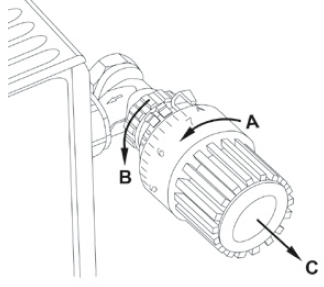
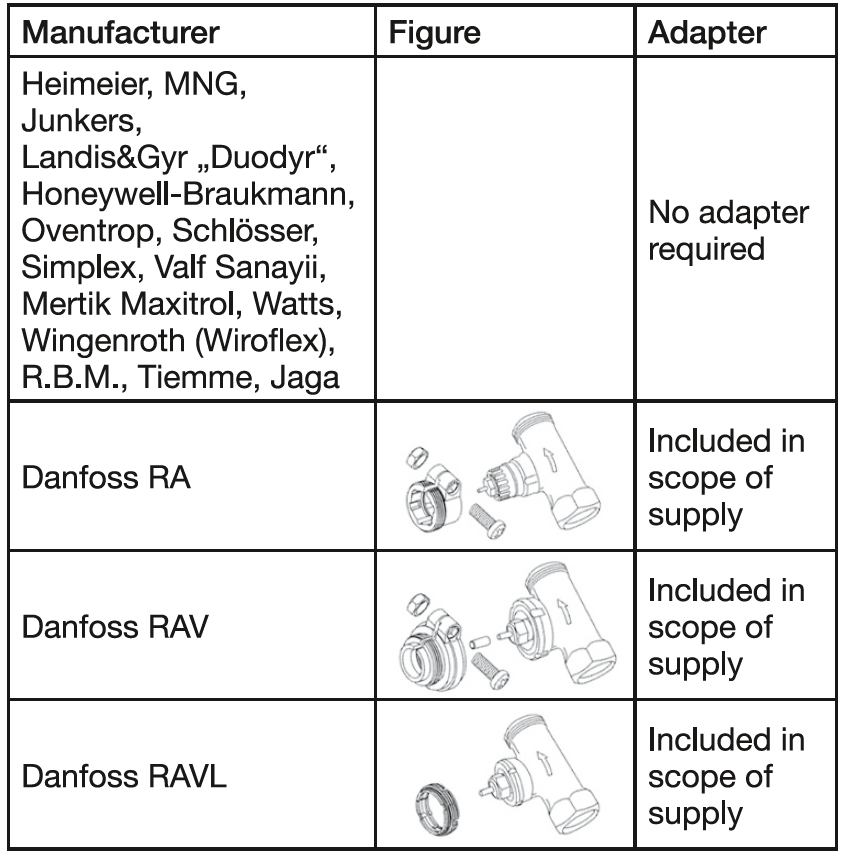
An adapter will need to be used in the case of certain valves. Adapters for Danfoss valves (RA, RAV, RAVL) are inclu-ded in the scope of delivery. For details, please refer to the adapter overview (see 26).
- The adapter must be placed on the valve and turned until it is securely seated.
- In the case of the RAV adapter, the extension supplied must be attached to the valve tappet.
- The RA and RAV adapters must, in addition, be secured by means of the bolt and nut supplied.
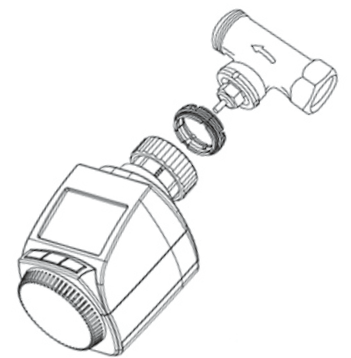
The energy-saving controller can only be installed if “lnS” is showing on the display. Following installation, the actuator will perform an adjustment run so that it can adapt to the valve. During this process, “AdA” will be displayed.
- Place the actuator on the valve.
- Tighten the Union nut.
- “lnS” will appear on the display, press the OK button.
- The actuator will perform an adjustment run (“AdA” will appear on the display, operation not possible).
- After that, the actuator will be ready for operation (Auto mode).
- [A” If the adjustment run was initiated prior to installation, or if an error message will be displayed (F1, F2, F3); press OK to move the motor back to the “lnS” position.
Setting the weekly program
The weekly program allows you to set up to 3 separate heating periods (7 switching times) for each day of the week. Programming is performed in relation to the selected days, for which temperatures must be stored for a period from 00:00 to 23:59.
- Press and hold down the menu button for more than 3 seconds.
- “Pro” will appear on the display.
- Confirm with OK. dAy” will appear on the display.
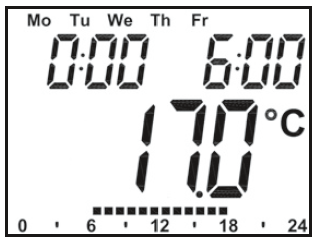
- The setting wheel can be used to select an individual day of the week, all working days, the weekend or the entire week (the example shows work king days selected).
- Confirm with OK.
- Use the setting wheel to set the first time segment (example shows 0:00 to 6:00).
- Confirm with OK.
- Then, select the required temperature for the selected time segment (example shows 17.0°C).
- Confirm with OK.
- Keep repeating this process until you have finished storing temperatures for the period from 0:00 to 23:59.
- In Auto mode, the temperature can be modified at any time via the setting wheel. The modified temperature will then be retained until the next program changeover
Weekly program: Examples
The energy-saving controller allows you to store up to 3 heating periods (7 switching times) with individual temperature settings for each day of the week. The factory setting consists of two heating phases (from 6:00 until 9:00 and from 17:00 until 23:00 respectively) for every single day of the week: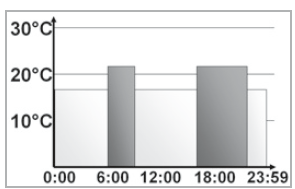
- From 00:00 to 06:00 17.o•c
- From 06:00 to 09:00 21.o•c
- From 09:00 to 17:00 11.o•c
- From 17:00 to 23:00 21.0°C
- From 23:00 to 23:59 11.o•c
Monday to Sunday
- From 00:00 to 06:00 1s.0°c
- From 06:00 to 09:00 22.o·c
- From 09:00 to 12:00 11.0°c
- From 12:00 to 14:00 20.o·c
- From 14:00 to 17:30 11.0°c
- From 17:30 to 23:30 21.0°c
- From 23:30 to 23:59 1s.0°c
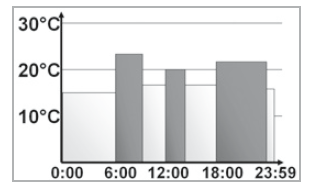
Monday to Sunday
- From 00:00 to 06:00 1s.0°c
- From 06:00 to 09:00 22.o·c
- From 09:00 to 12:00 11.0°c
- From 12:00 to 14:00 20.o·c
- From 14:00 to 17:30 11.0°c
- From 17:30 to 23:30 21.0°c
- From 23:30 to 23:59 1s.0°c
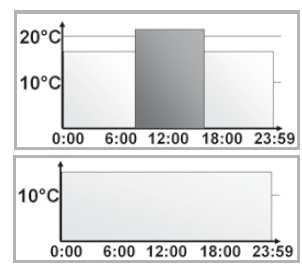
Operating modes
- To switch between the 3 operating modes described below, press the menu button briefly (these operating modes can only be selected following installation/Step 3):
- Holiday function = Set a temperature that is to be maintained until a fixed point in time.
- Manu: Manual operation – The temperature is set manually using the setting wheel.
- Auto: Weekly program – The temperature is controlled automatically in accordance with the stored weekly program.
Configuration menu
The configuration menu can be used to modify settings. To access this menu, press and hold down the menu button (for more than 3 seconds).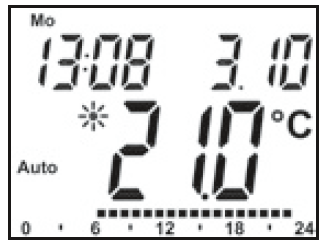
- Pro: For setting the weekly program (see Section “8 Setting the weekly program”)
- dAt: For modifying the time of day and date
- POS: For querying the actuator’s current position
- dSt: Automatic switchover at the start or end of daylight saving time can be deactivated.
- AEr: For setting the “window open” temperature and time so that the temperature is automatically reduced in the event of ventilation
- tOF: For setting the offset temperature
- rES: For restoring the factory settings
- Unl: For teaching out all taught-in wireless components
- Use the setting wheel to select menu items and the OK button to confirm your choice.
- Press the menu button again to return to the previous level. After 65 seconds without anything happening, the menu will close automatically
Display content during normal operation
- During normal operation, the following are displayed: day of the week, time of day, date, operating mode, temperature setting and switching periods.
- The bars indicating the weekly program’s switching periods are shown for every other time interval. For an example, please refer to “9. Weekly program: Examples”.
Teaching in wireless components
The actuator supports the teaching in of up to 4 system components (e.g. remote control and window contact plus 1 wall thermostat).
- Press and hold down the OK button for more than 3 seconds.
- The remaining teach-in time will be displayed (30 seconds).
- The device being taught-in now needs to send a wireless signal (e.g. press button on remote control).
- The display will then switch to the normal view.
- Once this has been done, the actuator will respond to wireless commands from taught-in devices. Whenever the actuator receives a signal from a window contact or remote control, the display will light up briefly.
Teaching out wireless components
- Components that have been taught in on the actuator can be taught out again using the “Unl” (Unlearn) function. All wireless components are taught out at once with this function.
- Press and hold down the menu button for more than 3 seconds.
- Use the setting wheel to select the “Unl” menu item.
- Confirm with OK.
- “ACC” will appear on the display; press OK to confirm.
Operation with a wall thermostat
If the actuator is going to be operated in conjunction with a wall thermostat, this thermostat will need to be taught in (see section 13). Once it has been taught in, “ECF” will appear on the display. No further settings can then be made on the actuator and it will no longer respond to taught-in remote controls or window contacts. If no wireless signal is received from the wall thermostat for a period of 60 minutes, the actuator will exit ECF mode. It will then assume control of the temperature, which it will continue to regulate in accordance with the weekly program until the next wireless signal is received. To “teach out” a wall thermostat, you must reinsert the batteries in the actuator (and wait for approx. 1 minute). Once you have entered the date and time of day, you can use the menu button (before the adjustment run is initiated) to perform the “Teachout” the process as described in Section 14
Setting the holiday function
If you want a fixed temperature to be maintained for a set period of time while you are on holiday or during a party, you can make use of the Holiday function.
- Press and release the menu button repeatedly until the suitcase symbol () appears on the display.
- Use the setting wheel to set the end of the time period during which the temperature is to be maintained.
- Press the OK button to confirm.
- Then use the setting wheel to set the date.
- Press the OK button to confirm.
- Use the setting wheel to set the temperature; press OK to confirm. The display will flash to confirm your settings.
- The set temperature will remain in force until the specified time. After that, the actuator will adopt Auto mode. Wireless commands from the window contact and remote control will continue to be executed.
Comfort and set-beck temperatures
The comforVset-back temperature button ) provides an easy and convenient way of switching between these two temperatures. The factory settings are 21.0°C and 17.0°C respectively. To adapt them, proceed as follows:
- Press and hold down the comforVset-back temperature buttonfor more than 3 seconds.
- The sun symbol will appear on the display along with the current comfort temperature.
- Use the setting wheel to modify the temperature; press OK to confirm.
- The moon symbol will appear together with the set-back temperature.
- Use the setting wheel to modify the temperature; press OK to confirm.
- The temperature can even be modified in Auto mode at any time by using this button.
- The new setting will be retained until the program’s next switching time.
Child-proof lock/Operating inhibit
The operation can be inhibited.
- To activate/deactivate the operating inhibit, briefly press the Menu and buttons at the same time.
- Once the function is active, “LOC” will appear on the display.
- To deactivate the function, press both buttons again.
Setting the heating break
If the heating is being switched off for the summer, you can save battery power. This involves opening the valve up fully. Limescale protection measures remain in place. Wireless commands from the window contact or remote control will no longer be executed.
- To activate the heating break, turn the setting wheel clockwise during manual operation (Manu) until “On” appears on the display.
- To terminate the heating break, quit manual operation (Manu) or turn the setting wheel anticlockwise.
Setting frost protection mode
If you do not want the room to be heated, the valve can be closed. It will only be opened again if there is a risk of freezing due to frost. Limescale protection measures remain in place. Wireless commands from the window contact or remote control will no longer be executed.
- To activate frost protection mode, turn the setting wheel anticlockwise during manual operation (Manu) until “OFF” appears on the display.
- To terminate frost protection mode, quit manual operation (Manu) or turn the setting wheel clockwise.
The “Window open” function
If the room is being ventilated, the actuator controls the temperature to save on heating costs. While this function is active, the “window open” symbol ([l’.l) appears on the display. Without window contact: The actuator will automatically detect a significant drop in temperature due to ventilation. You can set your own “window open” temperature and time. With taught-in window contact: The temperature will only be reduced during the time that the window is left open. You can set your own “window open” temperature.
- Press and hold down the menu button for more than 3 seconds.
- Use the setting wheel to select the “AEr” menu item.
- Confirm with OK.
- Use the setting wheel to set the temperature/time.
- Then press OK to confirm.
- Without a taught-in window contact, this function can be deactivated by selecting a time of “O”.
Setting the offset temperature
The temperature is measured at the heating appliance itself, with the result that other parts of the room may be warmer or colder than this. To allow for this, you can set a temperature offset of ±3.5°C. If, for example, a temperature of 18°C is measured somewhere within the room instead of the 20°c set, it means that an offset of -2.0°C needs to be configured.
- Press and hold down the menu button for more than 3 seconds.
- Use the setting wheel to select the “tOF” menu item.
- Confirm with OK.
- Use the setting wheel to modify the temperature.
- Press the OK button to confirm.
Restoring the factory settings
- You can reset the actuator to its initial state manually. This will clear all the settings that have been made manually.
- Press and hold down the menu button for more than 3 seconds.
- Use the setting wheel to select the “rES” menu item.
- Confirm with OK.
- “ACC” will appear on the display; press OK to confirm.
Troubleshooting
Troubleshooting and maintenance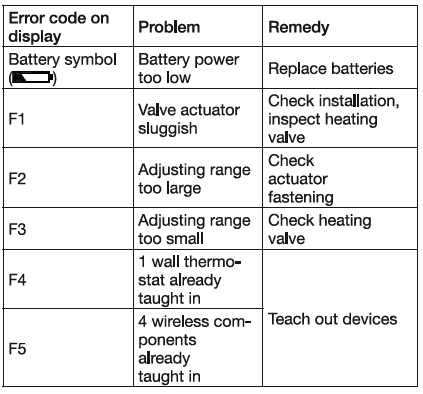
Adapter overview
information about radio operation
Radio transmission is performed on a non-exclusive transmission path, which means that there is a possibility of interference occurring. Switching operations, electric motors or faulty electric devices are some of the reasons why interference may occur. The range of transmission within buildings can deviate greatly from open-air distances. Besides the transmitting power and the reception characteristics of the receiver, environmental influences such as humidity and local structures also play an important role. Hereby, Hama GmbH & Co. KG, declares that this 00111935 is in compliance with the essential requirements and other relevant provisions of Directive 1999/5/EC. See www.hama.com for a declaration of conformity according to R&TTE Directive 99/5/EC guidelines.
Technical properties
- Supply voltage: 3V
- Max. current consumption: 100mA
- Batteries: 2x LR6 batteries (Mignon/AA)
- Battery life: Approx. 2 years
- Display: 868.3 MHz
- Receiver frequency: 63 x 70 x 99 mm (W x H x D)
- Housing dimensions: M30x 1.5
- Connection: +5to +55°C
- Ambient temperature: +90°C (of the radiator,
- Max. surface temperature: 4.2mm
- Linear travel: max. 80 N
Note on environmental protection:
After the implementation of the European Directive 2002/96/EU and 2006/66/ EU in the national legal system, the following applies: Electric and electronic devices as well as batteries must not be disposed of – with household waste. Consumers are obliged by law to return electrical and electronic devices as well as batteries at the end of their service lives to the public collecting points set up for this purpose or point of sale. Details to this are defined by the national law of the respective country. This symbol on the product, the instruction manual or the package indicates that a product is subject to these regulations. By recycling, reusing the materials or other forms of utilizing old devices/ Batteries, you are making an important contribution to protecting our environment.
REFERENCE:
DOWNLOAD MANUALS:
Xavax 111935 Raditors Thermostat Operating Manual