WHITE-RODGERS 1F80-241 Programmable Electronic Digital Thermostat 
Introduction
Your new White-Rodgers 5-Day/1-Day/1-Day Digital Thermostat uses the technology of a solid-state microcomputer to provide precise time/temperature control. This thermostat offers you the flexibility to design heating and cooling programs that fit your needs. This thermostat is intended for use with a low voltage system; do not use this thermostat with a line voltage system. If in doubt about whether your wiring is millivolt, line, or low voltage, have it inspected by a qualified heating and air conditioning contractor or electrician. Do not exceed the specification ratings. All wiring must conform to local and national electrical codes and ordinances. This control is a precision instrument, and should be handled carefully. Rough handling or distorting components could cause the control to malfunction.
Features
- 24 Volt System powered.
- Separate 5-day (weekday), 1-day (Sat) and 1-day (Sun) programming with four separate time/temperature settings per day
- Simultaneous heat and cool program storage
- Preprogrammed temperature control
- Backlit display
- LCD continuously displays set point, and alternately displays time and room temperature
- Temperature override until next program period
- Manual program override (HOLD temperature)
- Temporary HOLD
- °F/°C convertibility
- Temperature range 45° to 90°F
- RC, RH, C, W, Y, G , O and B terminals
- B and O terminals for single stage heat pumps (no auxiliary heat) or damper operation
- Program storage in case of power loss
PRECAUTIONS
- Do not use on circuits exceeding specified voltage. Higher voltage will damage control and could cause shock or fire hazard.
- Do not short out terminals on gas valve or primary control to test. Short or incorrect wiring will damage thermostat and could cause personal injury and/or property damage.
- Thermostat installation and all components of the system shall conform to Class II circuits per the NEC code.
SPECIFICATIONS
- Electrical Rating:
- 18 to 30 VAC 50/60 Hz. or D.C.
- 0.05 to 1.0 Amps (Load per terminal)
- 1.5 Amps Maximum Total Load (All terminals combined)
- THERMAL DATA
- Setpoint Temperature Range:
- 45°F to 90°F (7°C to 32°C)
- Operating Ambient Temperature Range:
- 32°F to 105°F
- Operating Humidity Range:
- 0 to 90% RH (non-condensing)
- Shipping Temperature Range:
- -4°F to 150°F
APPLICATIONS
For use with:
- Standard heat/cool or heat only systems
- Electric heat systems
- Gas or oil fired systems
- Gas systems with intermittent ignition devices (I.I.D.) and/or vent dampers
- Hydronic (hot water or steam) systems
- Single-stage heat pump systems (no auxiliary heat)
DO NOT USE WITH:
- Millivolt systems
- Multi-stage systems
- Systems exceeding 30 VAC and 1.5 amps
- 3-wire zoned hydronic heating systems
REMOVE OLD THERMOSTAT
- Shut off electricity at the main fuse box until installation is complete. Ensure that electrical power is disconnected.
- Remove the front cover of the old thermostat. With wires still attached, remove wall plate from the wall. If the old thermostat has a wall mounting plate, remove the thermostat and the wall mounting plate as an assembly.
- Identify each wire attached to the old thermostat using the labels enclosed with the new thermostat.
- Disconnect the wires from old thermostat one at a time. DO
- NOT LET WIRES FALL BACK INTO THE WALL.
- Install new thermostat using the following procedures
ATTENTION!
- This product does not contain mercury. However, this product may replace a unit which contains mercury.
- Do not open mercury cells. If a cell becomes damaged, do not touch any spilled mercury. Wearing non-absorbent gloves, take up the spilled mercury with sand or other absorbent material and place into a container which can be sealed. If a cell becomes damaged, the unit should be discarded.
- Mercury must not be discarded in household trash. When the unit this product is replacing is to be discarded, place in a suitable container and return to White-Rodgers at 9797 Reavis Road, St. Louis, MO, 63123-5398 for proper disposal
ELECTRIC HEAT OR SINGLE-STAGE HEAT PUMP SYSTEMS
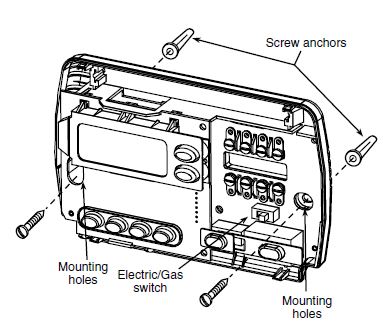
Read entire paragraph before setting electric heat switch. If you are unsure of your application, contact a qualified service person. If you have a single-stage heat pump system, OR your system uses central electric heat, where the blower is energized by a separate circuit through the fan relay (meaning that the fan turns on immediately on call for heat), then the switch on the thermostat base must be moved to the “ELECTRIC” position (see fig 1). If the thermostat is energizing electric heat sequencers, the switch MUST remain in the “GAS” position. If you must move the switch to the “ELECTRIC” position (to the left), use a small screwdriver or pencil
ATTACH THERMOSTAT BASE TO WALL
- Remove the packing material from the thermostat. Gently pull the cover straight off the base. Forcing or prying on the thermostat will cause damage to the unit. If necessary, move the electric heat switch (see ELECTRIC HEAT SYSTEMS,
above). - Connect wires beneath terminal screws on base using appropriate wiring schematic (see figs. 2 through 7).
- Place base over hole in wall and mark mounting hole locations on wall using base as a template.
- Move base out of the way. Drill mounting holes.
- Fasten base loosely to wall, as shown in fig. 1, using two mounting screws. Place a level against bottom of base, adjust until level, and then tighten screws. (Leveling is for appearance only and will not affect thermostat operation.) If you are using existing mounting holes, or if holes drilled are too large and do not allow you to tighten base snugly, use plastic screw anchors to secure subbase. Push excess wire into wall and plug hole with a fire-resistant material (such as fiberglass insulation) to prevent drafts from affecting thermostat operation.
HYDRONIC (HOT WATER OR STEAM)
HEATING SYSTEMS
This thermostat is set to operate properly with a forced-air heating system. If you have a hydronic heating system (a system that heats with hot water or steam), you must set the thermostat to operate properly with your system. Change the second option in the configuration menu to SL (see CONFIGURATION MENU, page 4).
CHECK THERMOSTAT OPERATION
- If at any time during testing your system does not operate properly, contact a qualified service person.
- Turn on power to the system.
Fan Operation
- If your system does not have a G terminal connection, skip to Heating System.
- Move fan switch to ON position. The blower should begin to operate.
- Move fan switch to AUTO position. The blower should stop immediately.
Heating System
- Move SYSTEM switch to HEAT position. If the heating system has a standing pilot, be sure to light it.
- Press
 to adjust thermostat setting above room temperature.
 - The heating system should begin to operate.
- Press
 to adjust temperature setting below room temperature.
 - The heating system should stop operating
Wiring Diagram
Cooling System
- Move SYSTEM switch to COOL position
- Press to adjust thermostat setting below room temperature.
- The blower should come on immediately on high speed, followed by cold air circulation
- Press to adjust temperature setting above room temperature. The cooling system should stop operating.
OPERATION
Before you begin programming your thermostat, you should be familiar with its features and with the display and the location and operation of the thermostat buttons. Your thermostat consists of two parts: the thermostat cover and the base. To remove the cover, pull it straight out from the base. To replace the cover, line up the cover with the base and press until the cover snaps onto the base.
THE THERMOSTAT BASE
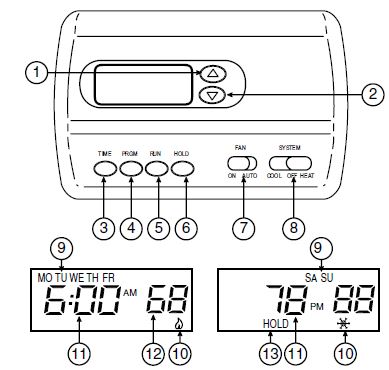
Other than and , the following buttons and switches are located on the bottom of the thermostat cover (see fig. 8).
The Thermostat Buttons and Switches
- Raises temperature setting.
- Lowers temperature setting.
- TIME button.
- PRGM (program) button.
- RUN (program) button.
- HOLD temperature button.
- FAN switch (ON, AUTO).
- SYSTEM switch (COOL, OFF, HEAT).
- The Display
- Indicates day of the week.
- Flame icon ( ) is displayed when the SYSTEM switch is in the HEAT position. Snowflake icon ( )is displayed (nonflashing) when the SYSTEM switch is in the COOL position. Snowflake is displayed (flashing) if the thermostat is in lockout mode to prevent the compressor from cycling too quickly.
- Alternately displays current time and temperature.
- Displays currently programmed set temperature (this is blank when SYSTEM switch is in the OFF position).
- The word HOLD is displayed when the thermostat is in the HOLD mode. HOLD is displayed flashing when the thermostat is in a temporary HOLD Mode.
CONFIGURATION MENU
The configuration menu allows you to set certain thermostat operating characteristics to your system or personal requirements. Press RUN to make sure the thermostat is in the run program mode, then press PRGM and RUN at the same time to enter the configuration menu. The display will show the first item in the configuration menu. The configuration menu chart below summarizes the configuration options. An explanation of each option follows. Press HOLD to change to the next menu item or press TIME to go backwards to the previous item in the menu. To exit the menu and return to the program operation, press RUN. If no keys are pressed within fifteen minutes, the thermostat will revert to normal operation.
| Step | Press Button(s) | Displayed (Factory Default) | Press or to select: | COMMENTS |
| 1 | PRGM
and RUN |
HOLD (0:00) | 0 to 8 hrs (in
15 minute increments0) |
Select temporary Hold time |
| 2 | HOLD* |
(FA) |
SL | Select FA or SL (Fast or Slow) heating cycle rate |
| 3 | HOLD* | d-L (ON) | OFF | Select display backlight OFF or ON |
| 4 | HOLD* | E (ON) | OFF | Select Energy Management Recovery OFF or ON |
| 5 | HOLD* | LOC (OFF) | ON | Select Compressor lockout OFF or ON |
| 6 | HOLD* | 0 HI
(0) |
4 LO to
4 HI |
Select temperature display adjustment higher or lower |
| 7 | HOLD* | (F) | °C | Select temperature display to °F or °C |
| 8 | RUN | Returns to normal operation |
- Select Temporary Hold Time – The thermostat can hold any temperature you set it to for the amount of time you select on this option. Your choices are 0:00 to 8:00 hours in 15 minute increments. 0:00 disables the function Example: Using the Temporary Hold Function
- You have selected 3:00 hours for the Temporary Hold time period.
- With the thermostat set to Heat or Cool, press HOLD for five seconds (time will show 3:00 hours as a setting reminder).
- HOLD on the display will blink.
- Use
 to set the temperature to your preference.
 - The thermostat will maintain this temperature setting for 3 hours with HOLD blinking to remind you it is in Temporary Hold. After 3 hours the thermostat will go back to the program temperature and HOLD will no longer blink or display.
- Select FA or SL (Fast or Slow) Heating Cycle Rate – The FA setting is frequently used for gas, oil or electric heat. The SL setting produces a longer heating cycle which is normally for hot water or steam (hydronic) systems. Both settings produce very accurate temperature control and can be set to your personal preference. FA cycles the system just under 1°F and the SL setting cycles at approximately 1.5°F.
- Select backlit display – The display backlight improves
display contrast in low lighting conditions. Selecting backlight ON will keep the light on continuously. Selecting OFF will keep the light off. - Select Energy Management Recovery OFF or ON – Energy Management Recovery (EMR) causes the thermostat to start heating or cooling early to make the building temperature reach the program setpoint at the time you specify. Heating will start 5 minutes early for every 1° of temperature required to reach setpoint.
Example: You select EMR and have your heating programmed to 65° at night and 70° at 7 AM. If the building temperature is 65° the difference between 65° and 70° is 5°. Allowing 5 minutes per degree the thermostat setpoint will change to 70° at 6:35 AM. Cooling allows more time per degree because it takes longer to reach temperature.
- Select Compressor Lockout LOC OFF or ON – Selecting LOC ON will cause the thermostat to wait 5 minutes before turning on the compressor if the heating and cooling system loses power. It will also wait 5 minutes minimum between cooling cycles. This is intended to help protect the compressor from short cycling. Some newer compressors already have a time delay built in and do not require this feature. Your compressor manufacturer can tell you if the feature is already present in their system. When the compressor time delay occurs it will flash the (snowflake icon) for about five minutes then turn on the compressor.
- Select Temperature Display Adjustment 4 LO to 4 HI – Allows you to adjust the room temperature display 4° higher or lower. Your thermostat was accurately calibrated at the factory but you have the option to change the display temperature to match your previous thermostat.
- Select F° or C° Readout – Changes the display readout to Celsius or Fahrenheit as required
OPERATING FEATURES
Now that you are familiar with the thermostat buttons and display, read the following information to learn about the many features of the thermostat.
SIMULTANEOUS HEATING/COOLING PROGRAM
STORAGE — When programming, you can enter both your heating and cooling programs at the same time. There is no need to reprogram the thermostat at the beginning of each season.
TEMPERATURE OVERRIDE — Press r until the display shows the temperature you want. The thermostat will override current programming and keep the room temperature at the selected temperature until the next program period begins. Then the thermostat will automatically revert to the program.
HOLD TEMPERATURE — The thermostat can hold any temperature within its range for an indefinite period without reverting to the programmed temperature. Momentarily press HOLD button. HOLD will be displayed. Then choose the desired temperature by pressing . The thermostat will hold the room temperature at the selected setting until you press RUN button to start program operation again.
|
Period |
WEEKDAY (5 DAY) | SATURDAY (1 DAY) | SUNDAY (1 DAY) | ||||
| Start Time |
Temperature |
Start Time |
Temperature |
Start Time |
Temperature |
||
| HEAT | 1ST | 6:00 AM | 70˚F | 6:00 AM | 70˚F | 6:00 AM | 70˚F |
| 2ND | 8:00 AM | 62˚F | 8:00 AM | 62˚F | 8:00 AM | 62˚F | |
| 3RD | 5:00 PM | 70˚F | 5:00 PM | 70˚F | 5:00 PM | 70˚F | |
| 4TH | 10:00 PM | 62˚F | 10:00 PM | 62˚F | 10:00 PM | 62˚F | |
| COOL | 1ST | 6:00 AM | 78˚F | 6:00 AM | 78˚F | 6:00 AM | 78˚F |
| 2ND | 8:00 AM | 85˚F | 8:00 AM | 85˚F | 8:00 AM | 85˚F | |
| 3RD | 5:00 PM | 78˚F | 5:00 PM | 78˚F | 5:00 PM | 78˚F | |
| 4TH | 10:00 PM | 82˚F | 10:00 PM | 82˚F | 10:00 PM | 82˚F | |
CONFIGURATION MENU — Allows you to customize certain thermostat options
PROGRAMMING YOUR THERMOSTAT
This section will help you plan your thermostat’s program to meet your needs. For maximum comfort and efficiency, keep the following guidelines in mind when planning your program.
- When heating (cooling) your building, program the temperatures to be cooler (warmer) when the building is vacant or during periods of low activity.
- During early morning hours, the need for cooling is usually minimal.
Planning Your Program
Look at the factory preprogrammed times and temperatures shown in the sample schedule. If this program will suit your needs, simply press the RUN button to begin running the factory preset program. If you want to change the preprogrammed times and temperatures, follow these steps. Determine the time periods and temperatures for your weekday and weekend programs. You must program four periods for both the weekday and weekend program. However, you may use the same heating and cooling temperatures for consecutive time periods. You can choose start times, heating temperatures, and cooling temperatures independently for both weekday and weekend programs (for example, you may select 5:00 AM and 70° as the weekday 1st period heating start time and temperature, and also choose 7:00 AM and 76° as the weekday 1st period cooling start time and temperature). Use the following table to plan your program time periods and the temperatures you want during each period. Fill in the complete table to have a record of your programs
Entering Your Program
Follow these steps to enter the heating and cooling programs you have selected.
|
Period |
WEEKDAY (5 DAY) | SATURDAY (1 DAY) | SUNDAY (1 DAY) | ||||
| Start Time |
Temperature |
Start Time |
Temperature |
Start Time |
Temperature |
||
| HEAT | 1ST | ||||||
| 2ND | |||||||
| 3RD | |||||||
| 4TH | |||||||
| COOL | 1ST | ||||||
| 2ND | |||||||
| 3RD | |||||||
| 4TH | |||||||
Set Current Time and Day
- Press TIME button once. The display will show the hour only
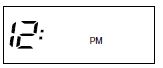
- Press and hold either until you reach the correct hour and AM/PM designation (AM begins at midnight; PM begins at noon).
- Press TIME once. The display window will show the minutes only.
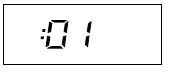
- Press and hold either until you reach the correct minutes.
- Press TIME once. The display will show the day of the week.
- Press until you reach the current day of the week.
- Press RUN once. The display will show the correct time and room temperature alternately
Enter Heating Program
- Move the SYSTEM switch to HEAT.
- Press PRGM once. “MO TU WE TH FR” (indicating weekday program) will appear in the display. Also displayed are the currently programmed start time for the 1st heating period and the currently programmed temperature (flashing).
EXAMPLE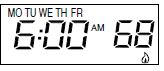
- This display window shows that for the 1st weekday period, the start time is 6:00 AM, and 68° is the programmed temperature (this example reflects factory preprogramming).
- Pressor to change the displayed temperature to your selected temperature for the 1st heating program period.
- Press TIME once (the programmed time will flash). Press until your selected time appears. The time will change in 15 minute increments. When your selected time is displayed, press TIME again to return to the change temperature mode.
- Press PRGM once. The currently programmed start time and setpoint temperature for the 2nd heating program period will appear.
- Repeat steps 3 and 4 to select the start time and heating temperature for the 2nd heating program period.
- Repeat steps 3 through 5 for the 3rd and 4th heating program periods. Weekday heating programs are now complete.
- Press PRGM once. “SA” (indicating Saturday program) will appear in the display, along with the start time for the 1st heating period and the currently programmed temperature.
- Repeat steps 3 through 7 to complete Saturday heating programming.
- Press PRGM once. “SU” (indicating Sunday program) will appear in the display, along with the start time for the 1st heating period and the currently programmed temperature.
- Repeat steps 3 through 7 to complete Sunday heating programming.
- When you have completed entering your heating program, press RUN.
Enter Cooling Program
- Move SYSTEM switch to COOL position.
- Follow the procedure for entering your cooling program, using your selected cooling times and temperatures.
CHECK YOUR PROGRAMMING
Follow these steps to check your thermostat programming one final time before beginning thermostat operation.
- Move SYSTEM switch to HEAT position.
- Press PRGM to view the 1st weekday heating period time and temperature. Each time you press PRGM, the next heating period time and temperature will be displayed in sequence for weekday, then weekend program periods (you may change any time or temperature during this procedure).
- Press RUN.
- Move SYSTEM switch to COOL position.
- Repeat step 2 to check cooling program.
- Move SYSTEM switch to HEAT or COOL and press RUN begin program operation.
TROUBLESHOOTING
No Heating
With the SYSTEM switch set to HEAT, when the setpoint temperature is raised or lowered past the room temperature, the thermostat will make a soft click sound. Usually, the sound indicates the thermostat is operating correctly. If the system does not come on, check the system or contact your heating/ cooling service person. If the thermostat does not click try the Reset Operation listed below.
No Cooling
Same procedure as heating except set SYSTEM switch to COOL. There can be up to a 5 minute compressor lock-out time delay before the thermostat clicks in COOL.
Blank Display
A blank digital display usually indicates loss of power to the thermostat from the heating and cooling system or indicates the thermostat has received a voltage spike or static discharge (see Reset Operation). The thermostat must have 24 volts constantly supplied to terminals RC/RH and C. A blown fuse or tripped breaker could cause a power loss. Also, many furnaces contain safety or limit devices that can disconnect the power to the thermostat intermittently.
Time Loss
The thermostat maintains its program in memory during a power loss but the clock time freezes until power is restored. If your clock does not keep accurate time you may be losing power. Check with your service person for additional assistance.
Reset Operation
If a voltage spike or static discharge blanks out the display or causes erratic thermostat operation you can reset the thermostat by pressing, and TIME at the same time. This also resets the factory defaults to the configuration menu and program. If the thermostat has power, has been reset and still does not function correctly contact your heating/cooling service person or place of purchase.
REFERENCE:
DOWNLOAD MANUALS:
