
Wengart WG03 WiFi Smart Thermostat
INTRODUCTION
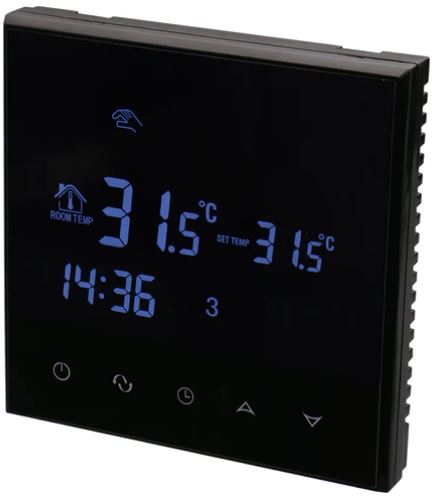
With the Wengart WG03 WiFi Smart Thermostat, you can operate your heating and cooling systems from a distance with your smartphone or other smart devices. It provides a variety of capabilities and features to improve your convenience, comfort, and energy efficiency. An overview of the Wengart WG03 WiFi Smart Thermostat is provided below:
- Smart Control: The WG03 thermostat may be controlled remotely with a specialized mobile app by connecting to your home’s WiFi network. With this clever feature, you can control the temperature, create schedules, and keep an eye on your energy use from anywhere. The WG03 thermostat is compatible with a variety of heating and cooling systems, including heat pumps, central HVAC systems, and electric or gas furnaces. It is flexible and can be adapted to different settings since it supports both single-stage and multi-stage systems.
- Energy Savings: To help you use less energy and pay less for utilities, the WG03 thermostat has energy-saving features. Based on your use habits and preferences, it uses advanced algorithms to optimize heating and cooling cycles, assuring smooth operation and reducing unnecessary energy consumption. The WG03 thermostat allows you to program custom temperature regimens that correspond to your regular habits. With this programming feature, you may program several temperature settings for various periods of the day or days of the week, assuring maximum comfort while reducing energy use.
- Geofencing: When you leave or return home, your smartphone’s geofencing function automatically adjusts the temperature settings based on your position. The thermostat can sense your vicinity and regulate the temperature appropriately by creating a virtual perimeter around your home, which enables energy savings while you’re not home. The WG03 thermostat uses advanced learning algorithms to gradually adjust to your tastes and actions. It adapts automatically, taking into account your temperature changes, occupancy patterns, and consumption patterns to provide a cozy atmosphere while optimizing the energy economy.
- Integration with Smart Home Systems: The WG03 thermostat is compatible with well-known voice assistants and smart home platforms, including Amazon Alexa and Google Assistant. This enables voice commands to be used to manage the thermostat and effortlessly integrates it into your current smart home environment.
- Energy Monitoring: The thermostat gives you insights into your heating and cooling use by providing extensive energy usage statistics and reports. You are now better equipped to decide on energy-saving changes and see possible areas for improvement thanks to this knowledge.
- User-friendly Design: The WG03 thermostat has a user-friendly design and a backlit display that makes it simple to see and manage settings even in dimly lit areas. The mobile app offers a user-friendly design that enables you to quickly access all of the thermostat’s functions and settings.
- Reminders for routine maintenance activities, such as changing air filters or arranging HVAC system inspections, may be sent to you via the thermostat.
- The best performance and lifespan of your heating and cooling systems are ensured by these reminders.
DIMENSION
DISPLAY
SPECIFICATION
The following specifications apply to this item:
- Working Voltage: AC90240V 50/60Hz
- Power Consumption: 2W
- Setting Range: 570°C (may be adjusted to 20-70°C)
- Switch Differential: Adjustable from 0.5 to 5°C (factory setting: 1°C)
- Ambient temperature range: -5 to 50 degrees Celsius. Ambient temperature display accuracy: 0.5 degrees Celsius.
- Measurement Range: 1–70°C
- The following features are included in this thermostat:
- Button: Capacitive Touch Button
- Inside Sensor: NTC 10k @25°C
- Protective Housing: IP20
- Housing Material: Anti-flammable PC
- Wiring Terminal: one terminal can be connected to 2*1.5mm2 or 1*2.5mm2 wire at most
- Package Content: 1 x Thermostat, 2 x Screws, 1 x Manual
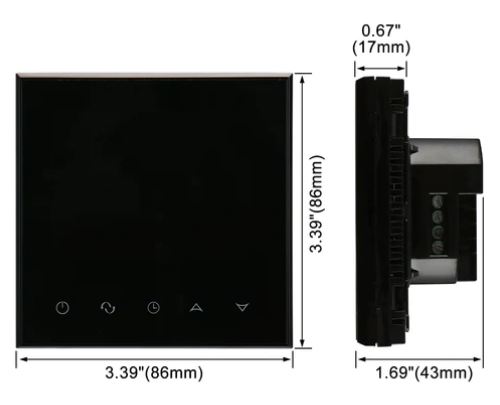
- Dimensions: 55mm55mm27mm I’m grateful.
Features
- Voice control: With the smart thermostat’s integration with Google Home and Amazon Echo, you can easily and hands-free adjust the temperature.
- Remote control: To provide warmth at home, the 7-day programmable thermostat may be operated remotely via a smartphone. Shared device functionality allows for multi-channel management.
- Digital thermostats for rooms Automatically achieve the desired temperature, regulate it precisely with an accuracy of up to 0.5 °C, and alter the temperature by tapping the buttons
- Freedom to choose Manual mode, Program mode, or Holiday mode based on various applications
- Write a setting program using the thermostat’s programmable interface to have it operate in accordance with the set guidelines, You may build your own schedule using the 6+1, 5+2, and 7 days weekly time slots for optimal convenience in various circumstances.
- Room Thermostat Timer: After accessing the interface for clock calibration, you may modify the current time. When the power is off, the clock keeps running without affecting the time settings. The room measuring temperature may be calibrated.
- Two sensors: This water underfloor heating thermostat lets you select between internal and exterior sensors.
- Memory function: The smart thermostat will remember all settings, so there is no need to be concerned about an unexpected power outage. You don’t need to reset it when you turn the power back on.
- The heating thermostat’s adjustment range is 0.5 to 5°C. For instance, if the set temperature is 20°C and the bandwidth is set to 1°C, the heating will switch off at 21°C and above and on at 19°C and below.
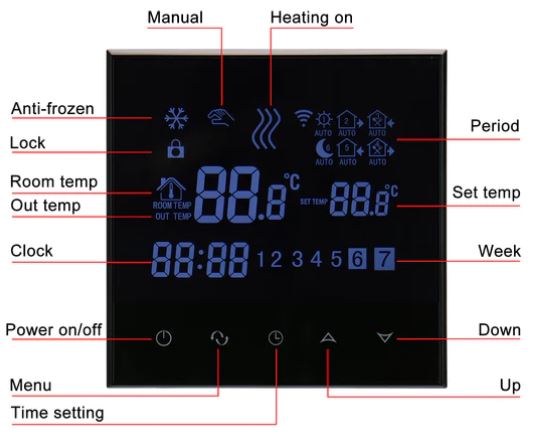
- LCD display digital thermostat with backlight, simple to use and easy to see even in the dark.
- Child lock: Keypad locking mechanism is intended to lock the home thermostat to prevent misoperation by children opening the expanded menu in the off state, more functionalities may be specified.
FAQS
The Wengart WG03 WiFi Smart Thermostat is what, exactly?
The Wengart WG03 is a smart thermostat that offers convenience and energy economy. It may be managed remotely over WiFi.
What distinguishing qualities does the WG03 WiFi Smart Thermostat offer?
The WiFi connection, remote control, customizable scheduling, energy-saving features, and compatibility with a range of heating and cooling systems are all highlights of the WG03 thermostat.
How does a WiFi connection function?
The WG03 thermostat may be controlled and monitored remotely via a smartphone app or a web site thanks to its connection to your home WiFi network.
Do voice assistants like Google Assistant and Amazon Alexa work with the WG03 thermostat?
You may use voice commands to operate the WG03 thermostat since it normally works with well-known voice assistants.
Is the WG03 thermostat capable of being programmed with temperature schedules?
You may set different temperature settings for various times of the day or days of the week using the thermostat’s programmable scheduling feature, which is available.
Does the thermostat’s user interface make sense?
A touchscreen display and an intuitive interface are common characteristics of the WG03 thermostat, making it simple to access and change settings.
Can I use my smartphone to remotely check and change the thermostat?
A smartphone app may be used to remotely operate the WG03 thermostat. You can check the temperature, modify the settings, and get alerts.
The WG03 thermostat has functions for conserving energy.
To assist reduce energy use, the thermostat often has energy-saving features including temperature setbacks, adaptive learning, and use reporting.
WG03 thermostat supports geofencing, right?
To guarantee comfort and energy savings, certain WG03 thermostat models may include geofencing features that modify the temperature depending on your location.
Does the WG03 thermostat work with systems that have several zones for cooling and heating?
The WG03 thermostat could offer multi-zone systems, enabling you to manage and keep an eye on several zones separately from a single gadget or app.
With the WG03 thermostat, can I access past temperature information?
In most cases, the thermostat gives you access to historical temperature information so you may study previous trends and make wise changes.
Does the WG03 thermostat provide intelligent notifications or alerts?
Yes, the thermostat has the ability to send alerts or messages to your smartphone in the case of things like temperature changes, system failures, or upcoming filter replacements.
Does the WG03 thermostat have the capacity to learn new settings?
Some WG03 thermostat models may have learning features that allow them to recognize your use habits and automatically alter the temperature settings.
Is the WG03 thermostat compatible with other smart home appliances?
You may build a connected ecosystem with the WG03 thermostat, which often allows interaction with various smart home tools and platforms.
How should the WG03 WiFi Smart Thermostat be installed?
The installation procedure could differ, but generally speaking, you’ll have to shut off the electricity, remove the old thermostat, attach the wire to the WG03 thermostat, and mount it on the wall. The user handbook has thorough instructions.