Warmup RSW-01-WH-RG WiFi Smart Heating Thermostat
Overview
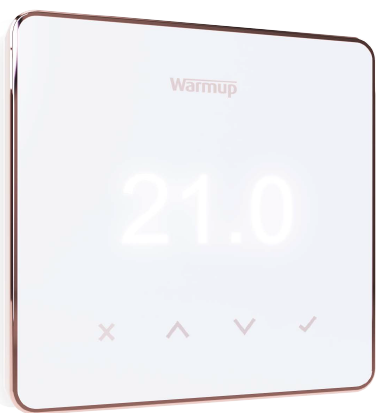
Warmup’s Element WiFi Thermostat has been designed with simplicity and stylish functionality in mind. It brings energy-efficient heating control to all Warmup floor heaters. Combining smart technology with simple, contemporary design, the Element WiFi Thermostat is the perfect all-rounder to control Warmup heating systems. The Element WiFi Thermostat utilises simple touch buttons for accurate control of your underfloor heating system. Its sleek, unobtrusive design will suit any home décor. Installation and set up is done in a matter of seconds, simply scan the QR code on the Element thermostat using the MyHeating app and it will automatically connect to your WiFi network The Element works with all of our advanced energy saving features in the MyHeating app such as SmartGeo. SmartGeo is a unique technology developed by Warmup and built into the MyHeating App that uses an advanced algorithm to understand the most efficient heat settings for your home. Working automatically; it learns your routines and location through background communication with your smartphone and lowers temperatures when you are away, only rising them up to your ideal comfort temperature in time for your arrival home saving you money and energy.
Features & Benefits
- Simple touch buttons for accurate control of your underfloor heating system. Its sleek, unobtrusive design will suit any home décor
- Easy to setup. Simply scan the QR code on the Element thermostat using the MyHeating app and it will automatically connect to your WiFi network.
- Automatic control of your heating. SmartGeo learns your routines and location through background communication with your smartphone and lowers temperatures when you are away, only rising them up to your ideal comfort temperature in time for your arrival home saving you money and energy.
- Reduce energy use by up to 25% with energy efficient MyHeating app technology.
- Reduce energy bills by over £400 per year using less energy and switching to a cheaper tariff with Warmup AutoSwitch. Save money by switching to renewable energy suppliers easily.
- Weather based Early Start. Turns the heating on at just the right time to be warm when you scheduled – no overheating or wasted energy. Takes into account the weather forecast for warmth just when you wanted, even on cold days and no wasted energy overheating on warm days.
- Energy Monitoring; Energy + cost graphs on mobile, tablet and desktop.
- 12 Year warranty when installed with a Warmup heater.
Element Thermostat Models
Pack Contents
- 1 x Element (Display & Power Base) with installation manual
- 1 x 3m NTC10K Sensor
- 2 x M3.5 x 25 x 0.6P screws
- 1 x Screwdriver
Technical Specifications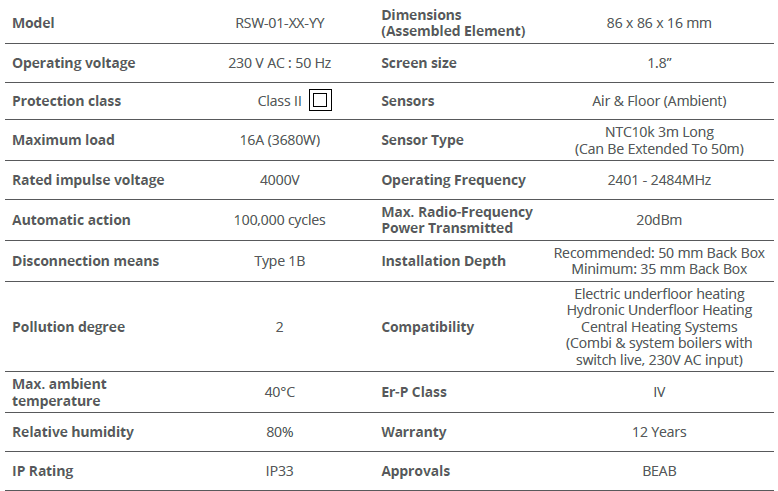
Contact
Warmup plc
- www.warmup.co.uk
- [email protected]
- T: 0345 345 2288
- F: 0345 345 2299
- Warmup plc n 704 Tudor Estate n Abbey Road n Londen n NW10 7UW n UK
- Warmup GmbH n Ottostrae 3 n 27793 Wildeshausen n DE
REFERENCE:
DOWNLOAD MANUALS:
Warmup RSW-01-WH-RG WiFi Smart Heating Thermostat Product Specification Sheet

Warmup RSW-01-WH-RG WiFi Smart Heating Thermostat Product Specification Sheet