Vive Comfort TP-Z-RDASW ZONING APPLICATION Thermostat

INSTALLATION & WIRING
- Drill a 3/4” hole in the supply duct at least 36” from heat exchanger/coil and before the first zone damper, in relation to airflow
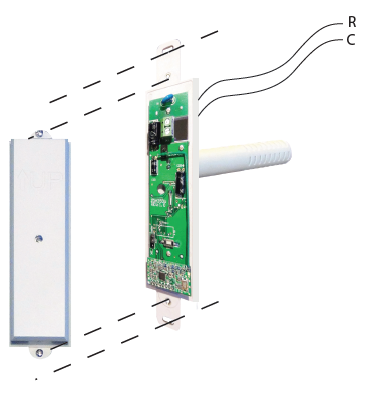
- Remove cover and Wire R and C to the 24V equipment transformer. (with power off)
- Mount on supply duct, leaving covers off for linking procedure, if needed. (If supplied in 2 Zone Kit it will already be linked).
- The Sensor must be powered with 24 VAC. We recommend wiring it to the equipment board.
Remember
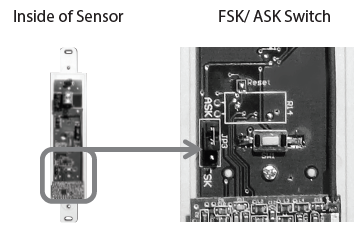
Our Wireless Zoning System contains selectable wireless communication. Each component has a jumper switch labeled FSK and ASK. Default setting: FSK. All components must be set to the same position for wireless communication. This selectable communication option is available to you in case you have a device you are pairing with that only has the ASK option.
Wireless Range
Range between the sensor and the Master Thermostat is approximately 100 feet with no obstructions and approximately 50 feet in standard residential metal, brick, and concrete construction
Power Type
24 VAC (Hardwire)
ESTABLISHING COMMUNICATION
Connecting to the Master Zone Thermostat
Easy, two step communication link set up.
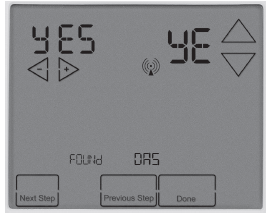
- The Master Thermostat Tech setting for the discharge air sensor must be set to YES. See Master Thermostat manual for instructions While the Master Thermostat is on the Discharge Air
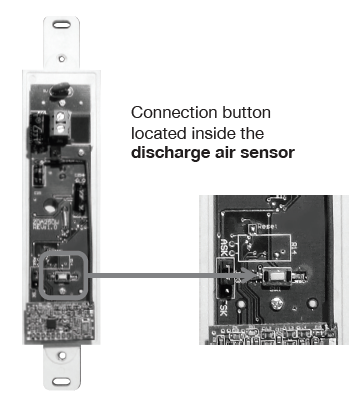
- Sensor screen, and set to yes, hold down the connection button on the inside of the Sensor until the Master Thermostat shows the letters YE and says Found DAS.
Communication Note
The discharge air sensor sends a temperature reading signal to the Master Thermostat every 5 minutes, or if a set temperature limit has been reached. If the temperature has exceeded a set limit, the Master Thermostat will shut of the heat or cool source while leaving the fan energized. It remains in this mode until the next temperature reading signal. (5 Minutes) At that time if the temperature limits are not exceeded, the heat or cool source will be energized if there is still a call.
Industry ‘Average’ Limits
- High limit:
- Heat pump: 120-140* F
- Electric/Gas Furnace: 140-160*F
- Low Limit:
- 45*F for most systems
Congratulations on purchasing our Wireless Zoning System
This Discharge Air Sensor was designed to the highest reliability and ease of use standards. Thank you for choosing our quality products.
WARRANTY
CONTACT US AND WARRANTY INFORMATION
Warranty Registration:
- Your new thermostat has a 5 year limited warranty. You must register your warranty within 60 days of installation. You can register your new thermostat in 2 ways.
- Go to our company website, select warranty registration and ll out a short registration form.
- Complete the form below and mail it to the address shown.
VIVE Comfort
- P.O. Box 3377
- SpringField, MO 65804
- Toll-Free: 1-800-776-1635
- Web: www.vivecomfort.com
- Hours of Operation: M-F 9AM – 6PM Eastern
REFERENCE
Download PDF
Vive Comfort TP-Z-RDASW ZONING APPLICATION Thermostat Installation Manual

Vive Comfort TP-Z-RDASW ZONING APPLICATION Thermostat Installation Manual