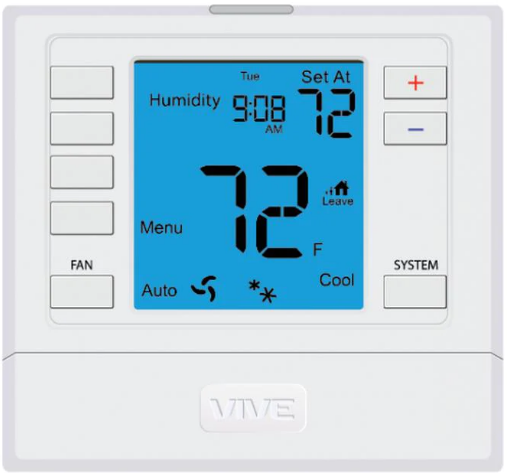
Vive Comfort TP-S-955WH Non-Programmable Thermostat
Wireless Type Selection
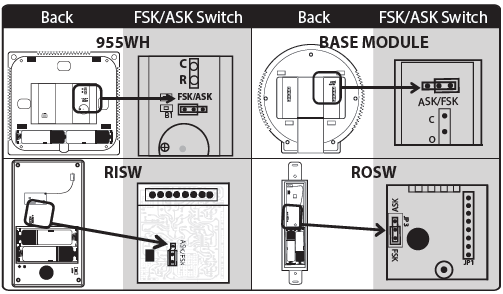
- The thermostat and base module contain selectable wireless communication options. Each component has a jumper switch label FSK and ASK. Default setting: FSK.
- All components must be set to the same position for wireless communication.
- Both modes utilize a 916 MHz frequency.
- FSK: frequency-shift keying, is the recommended mode.
- ASK: amplitude-shift keying, should be selected when using components that can not communicate with FSK.
- The images below illustrate the location of jumper switches for each item that has one. Note only the thermostat and Base Module are included in this package
Thermostat Application Guide
Power Type
- Battery Power*
- Hardwire (Common Wire)
- Hardwire (Common Wire) with
- Battery Backup
A trained, experienced technician must install this product.
Carefully read these instructions. You could damage this product or cause a hazardous condition if you fail to follow these instructions.
Installation Tips
Wall Locations
The thermostat should be installed approximately 4 to 5 feet above the floor. Select an area with average temperature and good air circulation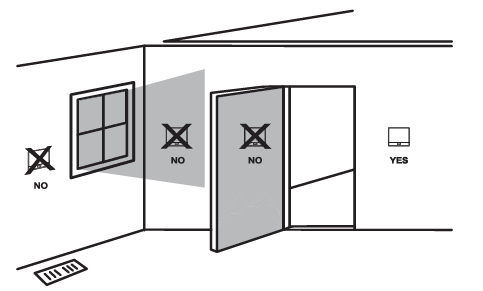
Do not install thermostats in these locations:
- Close to hot or cold air ducts
- That are in direct sunlight
- With an outside wall behind the thermostat
- In areas that do not require conditioning
- Where there are dead spots or drafts (in corners or behind doors)
- Where there might be concealed chimneys or pipes
Thermostat Subbase Installation
- Horizontal Mount For horizontal mount put one screw on the left and one screw on the right.
- Vertical Mount For vertical mount put one screw on the top and one screw on the bottom.
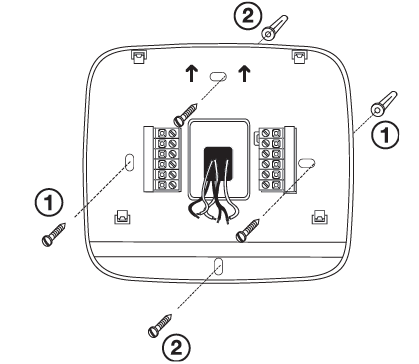
Base Module Subbase installation
- Horizontal Mount For horizontal mount put one screw on the left and one screw on the right.
- Vertical Mount For vertical mount put one screw on the top and one screw on the bottom.
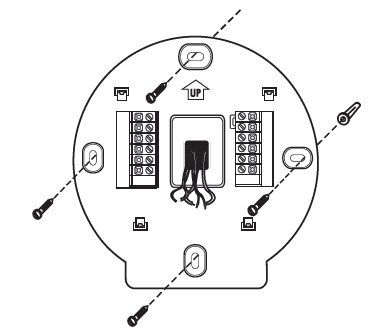
Mount Thermostat and Base Module
Align the 4 tabs on the subbase with corresponding slots on the back of the thermostat/base module, then push gently until it snaps in place.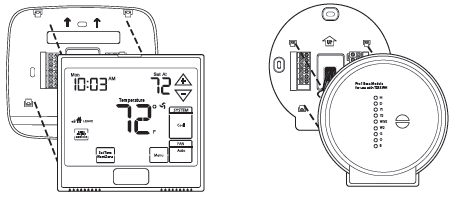
Battery Installation
Battery installation is optional if there are no remotes connected to the Master Thermostat (C terminal connected). If you connect an outdoor remote and/or indoor remote sensors it is required the thermostat be hardwired.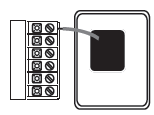
Important: High quality alkaline batteries are recommended. Rechargeable batteries or low quality batteries do not guarantee a 1-year life span.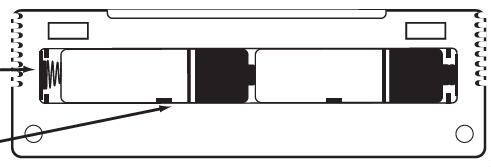
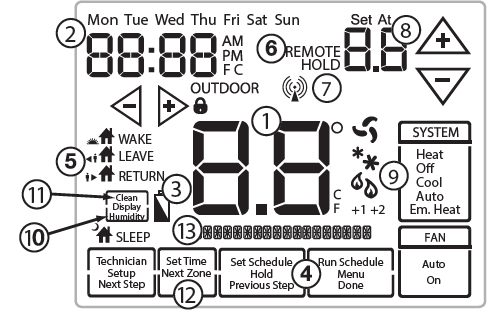
Getting to know your thermostat
- Indicates the current room temperature Time and day of the week
- Low Battery Indicator: Replace batterieswhen this indicator is shown.
- Program Menu Options: Show different options during programming.
- Period Icons – This thermostat can have 2 or 4 programmable time periods per day. Icons are displayed for 4 time periods. Occupied and unoccupied will display in the text field for 2 time periods REMOTE indicates a remote has control of the system. HOLD is displayed when thermostat program is permanently overriden.
- Setpoint: Displays the user selectable setpoint temperature System Operation Indicators: The COOL, HEAT or FAN icon will display when the COOL, HEAT or FAN is on. NOTE: The compressor delay feature is active if these icons are flashing. The compressor will not turn on until the 5 minute delay has elapsed.
- Humidity: Shows the humidity target setpoint settings and keys. Clean Display: Pressing CLEAN DISPLAY will allow 30 seconds to clean the display. The keys will be inoperable during this time. CLEAN will appear if your contractor has programmed a filter change reminder. Press CLEAN when filter has been replaced to reset the filter change reminder timer.
- Next Zone: This button will appear if optional indoor remotes are present. By selecting NEXT ZONE you can cycle through each of the zones set up during the initial installation.
- System Information: Shows which zone or zones are controlling your system. Shown only when one or more indoor sensors are connected.
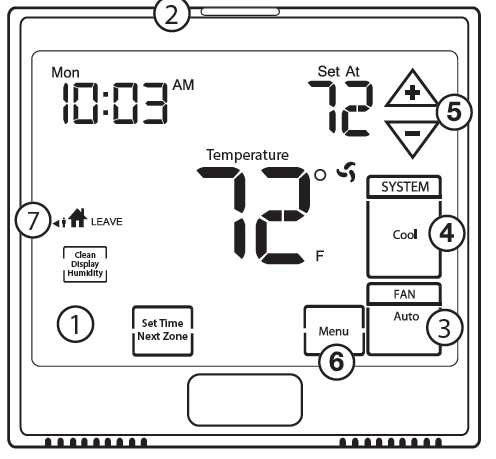
Description
- LCD Display
- Glow in the dark light button
- Fan key
- System key
- Setpoint keys
- Menu key
- Scheduled time period Icons
Installation Tips
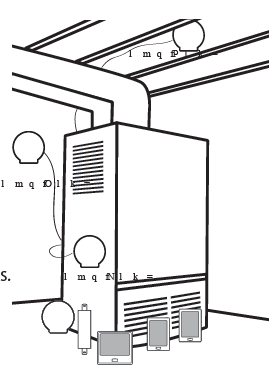
When performing an attic installation, instead of placing the base module in the attic, locate the closet nearest to the air conditioning unit. Then mount the base module high on the wall inside the closet or on the ceiling of the closet. This location will insure the base module is below the 150°F maximum ambient temperature specification
Base Module – Basement Location
Wireless Range
Range between the thermostat and the base module is up to 100 feet with no obstructions and approximately 50 feet in standard residential construction. To extend the range try replacing the base unit higher if in a basement or further away from large metal objects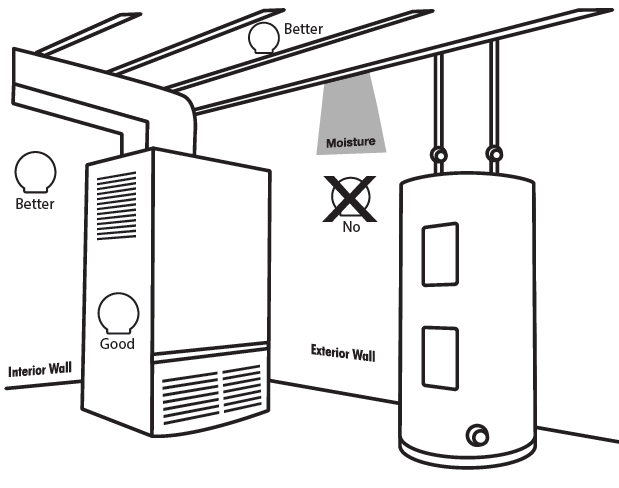
Private Label Badge
About The Badge
All of our thermostats use the same universal magnetic badge. Visit the company website to learn more about our free private label program.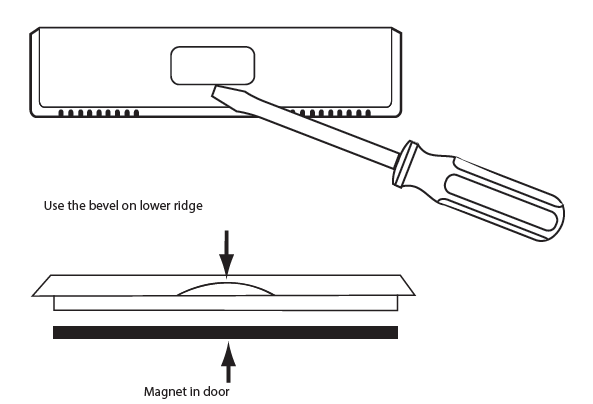
Wireless Communication Tips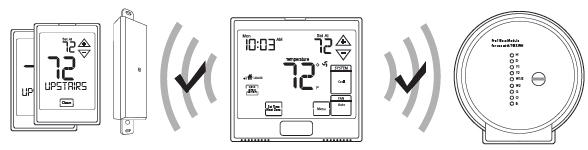
Follow these steps for a simple wireless communication setup.
- Locate all components in area near equipment.
- Wire base module with 8ft pigtail and temporarily mount.
- If you are not able to establish communication, this will allow you to relocate the module to an area with less obstruction, without having to rewire.
- Install batteries in all devices you wish to use.
Thermostat, indoor/outdoor sensors.
- A. Press the menu button on thermostat
- B. Press & hold tech set up button
- C. Configure the set up for your application
- D. Establish communication between devices Install thermostat in final location.
Reestablishing Communication
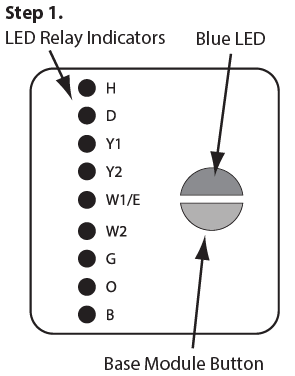
- Press and hold the base module button for 3 seconds. The Blue LED will flash when ready to receive initial signal from the thermostat. (Base module must be powered by 24V. Blue LED will be continuously on when 24V power is present.)
- Hold the light key (shown here) of the thermostat for 10 seconds, the Blue LED on the base module will stop flashing after communication has been established between base module and the thermostat.
Wiring
- If you are replacing a thermostat, make note of the terminal connections on the thermostat that is being replaced.
- In some cases the wiring connections will not be color coded. For example, the green wire may not be connected to the G terminal.
- Loosen the terminal block screws.
- Insert wires then retighten the terminal block screws.
- Place nonflammable insulation into the wall opening to prevent drafts

Terminal Designations on the Base Module
This thermostat is shipped from the factory to operate a conventional heating and cooling system. This thermostat may also be configured for a heat pump system. See the “heat pump” configuration step on page 23 of this manual to configure the thermostat for heat pump applications
|
Terminal |
2 Heat 2 Cool Conventional System | 2 Heat 2 Cool Heat Pump System | 3 Heat 2 Cool Heat Pump System |
| RC | Transformer power (cooling) | Transformer power (cooling) | Transformer power (cooling) |
| RH | Transformer power (heating) | Transformer power (heating) | Transformer power (heating) |
| C | Transformer common | Transformer common | Transformer common |
| B | Energized in heating | Heat pump changeover valve energized in heating | Heat pump changeover valve energized in heating |
| O | Energized in cooling | Heat pump changeover valve energized in cooling | Heat pump changeover valve energized in cooling |
| G | Fan relay | Fan relay | Fan relay |
| W/E | First stage of heat | First stage of emergency heat | First stage of emergency heat |
| Y | First stage of cool | First stage of heat & cool | First stage of heat & cool |
| Y2 | Second stage of cool | Second stage of cool | Second stage of cool & second stage of heat |
| W2 | Second stage of heat | Auxiliary heat relay, second stage of heat | Auxiliary heat relay, third stage of heat |
| H | Humidify | Humidify | Humidify |
| D | Dehumidify | Dehumidify | Dehumidify |

Terminal Designations on the Master Thermostat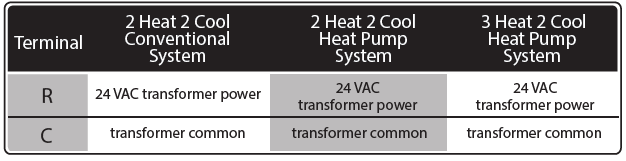
Technician Setup
- Press the MENU button.
- Press and hold the technician setup button for 3 seconds. This 3 second delay is designed so that homeowners do not accidentally access the installer settings.
- Configure the installer options as desired using the table below.
- Use the or keys to change settings and the next step or previous step key to move from one step to another. Note: Only press the DONE key when you want to exit the Technician Setup options.
- Press the
 DONE key to exit.
| Tech Setup Steps | LCD Will Show | Adjustment Options | Default | |
|
Filter Change Reminder |
This feature will flash a reminder after the elapsed run time to remind the user to change the filter. A setting of “OFF” will disable this feature. | OFF
|
You can adjust the filter change reminder from “OFF” to 2000 hours of fan runtime in 50 hour increments. |
OFF |
|
Room Temperature Calibration |
This feature allows the installer to change the calibration of the room temperature display. For example, if the thermostat reads 70˚ and you would like it to read 72˚ then select +2. | 0
CALIbRATE |
You can adjust the room temperature display to read up to 4˚above or below the factory calibrated reading. | 0˚F |
|
Minimum Compressor On Time |
This feature allows the installer to select the minimum run time for the compressor. For
example, a setting of 4 will force the compressor to run for at least 4 minutes every time the compressor turns on, regardless of the room temperature. |
OFF | You can set the minimum compressor run time to “OFF”, “3”, “4”, or “5” minutes. If 3,4 or 5 is selected, the compressor will run for
at least the selected time before turning off. |
OFF |
| Tech Setup Steps | LCD Will Show | Adjustment Options Default | ||
|
Compressor Short Cycle Delay |
The compressor short cycle delay protects the compressor from “short cycling”. This feature will not allow the compressor to be turned on for 5 minutes after it was last turned off. | ON OF
CO |
Selecting “ON” will not allow the compressor to be turned on for 5 minutes after the last time the compressor was on. Select “OF” to remove this delay. | ON |
|
Cooling Swing |
The swing setting often called “cycle rate”, “differential” or “anticipation” is adjustable. A smaller swing setting will cause more frequent cycles and a larger swing setting will cause fewer cycles. | 0.5 dF
CO |
The cooling swing setting is adjustable from 0.2˚ to 2˚. For example: A swing setting of 0.5˚ will turn the
cooling on at approximately 0.5˚ above the setpoint and turn the cooling off at approximately 0.5˚ below the setpoint. |
0.5˚ |
|
Heating Swing |
The swing setting often called “cycle rate”, “differential”, or “anticipation” is adjustable. A smaller swing setting will cause more frequent cycles and a larger swing setting will cause fewer cycles. | 0.5 dF
HE |
The heating swing setting is adjustable from 0.2˚ to 2˚. For example: A swing setting of 0.5˚ will turn the heating on at approximately 0.5˚ below the setpoint and turn the heating off at 0.5˚ above the setpoint. |
0.4˚ |
|
Keypad Lockout |
Keypad lockout allows you to configure the thermostat so that some or all of the keys don’t function. | PA | PA= partial keypad lockout, which locks all the keys except the or keys.
FU= full keypad lockout, which locks out all the keys.
See Keypad Lockout Note |
PA |
| Tech Setup Steps | LCD Will Show | Adjustment Options | Default | |
|
Stages of Heat |
You can configure the thermostat to operate a 3 stage heat pump system.
2H 2C = 2 heat, 2 cool 3H 2C = 3 heat, 2 cool This feature is shown only if the HEAT PUMP technician setup step is ON. |
2H2C
STAGE |
Use the or key to change between 2 or 3 stages of heat. 2 heat will use Y1 as first stage and W2 as auxiliary.
3 heat will use Y1 as the first stage, Y2 as the second stage and W2 as the auxiliary. |
2 STAGES |
Note:
Up to four indoor temperature sensors can be connected to one thermostat. This allows for 5 sensing points (zones). For example: the local (thermostat) plus four indoor sensors enables 5 sensing points. To connect an indoor sensor to a thermostat, select 1 on the FINDING SENSOR technician setup step. Then hold down the light button on the indoor sensor until it beeps, while in ZONE technician setup step on the indoor sensor. To connect a second indoor sensor change the thermostat to read 2 and change the indoor sensor to zone 2. The zone setting must match between the thermostat and the indoor sensor to connect. When the connection is established the thermostat will show FOUND + NAME of the indoor sensor in the system information area of display.
Balance Point: The system operates differently when a balance point is used. On a dual fuel system, the balance point outdoor temperature setting will be the outdoor temperature at which the thermostat chooses either the heat pump or gas furnace. For example: A balance point setting of 30°F will turn on only the heat pump above 30°F and only the gas furnace below 30°F. Y1 will be stage one above 30°F and W2 will be stage one below 30°F. A heat pump with electric auciliary will energize the heat pump above and below balance point. The electric auxiliary will only energize below balance point. For Example: A balance point setting of 40°F, will turn on the heat pump above 40°F and turn on the heat pump and electric auxiliary below 40°F.
Setting The Humidity
Follow the steps below to change your target humidity setpoint. Press the humidity button. Use the or button to select the target humidity setpoint. Press DONE when completed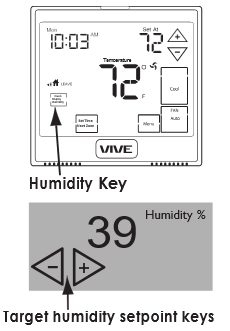
Ambient Humidity Display
Ambient humidity will flash opposite the day and time, if the optional outdoor temperature sensor is installed the ambient outdoor temperature will also cycle in the display
Increasing Humidity
The table on the right shows recommended indoor humidity levels in relation to outdoor temperatures during heating (adding humidity).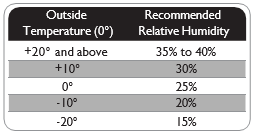
Set Time
- Press the MENU button.
- Press Set Time.
- Day of the week is flashing. Use the key to select the current day of the week.
- Press Next Step.
- The current hour is flashing. Use the key to select the current hour. When using 12-hour time, make sure the correct a.m. or p.m. choice is selected.
- Press Next Step.
- Minutes are now flashing. Use the key to select current minutes.
- Press DONE when completed.
All our programmable thermostats are shipped with an energy saving default program. You can customize this default program by following the instructions in the set program schedule section starting on page 34.
Programming
Your thermostat can be programmed to have each day of the week programmed uniquely (7 days), all the weekdays the same with a separate program for Saturday and a separate program for Sunday (5+1+1), or non-programmable. For the 7-day and 5+1+1 programming modes, there are three time period options.
- “4” Residential (WAKE, LEAVE, RETURN, SLEEP)
- “2C” Commercial (OCCUPIED, UNOCCUPIED)
- “4C” Commercial (OCCUPIED 1, UNOCCUPIED 1, OCCUPIED 2, UNOCCUPIED 2)
| Day of the Week | Events | Time | Setpoint Temperature (HEAT) | Setpoint Temperature (COOL) |
|
Weekday |
Wake/OCC1 | |||
| Leave/UNOCC1 | ||||
| Return/OCC2 | ||||
| Sleep/UNOCC2 | ||||
| Occupied | ||||
| Unoccupied | ||||
|
Saturday |
Wake/OCC1 | |||
| Leave/UNOCC1 | ||||
| Return/OCC2 | ||||
| Sleep/UNOCC2 | ||||
| Occupied | ||||
| Unoccupied | ||||
|
Sunday |
Wake/OCC1 | |||
| LeaveUNOCC1 | ||||
| Return/OCC2 | ||||
| Sleep/UNOCC2 | ||||
| Occupied | ||||
| Unoccupied | ||||
Set Program Schedule For Two Time Periods
- Select HEAT or COOL with the SYSTEM key.
- Note: You have to program heat and cool each separately.
- Press the MENU button (If menu does not appear first, press RUN SCHED).
- Press SET SCHED. Note: Monday-Friday is displayed and the OCCUPIED text is shown. You are now programming the OCCUPIED time period for the weekday setting.
- Use the or key to make your time selection for the weekday OCCUPIED time period. Note: If you want the fan to run continuously during this time period, select ON with the FAN key.
- Then use the key to make your setpoint selection for the weekday OCCUPIED period.
- Press Next Step.
- Repeat steps 4 through 6 for the weekday UNOCCUPIED time period.
Default Programming
| Day of the Week | Events | Time | Setpoint Temperature (HEAT) | Setpoint Temperature (COOL) |
|
Weekday |
Wake/OCC1 | 6 AM | 70˚F (21˚C) 75˚F (24˚C) | |
| Leave/UNOCC1 | 8 AM | 62˚F (17˚C) 83˚F (28˚C) | ||
| Return/OCC2 | 6 PM | 70˚F (21˚C) 75˚F (24˚C) | ||
| Sleep/UNOCC2 | 10 PM | 62˚F (17˚C) 78˚F (26˚C) | ||
|
Saturday |
Wake/OCC1 | 6 AM | 70˚F (21˚C) 75˚F (24˚C) | |
| Leave/UNOCC1 | 8 AM | 62˚F (17˚C) 83˚F (28˚C) | ||
| Return/OCC2 | 6 PM | 70˚F (21˚C) 75˚F (24˚C) | ||
| Sleep/UNOCC2 | 10 PM | 62˚F (17˚C) 78˚F (26˚C) | ||
|
Sunday |
Wake/OCC1 | 6 AM | 70˚F (21˚C) 75˚F (24˚C) | |
| LeaveUNOCC1 | 8 AM | 62˚F (17˚C) 83˚F (28˚C) | ||
| Return/OCC2 | 6 PM | 70˚F (21˚C) 75˚F (24˚C) | ||
| Sleep/UNOCC2 | 10 PM | 62˚F (17˚C) 78˚F (26˚C) | ||
| Day of the Week | Events | Time | Setpoint Temperature (HEAT) | Setpoint Temperature (COOL) |
|
Weekday |
OCCUPIED | 8 AM | 70˚F (21˚C) 72˚F (22˚C) | |
| UNOCCUPIED | 6 PM | 64˚F (18˚C) 80˚F (27˚C) | ||
|
Saturday |
OCCUPIED | 8 AM | 70˚F (21˚C) 72˚F (22˚C) | |
| UNOCCUPIED | 6 PM | 64˚F (18˚C) 80˚F (27˚C) | ||
|
Sunday |
OCCUPIED | 8 AM | 70˚F (21˚C) 72˚F (22˚C) | |
| UNOCCUPIED | 6 PM | 64˚F (18˚C) 80˚F (27˚C) | ||
To customize your 7 day program schedule, follow these steps:
Monday
- Select HEAT or COOL with the SYSTEM key.
- Note: You have to program heat and cool each seperately.
- Press the MENU button (If menu does not appear first press RUN SCHED).
- Press SET SCHED. Note: Monday is displayed and the OCCUPIED text is shown. You are now programming the OCCUPIED time period for that day.
- Use the key to make your time selection for the OCCUPIED time period. Note: If you want the fan to run continue ously during this time period, select ON with the FAN key.
- Then use the or key to make your setpoint selection for that day’s OCCUPIED period.
- Press NEXT.
- Repeat steps 4 through 6 for that day’s UNOCCUPIED time period
Set Program Schedule For Four Time Periods
Weekday::
- Select HEAT or COOL with the system key.
- Note: You have to program heat and cool each separately.
- Press the MENU button (If menu does not appear first press RUN SCHED).
- Press SET SCHEDULE. Note: Monday-Friday is displayed and the WAKE/OCC1 icon is shown. You are now programming the WAKE/OCC1 time period for the weekday setting.
- Use the key to make your time selection for the weekday WAKE/OCC1 time period.
- Note: If you want the fan to run continuously during this time period, select ON with the FAN key.
- Then use the or key to make your setpoint selection for the weekday WAKE/OCC1 period.
- Press Next Step.
- Repeat steps 4 through 6 for the weekday LEAVE/UNOCC1 time period, for the weekday RETURN/OCC2 time period, and for the weekday SLEEP/UNOCC2 time period
Specifications
- The display range of temperature … 41˚F to 95˚F (5˚C to 35˚C)
- The control range of temperature…. 44˚F to 90˚F (7˚C to 32˚C)
- Load Rating……………………………………….. 1 amp per terminal, 1.5 amp maximum all terminals combined
- Swing (cycle rate or differential) …… Heating is adjustable from 0.2˚ to 2.0˚
- Cooling is adjustable from 0.2˚ to 2.0˚
- Power source …………………………………….18 to 30 VAC, NEC Class II, 50/60 Hz
- for hardwire
- Battery power from 2 AA Alkaline
- batteries
- Operating ambient …………………………. 32˚F to +105˚F (0˚C to +41˚C)
- Operating humidity ………………………… 90% non-condensing maximum
- Dimensions of thermostat …………….. 4.7” W x 4.3” H x 1.1” D
- Frequency ………………………………………… 916 MHz Base module
- Load rating ……………………………………….. 1 amp per terminal, 1.5 amp maximum all terminals combined
- Power source ……………………………………. 18 to 30 VAC, NEC class II, 50/60 Hz
- Operating ambient …………………………. 32°F to +150°F (0° to +65°C)
- Operating humidity ………………………… 90% non-condensing maximum
vive
- Vive Comfort
- P.O. Box 3377
- Springfield, MO 65808-3377
- Toll Free : 888-776-1427
- Web: www.vivecomfort.com
- Hours of Operation: M-F 9AM – 6PM Eastern
Reference
Download Manual:
Vive Comfort TP-S-955WH Non-Programmable Thermostat Installation Manual
OTHER MANUALS
Vive Comfort TP-S-955WH Non-Programmable Thermostat Operational Manual

Vive Comfort TP-S-955WH Non-Programmable Thermostat Installation Manual