Vive Comfort TP-S-7555 Non-Programmable Thermostat
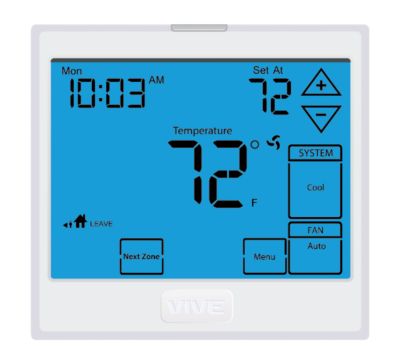
Wall Locations
The thermostat should be installed approximately 4 to 5 feet above the floor. Select an area with average temperature and good air circulation
Do not install thermostat in locations:
- Close to hot or cold air ducts
- That are in direct sunlight
- With an outside wall behind the thermostat
- In areas that do not require conditioning
- Where there are dead spots or drafts (in corners or behind doors)
- Where there might be concealed chimneys or pipes
Thermostat Application Guide
| Description | |
| Gas or Oil Heat | Yes |
| Electric Furnace | Yes |
| Heat Pump (No Aux. or Emergency Heat) | Yes |
| Heat Pump (With Aux. or Emergency Heat) | Yes |
| Multi-Stage Systems | Yes |
| Heat Only Systems | Yes |
| Cool Only Systems | Yes |
| Millivolt | Yes |
Power Type
- Battery Power
- Hardwire (Common Wire)
- Hardwire (Common Wire) with
- Battery Backup
Subbase Installation
- Horizontal Mount
- Vertical Mount

Mount Thermostat
Align the 4 tabs on the subbase with corresponding slots on the back of the thermostat, then push gently until the thermostat snaps in place
Battery Installation
Battery installation is recommended even if the thermostat is hardwired (C terminal connected). When the thermostat is hardwired and batteries are installed, the thermostat will activate a compressor delay of 5 minutes when it detects a power outage from the hardwired power supply.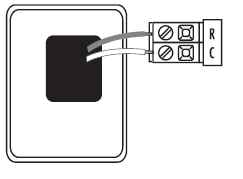
About The Badge
All of our thermostats use the same universal magnetic badge. Visit the company website to learn more about our free private label program
Getting to know your thermostat
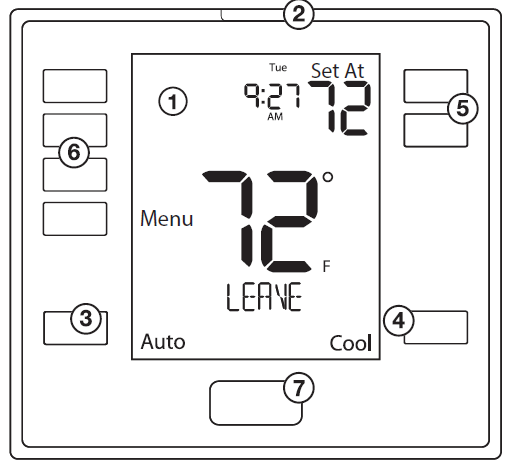
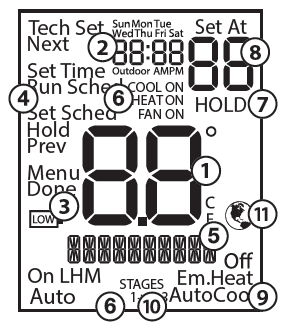
- LCD Display
- Glow in the dark light button
- Fan Button
- System Button
- Temperature Setpoint Buttons
- User Buttons
- Private Label Badge
- Indicates the current room temperature
- Time and day of the week
- Low Battery Indicator: Replace batteries when this indicator is shown.
- Menu Options: Shows different options.
- Program Time Periods: This thermostat has 4 programmable time periods per day.
- System Operation Indicators: The COOL ON , HEAT ON or icon will display when the COOL, HEAT, or (fan) is on. The compressor delay feature is active if these are flashing.
- Hold is displayed when the thermostat program is permanently overridden.
- Setpoint: Displays the selected setpoint temperature.
- System: Indicates current mode of operation.
- Stages: +1 will appear in the display when second stage of heat or cool is on. +2 will appear for third stage of heat.
- Globe: Globe is displayed if an energy efficient temperature has been selected.
Wiring
- If you are replacing a thermostat, make note of the terminal connections on the thermostat that is being replaced.
- In some cases the wiring connections will not be color coded. For example, the green wire may not be connected to the G terminal.
- Loosen the terminal block screws.
- Insert wires then retighten the terminal block screws.
- Place nonflammable insulation into the wall opening to prevent drafts.
| Terminal | 2 Heat 2 Cool Conventional System | 2 Heat 2 Cool Heat Pump System | 3 Heat 2 Cool Heat Pump System |
| RC | Transformer power (cooling) | Transformer power (cooling) | Transformer power (cooling) |
| RH | Transformer power (heating) | Transformer power (heating) | Transformer power (heating) |
| C | Transformer common | Transformer common | Transformer common |
| B | Energized in heating | Heat pump changeover valve energized in heating | Heat pump changeover valve energized in heating |
| O | Energized in cooling | Heat pump changeover valve energized in cooling | Heat pump changeover valve energized in cooling |
| G | Fan relay | Fan relay | Fan relay |
| W/E | First stage of heat | First stage of emergency heat | First stage of emergency heat |
| W2 | Second stage of heat | Auxiliary heat relay, second stage of heat | Auxiliary heat relay, third stage of heat |
| Y | First stage of cool | First stage of heat & cool | First stage of heat & cool |
| Y2 | Second stage of cool | Second stage of cool | Second stage of cool & second stage of heat |
| S1/S2 | Remote Sensor | Remote Sensor | Remote Sensor |
Wiring Diagrams
Wiring Tips
C Terminal
The C (common wire) terminal does not have to be connected when the thermostat is powered by batteries.
Wire Specifications
Use shielded or non-shielded 18-22 gauge thermostat wire.
Installation Tip: Do not overtighten terminal block screws, as this can damage the terminal block. A damaged terminal block can keep the thermostat from fitting on the subbase correctly or cause system operation issues. Max Torque = 6in-lbs.
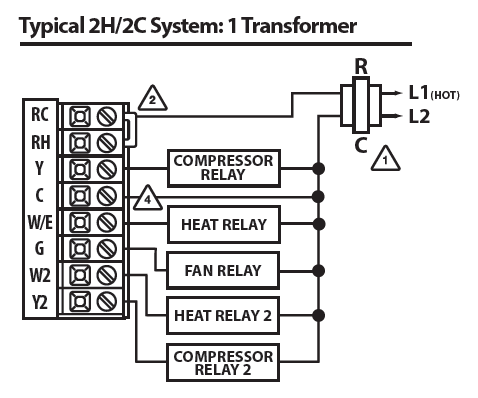
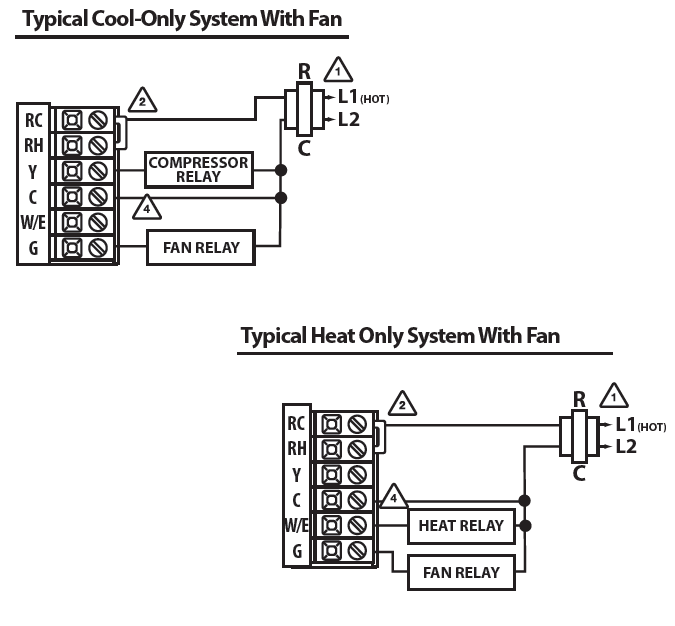
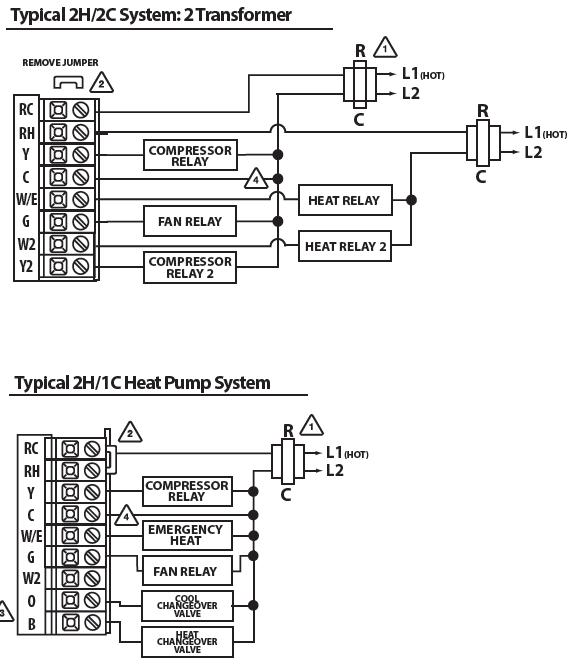
- Power supply
- Factory-installed jumper. Remove only when installing on 2 transformer systems.
- Use either O or B terminals for the changeover valve.
- Optional 24 VAC common connection when the thermostat is used in battery power mode.
Features
Temporary and Permanent Hold Feature
- When cool or heat is turned on, the thermostat will display HOLD and RUN SCHED on the left of your screen when you press the
 button.
 - Temporary Hold: At this time if you do nothing, the temperature will remain at this setpoint temporarily for 4 hours.
- Permanent Hold: If you press the HOLD key on the left of your screen, you will see HOLD appear below the setpoint temperature in the display. The thermostat will now permanently stay at this setpoint and can be adjusted using the keys.
- To Return to Running Schedule: Press the RUN SCHED button on the left of your screen to exit either temporary or permanent hold.
Filter Change Reminder
- If your installing contractor has configured the thermostat to remind you when the air filter needs to be changed, you will see FILT in the display when your air filter needs to be changed.
Resetting the filter change reminder When FILT reminder is displayed, you should change your air filter and reset the reminder by holding down the second button from the top left side of the thermostat for 3 seconds.
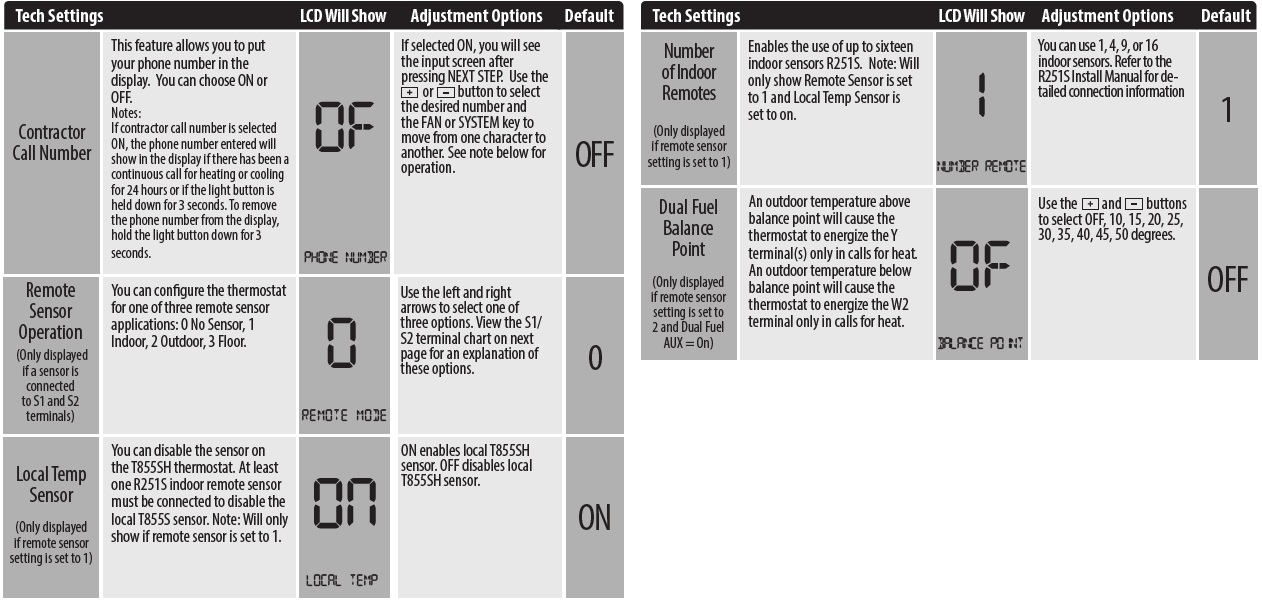
Tech Settings
Technician Setup Menu
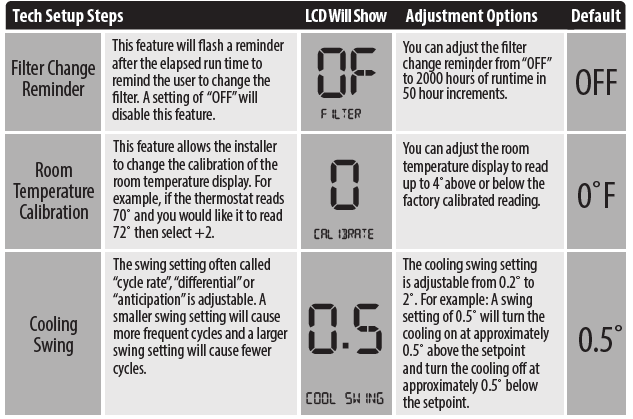
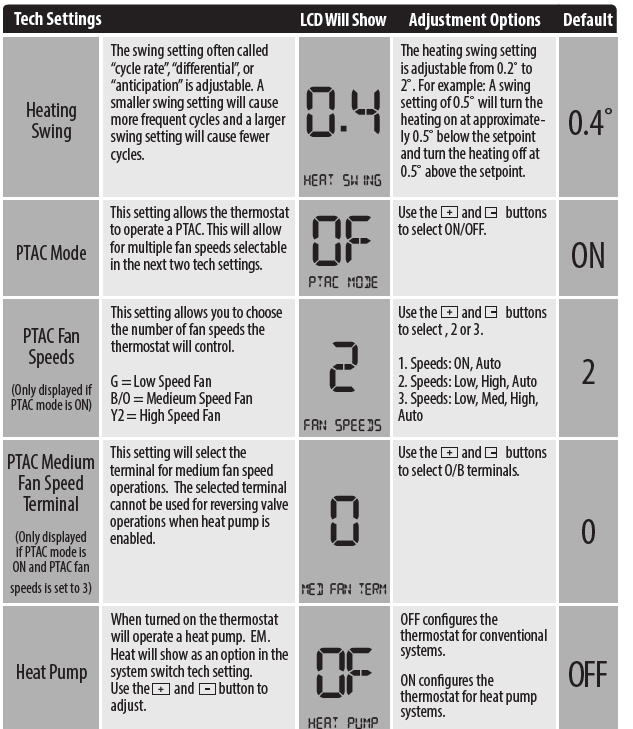
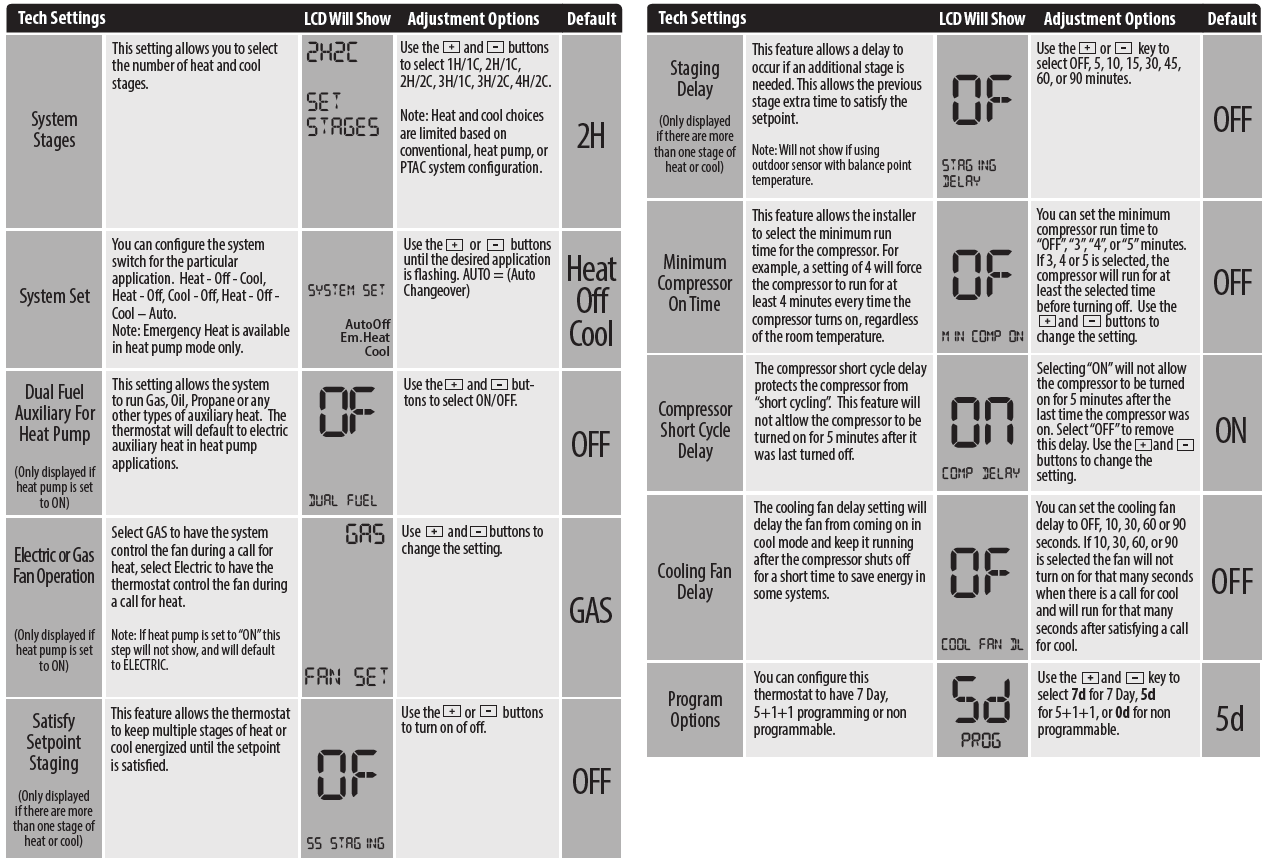
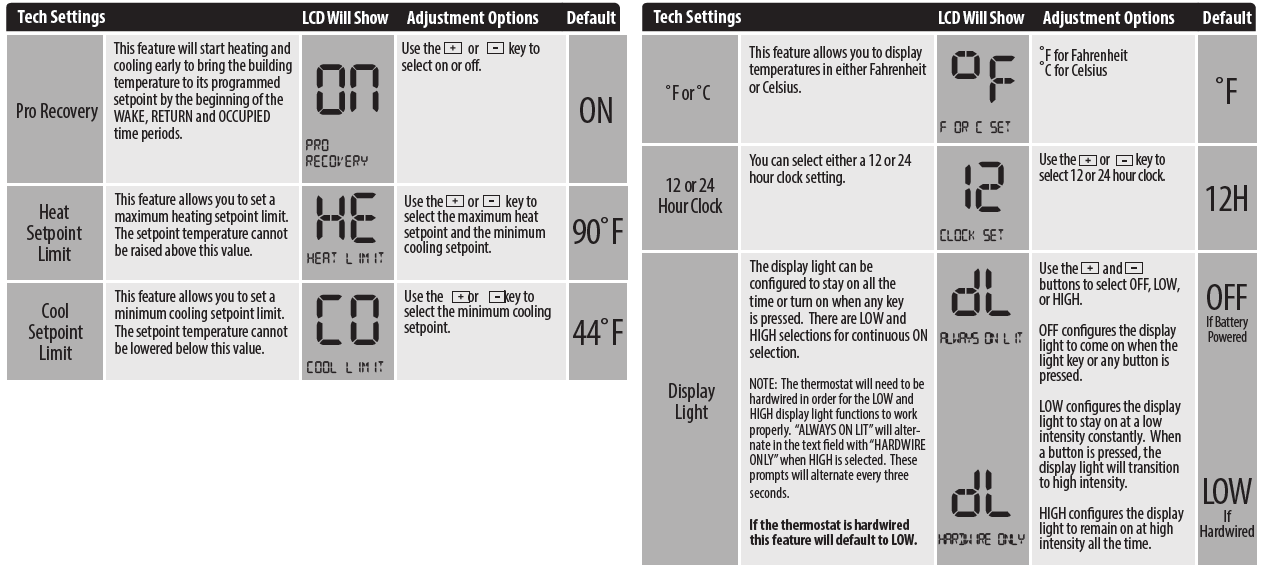
This thermostat has a technician setup menu for easy installer configuration. To set up the thermostat for your particular application:
- Press the MENU button.
- Press and hold the TECH SET button for 3 seconds. This 3 second delay is designed so that homeowners do not accidentally access the installer settings.
- Configure the installer options as desired using the table below. Use the keys to change settings and the NEXT or PREV key to move from one step to another.
- Note: Only press the DONE key when you want to exit the Technician Setup options.
- press the DONE key to exit.

Swing Setting Tip
Temperature swing, sometimes called differential or cycle rate, can be customized for this individual application. For most applications choose a swing setting that is as long as possible without making the occupants uncomfortable.
Programming
Set Time
- with system switch set to OFF, press the MENU button
- Press SET TIME
- Day of the week will be flashing. Use the or key to select the current day of the week.
- Press NEXT STEP
- The current hour is flashing. Use the or key to select the current hour. When using 12-hour time, make sure the correct a.m. or p.m. choice is selected.
- Press NEXT STEP
- Minutes are now flashing. Use the or key to select current minutes.
- Press DONE when completed
All of our programmable thermostats are shipped with an energy-saving pre-program. You can customize this default program by following the steps on the next page. There are four time periods for each program (WAKE, LEAVE, RETURN, SLEEP).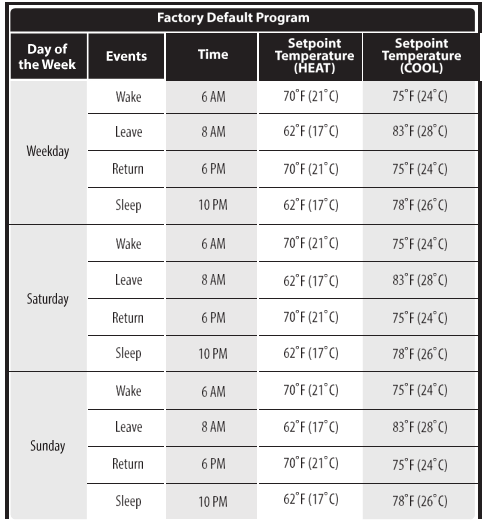
Set Program Schedule 5+1+1 or 7 Day
- Select HEAT or COOL with the system switch. Note: You have to program heat and cool each separately.
- press the MENU button (If menu does not appear first press RUN SCHED)
- press SET SCHED. Note: Monday-Friday or (Monday if in 7 Day) is displayed and the WAKE icon is shown. You are now programming the waketime period for that day.
- Time is flashing. Use the or key to make your time selection for that day’s WAKE time period. Note: If you want the fan to run continuously during this time period, select ON with the FAN key
- Press NEXT STEP
- The setpoint temperature is flashing. Use the or key to make your setpoint selection for that day’s WAKE time period.
- Press NEXT STEP
- Repeat steps 4 thru 7 for that day’s LEAVE time period,
- RETURN time period, and SLEEP time period.
You can use the table below to plan your customized program schedule
Specifications
- The display range of temperature … 41˚F to 95˚F (5˚C to 35˚C)
- The control range of temperature… 44˚F to 90˚F (7˚C to 32˚C)
- Load Rating……………………………………….. 1 amp per terminal, 1.5 amp maximum for all terminals combined
- Swing (cycle rate or differential) …… The heating is adjustable from 0.2˚ to 2.0˚
- Cooling is adjustable from 0.2˚ to 2.0˚
- Power source …………………………………….18 to 30 VAC, NEC Class II, 50/60 Hz for hardwire
- Battery power from 2 AA Alkaline batteries
- Operating ambient …………………………. 32˚F to +105˚F (0˚C to +41˚C)
- Operating humidity ………………………… 90% non-condensing maximum
- Dimensions of thermostat …………….. 4.7” W x 4.3” H x 0.9” D
Reference
Download Manual:
Vive Comfort TP-S-7555 Non-Programmable Thermostat Installation Manual
OTHER MANUALS
Vive Comfort TP-S-7555 Non-Programmable Thermostat Operational Manual

Vive Comfort TP-S-7555 Non-Programmable Thermostat Installation Manual