Verdant VX-TW Wireless Thermostat
Introduction
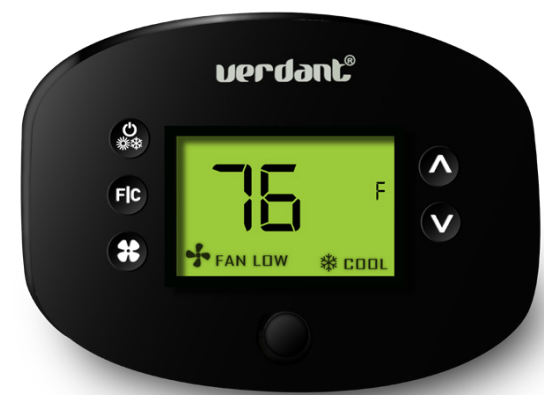
Verdant VX Series Energy Management Thermostats for the hospitality industry deliver unprecedented energy savings without compromising guest comfort.
An integrated occupancy sensor uses a combination of motion and thermal sensing technologies for accurate occupancy detection. Reliable occupancy detection allows for energy savings when rooms are unoccupied.
Energy-saving presets eliminate the guesswork and make it easy to adjust the energy-saving settings. (Patent Pending)
Fully configurable energy-saving settings allow for customization of the thermostat energy-saving settings to fit any situation.
Large buttons with international symbols make it easy to adjust the temperature at ±1° °F or °C and control the fan speed.
Comprehensive configuration options ensure full compatibility with virtually any existing or emerging hospitality HVAC system with up to 2 heat and 1 cool stage.
Built-in wireless mesh networking enables optional remote management.
NOTICE
FOR INSTALLATION OF NETWORKING THERMOSTATS WITH REMOTE MANAGEMENT, REFER TO THE “VX-TW NETWORK INSTALLATION” MANUAL.
LOGIN TO THE REMOTE MANAGEMENT WEBSITE TO CONFIRM THE SERVER IS CONNECTED TO THE INTERNET BEFORE INSTALLING THERMOSTATS.
DO NOT INSTALL THERMOSTATS IF THE SERVER IS NOT CONNECTED TO THE INTERNET. STOP THE INSTALLATION AND CONTACT VERDANT TECHNICAL SUPPORT.
START BY FIRST INSTALLING A THERMOSTAT IN THE ROOM CLOSEST TO THE SERVER. LOG IN TO VERDANT’S REMOTE MANAGEMENT WEBSITE TO CONFIRM THAT THE THERMOSTAT IS ON THE REMOTE MANAGEMENT WEBSITE WITH THE CORRECT ROOM NUMBER. CONTINUE BY INSTALLING ADDITIONAL THERMOSTATS IN ADJACENT ROOMS ONLY AFTER CONFIRMING THAT THE INSTALLED THERMOSTAT(S) HAVE CONNECTED TO THE WIRELESS NETWORK AND THE REMOTE MANAGEMENT WEBSITE.
IF INSTALLED THERMOSTAT(S) ARE NOT CONNECTING TO THE NETWORK AND DO NOT APPEAR ON THE VERDANT’S REMOTE MANAGEMENT WEBSITE WITH THE CORRECT ROOM NUMBER, STOP THE INSTALLATION AND CONTACT VERDANT TECHNICAL SUPPORT THE ROOMS FURTHEST AWAY FROM THE SERVER SHOULD BE INSTALLED LAST.
Before You Begin
- Determine the appropriate installation location for the thermostat.
THE THERMOSTAT SHOULD FACE THE BED AREA OF THE ROOM.
THE THERMOSTAT AND CONTROL CARD MUST NOT BE INSTALLED NEAR OR ON METAL STRUCTURES OR SURFACES INCLUDING METAL AIR DUCTING THAT MAY BE IN THE WALL.
WIRELESS CONTROLS CARDS MUST BE MOUNTED AWAY FROM METAL AND METAL ENCLOSURES. VTAC INSTALLATIONS SHOULD MOUNT THE CONTROL CARD ABOVE THE UNIT’S METAL ENCLOSURE.
METAL STRUCTURES AND SURFACES SIGNIFICANTLY REDUCE THE RANGE OF THE WIRELESS SIGNAL. - Set the HVAC unit to “External Thermostat” (Class 2) mode. Consult the HVAC unit documentation to determine how to set the HVAC unit to “External Thermostat” mode.
- Consult the HVAC manufacturer’s documentation or use a voltmeter to determine if the HVAC unit outputs AC or DC power (24V).
If the HVAC unit outputs AC power, make sure that the jumper on the Wireless Control Card is in the AC position – the jumper is connecting the “R” and “COM” pins (Default).
If the HVAC unit outputs DC power, make sure that the jumper on the Wireless Control Card is in the DC position – the jumper is connecting the “COM” and “C” pins.
Before You Begin
Pairing the Thermostat and the Control Card
The Thermostat and Control Card must be paired in order to operate together. Once paired, the thermostat cannot be used with another wireless control card without repeating the pairing procedure.
In the case of Network Installation with Remote Management, the thermostat and the Control Card must be paired with a Network Programmer specific to the property before the installation.
The Thermostat and Control Card must not be powered during the pairing procedure – remove batteries from the thermostat and unplug the control card from the HVAC unit during the pairing procedure.
- Plug one programmer connector into the thermostat;
- Plug the other programmer connector into the control card;
- Push the black button on the programmer. The red light on the programmer should turn on and remain steadily lit;
If the red light on the programmer is blinking or is not steadily lit, unplug the programmer from the thermostat and the control card and repeat the steps above. - Unplug the programmer from the thermostat and the control card;
Thermostat Installation
Wiring Table – 24V AC
| Wire Color | Terminal Letter | Terminal Connection |
| Black | C | Common |
| Red | R | 24V |
| Yellow | Y | Compressor |
| White | W | Heat |
| Orange | O or B | Reverse Valve |
| Green | GH | Fan High |
| Purple | GL | Fan Low |
Wiring Table – 24V DC
| Wire Color | Terminal Letter | Terminal Connection |
| Black | R | 24V |
| Red | C | Common |
| Yellow | Y | Compressor |
| White | W | Heat |
| Orange | O or B | Reverse Valve |
| Green | GH | Fan High |
| Purple | GL | Fan Low |
NOTE: If the PTAC unit has only one (1) fan speed, connect both fan control wires – Green and Purple – to the fan terminal (G).
Installing the Wireless Control Card
- Power Off the HVAC unit;
- Connect the control card to the thermostat terminals on the HVAC unit – refer to the Wiring Table to determine proper connections.
- Mount the control card inside the HVAC unit.
THE WIRELESS CONTROL CARD ANTENNA MUST NOT BE TOUCHING ANY METAL COMPONENTS OF THE HVAC UNIT.
THE WIRELESS CONTROL CARD ANTENNA MUST FACE THE THERMOSTAT ON THE WALL AND BE ORIENTED SO THAT ANY METAL PARTS OF THE HVAC UNIT DO NOT OBSTRUCT THE WIRELESS COMMUNICATION TO THE THERMOSTAT AND, IN CASE OF A NETWORK INSTALLATION, TO OTHER WIRELESS CONTROL CARDS AND THE SERVER. THE WIRELESS CONTROL CARD MUST NOT BE PLACED IN THE HVAC UNIT CONDENSATION PAN AND MUST BE MOUNTED SO IT CANNOT FALL INTO THE HVAC UNIT CONDENSATION PAN. - Power On the HVAC unit.
Mounting the thermostat to the wall
- Remove the thermostat cover;
- Use the supplied wall anchors and mounting screws to secure the thermostat to the wall;
- Insert two (2) AA-cell batteries (not supplied) into the thermostat battery compartment;
- Follow the “Thermostat Configuration” instructions;
- Replace the thermostat cover and screw in the locking screw;
Thermostat Configuration
Once the thermostat is powered, thermostat configuration settings will appear on the thermostat screen.
In order to properly operate the HVAC unit:
- Set the thermostat clock;
- Enter the room number;
- Configure the equipment settings;
- Select Energy Savings Preset;
The thermostat configuration screens have a 30-second time-out. If no action is taken within three (30) seconds, the thermostat will exit configuration settings.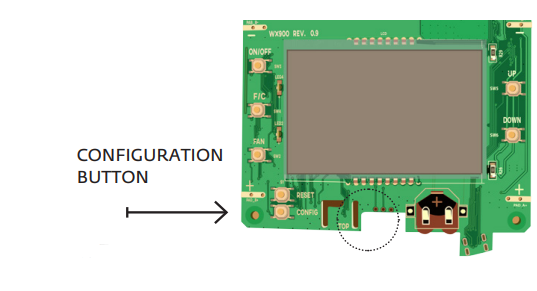
NOTE: If the thermostat is connected to a network, the equipment and the energy-saving settings configured on the thermostat will be ignored and the settings configured on the Remote Management Website will be applied.
Setting the thermostat clock
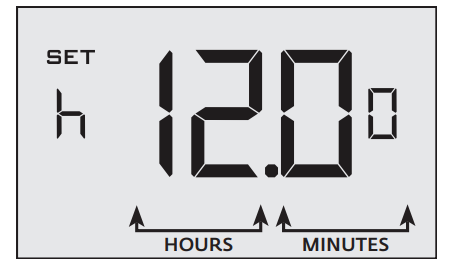
Set the thermostat clock to the current time in 24h (Military Time) format.
- Use the “Up” and “Down” buttons to set the hours;
- Press the “Fan” button to advance to the minutes setting;
- Use the “Up” an “Down” buttons to set the minutes;
- Press the “F/C” button to advance to the next menu;
Setting the clock correctly is crucial for the proper operation of the thermostat.
Entering the room number
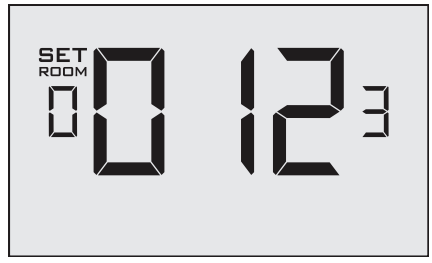
Enter the room number by changing the digits on the screen. Leading zeros “0” preceding other digits will be ignored, i.e. Room number “123” should be entered as “00123”.
- Use the “Up” and “Down” buttons to change the digit;
- Press the “Fan” button to advance to the next digit;
- Press the “F/C” button to advance to the next menu;
Entering the room number correctly is crucial for the proper operation of remotely managed thermostats.
Configuring the Equipment Settings – Compressor Type
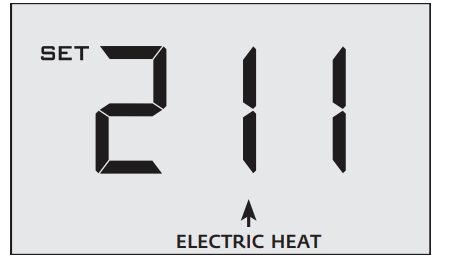
Use the “Up” and “Down” buttons to change the compressor type by changing the first digit;
- 0 No Compressor
- 1 Heat Pump
- 2* Air Conditioner
Press the “Fan” button to advance to the next setting;
Indicates default setting;
Configuring the Equipment Settings – Reversing Valve
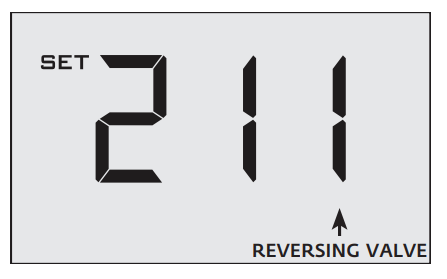
- Use the “Up” and “Down” buttons to change the Reversing Valve setting by changing the third digit;
- 0 OB contact is energized to cool;
- 1 * OB contact is energized to heat;
Refer to the HVAC unit documentation to determine the correct OB VALVE setting.
- If the incorrect OB VALVE Setting is selected, the HVAC unit will turn on the heating when air conditioning is requested and turn on the air conditioning when heating is requested;
- Press the “Fan” button to advance to the next setting;
- Press the “F/C” button to advance to the next menu;
* Indicates default setting;
Configuring the Energy Saving Settings
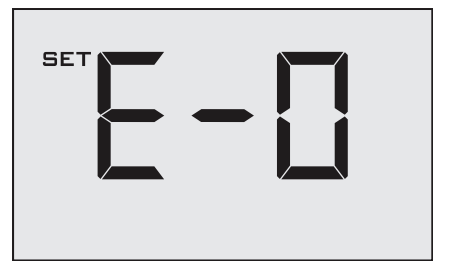
Use the “Up” and “Down” buttons to select the Energy Saving preset:
- E-0* Energy Savings Off – No Temperature Setback;
- E-1 Lowest Energy Savings;
- E-2 Lower Energy Savings;
- E-3 Standard Energy Savings;
- E-4 Higher Energy Savings;
- E-5 Highest Energy Savings;
Refer to APPENDIX 1 for Energy Saving Preset details. - E-C Indicates “Custom Energy Savings Settings” in case the active thermostat savings settings differ from any Energy Saving preset;
For details, refer to the “Custom Energy Savings Settings” section;
Press the “Power” button to save the Thermostat Configuration and start using the thermostat;
* Indicates default setting;
Testing the thermostat
Following the thermostat configuration, test if the thermostat is controlling the HVAC unit.
- Press the “Power” button to turn the thermostat ON;
- Press the “Down” button to change the temperature set point below the current room temperature to confirm that the thermostat initiates air conditioning.
- Press the “Up” button to change the temperature set point above the current room temperature to confirm that the thermostat initiates heating.
- Change the fan speed by touching the “Fan” button to test if the thermostat is controlling the fan speed.
Thermostat Maintenance
Replacing Thermostat Batteries
The low battery indicator will be displayed on the thermostat screen when it is necessary to replace batteries in the thermostat.
Under normal operating conditions, new brand-name alkaline batteries will last for a period of approximately one (1) year.
Please replace batteries every twelve (12) months to ensure continuous thermostat operation.
To replace thermostat batteries:
- Unscrew the fixing screw and remove the thermostat cover;
- Replace the two (2) AA-cell batteries (not supplied);
- Replace the thermostat cover and screw in the fixing screw;
- Follow the “Thermostat Configuration” instructions to set the thermostat clock;
- Press the “Power” button to start using the thermostat;
NOTE: The thermostat maintains all the “Thermostat Configuration” settings in non-volatile memory. There is no need to configure the thermostat again after battery replacement.
Troubleshooting
Error Codes
- ERR 1 Thermostat Temperature Sensor Hardware Defect
- ERR 2 Thermostat Radio Hardware Defect
- ERR 3 Thermostat Radio Software Defect
- ERR 4 No link with the Wireless Control Card
- ERR 5 Thermostat Memory Defect
The Thermostat is not controlling the HVAC unit.
Check if the HVAC unit is set to “External Thermostat” (Class 2) mode.
Verify the status of the red light on the Wireless Control Card;
- The red light is off
The Wireless Control Card is not powered. Verify that the Wireless Control Card is properly wired to the HVAC unit – specifically, make sure that the RED and the BLACK wires are properly connected; - If the red light is blinking with one (1) flash
The Wireless Control Card is powered but it is not communicating with the thermostat, turn the thermostat off and on to re-initiate the linking procedure.
In case of a Network Installation, re-link the thermostat and the Wireless Control Card with the Network Programmer. - The red light is blinking with three (3) flashes.
The Wireless Control Card is communicating with the thermostat. Verify that the Wireless Control Card is properly wired to the HVAC unit and that equipment settings on a thermostat – compressor type, electric heat, and reversing valve – are properly configured.
APPENDIX 1 – Energy Saving Presets
| SCREEN NUMBER | Level 0 |
Level 1 |
Level 2 |
Level 3 |
Level 4 |
Level 5 |
|
| 1 | Fan Control Mode | AUTO | AUTO | AUTO | AUTO | AUTO | AUTO |
| 2 | 1st Stage Differential Heat | 0.5 | 0.5 | 0.5 | 0.5 | 0.5 | 0.5 |
| 3 | 2nd Stage Differential Heat | 1 | 1 | 1 | 2 | 2 | 2 |
| 4 | 1st Stage Differential Cool | 0.5 | 0.5 | 0.5 | 0.5 | 0.5 | 0.5 |
| 5 | Guest Occupancy Threshold | 0 | 5 | 5 | 5 | 5 | 5 |
| 6 | Night Occupancy Threshold | 1 | 1 | 1 | 1 | 1 | 1 |
| 7 | Force 2nd Stage Heating After | 30 | 30 | 30 | 30 | 30 | 30 |
| 8 | Night Occupancy Start | 18 | 19 | 20 | 21 | 22 | 23 |
| 9 | Night Occupancy End | 12 | 11 | 10 | 9 | 8 | 7 |
| 10 | Recovery Time | 0 | 15 | 20 | 25 | 30 | 0 |
| 11 | Recovery Temperature Heat | 70 | 69 | 68 | 67 | 66 | 65 |
| 12 | Setback Delay – Heat | 0 | 30 | 25 | 20 | 15 | 10 |
| 13 | Minimum Setback Temperature | 67 | 66 | 65 | 64 | 63 | 62 |
| 14 | Setback Delay – Cool | 0 | 30 | 25 | 20 | 15 | 10 |
| 15 | Maximum Setback Tempera- | 72 | 74 | 76 | 78 | 80 | 82 |
| 16 | Recovery Temperature Cool | 71 | 72 | 73 | 74 | 75 | 76 |
| 17 | Minimum Setpoint | 64 | 64 | 65 | 66 | 67 | 68 |
| 18 | Maximum Setpoint | 82 | 82 | 80 | 78 | 76 | 74 |
| 19 | Temperature Control Mode | AUTO | AUTO | AUTO | AUTO | AUTO | AUTO |
| 20 | Auto Changeover Set Point | 1 | 1 | 1 | 1 | 1 | 1 |
| 21 | Auto Restore | OFF | ON | ON | ON | ON | ON |
| 21 | Setback Set Points | OFF | ON | ON | ON | ON | ON |
| 22 | Automatic Humidity Control | ON | ON | ON | ON | ON | ON |
| 23 | Temperature Calibration | 0 | 0 | 0 | 0 | 0 | 0 |
APPENDIX 2 – Glossary
- Automatic Fan Control Mode” – fan runs only when there is a demand for heating or cooling;
- “Manual Fan Control Mode” – guest can select between automatic or continuous fan operation;
- “Minimum Setpoint” – the minimum temperature that a guest can request;
- “Maximum Setpoint” – the maximum temperature that a guest can request;
- “Auto Changeover Set Point Offset” – the difference between the guest-selected set point and the heat and cool changeover temperatures;
- “1st Stage Differential – Heat” – the temperature that the thermostat has to sense between the automatic changeover temperature for heat and the room temperature before a call for the 1st stage heating is initiated;
- “2nd Stage Differential – Heat” – difference between 1st stage heating temperature and room temperature before the 2nd stage heating is initiated;
- “1st Stage Differential – Cool” – the temperature that the thermostat has to sense between the automatic changeover temperature for cool and the room temperature before a call for the 1st stage cooling is initiated;
- “Forced 2nd Stage Heating” – number of minutes 1st stage heating will run before 2nd stage heating is automatically initiated if the guest set point is not reached and the 2nd stage of heating is not initiated through differential settings
- “Temperature Recovery Time” – the maximum period of time allowed for restoring the
- “Recovery Temperature”;
- “Recovery Temperature” – the room temperature that needs to be restored within the “Temperature Recovery Time”;
- “Maximum Setback Temperature” – the highest room temperature allowed when the thermostat is in setback mode;
- “Minimum Setback Temperature” – the lowest room temperature allowed when the thermostat is in the setback mode;
- “Temperature Setback Delay” – the length of time for which the room that is in the guest occupancy mode needs to be unoccupied before the temperature setback is initiated;
- “Incidental Occupancy Threshold” – the minimum period of time (in minutes) for which occupancy needs to be detected in order to enter the “Guest Occupancy” mode;
- “Night Occupancy Threshold” – the minimum period of time during the “Night Occupancy” period for which occupancy needs to be detected in order to enter the “Night Occupancy” mode;
- “Night Occupancy Period” – The period of time during the day during which the “Night Occupancy” mode can be activated if occupancy longer than the “Night Occupancy Threshold” is detected;
- “Auto Restore On” – thermostat will restore the most recent guest settings when new occupancy is detected;
- “Auto Restore Off” – thermostat will NOT restore the most recent guest and will remain turned off settings when new occupancy is detected;
- “Setback Set points On” – thermostat will maintain setback temperatures when the room is unoccupied;
- “Setback Set points Off” – thermostat will NOT maintain setback temperatures when the room is unoccupied;
- “Incidental Occupancy” – occupancy shorter than the “Incidental Occupancy Threshold”; “Guest Occupancy” – occupancy longer than the “Incidental Occupancy Threshold”;
- “Temperature Setback” – thermostat maintains setback temperatures and not the guest set point temperature in order to save energy;
- “Night Occupancy Mode” – thermostat status during which setback mode is disabled if occupancy longer than “Night Occupancy Threshold” is detected within the “Nigh Occupancy” period;
- “Automatic Temperature Changeover” – thermostat automatically activates heating or cooling to maintain the desired room temperature;
- “External Thermostat” (Class 2) mode – PTAC unit setting allowing it to be controlled by a remote thermostat;
Warranty Information
Hardware
Verdant Environmental Technologies Inc. (“Verdant”) warrants the original end user (“Customer”) that new Verdant branded products will be free from defects in workmanship and materials, under normal use, for one (1) year from the original purchase date.
Software
Verdant warrants to Customer that the Verdant thermostat software will perform in substantial conformance to its program specifications for a period of one (1) year from the date of the original purchase.
Exclusions
This warranty excludes (1) physical damage to the surface of the product, including cracks, scratches or marks on the screen or outside casing; (2) damage caused by misuse, neglect, improper installation, unauthorized attempts to open, repair, or modify the product, or any other cause beyond the range of intended use; (3) damage caused by accident, fire, power changes, another hazard, or Acts of God; (4) damage caused by water, liquids, or foreign chemicals including condensation and humidity; or (5) use of the product with any device if such device causes the problem.
Exclusive Remedies
Should a covered defect occur during the warranty period and Customer notifies Verdant, Customer’s sole and exclusive remedy will be, at Verdant’s sole option and expense, to repair or replace the product. Replacement products or parts may be new or reconditioned or a comparable version of the defective item. Verdant warrants any replaced product or part for a period of ninety (90) days from shipment, or through the end of the original warranty, whichever is longer.
Obtaining Warranty Service
To obtain Warranty Service customer must follow Verdant’s “Warranty Service Procedure” and request a Return Merchandise Authorization (RMA) number by filling out the RMA Request Form on Verdant’s website.
Warranty Exclusive
THE FORGOING WARRANTIES AND REMEDIES ARE EXCLUSIVE AND IN LIEU OF ALL OTHER WARRANTIES, EXPRESS OR IMPLIED, INCLUDING WARRANTIES OF MERCHANTABILITY, FITNESS FOR A PARTICULAR PURPOSE, CORRESPONDENCE WITH DESCRIPTION, AND NONINFRINGEMENT, ALL OF WHICH ARE EXPRESSLY DISCLAIMED BY VERDANT AND ITS SUPPLIERS.
Disclaimer
NEITHER VERDANT NOR ITS SUPPLIERS SHALL BE LIABLE FOR INCIDENTAL, CONSEQUENTIAL, INDIRECT, SPECIAL, OR PUNITIVE DAMAGES OF ANY KIND, OR FINANCIAL LOSS ARISING OUT OF OR IN CONNECTION WITH THE SALE OR USE OF THIS PRODUCT, WHETHER BASED IN CONTRACT, TORT (INCLUDING NEGLIGENCE) OR ANY OTHER THEORY, EVEN IF VERDANT HAS BEEN ADVISED OF THE POSSIBILITY OF SUCH DAMAGES. VERDANT’S ENTIRE LIABILITY SHALL BE LIMITED TO THE REPLACEMENT OR REPAIR OF THE PRODUCT.
This device complies with Industry Canada license-exempt RSS standard(s). Operation is subject to the following two conditions:
- this device may not cause interference, and
- this device must accept any interference, including interference that may cause undesired operation of the device.
Technical Specifications
| Thermostat | Wireless Control Card | |
| Case Dimensions (Imperial) | 4.015 x 5.5118” x 0.925” | 3.875” x 2.125” x 0.75” |
| Case Dimensions (Metric) | 102mm x 140mm x 23.5mm | 98mm x 54mm x 19mm |
| Screen Dimensions (Imperial) | 3.625″ x 2.125″ | N/A |
| Screen Dimensions (Metric) | 92mm x 54mm | N/A |
| Operating Voltage | 3V DC – 2 “C” Cell Batteries | 24V AC/DC |
| Control Outputs | Fan High (GH) | |
| Fan Low (GL) | ||
| Compressor (Y) | ||
| Heat Pump (OB) | ||
| Electric Heat (W) | ||
| Occupancy Sensor Beam Width | ±47° (94°) | N/A |
| Wireless Frequency | 900MHz | 900MHz |
| Temperature Accuracy | ±1°F | N/A |
| FCC ID | XEYWX | XEYV8ACCC |
| IC | 8410A-WX | 8410A-V8ACCC |
THIS DEVICE COMPLIES WITH PART 15 OF THE FCC RULES. OPERATION IS SUBJECT TO THE FOLLOWING TWO CONDITIONS:
- THIS DEVICE MAY NOT CAUSE HARMFUL INTERFERENCE, AND
- THIS DEVICE MUST ACCEPT ANY INTERFERENCE RECEIVED, INCLUDING INTERFERENCE THAT MAY CAUSE UNDESIRED OPERATION.
PURSUANT TO PART 15.21 OF THE FCC RULES, ANY CHANGES OR MODIFICATIONS TO THIS EQUIPMENT NOT EXPRESSLY APPROVED BY VERDANT ENVIRONMENTAL TECHNOLOGIES, INC. MAY VOID THE USER’S AUTHORITY TO OPERATE THE EQUIPMENT.
COVERED BY ONE OR MORE OF THE FOLLOWING PATENTS. US PATENTS: 8,369,994; 8,141,791; 7,918,406; 7,232,075; 7,185,825; 7,156,318; 7,152,806; 7,145,110; 7,050,026; 7,028,912; 6,902,117; 6,789,739; 6,786,421; 6,619,555; 6,581,846; 6,578,770; 7,838,803; 7,841,542; D556,061; D518,744; RE40,437; CANADIAN PATENTS: 2,633,113; 2,633,200; OTHER PATENTS PENDING.
Verdant Environmental Technologies, Inc. reserves the right to make changes, without notice, in design or components. Product appearance may vary. © Verdant Environmental Technologies, Inc. 2017. Printed in Canada. V1 June 26, 2017
REFERENCE
Download Manual
Verdant VX-TW Wireless Thermostat Installation Manual
