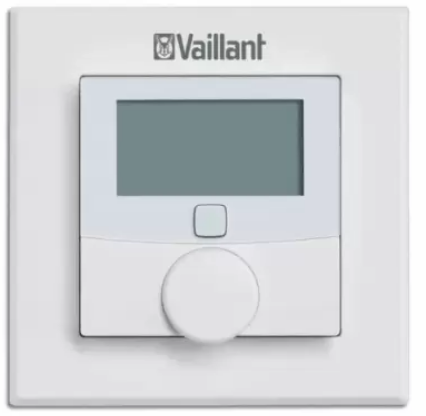
Vaillant VR51 Room Thermostat
Safety
- Action-related warnings
- Classification of action-related warnings
- The action-related warnings are classified in accordance with the severity of the possible danger using the following warning signs and signal words:
- Imminent danger to life or risk of severe personal injury
- Risk of death from electric shock
- Risk of minor personal injury
Intended use
In the event of inappropriate or improper use, damage to the product and other property may arise. You can use the room thermostat for the time-controlled regulation of individual rooms.
Intended use includes the following:
- observance of accompanying operating, installation and servicing instructions for the product and any other system components
- installing and fitting the product in accordance with the product and system approval
- compliance with all inspection and maintenance conditions listed in the instructions.
- Intended use also covers installation in accordance with the IP class.
- Any other use that is not specified in these instructions, or use beyond that specified in this document shall be considered improper use. Any direct commercial or industrial use is also deemed to be improper.
Caution
Improper use of any kind is prohibited.
Danger caused by improper operation
- Improper operation may present a danger to you and others, and cause material damage.
- Carefully read the enclosed instructions and all other applicable documents, par-ticularly the “Safety” section and the warnings.
- Only carry out the activities for which instructions are provided in these oper-ating instructions.
Risk of material damage caused by frost
Do not install the product in rooms prone to frost.
Danger caused by a malfunction
Install the product such that room air can circulate freely around the product, and it is not covered by furniture, cur-tains or other objects.
Risk of material damage caused by unsuitable environmental conditions
The electronics may be damaged if you install the product in an unsuitable envi-ronment.
- Only install the product in dry, dust-free rooms.
- Ensure that the product is not exposed to constant solar or heat irradiation, vibrations or mechanical loads.
Regulations (directives, laws, standards)
Observe the national regulations, standards, guidelines and laws.
Observing other applicable documents
You must observe all the operating and installation instructions included with the system components.
Storing documents
Keep this manual and all other applicable documents safe for future use.
Validity of the instructions
These instructions apply only to:
| Product | article number |
| VR 51 | 0020247923 |
System and product description
The product is part of the ambiSENSE room climate solution and communicates via a radio protocol. All products in the ambiSENSE room climate solution can be configured via the VRC 700 app using a smartphone. You can use the room thermostat with an air-humidity sensor for the time-controlled regulation of the room temperature via the VRC 700 app and adjust the heating times to your individual needs. The product is easily paired to the VR 920 Internet gateway in order to control one or several ambiSENSE VR 50 radiator thermostats. The room thermostat measures the temperature and air humidity in the room, and forwards this to the radiator thermostats in cycles, meaning that the room temperature can be regulated even more precisely. The installation takes place by screwing in or sticking the mounting plate and fastening in the clip-on frame that is supplied. The product can be integrated into existing switch series.
Design of the product
- Mounting plate
- Clip-on frame
- Setting wheel
- System button 5 Display
- Room thermostat

Display
Note
The background lighting for the display is switched off in standby mode. To activate the background lighting, press the setting wheel once.
- Operation lock active
- Unit for the numeric display
- Automatic decrease active
- Radio data transmission
- Low battery charge
- Boost mode active
- Manual mode active
- Target/actual temperature
- Setting mode active

Radio operation
The radio signal is transmitted on a non-exclusive transmission path. Faults can therefore not be ruled out. Interferences may, for example, be caused by switching operations, electric motors or defective electrical units. The range inside buildings may differ considerably from the range outdoors. Except for the transmission power and the reception properties of the transceivers, environmental influences (such as air humidity and structural elements) play an important role on-site.
Flashing sequence of the signal LED
| Flashing sequence | Meaning | Required activity |
| Brief period | Radio trans- | Wait until the |
| of flashing | mission/ | transmission |
| orange | transmission | has ended. |
| attempt or | ||
| configuration | ||
| data is trans- | ||
| ferred | ||
| 1 x long | Process con- | Continue with |
| period of | firmed | the opera- |
| lighting up | tion. | |
| green | ||
| 1 x long | Process failed | Wait for the |
| period of | or duty cycle | duty cycle |
| lighting up | limit reached | limit interval |
| red | and try again. |
| Flashing sequence | Meaning | Required activity |
| Brief period | Pairing mode | Enter the dig- |
| of flashing | active | its of the unit |
| orange (every | number to | |
| 10 seconds) | confirm. | |
| Brief period | Batteries flat | Replace the |
| of lighting up | batteries. | |
| orange (after | ||
| a green or | ||
| red reception | ||
| notification) | ||
| 3 x long | Product | Note the dis- |
| period of | defective | play in your |
| flashing red | App or con- | |
| tact your | ||
| specialist | ||
| dealer. | ||
| Lights up 1 x | Test display | Once the test |
| orange and 1 | display goes | |
| x green (after | out, you can | |
| inserting the | continue. | |
| batteries) |
| Flashing sequence | Meaning | Required activity |
| Long and | Update to the | New software |
| brief period | unit software | is trans- |
| of flashing | (OTAU = Over | ferred. (Dura- |
| orange (alter- | the Air | tion: Up to 12 |
| nating) | Update) | hours) This |
| does not | ||
| affect how | ||
| the product | ||
| works during | ||
| this time. |
Duty cycle limit
The duty cycle limit describes a legally regulated limit on the transmission time of units in the 868 MHz range. The aim of this regulation is to guarantee that all units that work in the 868 MHz range work correctly. In the frequency range 868 MHz that is used by the product, the maximum transmission time for each individual unit is 1% of an hour (i.e. 36 seconds in 1 hour). The product complies with this directive.
normally reached. In individual cases, e.g. during start-up or the new installation of a system, increased and radio-intensive pair-ing processes may mean that this limit is not reached. If the duty cycle limit is exceeded, the signal LED lights up red for one extended period and may indicate that a function is temporarily missing from the product. After a short time (max. one hour), the product’s function is restored.
CE marking
The CE mark shows that the products comply with the basic requirements of the applicable guidelines as stated on the data plate. The manufacturer hereby declares that the type of radio equipment that is described in these instructions complies with Directive 2014/53/EU. The complete text for the EU Declaration of Conformity is available at: http://www.vaillant-group.com/doc/doc-radio-equipment-directive/.
Checking the scope of delivery
Check that the scope of delivery is complete and intact.
| Number | Designation |
| 1 | Room thermostat |
| Number | Designation |
| 1 | Clip-on frame |
| 1 | Mounting plate |
| 2 | 1.5 V LR03/Micro/AAA batteries |
| 2 | 5 mm rawl plug, 3 x 30 mm cross-head screws |
| 2 | Double-sided adhesive strips |
| 1 | Unit number sticker |
| 1 | Operating and installation instructions |
Pairing
To ensure that the room thermostat is integrated into the ambiSENSE system and can communicate with other ambiSENSE units, it must first be paired to the VR 920 Internet gateway. You should therefore first set up the VR 920 Internet gateway via the VRC 700 app in order to be able to use ambiSENSE units in the system. Then pair the product via the VRC 700 app as follows.
- > Open the VRC 700 app on the smartphone.
- > Select Settings on the bottom right.
- > Select ambiSENSE
- > Select Add individual room component.
- > Follow the installation assistant.
- > When the installation assistant in the app requests that you establish the power supply, remove the product from the clip-on frame and mounting plate, and pull the insulating strips out of the battery compartment.
- > When you are prompted to do so by the installation assistant for the app, enter the digits of the unit number (SGTIN = Serialised Global Trade Item Number) in the app to confirm or use the smartphone to scan the QR code.
Note; You can find the unit number and the QR code on the enclosed sticker and in the product’s battery compartment.
- Wait until the pairing process is complete.
- The signal LED lights up green. The pairing process has been successfully completed.
- The signal LED lights up red. The pairing process has failed. Try again.
Set-up
Install the room thermostat:
- – On an interior wall of the living room
- Height: 1.5 m above the floor In a frost-free room
- Do not install the room thermostat:
- Close to heat sources, such as radiators, chimney walls, television sets, direct sunlight
- Above a cooker, from which vapours and grease are released
- On cold walls
- Between furniture, behind curtains or other objects that may prevent the room air from being recorded
- In a room that has a very dusty atmos-phere or in a corrosive environment
- Close to draughts (doors or windows)
Installing the room thermostat
- You can either install the room thermostat in the clip-on frame that is also supplied or you can integrate it into an existing switch series.
- To install it in the clip-on frame, you can use either the supplied double-sided adhesive strips or the supplied screws to secure the room thermostat to the wall.
Installation with double-sided adhesive strips
- To ensure that the adhesive strips can stick for a long time, the installation surface must be smooth, level, undam-aged, clean, free of grease and solvents, and not too cool.
- Secure the adhesive strips (1) to the rear of the mounting plate (2) in the markings provided for that purpose.
- Ensure that you can read the writing on the rear and that the clips for the mounting plate can click into the open-ings on the room thermostat.
- Remove the plastic film from the adhe-sive strips.
- Press the assembled room thermostat onto the wall with the rear at the required position.

Screw mounting

Note
- Ensure that no cables or pipes are routed within the wall.
- Use the mounting plate to mark two of the drill holes located diagonally opposite to each other.
Note
- Ensure that the arrow on the front of the mounting plate is pointing upwards.
- If required, use the holes (2) for the installation on a flush-mounted box.
- Drill the pre-marked holes (5 mm diameter).
- Install the mounting plate to the wall using the rawl plugs and screws supplied.
- Push the room thermostat and clip-on frame (3) onto the mounting plate so that the clips for the mounting plate click into the openings on the rear of the room thermostat.
Installation in multiple combinations
You can also use the room thermostat with clip-on frames from other manufacturers or you can integrate it into a multi-frame. The room thermostat fits into frames from the following manufacturers:
- Berker: S.1, B.1, B.3, B.7 glass
- ELSO: Joy
- GIRA: System 55, Standard 55, E2, E22, Event, Esprit
- merten: 1-M, Atelier-M, M-Smart, M-Arc, M-Star, M-Plan
- JUNG: A 500, AS 500, A plus, A creation
When installing in multiple combinations, ensure that the mounting plate for the room thermostat is attached flush beside the mounting plates/supporting rings that have already been attached and is aligned to these.
Operation
Changing the operating mode
Automatic mode: The heating program that is set via the VRC 700 app is active. Manual mode: You can set the temperature on the product or by using the VRC 700 app. The temperature setting is retained until the next time a manual change is implemented. Press and hold the setting wheel to switch between manual mode and automatic mode.
Setting the temperature
In automatic mode, the desired temperature (Quick Veto) that is manually set on the product remains for three hours. The set time program is then reactivated. You can also use the VRC 700 app in automatic mode to manually set a desired temperature (Quick Veto) that overwrites the current time program for a certain amount of time. The duration for which the manually set temperature should apply can be individually defined here. In manual mode, the temperature is retained until the next time a manual change is implemented.
- Turn the setting wheel clockwise or anti-clockwise to manually increase or decrease the room temperature.
- The display shows the current target temperature and the “SET” display.
Using the Boost function
The Boost function is used to rapidly heat up the radiator(s) in the room for a short period by opening the valve.
- Briefly press the setting wheel.
- The Boost function is automatically terminated after 300 seconds.
Activating/deactivating the operation lock
You can use the relevant room settings in the VRC 700 app to activate and deactivate the product‘s operation lock.
Troubleshooting
- Check whether the radiator thermostats on the radiators in the room in which the product is installed have radio contact with the Internet gateway.
- Check whether the radiator thermostats on the radiators in the room in which the product is installed have radio contact with the VR 920 Internet gateway.
- Check whether room air can circulate freely around the room thermostat, and that the room thermostat is not covered by furniture, curtains or other objects.
- Press the setting wheel briefly once.
- Check whether the “Low battery” symbol is shown in the display.
- Check that the batteries for the room thermostat have been correctly inserted in the battery compartment.
Command not confirmed
If at least one transceiver does not confirm a command, the signal LED lights up red once the incorrect transmission is completed.
The reason for the incorrect transmission may be radio interference caused by one of the following:
- Transceiver cannot be reached
- Transceiver cannot implement the command (load failure, mechanical blockage, etc.)
- Defective transceiver
Resetting to the factory setting
Note
All settings will be lost.
- Remove the batteries.

- Re-insert the batteries in accordance with the polarity markings and, at the same time, press and hold the system button for four seconds until the signal LED starts to rapidly flash in orange.
- Release the system button.
- Press the system button again for four seconds until the signal LED lights up green.
- Release the system button to complete the process of restoring the factory settings.
- The product restarts.
Care and maintenance
Do not use sprays, scouring agents, detergents, solvents or cleaning agents that contain chlorine. Clean the casing with a damp cloth and a little solvent-free soap.
Changing batteries
- Remove the product from the mounting plate.
- Always change all the batteries (1) at the same time.
- Battery type: LR03/Micro/AAA
- Do not use rechargeable batteries.
- Insert the batteries, making sure that the poles are the right way round.
- After inserting the batteries, observe the flashing sequence of the signal LED.
- Self-test successful: Signal LED lights up orange first and then green.
- Push the product in the clip-on frame-back onto the mounting plate.
Risk of death caused by unsuitable batteries
- Ensure that you use the correct battery type when replacing batteries.
- Dispose of used batteries in accordance with the instruc-tions in this manual.
Leaking batteries
- Risk of chemical burns caused by leaking batteries!
- If the product is not used for several weeks, the batteries may leak. The battery fluid may cause chemical burns.
- Remove the batteries if you will be away for an extended period.
- Take suitable measures to protect against chemical burns (e.g. wear protective gloves).
Batteries.
- Note the battery type, as described in these instructions; see section “Data plate”.
- Remove and insert batteries as described in these instructions; see section “Changing the batteries”.
- Do not recharge non-rechargeable batteries.
- Remove rechargeable batteries from the product before charging them.
- Do not combine batteries with other battery types.
- Do not combine new and used batteries.
- Insert the batteries, making sure that the poles are the right way round.
- Remove the dead batteries from the product and dispose of them correctly.
- Remove the batteries if you intend to store the product and not use it for an extended period and/or to scrap it.
- Do not short-circuit the connection contacts in the product’s battery compartment.
Decommissioning
- Delete the product in the VRC 700 app.
- Remove the product from the wall.
- Remove the batteries.
Recycling and disposal
If the product is labeled with this mark:
- In this case, do not dispose of the product with the household waste.
- Instead, hand in the product to a collec-tion center for old electrical or electronic appliances.
- If the product contains batteries that are labeled with this mark, these batteries may contain substances that are hazardous to human health and the envi-ronment.
- In this case, dispose of the batteries at a collection point for batteries.
Customer service
The contact details for our customer service are provided on our website. Operating and installation instructions 0020248975_01
Technical Data
| Parameter | Value |
| Battery type | 2x 1,5 V LR03 /
Micro / AAA |
| Current consumption | £ 50 mA |
| Battery life | 2 years |
| IP rating | IP 20 |
| Degree of contamina- tion | 2 |
| Maximum permitted environmental temperature | 0 … 35 °C |
| Height | 86 mm (3.39 in) |
| Width | 86 mm (3.39 in) |
| Depth | 25 mm (0.98 in) |
| Weight (incl. batteries) | 100 g (3.53 oz) |
| Transmission frequency | 868.0 – 868.6 MHz /
869.4 – 869.65 MHz |
| Parameter | Value |
| Maximum transmission power | < 25 mW |
| Receiver category | SRD category 2 |
| Range outdoors | 250 m (820 ft – 3 in) |
| Duty cycle | < 1% per h /
< 10% per h |
| Mode of operation | Type 1 |
Vaillant Ltd.
- Nottingham Road Belper Derbyshire DE56 1JT
- Telephone 0330 100 3461
- [email protected]
- www.vaillant.co.uk
- These instructions, or parts thereof, are protected by copyright and may be reproduced or distributed only with the manufacturer’s
- written consent.
- We reserve the right to make technical changes.
REFERENCE:
DOWNLOAD MANUALS:
Vaillant VR51 Room Thermostat Operating and Installation Instructions

Vaillant VR51 Room Thermostat Operating and Installation Instructions