Trueway TX-928 M Touch Screen Thermostats
Application
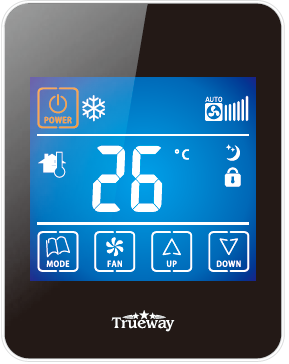
TX928-M is a cooling & heating thermostat with touch screen, suitable for the 2-pipe fan coil system. And this product includes three functions: ON/OFF state memory function, de-frost protection function and energy saving function
Features
- Super modem appearance design, suitable for office, hotel and residential building
- Slim design, direct installation on 86x86mm box
- 2-pipe integrated into one unit with easy configuration
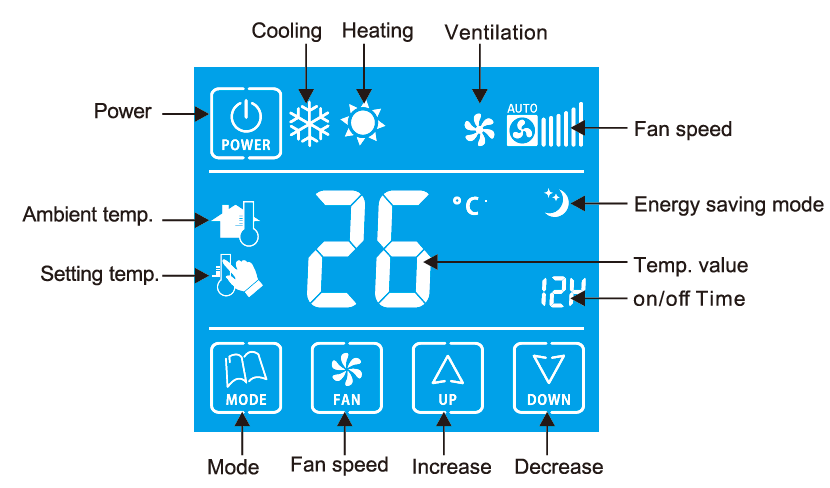
- Big LCD display with English and icons
- Easy to install and set-up
- Time on/off function
- Room temperature or setpoint temperature display
- Manual or automatic fan speed selection
- Energy saving mode activation by button press or dry contact (key card)
- Adjustment of display room temperature
- Temperature unit either “C or ‘F
- User settings can be kept when power off
- Freezing protection function available
- Lock or unlock keys or part of keys in Installer Set-up ( ISU )
- Heat and cool setpoint limitation for energy saving
- 24VAC power supply
- 230VAC fan load, 4A resistive and 2A inductive switch rating
Technical specification
- Power supply: 24±10%VAC
- Frequency: 50Hz
- Modulating output: DC0-10V, Support
- Relay life: 230±10%VAC,4(2)A 100,000,times
- Wiring: Max 16AWG
- Sensing element: 10K(@25’C)NTC
- Control algorithm: PI, Modulating output
- Accuracy: ±1″C at 25’C
- Setpoint Range: 10-32’C
- Display range: 0-50″C
- Protection Class: IP20
- Operation temperature: – 18- 49’C
- Shipping temperature:- 35-65″C
- Relative humidity: 5-90%
- Installed on 86×86 mm box
LCD Display
Function
- Modulating Valve control: The thermostat acquires the room temperature via its integrated sensor and maintains the setpoint by delivering modulating output.
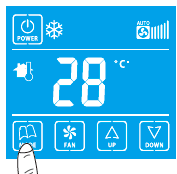
- Heat/CoolNent: Pressing the mode button to select heat, cool or vent mode
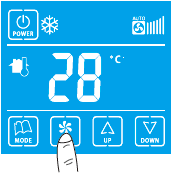
- Fan Operation: Fan can be selected as manual or automatic 3-speed operation. In Manual mode, the fan is switched to the selected speed via control output Gh, Gm, GI.In automatic mode, fan speed depends on the difference between room temperature and setpoint. When the room temperature reaches the setpoint, the valve will be closed and meanwhile, the fan will be closed either
- Temperature display: The displayed temperature can display room temperature or setpoint.
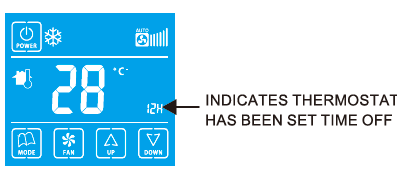
- Time on/off: When the thermostat is off, holding the power button for 3 seconds, the system will enter ” Time on ” mode. When the thermostat is on, holding the power button for 3 seconds, the system will enter ” Time off” mode. The range of ” Time on ” or ” Time off” is from O to 12 hours. The step is 1 hour and the default time is 0 .
- Backlight: Pressing any key will activate the backlight.
- The backlight will tum off after 8 seconds. When in ISU mode, the backlight will tum off after 60 seconds without operation.
- Keypad lock: The default status of ” Keypad Lock ” is all keys available and it can be changed in ISU mode.
The Keypad lock has the following settings:
- All keys are available (Default)
- System button is locked out
- Fan and System button are locked out
- All buttons are locked
Operating modes
The following operating modes are available:
- Comfort mode: In comfort mode, the setpoint can be changed by pressing up or down button. Different applications include 0001 only, heat only, and manual heaU000I changeover.
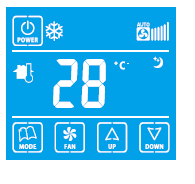
- Energy saving mode: A potential-free dry contact (such as a hotel key card) or button press (pressing the mode button for 3 seconds) can activate the energy saving mode with
 icon appearing on the screen. The dry contact can be selected as normally open or normal close type in ISU.
- If activated by dry contact, all buttons will be locked except the multi-key for ISU. If energy saving is activated by a button press, pressing any button will stop energy saving mode.
- For heating mode, if the energy-saving function is enabled, the setpoint will change to a remote setback heating setpoint.
- The range of remote setback heating setpoint is from 10″Cto 21″Cand the default value is 18″C. The value may change in ISU with the step of 0.5″C
- For 0001ing mode, if the energy saving function is enabled, the setpoint will change to remote setback 0001ing setting
- The range of remote setback cooling setpoint is from 22″C to 32″C and the default value is 28°C. The value may change in ISU with the step of 0.5″C.
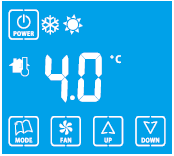
- Freezing protection mode: Freezing protection can be disabled (default) or enabled. If freezing protection is enabled (It is not available in cool only application) and the thermostat is in OFF mode while the room temperature is below 6 ‘C, the thermostat will open the heating device before the temperature rises to 8″C.
- On/off mode: Pressing the power button can tum on/ tum off the thermostat
Terminal Designations
| No | Terminal | Description |
| R | 24VAC power | |
| 2 | C | Common 24VAC |
| 3 | W/Y | DC o-1ov |
| 4 | L | 230VAC operating voltage for the fan |
| 5 | Gh | High-speed fan |
| 6 | Gm | Medium speed fan |
| 7 | GI | Low-speed fan |
| 8 | SC | Remote setback/Common for control output |
| 9 | SB | Common for remote setback |
Wiring diagrams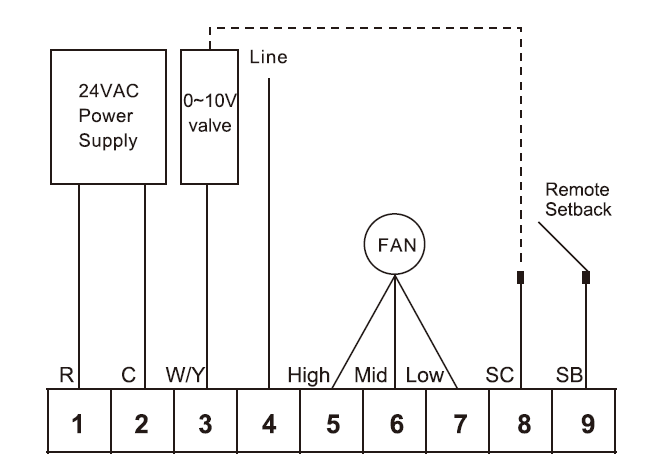
Installation & Commissioning
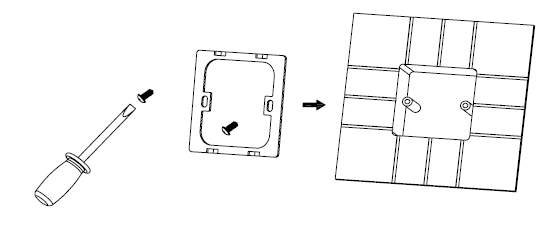
- Fix the iron holder with a screw and install it in the cassette on the wall.
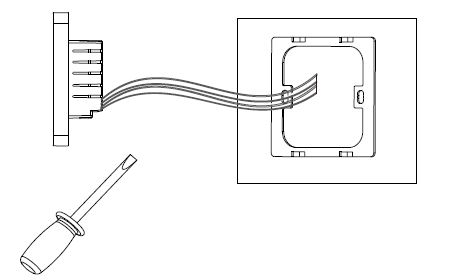
- Complete electrical connections correctly as to the wiring diagram.
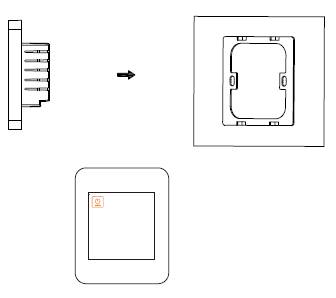
- lnsert the thermostat and stuck it into the iron holder.
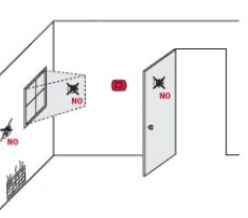
Install the thermostat about 5 feet (1.5m) above the floor In an area with good air circulation at an average temperature. Do not install in locations where Iha thermostat can be affected by:
- Drafts or dead spots behind doors and incomers
- Hot or cold air from duels
- Sunlight or radiant heat from appliances
- Concealed pipes or chimneys
- Unheated/uncooled areas such as an outside wall
Setup Function Settings & Options
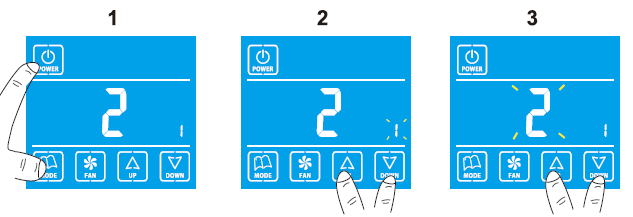
- Press the “Mode” key then press the “Power” key for 3 seconds to enter ISU setting mode.
- Press the “Increase” key or the “Decrease” key to select the setting items you want, and press the “Mode” key to confirm.
- Press the” Increase” key or the “Decrease” key to revise the values of the setting items, and press the “Mode” key to confirm.
- lf want to revise the other setting items, please repeat above step 2 and step 3.
- While setting, press “Power” to exit, the setting items and values as below form shown.
| ISU Code | Description | Possible Options |
|
System Type |
0 Heat only | |
| 1 Cool only | ||
| 2 Two pipes 1H1C manual(Default) | ||
|
2 |
Temperature scale | 0 °F |
| 1 °C(Default) | ||
|
3 |
Fan Control Type |
0 Auto only |
| 1 Constant only | ||
| 2 Both(Default) | ||
|
4 |
Keypad Lockout |
0 All keys are available(Default) |
| 1 System button is locked out | ||
| 2 Fan and System buttons are locked out | ||
| 3 All buttons are locked | ||
|
5 |
Remote setback enables method |
0 Hotel card NO |
| 1 Hotel Card NC | ||
| 2 Button (Default) | ||
|
6 |
Freeze Protection |
0 Disabled (Default) |
| 1 Enabled | ||
| 7 | Display Temperature Adjustment | – 2°C ( – 4°F) |
| -1.5 °C( – 3°F) | ||
| -1°C( – 2°F) | ||
| -0.5°C( – 1°F) | ||
| 0 °C(0 °F)(Default) | ||
| 0.5°C(1°F) | ||
| 1°C(2°F) | ||
| 1.5°C(3°F) | ||
| 2 °C(4°F) | ||
| 8 | Remote setback heating setpoint | Range 10-21°C Default :18°C (Range 50-70°FDefault: 64°F) |
| 9 | Remote setback cooling setpoint | Range 22-32°CDefault : 26°C(Range 72-90°FDefault : 79°F) |
Troubleshooting
| If... | Then... |
| The heating system does not turn on. | • Set the mode to Heat by pressing the Mode button. • Wait five minutes for the heating system to respond. |
| The cooling system does not turn on. | • Set the mode to Cool by pressing the Mode button. • Wait five minutes for the cooling system to respond. |
| The fan doesn’t work. | • Check whether the Fan mode is set to Auto • Check whether the heating or cooling system works well. |
| The Mode button doesn’t work. | • Check whether the keypad is locked or not. • Check whether the system is working in Energy saving mode. • Check whether the thermostat is off. |
|
The Fan button doesn’t work. |
• Check whether the keypad is locked or not. • Check whether the system is working in Energy saving mode. • Check whether the thermostat is off. |
| The Up or Down button doesn’t work. | • Check whether the keypad is locked or not. • Check whether the system is working in Energy saving mode. • Check whether the thermostat is off. |
Dimension
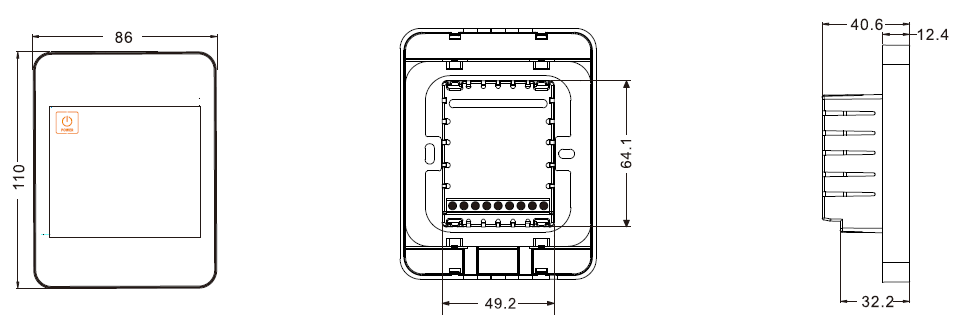
REFERENCE:
DOWNLOAD MANUALS:
Trueway TX-928 M Touch Screen Thermostats Product Data Sheet

Trueway TX-928 M Touch Screen Thermostats Product Data Sheet