
TRANE TREWIRE6AHA0DA Wired Remote Control Programmable Thermostat
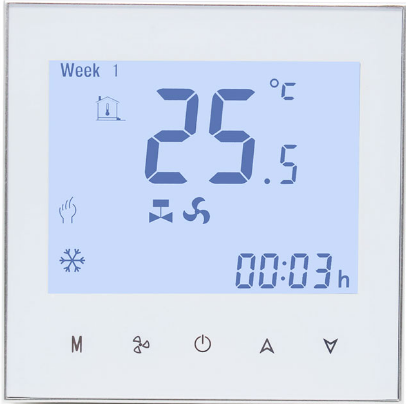
Parts and Functions
Interface Display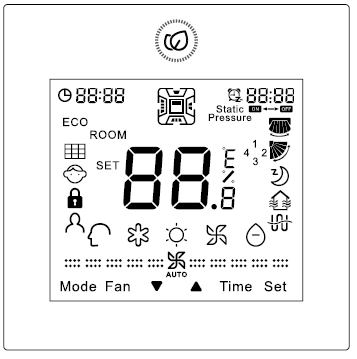
Key 
ON/OFF
- Adjusting key for temperature, clock, timer, sleeping adjustment, temp. compensation and energy saving;
- Inquiring key for detail parameter and malfunction inquiry;
- Switching key for function switch.
- The adjusting accuracy of temperature is 0.5°C (1°F).
- If energy saving mode is not set, the adjusting range is from 16°C (60°F) to 30°C (86°F).
- If energy saving mode is set, the lowest temperature limit of cooling/dry and the highest temperature limit of heating are decided by the setting of the chip, the default cooling/dry temperature is 23°C (74°F), and the default heating temperature is 26°C (78°F).
Note:
- If the dip switch Sw2 is “on”, it displays the ambient temp., as well as when powered off. From power off to power on, mode switching and set temp. adjustment, it flashes to display SET icon and statically displays the set temp.. And then statically displays the ambient temp. and ROOM icon after 3 seconds.
- In energy saving mode and temp. compensation mode, the adjusting step is 1°C (1°F) a time.
- If using Fresh Air unit, set temp. cannot be adjusted. If there is no Central/Lock set, the temp. will be fixed at 18°C (64°F) in cooling and 22°C (72°F) in heating. The Up/Down key will not display in normal state, but will display and valid in timer setting, function selection, unit shift in malfunction inquiry, parameter shift in parameter check, unit No. setting, sleeping time adjustment, etc.
 24-hour, press
 once to minus one minute. Keep pressing, minus 2 minutes in 1 second’s pressing, then 10 minutes in 5 seconds. The time will keep decreasing at the pace of 10 minutes a time in 10 seconds. Vice-versa. Press to confirm or it will turn back to the previous state automatically in 10s.
- Press this key to execute mode switch. For detailed information, please refer to mode setting.
- Note: If using Fresh Air unit, default 3 modes will circulate from cooling→heating→fan→cooling
FAN
Pressing this key, fan speed will be changed in sequence as follows
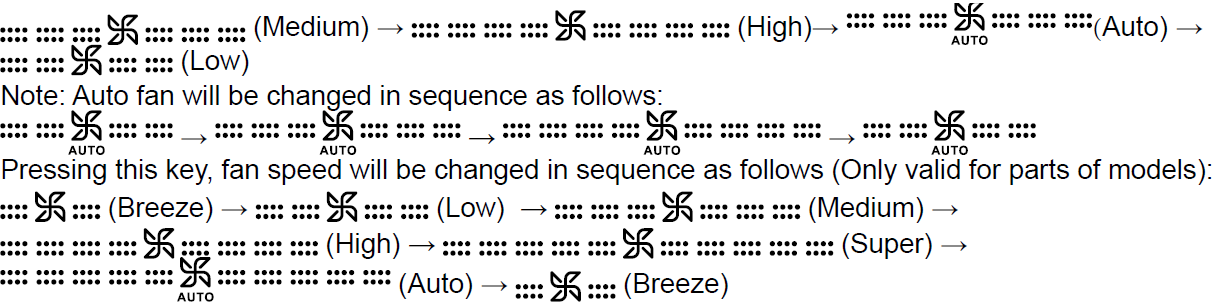
Auto fan circulation
- There is no auto fan in fan mode; The fan icon will flash when adjusting the fan speed. It will statically display after the adjustment.
- Note: If using Fresh Air unit, fan will be in auto fan and cannot be adjusted. If press FAN key, fan icon and FFFF on the top-right corner will flash, prompting fan speed cannot be adjusted, and will statically display after 3s.
- Fresh Air unit fan speed will be controlled automatically by indoor unit and wired controller will always display auto fan
TIME
Timer ON, Timer OFF, Timer ON/OFF.
SET
- Press this key to enter function circulation. If it is the four-way cassette model, press Set key for 5s to enter function circulation.
- Press to select the functions in sequence as follows:
 (Only when Left/Right swing is valid) →
 (Only when Up/Down swing is valid) →
 (ventilation function)
  (reserved function) →ECO
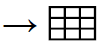 →(When it’s time for filter cleaning, this icon will involve in circulation)
  (the second 8 of 88.8 in the temp. display area displaying A,only valid for part of models) (the second 8 of 88.8 in the temp. display area displaying B,only valid for part of models) (motion sensing,only valid for part of models) →10°C heating function (this function only works in the heating mode, only valid for part of models) → health airflow up (Only valid for part of models) → health airflow down (Only valid for part of models)
 - Press
 to select the functions in sequence as follows:
- health airflow down (Only valid for part of models) → health airflow up (Only valid for part of models)
- →10°C heating function (this function only works in the heating mode, only valid for part of models)
- (motion sensing,only valid for part of models) (the second 8 of 88.8 in the temp. display area displaying B,only valid for part of models) (the second 8 of 88.8 in the temp. display area displaying A,only valid for part of models) (When it’s time for filter cleaning, this icon will involve in circulation) →ECO (reserved function) (ventilation function) → → (Only when
- Up/Down swing is valid) (Only when Left/Right swing is valid)
- Press to confirm the function selected. If there is function selected, press can cancel this function.
Note: The Left/Right swing is valid only after the dip switch is set, the filter icon is shown only after the filter requires cleaning
Icon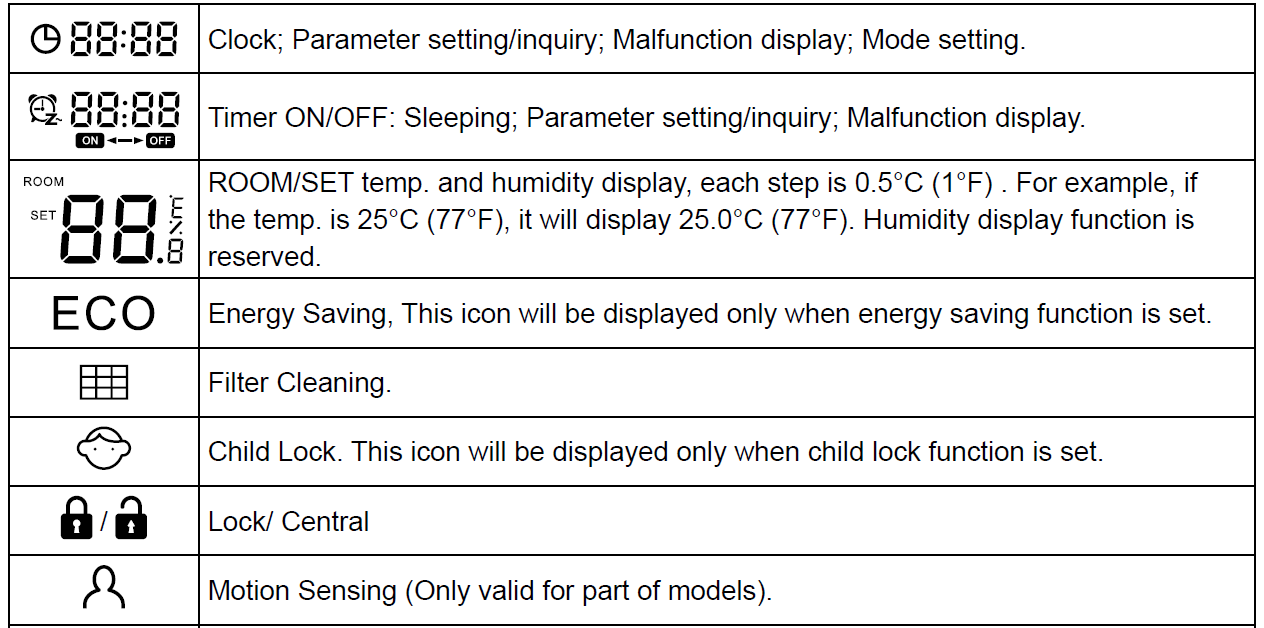
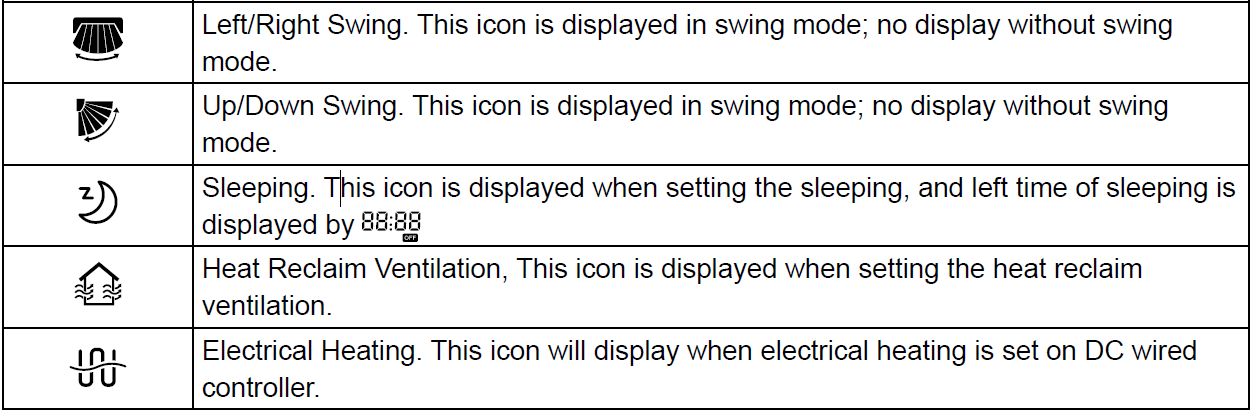
PARTS AND FUNCTION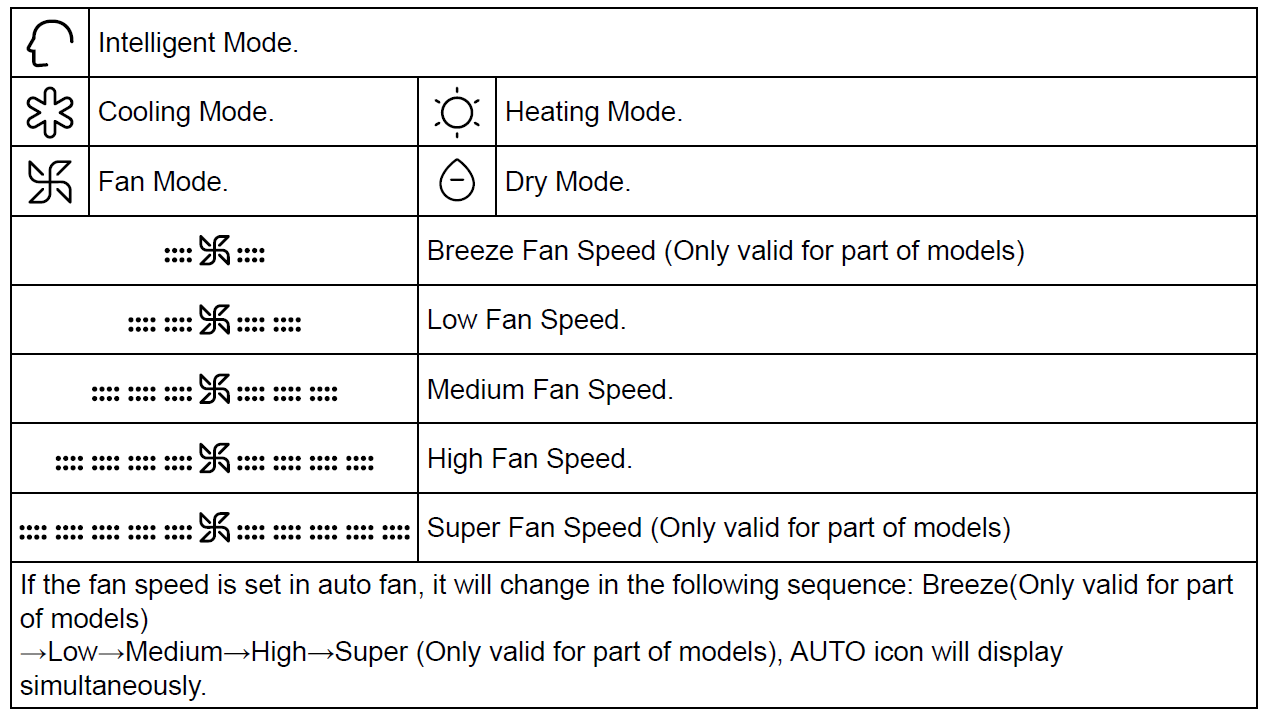
Operation
Dip Switch Interpretation (for AC)
| DIP switch | On/Off station | Function | Default setting |
| Sw1 | On | Slave wired controller | Off |
| Off | Master wired controller | ||
| Sw2 | On | Ambient temp. display on | Off |
| Off | Ambient temp. display off | ||
| Sw3 | On | Collect ambient temp. from PCB of indoor | Off |
| Off | Collect ambient Temp. from wired controller | ||
| Sw4 | On | Non-volatile memory invalid | Off |
| Off | Non-volatile memory valid | ||
| Sw5 | On | Old protocol | Off |
| Off | Selfadaption | ||
| Sw6 | On | reserved | Off |
| Off | reserved | ||
| Sw7 | On | Model with Up/Down and Left/Right swing | Off |
| Off | Model with Up/Down swing | ||
| Sw8 | On | Fresh Air unit | Off |
| Off | General unit |
Difference between the Function of the Master Wired Controller and Slave Wired Controller
| Comparison
item |
Master wired
controller |
Slave wired controller |
|
Function |
All functions are available |
1. ON/OFF, Mode, Fan Speed, Temp. Setting, Swing, Energy Saving, Clock function, Heat Reclaim Ventilation function, Mode Setting, Screen Saving and Child Lock are available
2. Cancel the filter cleaning icon 3. Look up the detailed parameter and malfunction code |
Initialization
- The wired controller will display all the icons after powering on or reset, then get into the initializing process. The controller will display in sequence as follows: 88:88 (the top-left corner) →88:88 (the top-right corner) →88.8 →88:88 (the top-left corner), the green LED flashes all the time until the initialization ends.
- If the wired controller can’t be communicated with the indoor PCB normally after powering on, the initialization will be finished in 4 minutes, and then the communication malfunction can be checked from the malfunction inquiry function.
Screen Saving
- In the state of off and onscreen saving, keep pressing and for 5s to set screen saving time, which will be shown after the top-right colon 88 statically. Press Up/Down key to adjust screen saving time and press key to confirm.
- Screen saving time should be 0s(backlight always on), 15s, the 30s, 60s, default value is 15s. If it is not the first time of entering, it will display the screen saving time adjusted last time.
- In the process of changing screen saving time, press ON/OFF key to quit screen saving time setting function, it will recover to screen saving time before adjusting and start-up the unit.
Note:
When controlling the Fresh Air unit, the controller main interface will not display Up/Down key in normal state. When in screen saving setting, press Time key first to display Up/Down key at the main interface, and then press together Time and Down key to enter screen saving time setting.
Clock Function
- 24-hour system is used, and at first time of powering on, it will display the default 12:00.
- When first powering on wired controller,12:00 will be displayed on the wired controller interface, clock time can be adjusted within 10s.
- At the same time, clock icon and minute-place of time will flash, meaning the current time can be adjusted.
- Press Time key for 5s to enter clock setting function.
- It will show12:00 after first powering on (if the not the first time of powering on, clock time is the memorized time), with clock icon and minute-place flashing, meaning current time can be adjusted.
- Press Time key to shift the hour place and the minute place. After adjusting the time, press set key to confirm.
- In the process of time adjustment, if there is no operation for 10s, it will quit and restore the previous state.
- In the process of time adjustment, press ON/OFF key to quit the clock setting function and execute the turning on/off operation at the same time.
- When setting timer or sleeping function, clock time cannot be adjusted. If press the Time key for 5s to enter clock adjustment, the clock icon and clock time will flash indicating time cannot be adjuste
Timer Function
- Timer mode setting: Timer ON, Timer OFF, Timer ON/OFF.
- Default: Timer ON is
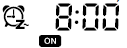 , Timer OFF is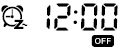
- Precision: The time precision is 1 minute. Timer clock is based on the current clock time; the adjustment is the same as clock time.
- Press Time key, the timer function circulation is as follows:
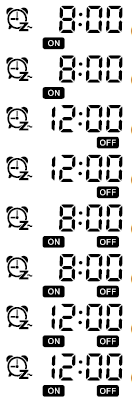 ON and the Hour position are flashing→
- ON and the Minute position are flashing→
- OFF and the Hour position are flashing→
- OFF and the Minute position are flashing→
- ON and the Hour position are flashing→
- ON and the Minute position are flashing→
- OFF and the Hour position are flashing→
- OFF and the Minute position are flashing→ the timer icon will disappear.
- the hour or minute position is flashing, press
 to adjust the timer, Keep pressing to accelerate the adjusting speed, then to confirm the setting.
 - The controller will judge the order of timer on and off and use the arrow to show the order. First ON then OFF:ON→OFF, First OFF then ON:ON ←OFF.
- The ON/OFF button has no affection on timer setting. Under power off state, the Time key is valid
Timer Setting Cancellation
- If there is no Time key related operation for 10s, this setting will be cancelled and the timer will come back to the previous state.
- Press Time key, until the timer icon disappears, the timer function will cancel.
- Relation to other buttons when timer is set.
- Press the key or key to exit the current setting, press them again to operate the function accordingly; Press the (ON/OFF) key can exit the timer setting and power ON/OFF directly. If there is a timer before, the wired controller will operate by following the previous setting. If not, the wired controller will have no timer operation.
Swing
- If Sw5 is on, only the Up/Down swing will be involved in function circulation. At this time SW7 is invalid.
- If Sw5 is off, swing type can be set by Sw7, when Sw7 is off, only Up/Down swing valid, when Sw7 turns on, Up/Down and Left/ Right swing valid. Only Up/Down swing is default.
- If Sw7 is off (default): only Up/Down swing is available.
- Press SET key to enter function circulation, Up/Down swing icon flashing, then press SET key again to confirm with swing icon statically displaying. If swing function is set, execute the above operation to cancel.
- If Sw7 is on: Up/Down swing and Left/Right swing are available.
- Press SET key to enter function circulation, Left/Right swing icon flashing, then press Up/Down key to enter Up/Down swing, with Up/Down swing icon flashing. Press SET key again when the swing icon flashes to confirm, with swing icon statically display. If swing function is set, execute the above operation to cancel.
- If connecting to the salve wired controller, Sw7 dip code of master and slave wired controllers should be set the same and should match the actual wired controller unit.
- If Sw5 is off, some models can self-adaptive the swing setting and swing angle control.
- If the angle of the Up/Down swing can be adjusted:
- Press SET key to enter the function circulation; the Up/Down swing icon will flash. Press the SET key again; the swing angle will flash(if powered on for the first time, the default angle will be different according to different modes; if not for the first time, the angle of swing will be displayed as last time). At this time, the swing angle can be adjusted by Up/Down key (when in intelligent mode, the swing angle is positioned press up key to automatic swing, and press down key to position
- When pressing Up/Down key to adjust the angle, If no operation in 10s, it will exist angle adjustment and function circulation. The interface displays the last angle. If you want to set other functions like sleep function, you need to press SET key again to enter function circulation.
- If the angle of the Up/Down and Left/Right swing can be adjusted Press SET key to enter the function circulation, and the Left/Right swing icon will flash. At this time, press Up/Down key to switch to Up/Down swing icon flashing. When Left/Right swing icon flashing, Press the SET key again, the angle of Left/Right swing will flash(if powered on for the first time, the default angle is in position 1, the middle position of Left/Right swing icon; if not for the first time, the angle will be displayed as last time).
- Pressing Fan key or Mode key can both exit swing function, with no order sending. When Fan or Mode key is pressed again, the order will be sent. If the present angle is confirmed, pressing the SET key will exit the swing function. In the adjustment process, if there is no key pressed for 10s, swing function will be exited, and swing angle will execute the final adjusted angle. In the adjustment process, pressing the ON/OFF key to power off the wired controller directly, and swing angle is the final adjusted swing angle.
Health airflow up/down function (Only valid for part of models)
- The function can be set through wired controller or remote controller.
- The function circulation is as follows: (Only when Left/Right swing is valid) → (Only when Up/Down swing is valid)→ (ventilation function) (reserved function)→ECO (When it’s time for filter cleaning, this icon will involve in circulation) (the second 8 of 88.8 in the temp. display area displaying A,only valid for part of models) (the second 8 of 88.8 in the temp. display area displaying B,only valid for part of models) (motion sensing,only valid for part of models) →10°C heating function(this function only works in the heating mode, only valid for part of models) → health airflow up (Only valid for part of models) → health airflow down (Only valid for part of models)
- The function is valid only when the angle of Up/Down swing can be set.
- Health airflow up/down function cannot be set at the same time. When the latter is set, the former will be automatically canceled.
- After the function is set, the angle of Up/Down or Left/Right swing can be normally adjusted in the main interface. Press the SET key to enter function circulation. When Up/Down swing icon flashes, press SET key, and then swing angle position 1 will flash. Press Up/Down key to adjust the angle.
- When the adjusted swing angle is executed, the health airflow up/down is canceled simultaneously
Sleeping
- Press key to enter function setting, press to the sleeping icon “ ” and it will flash, the sleeping time will display by the
 which is on the top-right corner. Press Time key to enter sleeping time setting. “OFF” and sleeping icon are flashing.
 - Press to adjust the sleeping time by0.5h once, the range of sleeping time is from 0.5h to 72h. After the adjustment, press key again to confirm the operation. “OFF” and sleeping icons are statically displayed.
- During sleeping icon is flashing, pressing key instead of key, the wired controller will take the converse operation of previous sleeping state. If there is sleeping set, cancel it; if not, come into the setting operation.
- If power off is executed during sleeping, the sleeping function is cancelled at the same time; there is no display when powered on again. It needs to be reset if any requirement
- In sleeping set or modification state, if there is no operation in 10 seconds, it will keep previous state, and the setting or modification is invalid this time.
- Under sleeping and timer setting state, it will display setting time respectively; when setting simultaneously, it will display the prior executed time. When timer off is executed first, sleeping function will be cancelled and when sleeping is executed first, then timer off function will be operated after that.
- Under function setting state, it will exit function setting state by pressing or key.
- Sleeping time and timer on should not be set at the same time.
- When setting sleeping function, press ON/OFF key to quit sleeping set and turn off unit.
Heat Reclaim Ventilation Function
- Press key to enter function setting, press to the heat reclaim ventilation icon “ ” and it will flash, press key again to confirm the operation. The above operation can cancel the heat reclaim ventilation function if heat reclaim ventilation function has been set.
- After you set heat reclaim ventilation function, change mode of wired controller, heat reclaim ventilation function is kept and heat reclaim ventilation function will be memorized when non-volatile memory valid
Switch between Fahrenheit and Celsius
- If the current temperature is displayed in Celsius, set temp. should be adjusted to 30°C in each mode(when energy saving function is set currently, the heating mode will be the highest limit value of the energy saving function). Then press key for 15s to switch to Fahrenheit, the interface will display 86°F (when the energy saving function is set, its highest limit value of Fahrenheit will be displayed).
- If the current temp. is displayed in Fahrenheit,set temp. should be adjusted to 60°F in each mode(when energy saving function is set currently, the cooling/dry mode will be the lowest limit value of the energy saving function). Then press key for 15s to switch to Celsius, the interface will display 16°C (when energy saving function is set, its lowest limit value of Celsius will be displayed).
Humidity Function (Only valid for part of models)
Press the mode key to switch to the dry mode, and the humidity will be shown in the temp. display area. The Up/Down key is the humidity adjusting key.
Energy Saving
- Press key to enter function setting, then press to choose energy saving, press keyagain to confirm the operation and display energy saving icon . If energy saving function has been set, the above operation will cancel it.
- The energy saving default parameter are 23°C (74°F) (the lowest temp. limit of cooling and dry mode) and 26°C (78°F) (the highest temp. limit of heating mode). The temp. adjusting range is 23°C-30°C (74°F-80°F) in cooling and dry mode, the temp. adjusting range is 16°C-26°C (60°F-78°F) in heating mode. If energy saving function is set, the indoor units will run at the default temperature.
Note: Fresh Air unit has no energy saving function
Filter Cleaning
When filter cleaning icon is displayed, the icon will display in function sequence. If filter cleaning icon is flashing, press key to clear it.
10°C Heating Function (Only valid for part of models)
- Only in heating mode, this function is valid in function circulation.
- For the four-way cassette model, press the SET key for 5s to enter the function circulation. When it switches to the 10°C heating function, 10°C will flash in the temp. display area. Press the SET key to confirm, and 10°C will be statically displayed.
Four-way cassette – Function (Only valid for part of models
- When it is powered on for the first time, four-way cassette icon and Up/Down swing will be displayed. The number1,2,3,4 next to the swing referred to different wind deflectors will be displayed(if the wind deflector is on the position 1, the Up/Down swing will stay the angle set by the wind deflector position 1.Meanwhile the number 1 next to the Up/Down swing will be displayed. If it is selected as four sides controlled together, the number 1, 2, 3 ,4 next to the Up/Down swing will be displayed at the same time). Set key now can only switch among four wind deflectors. Use Up/Down key to set the angle of the current wind deflector.
- The circulation of the wind deflector: four-way cassette deflectors controlled together→four-way cassette deflector 1→four-way cassette deflector 2→four-way cassette deflector 3→four-way cassette deflector 4→four-way cassette deflectors controlled together.
- If it’s not the first time to enter it, press Set key, the wind deflector set last time will flash. Meanwhile the angle of this deflector set last time will be displayed statically, and the number of the wind deflectors next to Up/Down swing will be statically displayed
Motion sensing (Only valid for part of models)
- Press Set key for 5s to enter the function circulation, and then press Up/Down key to switch to (the second 8 of 88.8 in the temp. display area displaying A) → (the second 8 of 88.8 in the temp. display area displaying B) → (motion sensing).
- After motion sensing A is set, the character A will disappear with room temp./set temp. displaying. The icon of motion sensing will display statically.
- After motion sensing B is set, the character B will disappear, with room temp./set temp. displayed.
- The icon of motion sensing will flash in the fixed frequency.
- After motion sensing is set, the icon of motion sensing will be displayed for 2s and disappear for another 2s to have respiratory effect.
Mode Setting (Only valid for part of models)
- In off and non screen saving state, press Mode key for 5s, it will display 8 segment on the top-left corner of current mode circulation, default value being 0. Press Up/Down key to shift between 0, 1, 2, 3, then press Set key to confirm value. It will follow the altered mode circulation after turning on the unit again.
Corresponding mode of different value.- 0————-[Intelligent] [Heating] [Dry]
- [Cooling] [Fan] 1————-[Heating] [Dry] [Cooling] [Fan]
- 2————-[Dry] [Cooling] [Fan]
- 3————-[Heating] [Dry] [Cooling] [Fan]
- The intersection of mode circulation set by wired controller and indoor unit is valid.
- Fresh Air unit can execute mode setting, it will execute the intersection with three modes of Fresh Air unit (cooling/heating/fan mode)
- The mode of indoor units can be inquired /changed by the advanced setting function after the wired controller is powered on, Only valid for part of models.
- Set as follows (Only valid for part of models): Press Set key and Up key for 5s to enter the advanced setting state, with the function A in temp. display area displayed statically. Press Fan key to switch to function B. The function code 01 displayedin the clock display area will flash. The specific information in the timing display area is statically displayed, it can be changed in the range of 00-03 by Up/Down key. At this time press Set key to confirm, and the function code 01 in clock display area stays static, the specific information in the timing display area flashes, meaning it can be changed currently. Press Up/Down key to change the content and Set key to confirm.
Malfunction Display
- Under no screen saving state, press key for 10 seconds to check all indoor units malfunction in the group. Unit No. is displayed behind the top-left colon; current malfunction is displayed before top-right colon and historical malfunction is behind colon.
- Unit No. is displayed in decimal and malfunction is displayed in hexadecimal.
- All hexadecimal numbers of malfunction are in capital. But b and d is in small capital in order not to mix with 8.
- If there is no current malfunction, “–” is displayed before the right colon; if there is no historical malfunction, “–” is displayed behind the right colon.
- Press key to quit malfunction check state. The clock information and timer information are displayed.
- Malfunction records clearance: Keep pressing key for 10 seconds, malfunction is displayed.
- Then press key again for 5 seconds to clear current and historical malfunction of all the units.
- Press to choose unit No..
Child Lock
- Child lock function can be used to prevent false operations. All of keys are locked after pressing and together for 5 seconds. child lock icon
 will display on the interface. All of settings will exit and keep the previous state. All of keys are invalid including “ON/OFF”.
 - The screen will unlock after pressing and together for 5 seconds, child lock icon will disappear and all keys are available.
Note:
When controlling Fresh Air unit, the controller main interface will not display Up/Down key in normal state. When in child lock setting, press Time key first to display Up/Down key at the main interface, and then press Set and Down key together for 5 seconds to enter child lock setting. After setting child lock, Up/Down key will keep displaying for the convenience of cancellation of child lock
Parameter Inquiry
Keep pressing for 5 seconds (if it is the four-way cassette model, the time is 10 seconds) to enter parameter inquiry. Unit No. is displayed on 88 area of clock while data type is displayed on 88 area of timer. Unit No. is displayed on the first two “88” fields of clock while data type is displayed on the first two “88” fields of timer. The data type includes A, b, C, d, E and F. The current data is displayed behind date type. For example, ambient temp. of 00 unit is 16 degree, then “00 A 16” is displayed. Press to choose different type of data from A, b, C, d, E and F
| Data | Type meaning | System |
| A | Indoor sensor Tai temp. | Actual value, decimal sys. |
| b | Indoor sensor Tc1 temp. | Actual value, decimal sys. |
| C | Indoor sensor Tc2 temp. | Actual value, decimal sys. |
| d | Indoor unit PMV opening/2 | Actual value, decimal sys. |
| E | Indoor unit address | Actual value, hexadecimal sys. |
| F | Indoor unit central address | Actual value, hexadecimal sys. |
Unit No. Setting
- Entering: Press key for 10 seconds (if it is the four-way cassette model, the time is 15 seconds) to enter unit No. setting/ inquiring.
- Setting is available when the communication address between indoor and outdoor unit is flashing if the indoor unit’s dip switch can set the address, then use to adjust within the range of 0-3F. If the indoor dip switch cannot set the address, the communication address between indoor and outdoor unit is static, which can only be inquired.
- Wired controller’s address is displayed before the colon of clock on the top-left corner, ranging from 0 to 15 and displayed in decimal system.
- The communication address between indoor and outdoor unit is displayed on the top-left corner.
- The default value is the current unit’s address, selecting other indoor units by the
- Central address is displayed on top-right corner which cannot be edited.
- Press key to confirm and exit the setting after changing the communication address of indoor unit.
- If press other keys or no operation in 10 seconds, it will automatically exit and keep previous setting.
- If press or key, exit and the current setting is invalid. If press “ON/OFF”, turn on/off the unit directly and the current setting is invalid.
Static Pressure Grade Inquiry and Adjustment Function
- In the state of ON and non screen saving state, press Fan + Set keys for 5s to enter static pressure grade adjustment state with static pressure icon flashing and current static pressure grade statically displaying. Press
- key to change static pressure grade, then press Set key to confirm.
- The unit No. will display by two 8 segments after colon on the top-left corner, and static pressure grade will display by two 8 segments after colon on the top-right corner. Press Time key to shift unit No..
- Unit No. will show decimally from 00-15. Static pressure will be shown decimally from 01-04.
- In query and adjustment state, if there is no screen saving, press ON/OFF key to quit current state and turning on/off unit, with changed values not being saved.
- Static pressure is the inquired value with non-volatile memory invalid.
- The number about the indoor units’ static pressure grade and the static pressure grade executed by the indoor units can be queried/ changed by the wired controller(Only valid for part of models).
- The number about the static pressure grade and the static pressure grade can also be queried/ changed by advanced setting interface(Only valid for part of models).
Communication with Central Controller
- The controller displays
 to show central control mode after receiving central control signal from indoor unit;
 - When statically displays, all keys except “ON/OFF” of wired controller are invalid. central icon will disappear if no central control signal from indoor unit.
- When receiving locking signal from indoor unit, statically display, all keys are invalid.
- In central or lock state, screen saving is valid; press any key to wake up screen.
- In central or lock state, malfunction inquiry, indoor unit parameter inquiry and child lock are valid
Energy Saving Parameter Setting
- Under cooling mode 30°C (86°F), keep pressing key for 5 seconds to set energy saving parameter in cooling mode.
- This cooling energy saving parameter is flashing behind top-left colon. The default value is 23°C (74°F).
- This lowest target cooling temperature can be adjusted by . After setting, press key to confirm and exit.
- Under heating mode 16°C (60°F), keep pressing key for 5 seconds to set energy saving parameter in heating mode.
- This heating energy saving parameter is flashing behind top-right colon.
- The default value is 26°C (78°F). This highest target heating temperature can be adjusted by .
- After setting, press key to confirm and exit.
- Energy saving parameter will be valid after energy saving icon displays
Non-volatile Memory
- Set valid or invalid non- volatile memory through dip switch Sw4.
- Info memorized: Mode, Fan Speed, Temp. Setting, Swing State, Heat Reclaim Ventilation function.
- If timer or sleeping is set, it will be in OFF state after electrified again; it will memorize all the state before power failure except ON/OFF state.
- For easy maintenance, no matter non-volatile memory is valid or invalid, malfunction record will be remembered.
Communication Malfunction of Wired Controller
If there is no communication between wired controller and indoor unit for 4 minutes, it will display error code “07” when checking malfunction.
Sensor Malfunction
If the dip switch is set to collect ambient Temp. from wired controller and the sensor can’t work normally, it will display error code “01” when checking malfunction
Temp. Compensation Setting
- In OFF state, keep pressing key for 5 seconds, the current temp. compensation value is displayed on the top-right of the screen and flashes. “00” is the default value.
- When in celsius system, ambient compensation value is -04~+04°C, while in fahrenheit system, ambient compensation value being -07~+07°F. The temp. compensation value can be adjusted by pressing .
- After adjustment, press key to confirm the setting.
- The compensation value is used for ambient temp..
- The compensation value is valid only in the state of collecting ambient temp. of wired controller..
Forced Cooling/ Heating.
- Powered off in cooling mode, keep pressing “ON/OFF” key for 10 seconds, it will enter into the forced cooling function, and the cooling mode icon will be displayed on the interface. “LL” is flashing in the temp. area at the same time. Press “ON/OFF” key to power off and exit forced cooling.
- Powered off in heating mode, keep pressing “ON/OFF” key for 10 seconds, it will enter into the forced heating function, and the heating mode icon will be displayed on the interface, “HH” is flashing in the temp. area at the same time. Press “ON/OFF” key to power off and exit forced heating.
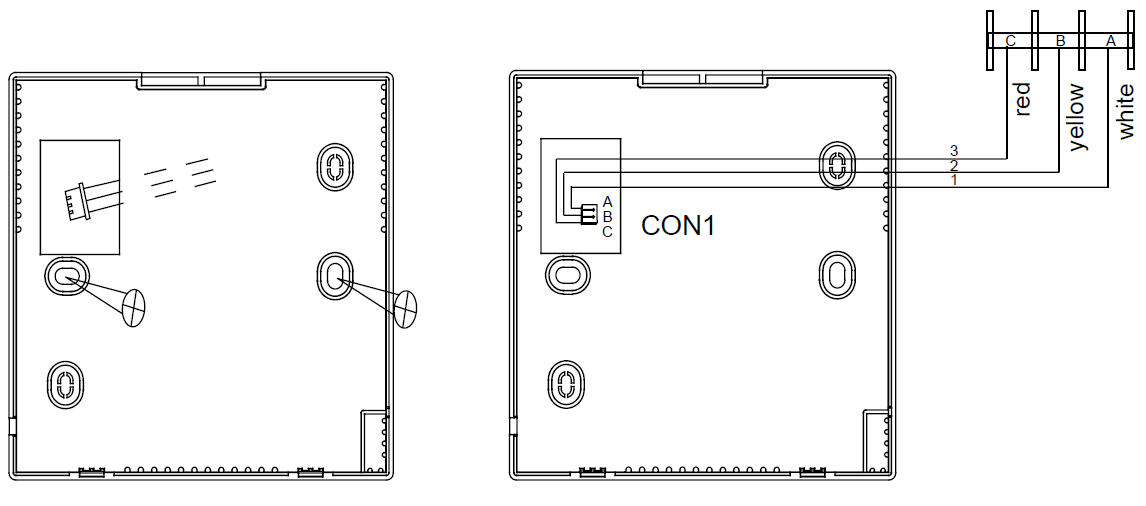
Wired Controller Wiring Instruction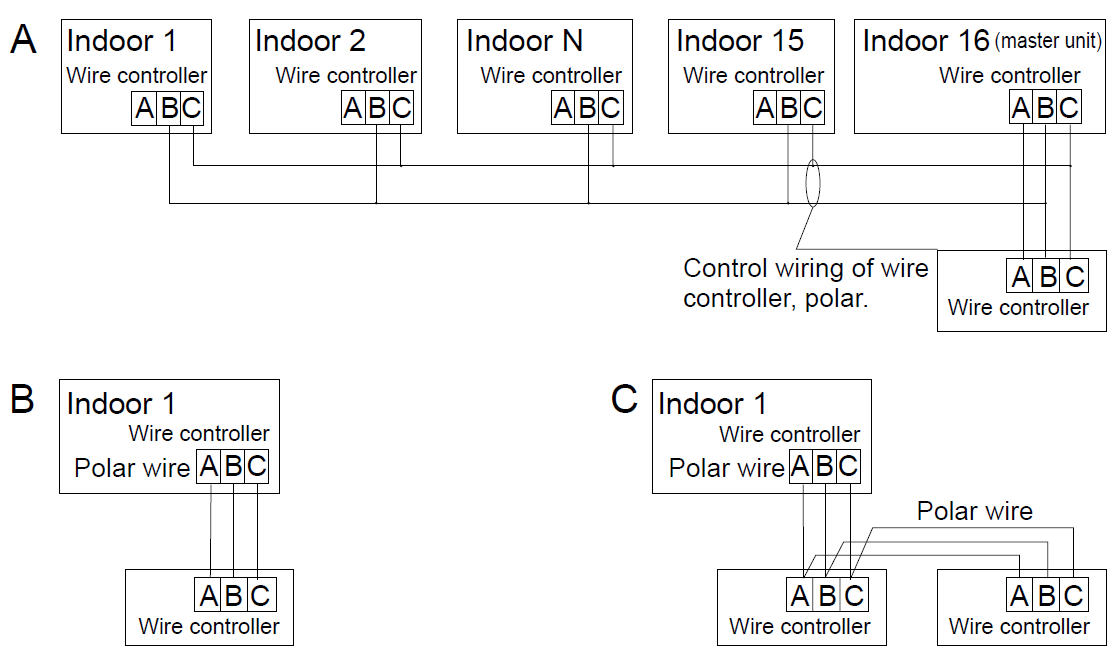
There are three methods to connect wired controller with the indoor units
- One wired controller can control max. up to 16 sets of indoor units, and 3 pieces of polar wire must connect the wire controller and the master unit (the indoor unit connected with wire controller directly), the others connect with the master unit through 2 pieces of polar wire.
- One wire controller controls one indoor unit, and the indoor unit connects with the wire controller through 3 pieces of polar wire.
- Two wired controllers control one indoor unit. The wired controller connected with indoor unit is called master one, the other is called slave one. Master wired controller and indoor unit; master and slave wire controllers are all connected through 3 pieces of polar wire.
Installation manual for wired controller
- First, put communication wire through the hole in the back coverFirst, put communication wire through the hole in the back cover
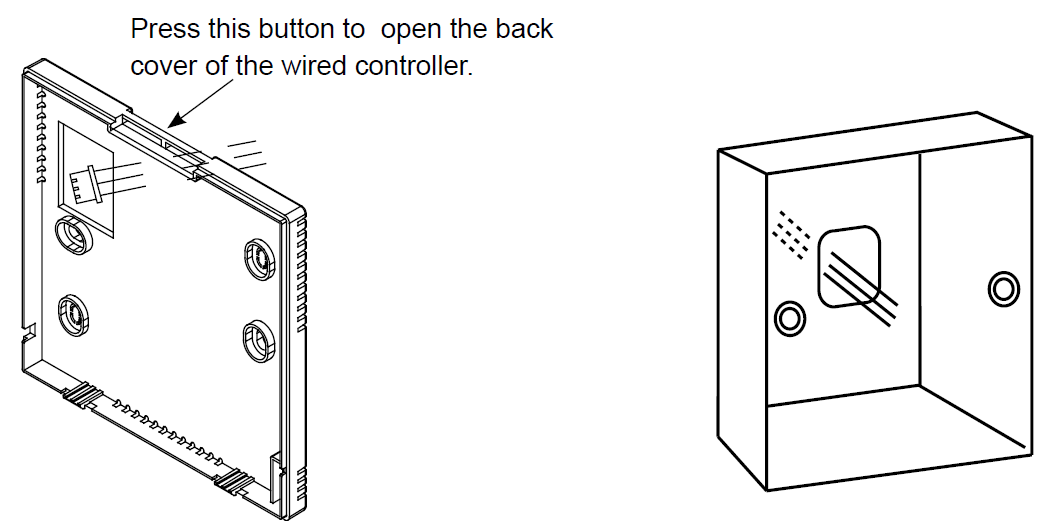
- There are three methods to connect wired controller with the indoor units
- One wired controller can control max. up to 16 sets of indoor units, and 3 pieces of polar wire must connect the wire controller and the master unit (the indoor unit connected with wire controller directly), the others connect with the master unit through 2 pieces of polar wire.
Communication wiring
- Installation manual for a wired controller
- First, put a communication wire through the hole in the back cover
- Fix the back cover to the holder. After that, connect the communication wire to the CON1 port of the wired controller. Finally put the front cover of wired controller to back cover to complete the installation
Trane
Trane – by Trane Technologies (NYSE: TT), a global climate innovator – creates comfortable, energy-efficient indoor environments for commercial and residential applications. For more information,
please visit trane.com or tranetechnologies.com. Trane has a policy of continuous product and product data improvement and reserves the right to change design and specifications without notice. We are committed to using environmentally conscious print practices.
REFERENCE
DOWNLOAD MANUAL
TRANE TREWIRE6AHA0DA Wired Remote Control Programmable Thermostat Installational Manual
TRANE TREWIRE6AHA0DA Wired Remote Control Programmable Thermostat Installational Manual