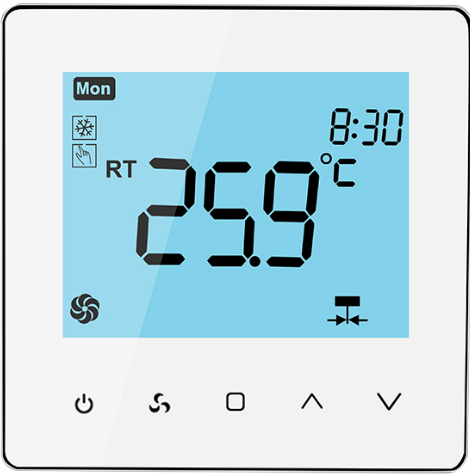
Toupwell Tp518 Digital Wifi Smart Thermostat
Specification
- Warranty: 2 years
- Project Solution Capability: graphic design, 3D model design, total solution for project
- Place of Origin: Guangdong, China
- Model Number: Tp518
- After-sale Service: Online technical support, Free spare parts, Return an
- Application: Hotel
- Design Style: Modern
- Brand Name: Toupwell
Introduction
A Digital WiFi Smart Thermostat is a type of thermostat that can be controlled remotely through a Wi-Fi connection using a smartphone, tablet, or computer. It allows users to adjust the temperature of their home or office from anywhere, as long as they have an internet connection. These thermostats typically have a digital display that shows the current temperature and allow users to program temperature settings for different times of the day. They often have advanced features such as:
- Wi-Fi Connectivity: This feature enables users to control and monitor the thermostat remotely using a dedicated mobile app or through a web portal.
- Remote Access: Users can adjust the temperature, set schedules, and monitor energy usage from anywhere using their smart devices.
- Energy Savings: Smart thermostats often come with energy-saving features, such as learning capabilities or occupancy detection, which help optimize energy usage and reduce heating and cooling costs.
- Smart Home Integration: Many digital WiFi smart thermostats are compatible with popular smart home platforms like Amazon Alexa, Google Assistant, or Apple HomeKit, allowing users to control their thermostat using voice commands or integrate it with other smart devices in their home.
- Usage Reports and Analytics: These thermostats provide detailed reports and analytics on energy consumption, allowing users to track and manage their energy usage more effectively.
- Geofencing: Some smart thermostats use geofencing technology to detect when users are approaching home and automatically adjust the temperature to their preferred settings.
What Is In The Box
- Thermostat
- User Manual
- Screws
- External Sensor
Important Information
- Powerful functions are available.Just like WIFI.Modbus.Modulating etc.
- 0.5°C Accuracy keeps the temperature within the level you set.
- A humidity sensor helps you know the humidity around you.
- Data memory when power is off.
- 7 days six periods programmable maximize comfort and economy.
- Integrated with Amazon Echo, and Google Home.
- All languages are according to your area.If there is no local language.It will show english only
- 2.4G/5G both available now
- No limit to adding rooms and support device sharing with family.
Fan coil / cold and hot switching

Installation
Here is a general guide for installing the Toupwell TP518 Digital WiFi Smart Thermostat:
- Before you begin, ensure that you have the necessary tools, such as a screwdriver and wire strippers. Also, turn off the power to your HVAC system at the circuit breaker to ensure safety during the installation process.
- Remove the existing thermostat: Carefully remove the cover of your old thermostat and disconnect the wires from the terminal screws. Take note of the wire labels or take a picture for reference during installation.
- Mount the TP518 thermostat base: Position the TP518 thermostat base on the wall at the desired location. Ensure that it is level and mark the screw hole locations. Use screws and wall anchors, if necessary, to secure the base to the wall.
- Connect the wires: Take the wires from your HVAC system and insert them into the corresponding terminal screws on the TP518 thermostat base. Refer to the wire labels or the picture you took earlier to ensure proper connections.
- Attach the TP518 thermostat: Align the TP518 thermostat with the base and firmly press it into place until it clicks. Make sure it is securely attached to the base.
- Restore power: Go back to the circuit breaker and turn on the power to your HVAC system.
- Configure Wi-Fi connectivity: Follow the instructions provided by Toupwell to connect the TP518 thermostat to your Wi-Fi network. This usually involves downloading the mobile app, creating an account, and following the in-app instructions to connect the thermostat to Wi-Fi.
- Set up the thermostat: Use the Toupwell mobile app or the touchscreen display on the TP518 thermostat to set up your desired temperature settings, schedules, and other preferences. Refer to the user manual or manufacturer’s instructions for detailed steps on configuring the thermostat.
- Test the thermostat: Verify that the TP518 thermostat is functioning correctly by adjusting the temperature settings and ensuring that your HVAC system responds accordingly. Check that the Wi-Fi connection is stable and that you can control the thermostat remotely through the mobile app.
FAQS
What is the Toupwell TP518 Digital WiFi Smart Thermostat?
The Toupwell TP518 is a smart thermostat that allows you to control your home’s heating and cooling remotely using a Wi-Fi connection.
How does the TP518 thermostat connect to Wi-Fi?
The TP518 thermostat connects to your home’s Wi-Fi network through its built-in Wi-Fi module. You can easily set it up by following the provided instructions.
Can I control the TP518 thermostat using my smartphone?
Yes, you can control the TP518 thermostat using your smartphone by downloading the dedicated mobile app provided by Toupwell. The app is available for iOS and Android devices.
What features does the TP518 thermostat offer?
The TP518 thermostat offers features such as temperature scheduling, energy-saving mode, vacation mode, voice control compatibility with popular smart home platforms (e.g., Alexa, Google Assistant), and real-time temperature monitoring.
Does the TP518 thermostat have a touchscreen display?
Yes, the TP518 thermostat features a touchscreen display that allows for easy navigation and temperature adjustment.
Can I program temperature schedules with the TP518 thermostat?
Yes, you can program temperature schedules with the TP518 thermostat. You can set different temperatures for different times of the day to suit your preferences and save energy.
Does the TP518 thermostat have a learning feature?
No, the TP518 thermostat does not have a learning feature. It relies on manual temperature programming based on your preferences.
Can I monitor energy usage with the TP518 thermostat?
Yes, the TP518 thermostat provides energy usage reports and analytics, allowing you to track and manage your energy consumption.
Does the TP518 thermostat support geofencing?
Yes, the TP518 thermostat supports geofencing technology. It can detect when you’re approaching or leaving home and automatically adjust the temperature accordingly.
Can I control multiple TP518 thermostats in different locations?
Yes, you can control multiple TP518 thermostats in different locations using the same mobile app. This is convenient if you have multiple properties or zones to manage.
Does the TP518 thermostat require a C-wire for installation?
Yes, the TP518 thermostat requires a C-wire (common wire) for installation. It helps provide continuous power to the thermostat.
Can I customize the display settings on the TP518 thermostat?
Yes, you can customize the display settings on the TP518 thermostat, such as adjusting brightness and choosing between Fahrenheit and Celsius temperature units.
Does the TP518 thermostat have a battery backup?
No, the TP518 thermostat does not have a built-in battery backup. It relies on the main power source.
Can I control the TP518 thermostat without an internet connection?
No, to control the TP518 thermostat remotely, you need an internet connection as it relies on Wi-Fi connectivity.
Is the TP518 thermostat compatible with all heating and cooling systems?
The TP518 thermostat is compatible with most heating and cooling systems, including gas, electric, oil, and heat pumps. However, it’s always recommended to check the compatibility with your specific HVAC system before purchasing.