
Tellur TLL331151 WiFi Thermostat
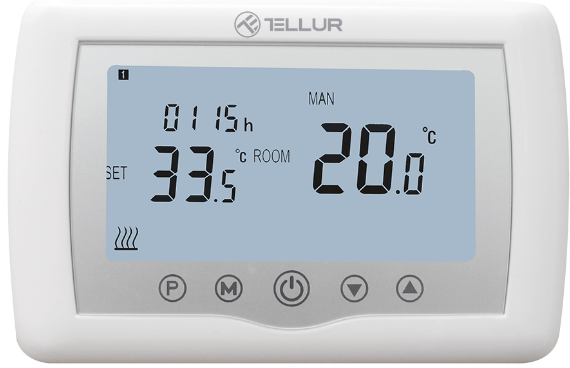
Product Diagram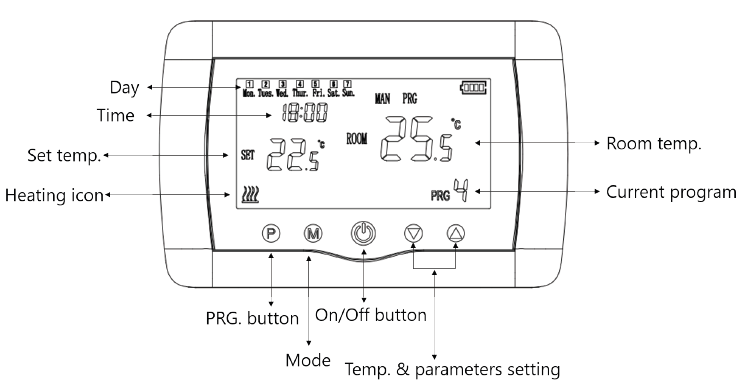
Wiring diagram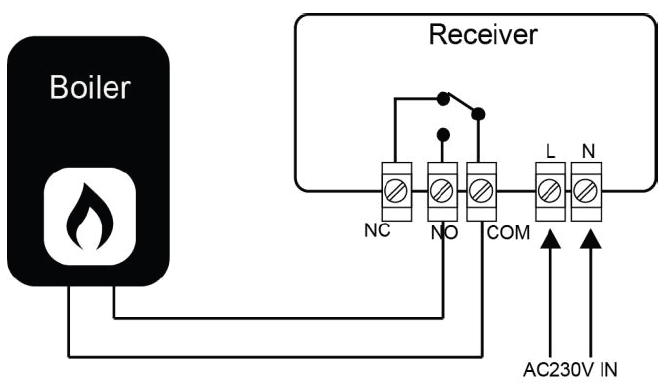
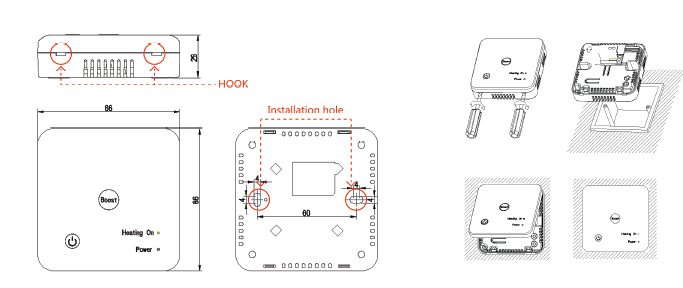
Dimensions and installation
Desk mounting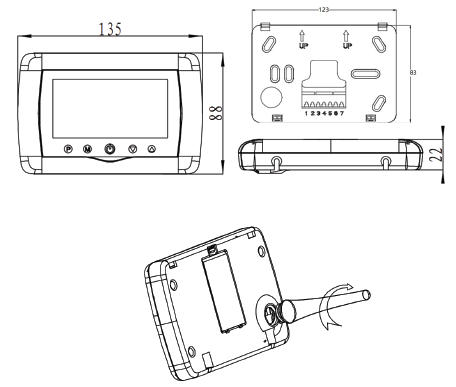
Wall mounting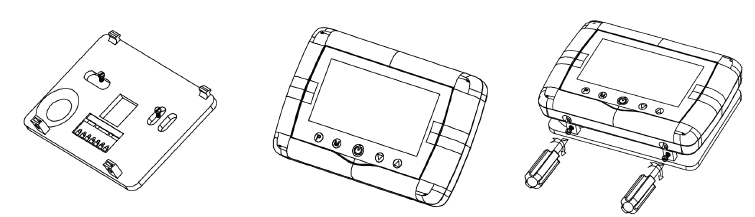
Receiver installation
LED State
|
Device Status |
LED State |
| EZ mode | Indicator flashes quickly |
| AP mode | Indicator flashes slowly |
| Triggered | LED indicator will rapidly blink, and it
will turn OFF after the scheduled time |
| Suspend mode | LED indicator is off |
|
Reset |
LED indicator lights up for 4 seconds; once the LED turns off, the device enters configuration mode. |
How to reset?
- Long press the pairing (reset) button for 6 seconds until the LED indicator is flashing rapidly. The device will enter EZ mode.
- Press the reset button again for 6 seconds until the LED indicator is flashing slowly. The device turns to AP mode
Product Features
Child Lock
When the Child Lock function is enabled (refer to menu 11 of parameter settings), the buttons will lock once the backlight turns off. Press the M button for 5 seconds to temporarily unlock the thermostat for adjustments. The function can be enabled/disabled from Tellur app.
Dead zone.
This function represent the minimum difference between the target temperature and current temperature to be achieved before the thermostat start or stop. Default value is set to 0° C ( programmable 0° C – 3° C )
Open Window Detection Function (OWD function)
When the Open Window Detection function is enabled in the parameter settings, the system will automatically stop heating when it detects a sudden drop of room temperature (2°C in 15 minutes as default). This is normally caused when a window or door is opened without turning off the heating device. The device will return to the previous working mode after 30mins and OP will disappear. Press any button to temporarily disable OWD function during the heating off period.
Mode selection
- Press the M button to select Auto ( PRG icon ) /Manual ( MAN icon )/Eco (no icon indicators).
- Auto – This mode is based on the settings made for each day, hour, working programs. It autodetects the required program and is operating the thermostat accordingly.
- Manual – This mode allows the user to define each setting freely.
- Eco – This mode allows for a preset setting to be saved and used for different occasions, activated by a simple change. ( for example, when the user is away and sets the thermostat to a lower temperature to conserve energy )
Time & day setting
Press and hold the M button for 3s and set the time and date (Min-Hour-Day) by using the  buttons. Each press of the M button will take you to the next setting item.
7-days programmable setting (4 programs per day)
After setting the time and date, press the P button to enter the program setting. You can set the start time and desired temperature for each program by using the buttons. Each press of the P button will take you to the next setting item.
Default setting
| Period | 1 | 2 | 3 | 4 | ||||
| 12345 (Mon.-Fri.) | Time
7:00 |
Temp
220C |
Time
8:30 |
Temp
190C |
Time
17:00 |
Temp
220C |
Time
22:00 |
Temp
190C |
| 6 (Sat.) | 8:00 | 220C | 8:30 | 220C | 17:00 | 220C | 22:00 | 190C |
| 7 (Sun.) | 8:00 | 220C | 8:30 | 220C | 17:00 | 220C | 22:00 | 190C |
Parameters setting
Turn the thermostat off, then press and hold the  button at the same time until menu 1 shows on display. Set the parameters by using the buttons. Each press of the M button will take you to the next setting item.
| 01 | Temperature calibration for internal sensor | -8 ℃ ~8 ℃ | 0℃ |
| 02 | Set point max. | 5 ℃ ~35℃ | 35 ℃ |
| 03 | Set point min. | 5 ℃ ~35℃ | 5 ℃ |
| 05 | Frost protection temperature | 5 ℃ ~15℃ | 5 ℃ |
| 09 | Dead zone | 0~3℃ | 0℃ |
| 11 | Child lock | 1: Enable 0: Disable | 0 |
| 12 | Open Window Detection function | On/OF(Off) | OF |
| 13 | OWD detection time | 2~30min | 15min |
| 14 | OWD temperature drop (within detection time) | 2~3~4℃ | 2℃ |
| 15 | OWD delay time
(return to previous working status) |
10~60min | 30min |
| 17 | Factory reset | 0: No | 0 |
| 1: Yes – Press the On/Off button for 5s
and wait until the thermostat restarts |
|||
| Software version |
Product installation
WARNING!
- Make sure to switch off the power supply before installing or maintaining the product!
- To avoid the risk of fire or electrical shock, please make sure you install the product following its electrical rating (AC220-240V).
- To avoid wiring damage or abrasion, do not expose the wire to edges of metal or other sharp objects
Pairing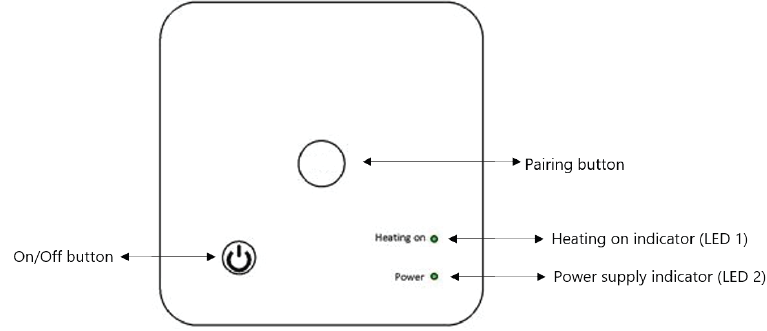
Pairing the receiver with the central unit (paired from factory)
- Long press the pairing button on the receiver until LED 1 is flashing quickly.
- Turn off the central unit and long press the M button until the code shows on the screen, then press the button.
- After a while, LED 1 will stop flashing, indicating successful code pairing
Pairing the receiver with Tellur Smart app
- Download and install the Tellur Smart app for either iOS or Android devices
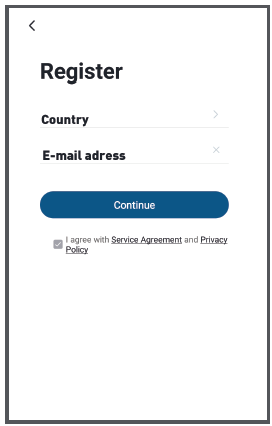
- Once downloaded, the app will ask you to register your device. Enter your email, select the country you live in and create a password for your Tellur Smart account.
- Turn on the receiver and make sure LED 1 is flashing quickly. If not, press and hold the pairing button on the receiver until LED 1 starts flashing quickly.
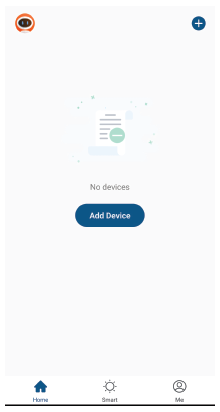
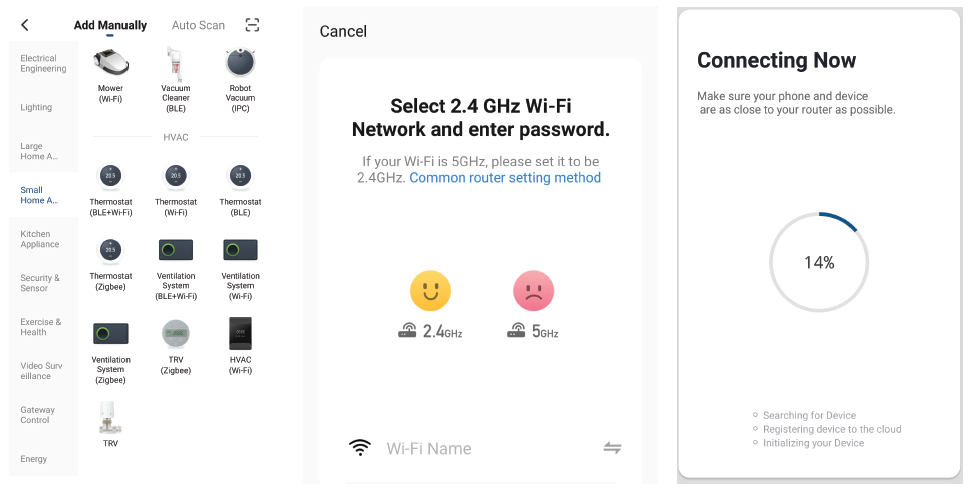
- Open Tellur Smart app, click “+” and select Thermostat from the list. Select your WiFi network and input the network’s password.
- Once Tellur Smart app is installed on your device and you have added your smart device to your app you will be able to control it.
Clear all pairings
Long press both pairing button and On/Off button for 5s until LED1 and LED2 flash once, which means the previous pairing is deleted. IV. Signal lost In case the RF and WiFi signal get disconnected, LED 1 will flash slowly
Failed to add a device?
- Make sure the device is powered on.
- Check the WiFi connection of your phone.
- Check if the device is in pairing mode. Reset your smart device to enter pairing mode. Please refer to the “How to reset device” section
- Check router or related:
- If you use a dual-band router, select the 2.4GHz network to add the device. You also need to enable the router’s broadcasting function. Set encryption method as WPA2-PSK and the authorization type as AES, or set both on “auto”.
- Check if the WiFi signal is strong enough.
- To maintain the signal strength, keep your router and the smart device as close as possible.
- Wireless mode should be 802.11.b/g/n
- Make sure you don’t exceed the maximum number of registered devices supported by the app (150).
- Check if the router’s MAC filtering function is enabled. If so, remove the device from the filter list and make sure the router is not prohibiting the device connection.
- Make sure the WiFi password entered in the app is correct.
EZ and AP connection modes:
Smart devices can be connected using two modes: EZ represents the easiest way of connecting and enabling a smart device. You will need to have the device, active wireless network through with login password and Tellur Smart APP installed on a smartphone/tablet. AP mode can be used to configure and enable a smart device first with the smartphone / tablet and later with the Wi-Fi network.
How to add device under EZ mode?
- Make sure the LED indicator/light flashes quickly.
- Make sure the phone is connected to WiFi.
- Tap “Add device” in Tellur Smart app and enter the WiFi’s network password.
- In the device list, select the device you want to pair and add it.
How to add a device under AP mode?
- Make sure the LED indicator/light flashes slowly.
- Tap “Add device” in Tellur Smart app and select “AP mode” from the top-right corner. Connect to the device’s hotspot first and then proceed to connect it to the WiFi network.
- Tap “Next” to add device.
Can I control the device with 2G/3G/4G network?
When adding the device for the first time, the device and the phone need to be connected to the same WiFi network. Once the device has been successfully paired with Tellur Smart app, you can remotely control it via 2G/3G/4G networks.
How can I share my device with my family?
Open the Tellur Smart app, go to “Profile” -> “Device sharing” -> “Sharing sent”, tap “Add sharing” and share the device with the added family members. Notice – users must install the Tellur Smart app on their device in order to see shared devices.
How can I manage the devices shared by others?
Open App, go to “Profile” > “Device Sharing” > “Sharings Received”, then you can find the devices shared by other users. To delete a shared device, swipe left.
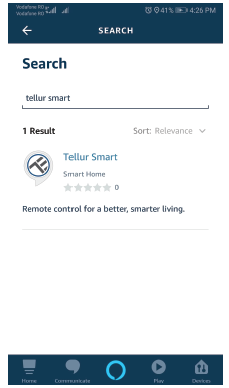
Alexa integration:
- Go to Home menu on Alexa app.
- Select “Skills” / “Skills & Games
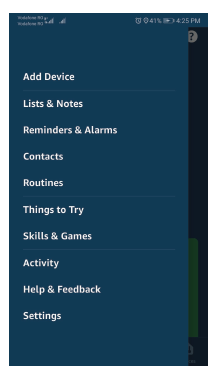
- Type Tellur Smart in the search bar.
Google Home integration
- Before using Google Home to control your devices, make sure you meet the following conditions:
- You have a Google Home device or an Android device with
Google Assistant.
- You have the newest version of Google Home app.
- You have the newest version of Google app (Android only).
- You have the Tellur Smart app and a related account.
- Add devices in Tellur Smart app (refer to app instructions) – you can skip this part if you’ve already added some devices to your Tellur Smart account. Make sure your devices’ names are easily recognizable
Link account in Home Control
- Go to Google Home’s homepage and tap “+”.
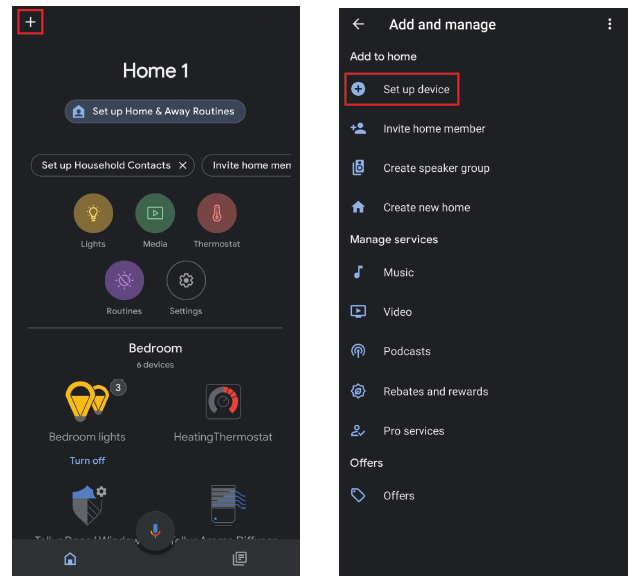
- Hit the “Add new” button, enter Tellur Smart in the search bar and select the app from the list. Next, select your Tellur Smart account’s region, enter your Tellur Smart account and password and tap “Link now”.
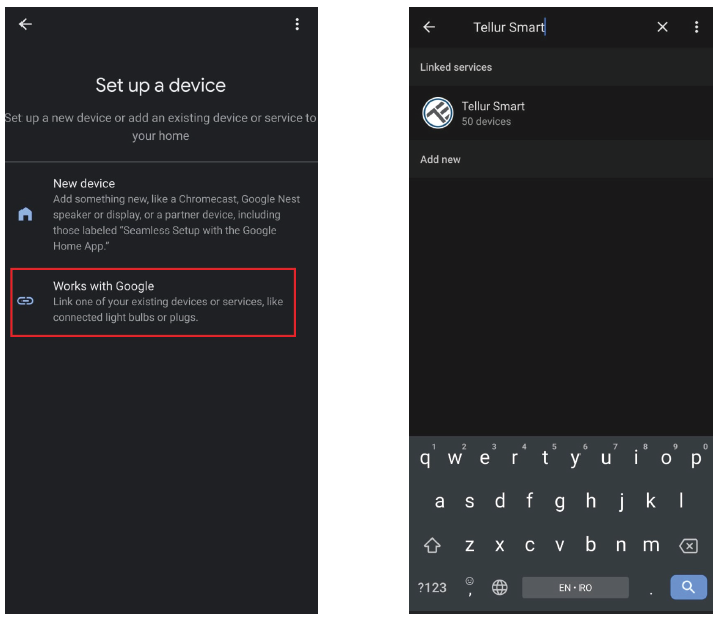
- After you assign rooms for devices, your devices will be listed in the Home Control page Now you can control your smart devices through Google Home.
Here are some examples of commands for Tellur Thermostat:
- ”Ok Google, raise the temperature for the thermostat by 2 degrees”
- “Ok Google, turn of the thermostat”
- “Ok Google, change the thermostat to Auto”
- “Ok Google, set the thermostat to 22 degrees”
DISPOSAL AND RECYCLING INFORMATION
The crossed-out wheeled bin symbol on your product, battery, literature or packaging reminds you that all electronic products and batteries must be taken to separate waste collection points at the end of their working lives; they must not be disposed of in the normal waste stream with household garbage. It is the responsibility of the user to dispose of the equipment using a designated collection point or service for separate recycling of electrical and electronic equipment waste (WEEE) and batteries according to local laws. Proper collection and recycling of your equipment helps ensure EEE waste is recycled in a manner that conserves valuable materials and protects human health and the environment. Improper handling, accidental breakage, damage, and/or improper recycling at the end of its life may be harmful for health and the environment
Declaration of conformity
We, ABN SYSTEMS INTERNATIONAL S.R.L., Bucharest, Sector 1, Marinarilor street, nr. 31, we declare on own responsibility that the product below:
- Product description: Tellur WiFi Thermostat, Boiler, white
- Brand: Tellur
- Product code: TLL331151
It does not endanger life, health, work safety, does not have a negative impact on the environment and corresponds to the standards stated in the manufacturer’s declaration of conformity. The product is in compliance with the following standards and / or other normative documents:
- RED – 2014/53/EU
- EN 301 489-1 V2.1.1 (2017)
- EN 301 489-3 V2.1.1 (2019)
- EN 300 220-1 V3.1.1 (2017)
- EN 300 220-2 V3.2.1 (2018)
- EN 62479:2010
- EN 62368-1:2014
- LVD – 2014/35/EU
- EN 60730-2-9:2010
- EN 60730-1:2011
- EMC – 2014/30/EU
- EN 61000-6-3:2007 + A1:2011
- EN 61000-3-2:2014
- EN 61000-3-3:2013
- EN 61000-6-1:2007
- RoHS – 2011/65/EU (RoHS 2.0)
REFERENCE:
DOWNLOAD MANUALS:
Tellur TLL331151 WiFi Thermostat User manual