sygonix 2353939 Digital Programmable Room Thermostat

Intended use
The heating thermostat is intended for temperature control in conjunction with an electric heater. To operate the product, it must be connected directly to the mains voltage. A consumer also operated via the mains power supply can then be connected to the product and switched on or off by regulating the temperature. It is equipped with an internal and external sensor (probe). The external sensor can be used to measure the temperature at a different location to the thermostat, such as on the floor with an electric floor heating system. Button lock can be activated to protect against incorrect operation and the product is equipped with memory storage to preserve data in case of power failure. The product has protection class IP20 and is suitable for dry rooms and indoor use only. Do not use it outdoors. Contact with moisture, e.g. in bathrooms, must be avoided under all circumstances. For safety and approval purposes, do not rebuild and/or modify this product. If you use the product for purposes other than those described above, the product may be damaged. In addition, improper use can result in short circuits, fires, electric shocks or other hazards. Read the instructions carefully and store them in a safe place. Always provide these operating instructions when passing the product on to a third party. This product complies with the statutory national and European requirements. All company and product names contained herein are trademarks of their respective owners. All rights reserved.
Delivery content
- Thermostat
- 2x screws
- External sensor
- Operating instructions
Up-to-date operating instructions
Download the latest operating instructions at www.conrad.com/downloads or scan the QR code shown. Follow the instructions on the website.
Description of symbols
- The symbol with the lightning in a triangle indicates that there is a risk to your health, e.g. due to an electric shock.
- The symbol with an exclamation mark in a triangle is used to highlight important information in these operating instructions. Always read this information carefully.
- The arrow symbol indicates special information and tips on how to use the product.
- This product must only be used in dry, enclosed indoor areas. The product must not become damp or wet. Risk of life-threatening electric shock!
Safety information
Read the operating instructions and safety information carefully. If you do not follow the safety information and information on proper handling in these operating instructions, we will assume no liability for any resulting personal injury or damage to property. Such cases will invalidate the warranty/ guarantee.
General information
- The device is not a toy. Keep it out of the reach of children and pets.
- Do not leave packaging material lying around carelessly. It may become a dangerous plaything for children.
- Handle the product carefully. Jolts, impacts or a fall even from a low height may damage the product.
- Protect the product from extreme temperatures, direct sunlight, strong jolts, high humidity, moisture, flammable gases, vapours and solvents.
- Never expose the product to mechanical stress.
- If it is no longer possible to operate the product safely, stop using it and prevent unauthorised use. Safe operation can no longer be guaranteed if the product:
- is visibly damaged,
- is no longer working properly,
- has been stored for extended periods in poor ambient conditions or
- has been subjected to any serious transport-related stress.
- Consult a technician if you are not sure how to use or connect the product, or if you have concerns about safety
- Maintenance, modifications and repairs must be carried out by a technician or a specialist repair centre.
- If you have questions which remain unanswered by these operating instructions, contact our technical support service or other technical personnel.
Installation/connection
The product should only be installed by people with relevant electrical knowledge and experience! *) If it is not installed properly, you risk:
- your own life
- the life of user of the electrical device
- If it is not installed properly, you risk severe damage to property, e.g. by fire. You face the risk of personal liability for personal injury and material damage.
- Always consult an electrician!
Technical knowledge required to perform the installation:
- The following specialist knowledge is required for installation in particular:
- The ‘Five safety rules’: Disconnect from the mains; secure against reactivation; ensure dead; earth and short-circuit; cover or protect adjacent live parts
- Use of suitable tools, measuring devices and personal protective equipment, where necessary
- Analysis of measurement results
- Use of electrical installation materials to meet the requirements for disconnection
- IP protection classes
- Installation of electrical installation materials
- Type of power supply (TN system, IT system, TT system) and the corresponding connection criteria (classic earthing, protective earthing, requisite additional measures etc.)
- If you are not a professional, do not do it yourself, always have it carried out by a specialist.
Further warnings:
- The design of the product corresponds to protection class II (double or reinforced isolation). Ensure that the insulation of the housing is neither damaged nor destroyed.
- During installation, all poles must be disconnected from the mains voltage, e.g. via a RCD. There must be an appropriately dimensioned fuse or circuit breaker between the RCD and the product.
- The device must be dead during installation and connection. Furthermore, turn off the automatic circuit breaker and the RCD to disconnect all poles from the mains voltage. Secure it against unauthorized reconnection, e.g. with a warning sign. Check to make sure there is no voltage with a suitable measuring instrument (e.g. a digital multimeter).
- Never connect the product to the power supply immediately after it has been transferred from a cold environment into a warm environment (e.g. during transport). The condensation that forms might destroy the device. Moreover, there is risk of electric shock!
- Allow the product to reach room temperature. Wait until the condensation has evaporated. In some cases, this may take several hours. Only once the condensation has evaporated should it be installed, connected to the power supply and put into use.
Protection class
- The product or its housing has protection class IP20 and is suitable for operation in dry rooms and indoor use only.
- There is no protection against water, combustible gases or vapours.
Product Description
- Holiday mode
- Heating mode
- Automatic mode
- Target temperature setting
- Measured temperature Air = internal sensor, Floor = external sensor
- Time
- Button lock
- Time button
- Mode button
- On/off button
- Up arrow button
- Down arrow button
- Day of the week
- Program
- Manual mode

Connections and fasteners
- Front panel mount
- Holes for fastening screws
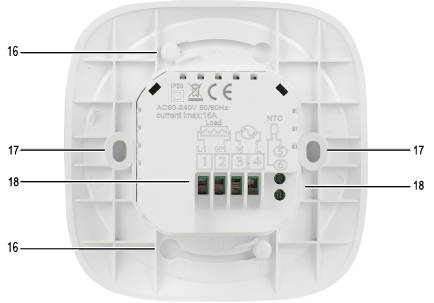
Installation
- To remove the front panel, hold the rear panel of the thermostat and turn the front panel anti-clockwise. The two parts are connected by cables.
- There are six connection terminals (18) on the rear of the room thermostat: These are used for connection of:
- The main power supply
- The electrical load (consumer)
- The external temperature sensor
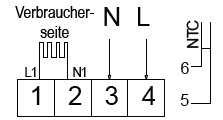
- Connect the neutral wire and phase of the power supply to inputs 3 and 4.
- Connect the consumer (e.g. an electric radiator or electric floor heating) to the corresponding outputs 1 and 2.
Operation
Power on/off
To switch the thermostat on or off, proceed as follows:
- Press the on/off button (10) to switch the thermostat on or off.
- When the thermostat is switched off, the display goes out and no temperature control takes place.
Activating/deactivating button lock
Button lock (child lock) prevents settings from being changed by accidental touch. To activate and deactivate button lock, proceed as follows:
- To activate button lock, press and hold the down arrow button (12). The button lock symbol (7) appears on the display and the buttons are locked.
- To deactivate button lock, press and hold the down arrow button (12) again. The button lock symbol (7) disappears from the display and the buttons are released again.
Depending on the settings set in ‘System settings’ → ‘A5’, two child locks are possible:
- 0 = All buttons except the on/off button are locked.
- 1 = All buttons are locked.
Setting the date and time
To set the date and time, proceed as follows:
- Briefly press the time button (8). The minute indicator starts to flash.
- Use the arrow buttons (11, 12) to adjust the value.
- Confirm your entry by briefly pressing the time button (8) again.
- After confirming the minute value, the hour indicator starts to flash.
- Use the arrow buttons (11, 12) to adjust the value.
- Confirm your entry by briefly pressing the time button (8) again.
- After confirming the hour value, the day of the week indicator (13) starts to flash.
- Use the arrow buttons (11, 12) to adjust the value (1 = Monday – 7 = Sunday).
- Confirm your entry by briefly pressing the time button (8) again.
- The settings are saved and the thermostat returns to normal operation.
Switching the temperature indicator
If an external sensor is connected, you can switch the temperature display (5) between the internal sensor (‘Air’) and the external sensor (‘Floor’). Proceed as follows:
- Press and hold the down arrow button (12).
- Press and hold the down arrow button (12) again to switch the display back.
Switching between automatic and manual mode
To switch between automatic and manual mode, proceed as follows:
- Briefly press the mode button (9).
- Automatic mode: The symbol for manual mode (15) is displayed. The temperature settings are based the active program preset.
- Manual mode: The symbol for manual mode (15) appears on the display. The temperature can be set manually with the arrow buttons (11, 12).
Manually overriding automatic mode
To temporarily change the temperature set for automatic mode, proceed as follows:
- Adjust the set target temperature with the arrow buttons (11, 12) . Both the automatic mode (3) and manual mode (15) symbols appear on the display.
- The manual override remains active until the automatic mode setting reaches the next time interval. This means:
- The manual override is deactivated and the thermostat returns to automatic mode.
- The symbol for manual mode (15) is displayed.
Activating/deactivating holiday mode
Use holiday mode to set a time and temperature for the days you will be away.
To activate holiday mode, proceed as follows:
- Press and hold the time button (8) for five seconds until the holiday symbol (1) appears on the display.
- Select holiday mode.
- Use the arrow buttons (11, 12) to select ‘ON’.
- Confirm your entry by briefly pressing the time button (8).
- Set the number of days you will be away between 1 and 30.
- Apply the value with the arrow buttons (11, 12).
- Confirm your entry by briefly pressing the time button (8).
- Set the desired temperature.
- Apply the value with the arrow buttons (11, 12).
- Confirm your entry by briefly pressing the time button (8).
- The holiday symbol (1) continues to appear on the display to indicate that holiday mode is active.
- After the set duration has elapsed, holiday mode switches off automatically. To deactivate holiday mode, proceed as follows:
- Briefly press the mode button (9) to deactivate holiday mode. The thermostat then returns to manual or automatic mode.
Programming a weekly schedule
Overview
- You can set your own temperature setting for six different time periods per day. A symbol indicates which time period is active.
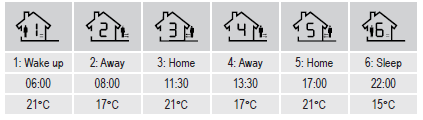
For example:
Setting the weekly cycle
For the weekly schedule, you can choose between different weekly cycles (number of weekdays + weekend). To set the weekly cycle, proceed as follows:
- If the thermostat is switched on: Press the on/off button (10) to switch the thermostat off.
- Press and hold the mode button (9) for three to five seconds. The settings menu opens.
- Briefly press the mode button (9) several times until the setting ‘AC’ is displayed.
- Use the arrow buttons (11, 12) to select the desired weekly cycle.
- 0 = 5 days identical + 2 days identical (enabled by default)
- 1 = 6 days identical + 1 day individual
- 2 = 7 days identical
- Press the on/off button (10) to save the setting and exit the setting menu.
- Settings are also be saved if no buttons are pressed for approx. ten seconds.
Programming a schedule
- To program the different time periods, proceed as follows:
- If the thermostat is switched off: Press the on/off button (10) to switch the thermostat on.
- Press and hold the mode button (9) for three to five seconds. Programming mode opens and the symbol for the first time period ‘1: Wake up’ and the time start to flash.
- Use the arrow buttons (11, 12) to adjust the value.
- Confirm your entry by briefly pressing the mode button (9).
- After confirming the time, the temperature starts to flash.
- Use the arrow buttons (11, 12) to adjust the value.
- Confirm your entry by briefly pressing the mode button (9).
- After confirming the temperature, the symbol for the next time period starts to flash.
- Repeat the procedure for all six time periods.
- Wait approx. ten seconds without pressing any buttons to save the settings.
- To activate or deactivate the programmed schedule, briefly press the mode button 9), see also section “e) Switching between automatic and manual mode”.
System settings
Adjusting system settings may cause your thermostat to behave unexpectedly. Read all instructions carefully before adjusting any settings. To open the settings menu and make changes, proceed as follows:
- If the thermostat is switched on: Press the on/off button (10) to switch the thermostat off.
- Press and hold the mode button (9) for three to five seconds. The settings menu opens.
- To go to the next setting, press the mode button (9).
- To change the setting, select the desired value with the arrow buttons (11, 12).
- Press the on/off button (10) to save the settings and exit the setting menu.
- Settings are also be saved if no buttons are pressed for approx. ten seconds.
| Code | Descriptions | Settings | Default value |
| A1 | Temperature calibration | Setting range:
-9 to +9 °C |
-1 °C |
| A2 | Switching differential (hysteresis) | Setting range:
0.5 to 2.5 °C Example: For a setting of 1 °C and the thermostat temperature set to 20 °C, the thermostat will switch heating on at 19 °C and off at 21 °C. |
1 °C |
| A3 | High temperature protection/difference setting (external sensor) | Setting range: 1 to 9 °C
Example: The limit value ‘A6’ is set to +45 °C and ‘A3’ to 2 °C. If a temperature of +45 °C is reached, heating mode is interrupted. If the temperature drops to +43 °C, heating mode is resumed. This only works if the indoor temperature is lower than the target temperature. |
2 °C |
| A4 | Sensor selection | N1 = The internal sensor controls the temperature.
N2 = The external sensor controls the temperature. N3 = The internal sensor controls the temperature. If N3 is activated, the external sensor is used as the temperature limiting sensor. With all of the settings above, if the maximum temperature is reached, heating mode is interrupted. |
N1 |
| A5 | Button lock | 0 = All buttons except on/off are locked
1 = All buttons are locked |
0 |
| A6 | High temperature protection | If the temperature measured by the sensor rises above the value set here, heating mode is stopped automatically (e.g. serves as
overheating protection for underfloor heating). Setting range: +20 to +70 °C To deactivate this function, press and hold the down arrow button (12) until ‘–’ appears on the display. |
+45 °C |
| A7 | Low temperature protection | If the temperature measured by the sensor drops below the value set here, heating mode is activated automatically (e.g. serves as frost protection).
Setting range: +1 to +10 °C To deactivate this function, press and hold the up arrow button (11) until ‘–’ appears on the display. |
+5 °C |
| A8 | Minimum temperature | Sets the lowest selectable temperature value.
Setting range: +1 to +10 °C |
5°C |
| A9 | Maximum temperature | Sets the highest selectable temperature value.
Setting range: +20 to +70 °C |
+35 °C |
| AA | Descaling | 0 = closed
1 = open |
0 |
| Code | Descriptions | Settings | Default value |
| AB | Behaviour after power failure | 0 = Return to previous function 1 = Switch off
2 = Switch on |
0 |
| AC | Weekly cycle setting | 0 = 5 days identical + 2 days identical
(Mo – Fr + Sa – Su) 1 = 6 days identical + 1 day individual (Mo – Sa + Su) 2 = 7 days identical (Mo – Su) The correct day of the week must be set for the program to recognise the start of the weekend. For further information, see “c) Setting the date and time”. |
0 |
| AD | Restore all settings to factory defaults. | Press and hold the time button (8) for three to five seconds until all elements on the display light up at the same time. All system settings are reset to the factory defaults. |
Error codes
If the internal or external sensor is faulty, the display shows a corresponding error code and the thermostat switches heating on until the fault is rectified
| Code | Descriptions | Suggestion |
| E1 | Internal sensor error | Switch the thermostat off and contact technical support service or other technical personnel. |
| E2 | External sensor error | Check the external sensor connection.
Switch the thermostat off and contact technical support service or other technical personnel. |
Care and cleaning
- Do not use any aggressive cleaning agents, rubbing alcohol or other chemical solutions, as these may damage the housing or impair the functioning of the device.
- Use a dry, lint-free cloth to clean the front panel.
- To prevent scratch marks, do not press too strongly on the surface when cleaning.
- Activate button lock when wiping the front panel. Accidentally pressing the buttons can cause unintended settings.
Disposal
Electronic devices are recyclable waste and must not be placed in household waste. At the end of its service life, dispose of the product according to the relevant statutory regulations. Remove any inserted batteries and dispose of them separately from the product. You thus fulfil your statutory obligations and contribute to environmental protection.
Specifications
- Input voltage…………………………………..90 – 240 V/AC, 50/60 Hz
- Max. switching capacity……………………3000 W (ohmic load)
- 2000 W (inductive load)
- Contact load …………………………………..16 A, 250 V
- Adjustable standard range………………..+5 to +35 °C
- Temperature display ………………………..0 to +40 °C
- Display precision …………………………….0.5 ºC
- Sensor …………………………………………..1x internal, 1x external
- External sensor……………………………….NTC (10 k) 1 %
- Protection class ………………………………IP20
- Operating conditions………………………..+1 to +70 ºC, <85 % relative humidity
- Storage conditions…………………………..+1 to +70 ºC, <85 % relative humidity
- Dimensions (W x H x D) …………………..94 x 94 x 41.3 mm
- Display size ……………………………………Ø 52 mm
- Length of sensor cable …………………….2.5 m
- Weight …………………………………………..139 g
REFERENCE:
DOWNLOAD MANUALS:
sygonix 2353939 Digital Programmable Room Thermostat Operating Instructions

sygonix 2353939 Digital Programmable Room Thermostat Operating Instructions