sygonix 2250410 WiFi Thermostat

Introduction
The connected device works through a Wi-Fi network together with the “Smart Life – Smart Living” app. This mobile app allows you to control, manage, and receive alerts on devices connected to your network.
General Information
Legal Notice
This is a publication by Conrad Electronic SE, Klaus-Conrad-Str. 1, D-92240 Hirschau (www.conrad.com). All rights including translation reserved. Reproduction by any method, e.g. photocopy, microfilming, or the capture in electronic data processing systems require the prior written approval by the editor. Reprinting, also in part, is prohibited. This publication represents the technical status at the time of printing. Copyright 2021 by Conrad Electronic SE.
Security It is strongly recommended that you set up your Wi-Fi Router/Wi-Fi Access Point (AP) to use the most secure encryption option it supports
App to Device Connection
- To add a new device to the app, the mobile device that runs the app and the smart device must be connected to the same Wi- Fi network.
- You can control the smart device through the app via Wi-Fi or using mobile device data
Safety
- Remind yourself of the possible dangers the device you intend to connect can pose to your environment.
- Read the instruction manual that came with the product you are going to connect to the smart device to find out
- if it is suitable to be operated without attendance.
- If it is not, then do not use it in conjuction with timer and schedules.
- A heater can cause fire if left unattended!
- A kettle that contains no water may cause fire!
- A coffee maker may overheat if not turned off on time and cause fire!
Getting Started
First time users should follow these steps:
- Download and Install the App.
- Create a User Account.
- Log In.
- Add Device.
Download and Install the App
App Installation
- Apps are available for Android and iOS mobile devices.
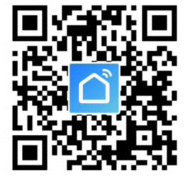
- Visit the respective app store and search for “Smart Life – Smart
- Living”, or scan the QR code shown here.
User Account
Your account settings are stored in the cloud.
Create a User Account
A user account is required for you to operate the device.
- Select Register to create an account.
- Log In.
- You will then be taken to the “Home Page”.
Home Page
The home page lists all devices that are under your account’s control. When you log in for the first time, the device list will be blank
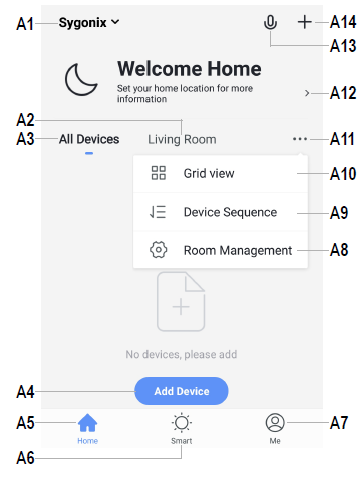
- Access to “Home Management” settings, where you can name a home, set the home location on a map, and assign/add new devices to each room.
- Enter a room to view or add devices.
- View all devices at once.
- Adds a new device; identical with A14
- Return to “Home Page” view
- Access “Tap-to-Run” and “Automation”.
- Access your profile and settings.
- Manage your rooms and assigned devices.
- Remove one or all devices.
- Switch between list and grid view,
- Access submenus, see items A8, A9 and A10
- Displays location information such as current temperature, humidity, air pressure and wind speed.
- Voice control.
- Adds a new device; identical with A4
Add Device
- Connect your mobile device to a Wi-Fi network.
- Add a device by selecting Add Device or the icon.
- Select Small Home Appliances → Thermostat.
- Follow the onscreen instructions to complete the setup process.
Overview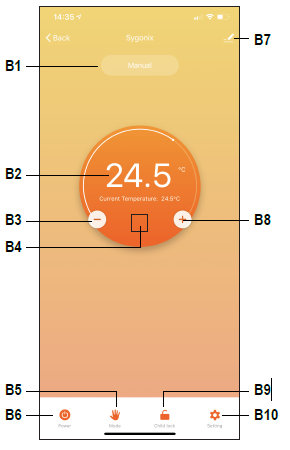
- Active mode
- Current temperature
- Decrease temperature
- Flame icon
 shows when heating has been triggered.
 - Mode Select: Manual, Program, Holiday
- Power ON/OFF
- App settings
- Increase temperature
- Keypad lock ON/OFF
- Thermostat settings
App settings
Change Device Name
- From the “overview” screen select > .
- Enter a new device name.
Device Sharing
- To share access to a device e.g. with a family member:
- From the “Overview” screen select >
Share Device.
Follow the onscreen instructions.
Remove Device
- From the “Overview” screen select >
- Remove Device.
Offline Notification
- Receive a notification if your device goes offline.
- From the “Overview” screen select > Offline Notification > toggle on/off.
Create Groups
- Devices under the same group can be controlled all at once.
- From the “Overview” screen select > Create Group.
- Follow the onscreen instructions.
Push Notifications
- From the “Home Page” view select Me > Settings > App Notification.
- Set your notification settings as required.
FAQ
Visit a list of frequently asked questions here: From the “Overview” screen select > FAQ & Feedback.
Device settings
- Application device settings are the same as the ones that can be adjusted directly on the thermostat.
- The table shows application settings alongside equivalent thermostat settings.
- Refer to the hardware manual for further information about each setting
| Application | Thermostat |
| Temperature Setting | BN |
| Temperature Calibration | A1 |
| HighTemp Protection | AA |
| LowTemp Protection | A9 |
| Int Sensor Deadzone | A2 |
| Ext Sensor Deadzone | |
| Device State On Power | A4 |
| Max Temperature Limit | A8 |
| Min. Temperature Limit | A7 |
| Program Type | A6 |
|
Weekly program setting |
Weekly schedule program |
Troubleshooting
- The app cannot connect to the device This may be due to a weak Wi-Fi signal or an interrupted connection.
- Check that your internet connection is working correctly. Check cables, routers and connections. Restart network devices if necessary.
- Check that the device is within range of your Wi-Fi access point. Use of other 2.4 GHz products e.g. wireless networks and microwave ovens may cause interference.
- You may need to set up a wireless repeater to improve the connection.
- If the device is battery-powered, it may need to have the batteries replaced
REFERENCE:
DOWNLOAD MANUALS:
sygonix 2250410 WiFi Thermostat Instruction Manual
OTHER MANUALS:
sygonix 2250410 WiFi Thermostat Operating Instructions