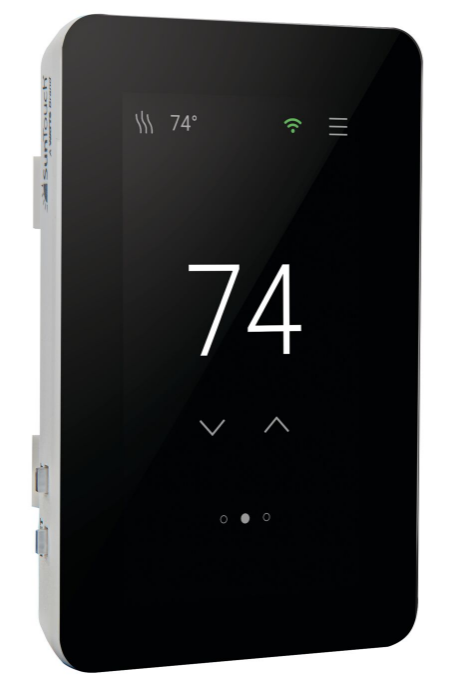
SunStat 113901 ConnectPlus Wi-Fi Programmable Touchscreen Thermostat
Features
- Floor or air-sensing temperature control
- Remote access via Watts Home mobile app
- Compatible with Voice commands
- Large touchscreen display
- Easy-to-use scheduling
- Weather/Clock display options
- Portrait/Landscape display
- Guided setup
- Comprehensive help screens
- Energy use monitoring
- Overcurrent and Voltage-level sensing
- Floor Sensor Included
- Wired or Wireless connection to SunStat® R4 Relay (sold separately)
- Wireless connection to ConnectPlus™ Smart Sensor (sold separately)
- 3 Year warranty
Model# 1139-01, 1139-02, 1139-03, 1139-04: SunTouch Model# 500900-SB/BB/WB/PB
Specifications
- Power supply 120/240 VAC, 60 Hz, 3 W
- Maximum load 15 A, resistive
- Maximum power 1800 W at 120 VAC, 3600 W at 240 VAC
- GFCI Class A (5 mA trip)
- Dimensions 4.73″ H x 3.11″ W x 1.9″ D (120 x 79 x 48 mm) 0.620″ D (16 mm) from wall
- Approvals UL 943, UL/CSA 60730, UL 991
- Ambient conditions 32°F to 86°F (0°C to 30°C), < 90% RH non-condensing
- Floor Sensor Thermistor, 10kΩ NTC type, 300 V jacketed cable, 15 ft
WARNING
Read this manual BEFORE using this equipment.
Failure to read and follow all safety and use information can result in death, serious personal injury, property damage, or damage to the equipment.
Keep this manual for future reference.
The antenna used for this radio must be properly installed and maintained and must provide a separation distance of at least 7.9 inches (20 cm) from all persons.
FCC STATEMENT
This device complies with Part 15 of the FCC Rules and with Industry Canada license-exempt RSS standard(s). Operation is subject to the following two conditions: (1) this device may not cause harmful interference, and (2) this device must accept any interference received, including interference that may cause undesired operation. Changes or modifications not expressly approved by the party responsible for compliance could void the user’s authority to operate the equipment. This equipment has been tested and found to comply with the limits for a Class B digital device, pursuant to Part 15 of the FCC Rules. These limits are designed to provide reasonable protection against harmful interference in a residential installation. This equipment generates uses and can radiate radio frequency energy and, if not installed and used in accordance with the instructions, may cause harmful interference to radio communications. However, there is no guarantee that interference will not occur in a particular installation. If this equipment does cause harmful interference to radio or television reception, which can be determined by turning the equipment off and on, the user is encouraged to try to correct the interference by one of the following measures:
- Reorient or relocate the receiving antenna.
- Increase the separation between the equipment and the receiver.
- Consult the dealer or an experienced radio/TV technician for help.
- Connect the equipment to an outlet on a circuit different from that to which the receiver is connected.
Box Contents
- SunStat® ConnectPlus Wi-Fi thermostat
- Floor sensor
- Screwdriver
- Installation manual
- Machine screws (2), 6-32
Items Needed
- Electrical box (must be UL listed and proper size)
- Portrait: vertical 1-gang box
- Landscape: square 2-gang box/plastic 1-gang mud ring
- Conduit, flexible or rigid (if required, must be UL listed and proper size)
- Electrical wiring cable (UL listed)
- Minimum 14 AWG to 12 A
- 12 AWG to 15 A
- Nail plate
- Hot glue gun and hot glue
Location
- Indoor location only
- Do not install where there is a draft, direct sun, hot-water piping, ducting, or other cause for inaccurate temperature readings
- Do not install where there is electrical interference from equipment, appliances, or other sources
- Install away from all water sources such as sinks and at least 4 ft (1.2 m) away from showers and bathtubs
- Consider easy access for wiring, viewing, and adjusting
- Install at a suitable height, normally about 4-1/2 ft to 5 ft (1.4 m to 1.5 m) from the floor
Important Safety Information
This is a safety alert symbol. The safety-alert symbol is shown alone or used with a signal word (DANGER, WARNING, or CAUTION), a pictorial and/or a safety message to identify hazards.
When you see this symbol alone or with a signal word on your equipment or in this manual, be alert to the potential for death or serious personal injury.
This pictorial alerts you to electricity, electrocution, and shock hazards.
WARNING
This symbol identifies hazards that, if not avoided, could result in death or serious injury.
NOTICE
This symbol identifies practices, actions, or failure to act, which could result in property damage or damage to the equipment.
Installation
WARNING
Installation must be performed by qualified persons, in accordance with local codes, ANSI/NFPA 70 (NEC Article 424) and CEC Part 1 Section 62 where applicable. Prior to installation, please consult the local codes in order to understand what is acceptable. To the extent this information is not consistent with local codes, the local codes should be followed. Regardless, electrical wiring is required from a circuit breaker or other electrical circuit to the control. It is recommended that an electrician perform these installation steps. Please be aware local codes may require this product to be installed by an electrician.
The following cautions must be observed:
ALWAYS install the floor sensor included with the thermostat.
NEVER put the system into full operation until the tile or flooring installer verifies all cement materials are fully cured (typically two to four weeks after installation).
ALWAYS use insulated copper wires rated for 90°C (194°F) and 600 V minimum. Do not use aluminum.
ALWAYS wire all circuits as Class 1, electric light & power circuits.
ALWAYS mount the thermostat to a grounded electrical box.
ALWAYS seek help if a problem arises. If ever in doubt about the correct installation procedure, or if the product appears to be damaged, the factory must be contacted before proceeding with the installation.
WARNING
To prevent the risk of personal injury and/or death, make sure power is not applied to the product until it is fully installed and ready for final testing. All work must be done with the power turned off to the circuit being worked on.
To reduce the risk of electric shock, do not connect to a circuit operating at more than 150 V to the ground.
Power Supply
Pull power supply wiring to the control location.
- Leave about 6 to 8″ (15 to 20 cm) of wire for connections.
- This wiring should be size 12 or 14 AWG, in compliance with local code requirements.
- A qualified person should run a dedicated circuit from the main circuit breaker panel to the control location. If a dedicated circuit is not possible, it is acceptable to tap into an existing circuit. However, there must be enough capacity to handle the load (amps) of the floor heating system being installed, and any appliance likely to be used on the circuit such as a hair dryer or vacuum cleaner.
- Avoid circuits that have ballasted lighting, motors, exhaust fans, or hot tub pumps to reduce the likelihood of interference.
- The circuit breaker should be rated 20 amps for total circuit loads up to 15 amps. A 15-amp circuit breaker may be used for total circuit loads up to 12 amps.
- A GFCI (ground-fault circuit interrupter) or AFCI (arc-fault circuit interrupter) type circuit breaker may be used, but is not necessary.
WARNING
Make sure 120 VAC is supplied to 120 VAC cables and 240 VAC is supplied to 240 VAC mat or wire. Otherwise, dangerous overheating and a fire hazard could result. Do not exceed 15-amps on this control.
Bottom Plate Work
- Drill or chisel holes at the bottom plate as indicated. One hole is for routing the power lead conduit and the other is for the thermostat sensor. These holes should be directly below the electrical box(es).

SunStat Sensor Installation
- The SunStat sensor can be installed with or without electrical conduit depending on code requirements. Conduit is recommended for added protection against nails and screws.
- Do not place the sensor in the same conduit as the power leads to avoid possible interference. Open a separate knock-out in the bottom of the thermostat box. Feed the sensor (and conduit, if used) through the knock-out, down through the cut-out in the bottom plate, and out into the floor where the heating cable will be installed.
- If the sensor wire needs to be secured to the wall stud, wait until after the wire or mat and sensor are completely installed on the floor.
- At the sensor location, measure at least 1′ into the heated area. Mark the spot where the sensor will be attached to the floor. Be sure to place the sensor exactly between two of the heating wires. Ensure the sensor wire does not cross over any heating wires.
- Do not locate the sensor outside the heating area or in a gap between heating wires that is wider than the rest of the floor. Do not locate the sensor where direct sun, hot-water piping, heat duct, or lighting below will cause inaccurate temperature reading. Do not locate the sensor where an insulating item such as a rug is likely to be placed.
- To make sure the sensor tip does not create a high spot in the floor, it may be necessary to chisel a channel into the floor and lay the sensor tip into the channel. Hot glue the tip into place.
- Do not cut the sensor wire or remove the black cable protector. Strip the wire ends to 1⁄8″ long.

Floor Heating Mat or Cable Power Lead Installation
- The shielded power lead can be installed with or without an electrical conduit (recommended for added protection against nails or screws), depending on code requirements.
- Remove one of the knock-outs in the electrical box to route the power lead. If electrical conduit is not required by code, install a wire collar to secure the power leads where they enter the box. If conduit is required by code, install 1⁄2″ (minimum) conduit from the bottom plate up to the electrical box. For multiple power leads (multiple cables), install 3⁄4″ conduit.
- Secure a steel nail plate over the cutout in the bottom plate to protect the wires against baseboard nails later.
SunStat Relay Rough-in Wiring
SunStat® R4 Relays are used when more than 15 A must be controlled by one ConnectPlus thermostat. The ConnectPlus can connect wirelessly to the R4 Relay (see Operation > Wireless Pairing). If a wired connection is desired, follow these steps.
- Pull 18 AWG to 24 AWG 2-conductor wire from the R4 Relay location to the ConnectPlus location
- The wire may be up to 100 ft (30 m) long
- Strip the wire ends to 1⁄8″ long
- Refer to the R4 Relay manual for additional details
Home Automation System Rough-in Wiring
A short or 24 VAC applied between the AWAY and COM terminals will switch the thermostat into ‘Away’ mode.
- Pull 18 AWG to 24 AWG 2-conductor wire from the home automation location to the ConnectPlus location
- Strip the wire ends to 1⁄8″ long
Second Stage Rough-in Wiring
The ConnectPlus provides a dry contact output, rated at 30 VAC, 1 A, for second-stage heat to be activated when the room temperature dwells below the setpoint. Room control mode only.
- Pull 18 AWG to 24 AWG 2-conductor wire from the second stage control location to the ConnectPlus location
- Strip the wire ends to 1⁄8″ long
ConnectPlus Wiring
Before connecting the wires to the back of the thermostat, detach the display front from the base.
While holding the base section in one hand, with the other pull gently up holding the sides of the thermostat towards the bottom (near RESET button), pivoting away from the base.
Power Wiring
- Connect the ground wire from the power supply to the ground wire from the floor heating power lead
- If the electrical box is metal, use a short length of wire to connect the ground wires to the bonding screw
- Connect the floor heating power lead conductors to the LOAD 1 and LOAD 2 terminals
- For 120 VAC connections, connect the power supply black (L) wire to the L terminal and the white (N) wire to the N terminal
- For 240 VAC connections, connect one of the power supply wires to the L1 terminal and the other to the L2 terminal

Low Voltage Wiring
Sensor, R4 Relay, Home Automation, and Second Stage connections are made to the terminal block by inserting the wires into the openings and tightening the screws. Three holes are provided for wire access from the back. Wires must be routed in the channel to the right of the terminal block so that the display front can be re-attached. Any low-voltage wiring that passes through the inside of the electrical box must be rated at least 90°C 300 V.
- Sensor—connect to the SENSOR terminals, not polarity sensitive
- R4 Relay—connect to RELAY and COM terminals, matching connections on the R4 Relay
- Home Automation—connect to AWAY and COM terminals, refer to home automation control instructions
- Second Stage—connect to W2 terminals, refer to the second stage control instructions
WARNING
Make sure the wire connections are secure by gently tugging on them. Otherwise, arcing could occur, causing dangerous overheating and a possible fire hazard.
Finish ConnectPlus Installation
- Ensure all connections are secure
- Carefully press the wires into the electrical box
- Do not use the thermostat to push the wires
- Secure the thermostat base to the electrical box with the screws included
- Do not overtighten
- Re-attach the display front
- Line up the top edge with the base
- Rotate the bottom towards the base and snap it into position
NOTICE
Make sure the mortar has had time to fully cure before operating the system for more than a brief test.
Touchscreen Operation


Operation
Power Up
- Switch on the circuit power supply at the breaker
- The ConnectPlus will load stored settings into the memory
Heating Operation
By default, the ConnectPlus controls the heating system to maintain the floor temperature at the setpoint of 85°F (29°C). Room temperature control can be selected in the Temperature Settings. Floor and Room maximum settings are also available to limit temperatures.
GFCI Testing and GFCI Light Operation
- Press the TEST button on the GFCI monthly to verify that it is operational. The GFCI RESET light will flash red. To resume normal operation, press the RESET button.
- If pressing TEST does not display a flashing red GFCI RESET light, protection is lost, and the unit will need replacement.
- If the GFCI RESET light continues to flash after pressing the RESET button, protection is lost, and the unit will need replacement.
- If the GFCI trips during normal operation, press the RESET button to resume operation. If it trips again, the floor heating system should be inspected and tested by a qualified electrician.
- If the GFCI TEST light stays on solid, a welded relay has occurred, and the unit will need replacement.
Power Off
- Menu > Power > Power Off
- To resume operation, touch the display for power on option
Home/Away Settings
- Menu > Home/Away
- Home mode is normal operation
- In Away mode, the heating system is controlled to the Away temperature
- Set Floor or Room Away corresponding to Temperature Settings Control
- Away mode is entered from the Menu, the mobile app, voice services, or a home automation system
Temperature Settings
- Menu > Settings > Temperature
- Floor and Room Max are used to protect temperature-sensitive flooring or prevent space overheating
- “MAX” displays when the floor or room has reached its maximum allowed temperature
- Control determines whether the floor or room temperature will be controlled
- Weather Compensation adjusts heating operation to compensate for changing weather conditions
- Warm Weather Shut Down saves energy by turning off the heating system when the outdoor temperature is above the setting
- Floor and Room Offsets allow for corrections to the sensor readings
Services & Voice Settings
- Menu > Settings > Services & Voice
- Weather uses the ZIP/Postal Code to get local weather data
- Watts Home registers the device to the mobile app
- See Voice Control for a link to setup
Display Settings
- Menu > Settings > Display
- Select Language, Orientation, screen Brightness and Timeout
- If the Schedule is enabled, set screen Brightness for Wake/ Return and Leave/Sleep
- If enabled, the Night Light will keep the screen on from dusk to dawn
- Clean Screen allows the screen to be cleaned without affecting operation
Pair Devises Settings
- Menu > Settings > Pair Devices
- Press and hold RESET button on the R4 Relay for 3 seconds
- Press and hold the button on the ConnectPlus Smart Sensor for 3 seconds
- The number of paired devices is shown
- Limit of 6 paired devices
- Any mix of SunStat® R4 Relays and ConnectPlus Smart Sensors
Schedule
- Menu > Schedule
- The default schedule has a Weekdays program and a Weekends program (the default is Schedule Off)
- To edit the time or temperature for a Wake, Leave, Return, or Sleep event select the day group
- To create a new schedule, select Change Days
- Smart Start will begin heating the floor early to meet the scheduled temperature on time
Notifications
- Firmware Update
New firmware is available for the device - Ground Fault
A ground fault has been detected - Welded Relay
The device must be replaced - Over Current Error
The current limits of the device have been exceeded - Voltage Error
The line voltage does not match the heating mat/cable - Floor Sensor Error
The floor sensor is disconnected or needs to be replaced - Memory Error
Programming may be lost—verify all settings - Water Leak
The ConnectPlus Smart Sensor has detected moisture - Low Battery/Sensor Lost
Replace the batteries in the ConnectPlus Smart Sensor
Remote Access Setup
- Download the Watts® Home mobile app from the Apple App Store or Google Play
- Create an account and/or sign in
- On a Location page, select Add New Device
- On the ConnectPlus, get a registration code either from the guided setup or from Menu > Settings > Services & Voice > Watts Home
- Enter the registration code on the mobile app, name your device, and save
- To disable mobile access, go to Menu > Settings > Services & Voice > Watts Home
NOTICE
Before first using the Wi-Fi features of this product, you must accept the Terms of Use, as amended from time to time and available at https://www.watts.com/terms-of-use. If you do not accept these terms, this product can still be used without Wi-Fi features.
Troubleshooting Guide
It is strongly recommended that a qualified, licensed electrician install the heating cables and related electrical components. If problems with the system arise, please consult the troubleshooting guide below.
 WARNING
Any electrical troubleshooting work should be performed with the power removed from the circuit, unless otherwise noted.

Limited 3-Year Warranty
SunTouch warrants this control (the product) to be free from defects in material and workmanship for a period of (3) years from the date of original purchase from authorized dealers. During this period, SunTouch will replace the product or refund the original cost of the product at SunTouch’s option, without charge, if the product is proven defective in normal use. Please return the control to your distributor to begin the warranty process. This limited warranty does not cover shipping costs. Nor does it cover a product subjected to misuse or accidental damage. This warranty does not cover the cost of installation, diagnosis, removal, or reinstallation, or any material costs or loss of use. This limited warranty is in lieu of all other warranties, obligations, or liabilities expressed or implied by the company. In no event shall SunTouch be liable for consequential or incidental damages resulting from the installation of this product. Some states or provinces do not allow limitations on how long an implied warranty lasts or the exclusion or limitation of incidental or consequential damages, so the above exclusions or limitations may not apply to you. This warranty gives you specific legal rights and you may also have other rights that vary from state to state.
SunTouch Customer Support
USA Toll-free: (888) 432-8932
Canada Toll-free: (888) 208-8927
Latin America Tel: (52) 81-1001-8600
SunTouch.com ©2021 Watts
Reference
Download Manual
SunStat 113901 ConnectPlus Wi-Fi Programmable Touchscreen Thermostat User Manual
other manuals:
SunStat 113901 ConnectPlus Wi-Fi Programmable Touchscreen Thermostat Product Specifications Guide

SunStat 113901 ConnectPlus Wi-Fi Programmable Touchscreen Thermostat User Manual