SNUGSTAT RF Wi-Fi thermostats
OVERVIEW
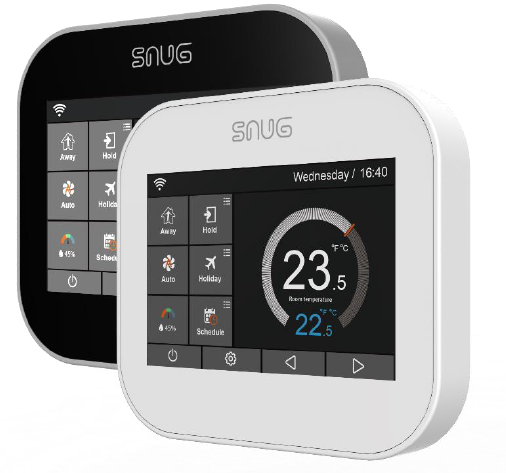
The SnugStat RF Wi-Fi thermostats offer an innovative heating control solution without the need to hardwire into a property, resulting in them being ideal for retrofits. They benefit from all of the features of our SnugStat Smart Wi-Fi thermostat, including g intuitive programming, added control on the move with the free Smart phone app, helpful holiday mode, and optimum start functionality to maximize the efficiency of your heating and reduce costs. The SnugStat RF Wireless Wi-Fi Thermostats are power ed via a mini USB to a USB and can be plugged into a standard plug socket. They’re compatible with our Snug Centre RF Wireless Wiring Centre and don’t require additional equipment, such as a hub making them a cost-effective option.
KEY FEATURES
- Can be controlled remotely from your smartphone
- Self-learning for optimum comfort and efficiency
- Smart dynamic geo-location function
- Automatic brightness dimmer
- Helpful holiday mode
- Inbuilt temperature and humidity sensor
- Can be set to control air, floor or air and floor
- Comes complete with floor probe (only available on e-version)
- Able to simultaneously control 2 remote probes, so you can position the unit out of sight if you choose
- The free app, which is compatible with both Android and iOS

SPECIFICATIONS
| Supply | 12V, via mini-USB to a USB & plugged into a standard wall socket |
| Temperature Range | 5⁰ to 35⁰C |
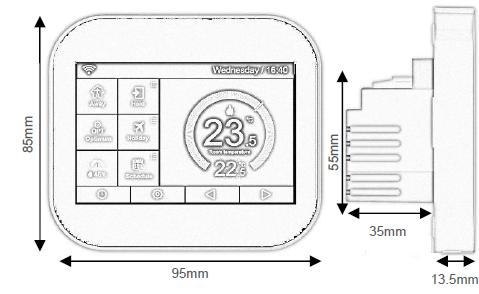
| Unit Size | 85mm x 95mm |
| Warranty | 2 year manufacturer’s warranty |
| IP Protection | IP20 |
| Probe | 10K NTC |
All dimensions in mm unless otherwise stated
FEATURES TABLE
| Temperature Range | 5 – 45°C |
| Full Colour Touch Screen Display | Y |
| Non-Programable Mode | Y |
| 5/2 Day Programming Mode | Y |
| 7 Day Programming Mode | Y |
| 24 Hour Mode | Y |
| Number of Heating Levels | 4 |
| Number of Switching Times (Timer Mode) | 4 |
| Full Calendar Holiday Mode | Y |
| Passcode Lock | Y |
| Temperature Hold Function | Y |
| Temperature Override | Y |
| Temperature Limit | Y |
| Output Delay | Y |
| Frost Protection Mode (5 – 17°C) | Y |
| °C / °F Option | Y |
| Built-In Air Sensor | Y |
| Remote Air Sensing Mode | Y |
| Remote Floor Sensing Mode | Y |
| Max Switching Differential | 16A |
| Accuracy +/- | 1°C |
| Supply | 230V AC |
| Weight | 159g |
| Wi-Fi Enabled | Y |
WWW.FIRST-TRACEHEATING.CO.UK
[email protected]
01772 761333
REFERENCE:
DOWNLOAD MANUALS:
SNUGSTAT t RF Wi-Fi thermostats Product Specifications Guide

SNUGSTAT t RF Wi-Fi thermostats Product Specifications Guide