
SIEMENS REV13 Room thermostat

24-hour room temperature controller
- Heating applications
SPECIFICATION
- Mains-independent, battery-operated room temperature controller featuring user-friendly operation, easy-to-read display and large numbers
- Self-learning two-position controller with PID response (patented)
- Operating mode selection: – Automatic mode with two heating phases
- Automatic mode with one heating phase – Continuous comfort mode – Continuous energy saving mode
- Frost protection
- Automatic modes with time switch program
- Heating zone control
Use
Room temperature control in:
- Single-family and vacation homes.
- Apartments and offices.
- Individual rooms and professional office facilities.
- Commercially used spaces.
Control for the following equipment:
- Magnetic valves of an instantaneous water heater.
- Magnetic valves of an atmospheric gas burner.
- Forced draught gas and oil burners.
- Electrothermal actuators.
- Circulating pumps in heating systems.
- Electric direct heating.
- Fans of electric storage heaters.
- Zone valves (normally open and normally closed).
Function
- PID control with self-learning or selectable switching cycle time
- 2-point control
- 24-hour time switch
- Remote control
- Preselected 24-hour operating modes
- Override function
- Party mode
- Frost protection mode
- Information level to check settings
- Reset function
- Sensor calibration
- Minimum limitation of setpoint
- Synchronization to a radio time signal from Frankfurt, Germany (REV13DC)
Type summary
- 24-hour room temperature controller REV13
- 24-hour room temperature controller with receiver for time signal from Frankfurt, Germany (DCF77) REV13DC
Ordering
Please indicate the type number as per the “Type summary” when ordering.
Delivery
The controller is supplied with batteries.
Mechanical design
- Plastic casing with an easy-to-read display and large numbers, easily accessible operating elements, and a removable base.
- The housing contains the controller’s electronics, DIP switches, and the relay with a potential-free changeover contact. The easily accessible battery compartment allows for easy exchange of two 1.5 V alkaline batteries, type AAA.
- The base with a terminal block provides lots of space to connect the wires
Display and operating elements


When the symbol flashes, the battery can still power the thermostat for 3 months. After that time, the thermostat is out of power and battery must be replaced
| 2 |
Operating mode selector |
 |
Automatic 24-hour mode with two heating phases |
 |
Automatic 24-hour mode with one heating phase |
 |
Continuous comfort mode (= continuous comfort temperature) |
 |
Continuous energy saving mode (= continuous energy saving temperature) |
 |
Frost protection mode ( = continuous frost protection temperature) |
| 3 |
INFO |
|
|
Pressing the Info button once illuminates the display. Illumination automatically turns off after a short period of time.
Pressing the Info button again activates the information display: is lit. The unit first displays queued error messages followed by important information (e.g. time switch programs, etc.). |

| 4 |
Plus button |
 |
Increase values, set time, or make a selection. |
| 5 |
Override button/party mode |
|
|
In the time switch program, this button allows you to quickly change from the active temperature level to the next and back.
Thus, you can quickly change to an energy-saving temperature when you leave the apartment for a short period of time, thus saving energy. The display indicates the change. It is valid only until the next switching time. Activate party mode: Press the button for 3 seconds. Party mode is available only in operating modes In party mode, symbol |
 is displayed along with the end of party mode.
| 6 |
Minus button |
| Decrease values, set time, or make a selection.
|

| 7 |
Program selection slider |
 |
Time. | |
 |
Day – Month – Year (2 spaces for day, month, and year). |
|
 |
Start time 1 |
User-specific settings for 1st heating phase for automatic mode with 2 heating phases |
 |
End 1 | |
 |
Start time 2 |
User-specific settings for 2nd heating phase for automatic mode with 2 heating phases |
 |
End 2 | |
 |
Start time |
User-specific settings for automatic mode with 1 heating phase |
 |
End | |
 |
Comfort temperature for the automatic mode time switches A and B. | |
 |
Energy saving temperature for the automatic mode time switches A and B. | |
 |
Temperature setpoint at active remote control. | |
| RUN | Slider position RUN allows for closing the cover. | |
Operating modes
- 24-hour operation with time switch program The controller offers two-time switch programs and
 .
. - Example A with 2 heating phases Enter a start time and end time for each heating phase. The comfort temperature setpoint can be freely entered and is the same for both heating phases. Between the heating phases, the controller always switches to the same, freely selectable energy-saving temperature setpoint

- Continuous operating modes The controller also offers three 3 continuous modes
 comfort mode, energy saving mode and frost protection mode.
 - Setpoints
- You can freely adjust temperature setpoints.
- Setting range for all setpoints without setpoint limitation 3…35 °C.
- Setting range for all setpoints with setpoint limitation 16…35 °C.
Factory setting
| Factory settings: Heating | ||
|
|
|
20 °C |
| |
16 °C |
|
|
8 °C | |
|
12 °C | |

| Factory settings: Switching times | ||||
|
A1 | A2 | A3 | A4 |
| 06:00 | 08:00 | 17:00 | 22:00 | |
|
B1 | B2 |
| 07:00 | 23:00 |
Remote control
- Use a suitable remote control unit to activate the “Remote control” temperature setpoint in the controller. Changeover takes place by making a potential-free contact connected to terminals T1 and T2.
- A flashing
 symbol indicates active remote control mode.
 - After the contact opens, the previously set operating mode is reactivated.
| Operation according to controller setting | Temperature setpoint “remote control“
active |
|
 |
T1
T2 |

|
Suitable remote control units are:
Telephone modem, manual switch, window contact, presence detector, central unit, etc
Enter temperature for active remote control
- You can freely select the temperature for the active remote control. Activating the remote control immediately enables control to the remote control temperature regardless of the currently active operating mode. When you deactivate the remote control, the controller returns to the set operating mode.
- A flashing symbol indicates active remote control mode
Proceed as follows to enter your settings
| |
Set slider to temperature for active remote control: Press or to set the desired temperature. |
| RUN | Return the slider to position RUN. |
Technical features
DIP switches
| ON / OFF | 1 | 2 | 3 | 4 | 5 | 6 | |||
| See
A |
Sensor calibration On |  |
|||||||
| Sensor calibration Off |  |
||||||||
|
B |
Setpoint limitation 16…35 °C | |
|||||||
| Setpoint limitation 3…35 °C | |
||||||||
|
C |
Temperature display °F | |
|||||||
| Temperature display °C | |
||||||||
|
D |
PID self-learning | |
|
||||||
| PID 6 |
|
|
|||||||
| PID12 | |
|
|||||||
| 2-point | |
|
|||||||
|
E |
Quartz | |
|||||||
 Radio clock Radio clock |
|
||||||||
|
F |
DIP switch reset
ON |
After you change one or several DIP switch positions, you must press the DIP switch reset button to reset the DIP switch. Otherwise, the previous setting remains active! |
|||||||
| Factory setting: All DIP switches to | OFF | ||||||||
- A Sensor calibration: DIP switch 1
- If the displayed room temperature does not match the measured room temperature, the temperature sensor can be recalibrated.
- Set the DIP switch to ON and press the DIP switch reset button:
- CAL symbol is displayed. The currently measured temperature flashes.
- Press orrecalibrate by max. ± 5 °C.
- Set the DIP switch to OFF and press the DIP switch reset button to save the settings
- B Setpoint limitation: DIP switch 2
- The minimum setpoint limitation of 16 °C prevents undesired heat transfer to neighboring spaces in buildings featuring several heating zones.
- DIP switch ON: Setpoint limitation 16…35 °C.
- DIP switch OFF: Setpoint limitation 3…35 °C (factory setting).
- Press the DIP switch reset button to save the settings.
- C Temperature display in °C or °F: DIP switch 3
- DIP switch ON: Temperature display in °F.
- DIP switch OFF: Temperature display in °C (factory setting).
- Press the DIP switch reset button to save the settings.
- D Control behavior: DIP switches 4 and 5
- The REV13… is a two-position controller with PID control. The room temperature is controlled through cyclic switching of an actuating unit.
- DIP switches 4 ON and 5 ON: PID self-learning Adaptive control for all applications.
- DIP switches 4 ON and 5 OFF: PID 6 Fast controlled system for applications in locations with large temperature deviations.
- DIP switches 4 OFF and 5 ON: PID 12 Normal controlled system for applications in locations with normal temperature deviations.
- DIP switches 4 OFF and 5 OFF: 2-point For complex controlled systems, simple two-position controller with 0.5 °C switching differential (factory setting).
- Press the DIP switch reset button to save the settings.
- E Radio clock: DIP switch 6
- Only applicable to REV..DC (with integrated DCF77 receiver to receive time signal from Frankfurt, Germany)!
- DIP switch ON: Clock run by controller-internal quartz.
- DIP switch OFF: Time signal DCF77 from Frankfurt, Germany.
- Press the DIP switch reset button to save the settings.
- Note on synchronization
- During startup, REV..DC synchronizes automatically to the time signal (DCF77) from Frankfurt, Germany. Synchronization takes max. 10 minutes. Synchronization restarts each time you press the button or move the program selection slider from the RUN position during these 10 minutes. Siemens recommends to set the desired settings upon startup, install the REV..DC in the desired location, and not carry out any actions on the REV..DC for the next 10 minutes
- Note on reception
- In normal operation, the REV..DC synchronizes to the radio clock every day at 3:10 a.m.
- The time signal from Frankfurt is modulated to a radio signal. The reception of this radio signal depends on the distance to Frankfurt, atmospheric conditions as well as the location where the REV..DC is installed. Siemens cannot guarantee that the REV..DC can receive the time signal from Frankfurt at any time and any place
- No reception
- The radio clock symbol is deactivated and an error message is displayed if the clock was not able to synchronize the time for 7 consecutive days. The controller then runs on the internal quartz.
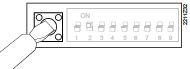 F DIP switch reset
- After you change one or several DIP switch positions, you must press the DIP switch reset button to reset the DIP switch.
- Otherwise, the previous setting remains active!
Access to the expert level
- Set the program selection slider to RUN. Press andsimultaneously for 3 seconds, release the buttons, and within 3 seconds press and hold down
 and
and  simultaneously for 3 seconds, release, and press for another 3 seconds. This releases the engineering settings. is displayed.
 - The display first shows language selection with Code 00. Press the buttonsornavigate the settings. Confirm settings by pressing.
- Press the operating mode selector to exit the engineering settings.
Code list
| Function block | Code | Name | Factory setting | Your setting |
|
Basic settings |
00 | Language | English | |
| 01 | Sensor calibration | off | ||
| 02 | Switching differential 2-point | 0.5 °C | ||
|
LCD optimization |
10 | Illumination time | 10 seconds | |
| 11 | Background brightness | 0 | ||
| 12 | Contrast | 0 | ||
|
Clock settings |
30 |
Time zone
Deviation from time signal in Frankfurt (Central European Time CET) (see Note 1) |
0 hours |
|
| 31 | Start of daylight saving time (see Note 2) | March 31 (03-31) | ||
| 32 | End of daylight saving time (see Note 3) | October 31 (10-31) |
- Note 1:
- This entry has no effect if the radio clock either is inactive or not available. The time signal received from Frankfurt is shifted by the value set in Code 30 (time zone) if the radio clock is active
- Note 2:
- The time is always changed over at 2 a.m. on the Sunday preceding the set date if there is no radio clock or if it is inactive. The time change is shifted by the value set in Code 30 (time zone) when the radio clock is active
- Note 3:
- The time is always changed over at 3 a.m. on the Sunday preceding the set date if there is no radio clock or if it is inactive.
Functional check
- Check the display. If there is no display, check the insertion and function of the batteries.
- The operating mode “Continuous comfort mode“ read the displayed temperature.
- Set the temperature setpoint higher than the displayed room temperature (see operating instructions).
- The relay and, as a result, the actuating device must switch at the latest after one minute. The symbol ▲ is displayed. If not displayed:
• Check actuating device and wiring.
• It is possible that in heating mode the room temperature is higher than the set temperature setpoint. - Set the temperature setpoint for operating mode “Continuous comfort mode“\to the desired value.
- Select the desired operating mode.
Reset
User-defined settings:
, and simultaneously for 3 seconds:
This resets all temperature and time settings of the program selection slider to default values (see also “Factory settings” in the operating instructions). The expert settings remain unchanged.
The clock starts at 12 p.m., the date on 01-01-08 (01 – January – 2008).
During the reset, all display fields are lit and can be checked accordingly.
All user-defined settings plus expert settings:
- Press the DIP switch reset button , andsimultaneously for 5 seconds:
- After the reset, all factor settings are reloaded. This applies to the program selection slider as well as to the expert settings.
Engineering
- Mount the room temperature controller in the main living room.
- Select the mounting place so that the sensor can acquire the air temperature in the room as accurately as possible and without being influenced by solar radiation or other heat or refrigeration sources.
- The mounting height is approx. 1.5 m above the floor.
- You can mount the unit on most commercially available recessed conduit boxes or directly on the wall

Mounting and installation
- Begin installation by first attaching and wiring the base. You can mount the base on the most commercially available recessed conduit boxes or directly on the wall. Then insert the controller from top to bottom into the base.
For more information, see the installation instructions supplied with the unit. - Comply with all local regulations on electrical installation.
- Wire separately the remote control contact T1 / T2 using a separate, shielded cable.
Commissioning
No internal line protection for supply lines to external consumers.
Risk of fire and injury due to short circuits!
- Adapt the line diameters as per local regulations to the rated value of the installed overcurrent protection device.
- The power supply line must have an external circuit breaker with a rated current of no more than 10 A.
- Remove from the batteries the battery transit tab designed to prevent premature activation of the unit: Select the desired language by or. Confirm by.
- You can change the control characteristics using the DIP switch on the rear of the unit.
- Set any thermostatic radiator valves to their fully open position, if present in the reference room
- Recalibrate the temperature sensor (see “Sensor calibration”) if the displayed room temperature does not match the room temperature measured.
Notes
This is a software class A controller designed for use at a normal degree of pollution.
Disposal
The device is considered electrical and electronic equipment for disposal in terms of the applicable European Directive and may not be disposed of as domestic garbage.
- Dispose of the device through channels provided for this purpose.
- Comply with all local and currently applicable laws and regulations.
- Dispose of empty batteries in designated collection points
Risk of explosion due to fire or short-circuit, even if the batteries are empty
Risk of injuries from by flying parts
- Do not allow the batteries to come into contact with water.
- Do not charge the batteries.
- Do not damage or destroy the batteries.
- Do not heat the batteries to more than 85 °C.
Electrolyte leakage
Chemical burns
- Only grasp damaged batteries using suitable protective gloves.
- If electrolyte comes into contact with the eyes, immediately rinse the eyes with plenty of water. Consult a doctor
Observe the following:
- Only replace batteries with batteries of the same type and from the same manufacturer.
- Observe the polarities (+/-).
- The batteries must be new and free from damage.
- Do not mix new batteries with used batteries.
- Store, transport, and dispose of the batteries in accordance with local regulations, guidelines, and laws. Also, observe information from the battery manufacturer.
Technical data
|
General unit data |
Power Batteries (alkaline AAA) Life Backup of clock when changing battery (all other data remain in EEPROM) |
DC 3 V 2 x 1,5 V Ca. 1 year Max. 1 min |
|
| Switching capacity of relay Voltage
Current |
AC 24…250 V 0.1…6 (2.5) A |
||
| No internal fuse
External preliminary protection with max. C 10 A circuit breaker in the supply line required under all circumstances. |
|||
| Protection class | II as per EN 60 730-1 | ||
| Sensing element Measuring range Time constant | NTC 10 kW ±1 % at 25 °C
0…50 °C Max. 10 min |
||
| Setpoint setting ranges
All temperature settings |
3…35 °C |
||
| Resolution for settings and displays Setpoints
Switching times Actual value measurement Actual value display Time display |
0.2 °C 10 min 0.1 °C 0.2 °C 1 min |
||
| Standards | EU Conformity (CE) | REV13 and REV13-XA: CE1T2201X1*) REV13DC: CE1T2201X2*) | |
| RCM conformity | REV13 and REV13-XA: A6V11180829 *)
REV13DC: A6V11399493 *) |
||
| Eco design and labelling Based on EU Regulation 813/2013 (Eco design directive) and 811/2013 (Labelling
directives directive) concerning space heaters, combination heaters, the following classes apply: |
|||
| – Application with On/Off operation of a heater
– PWM (TPI) room thermostat, for use with On/Off output heaters |
Class I
Class IV |
value 1%
value 2% |
|
| Product safety | Degree of protection | IP20 | |
| Environmental conditions | Operation
Climatic conditions Temperature Humidity |
3K3 as per IEC 60 721-3 5…40 °C < 85 % r.h. |
|
| Storage and transport Climatic conditions Temperature Humidity
Mechanical conditions |
2K3 as per IEC 60 721-3 -25…70 °C < 93 % r.h. 2M2 as per IEC 60 721-3 |
||
| Weight | Excl. packaging | 0.24 kg | |
| Color | Housing | RAL9003 signal white | |
| Base | RAL7038 gray | ||
| Size | Housing with base | 94 x 130 x 30 mm | |
The documents can be downloaded from http://siemens.com/bt/download.
Connection diagrams

REV13 / REV13DC
- L Phase, AC 24 … 250 V S1 Remote control unit (potential-free)
- L1 N.O. contact, AC 24 …250 V / 6 (2.5) A
- T1 Remote control signal
- L2 N.C. contact, AC 24 … 250 V / 6 (2.5) A
- T2 Remote control signal
- M1 Circulating pump Y1 Actuating device
- N1 REV13… controller
Application examples

- F1 Thermal reset limit thermostat
- Y1 3-port valve with manual adjustment
- F2 Manual reset safety limit thermostat
- Y2 Magnetic valve
- M1 Circulating pump
- Y3 Three-port valve with actuator
- N1 REV13.. room temperature controller
- Y4 Two-port valve with actuator
Dimensions
© Siemens Switzerland Ltd, 2008 – 2021
Technical specifications and availability subject to change without notice.
Issued by Siemens Switzerland Ltd Smart Infrastructure Global Headquarters Theilerstrasse 1a CH-6300 Zug
Tel. +41 58 724 2424
www.siemens.com/buildingtechnologies
Siemens Smart Infrastructure
Room temperature controller REV13.
REFERENCE:
DOWNLOAD MANUALS:
SIEMENS REV13 Room Thermostat Production Specifications Guide
OTHER MANUALS:
SIEMENS REV13 Room thermostat Operating Instruction

SIEMENS REV13 Room Thermostat Production Specifications Guide