
SIEMENS RDD810KN Flush Mount Touchscreen Thermostat

Heating applications
- KNX bus communications (S-Mode and LTE-Mode)
- Large display with backlight
- 2-position (ON/OFF) control with potential free output for heating
- 2 multifunctional inputs for the keycard, window contact, external temperature sensor, presence detection, and etc.
- Operating modes: Comfort, Economy and Protection
- The minimum and maximum limitation of room temperature setpoint
- Control depending on the room or external temperature sensor
- Adjustable commissioning and control parameters
- Commissioning with Synco ACS, ETS5 or via local HMI
- Interoperation into Synco 700
- Integration into Desigo via group (ETS5) or via individual addressing
- Integration into third-party system via group addressing (ETS5)
- AC 230 V operating voltage
- RDD810KN: Mounting on round box, with min 60 mm diameter or recessed square 86 mm box with 60.3 mm fixing centers and min 40 mm depth
- RDD810KN/NF: Mounting on recessed square 86 mm box with 60.3 mm fixing centers and min 40 mm depth, requires additional mounting frame
Use
Typical applications:
- Apartments
- Commercial buildings
- Schools
For the control of the following pieces of equipment:
- Thermal valves or zone valves
- Gas or oil boilers
- Fans
- Pumps
- Floor Heating
The heating unit can be configured using one of the following tools via remote configuration:
- Local HMI
- Synco ACS
- ETS5
Functions
- Room temperature control via built-in temperature sensor or external room temperature sensor.
- Selection of operating mode via touch screen.
- Temporary Comfort mode extension.
- Display of current room temperature or setpoint in °C and/or °F.
- The minimum and maximum limitation of room temperature setpoint.
- Key lock function: unlock, total lock and setpoint
- 2 multifunctional inputs, freely selectable for:
- Window contact
- Presence detector
- External room temperature or return air temperature sensor
- Fault input
- Monitor input for temperature sensor or switch state
- Floor heating temperature limitation.
- Reload factory settings for commissioning and control parameters.
- Wizard function for easy commissioning via HMI
- KNX bus (terminals CE+ and CE-) for communication with Synco 700 or KNX-compatible devices
- Display of time of day via KNX bus
- Display of outdoor temperature via KNX bus on INFO page
- Time scheduling and central control of setpoints via KNX bus
- With a Synco RMx7xx controller, the energy demand signal of the thermostat is used to optimize the energy supply.
Applications
The thermostat supports the heating applications:
- Hydronic floor heating controls
- Radiators
- Wall-hung boilers
Application Examples
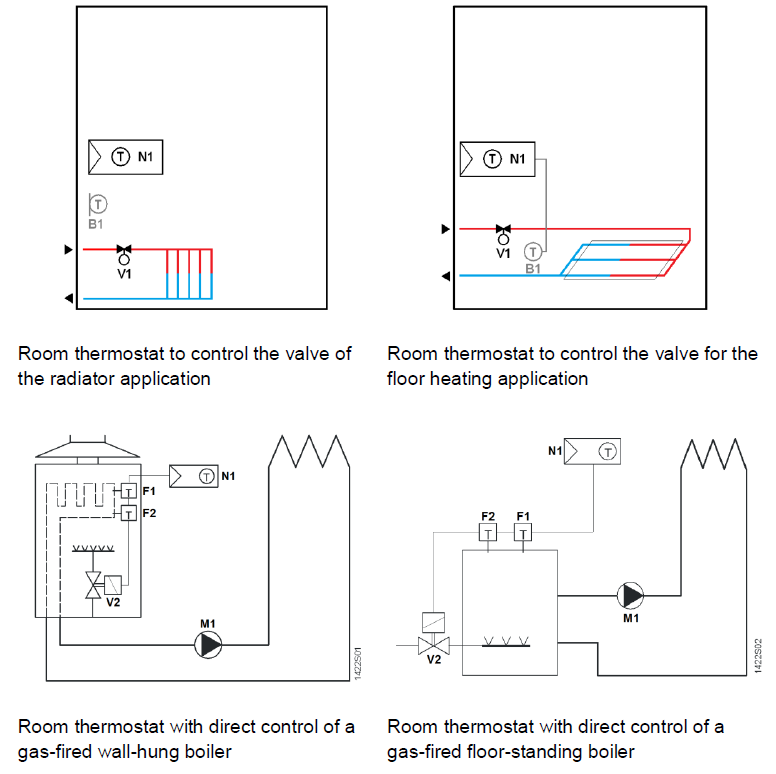
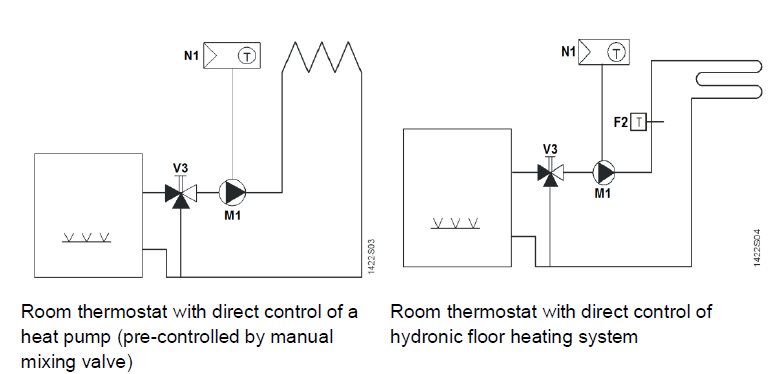
- F1 Thermal reset limit thermostat
- F2 Safety limit thermostat
- M1 Circulating pump
- N1 Room thermostat
- V1 2-port valve
- V2 Mixing 3-port valve with manual adjustment
- V3 Magnetic valve
Type summary
|
Product no. |
Stock no. |
Operating voltage | Control outputs |
Suitable for |
||
| 3-pos | ON/OFF | DC 0..10 V | ||||
| RDD810KN/NF 2) | S55770-T336 | AC 230 V | — | 2 1) | — | Square conduit box
2) |
| RDD810KN 3) | S55770-T444 | AC 230 V | — | 2 1) | — | Round or square conduit box |
Ordering
- When ordering, indicate product number, SSN and name.
- For example: RDD810KN/NF (S55770-T336) room thermostat
- A mounting frame must be ordered for RDD810KN… installation (See “Accessories”)
- Order valve actuators separately
Equipment combinations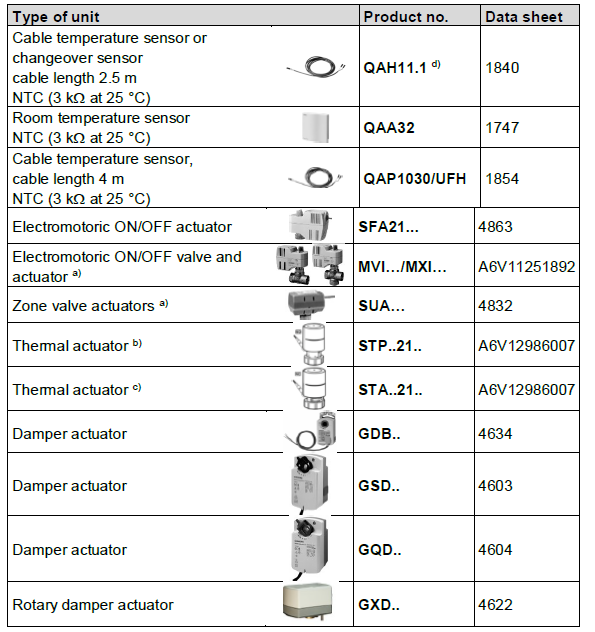
Accessories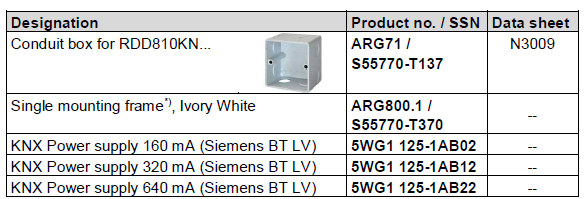
Mechanical design
The thermostats consist of the following parts:
- Front panel with electronics, operating elements and built-in room temperature sensor.
- Mounting base with power electronics.
- Mounting frame is an additional part to complete the installation for RDD810KN….
Operation and settings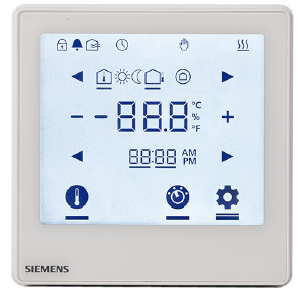
Display
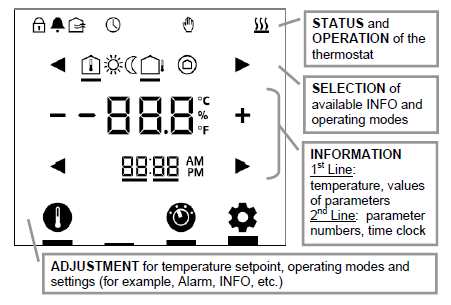
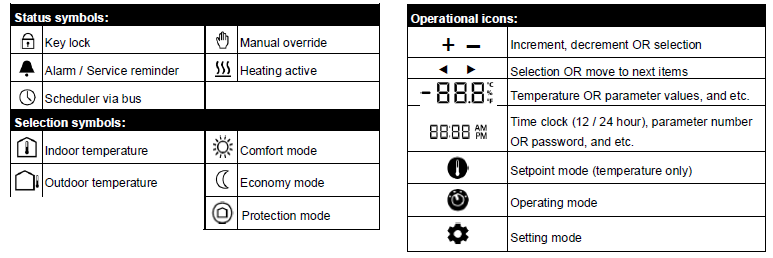
Engineering notes
See the “Reference documentation”, page 12, for information on how to engineer the KNX bus (topology, bus repeaters, etc.) and how to select and dimension connecting cables for supply voltage and field devices.
Mounting and installation
Mount the room thermostat on a conduit box. Do not mount on a wall in niches or between bookshelves, behind curtains, above or near heat sources, or exposed to direct solar radiation. Mount about 1.5 m above the floor.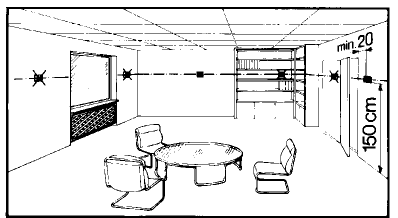
Mounting / Dismounting
- Do not apply excessive force on screws! The deformation of the mounting frame may lead to improper connections and the operation of the unit.
- Mount the room thermostat on a clean, dry indoor place without direct airflow from a heating/cooling device, and not exposed to drips or water.
- Before removing the front cover, disconnect the power supply.
Wiring
- See the User Manual for the installation instructions enclosed with the thermostat.
- Comply with local regulations to wire, protect and earth the thermostat.
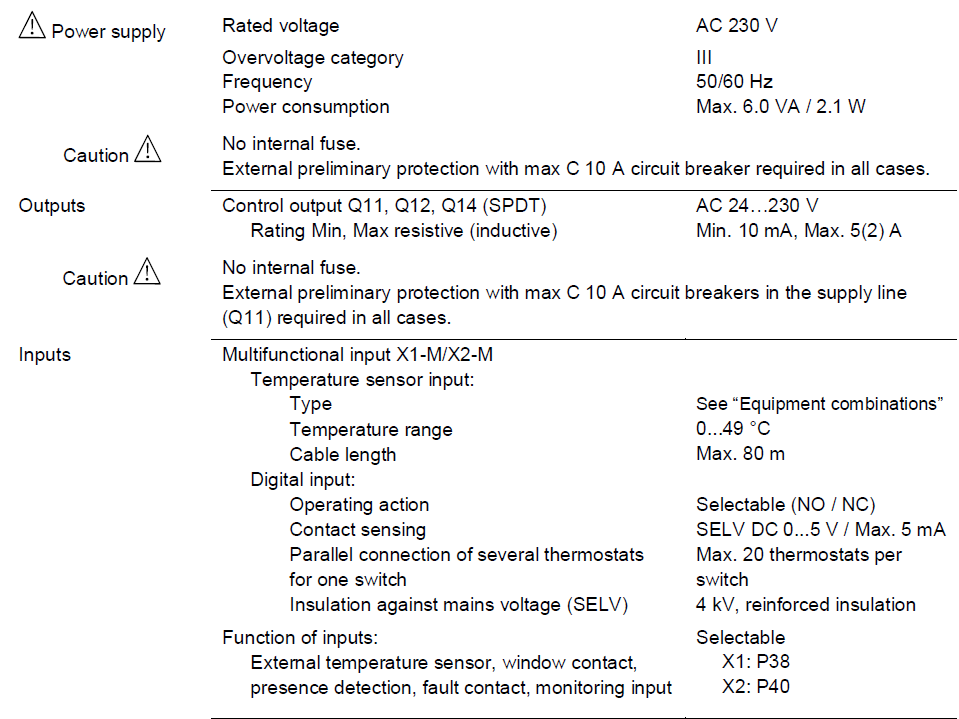
- The device has no internal fuse for supply lines to fans and actuators. To avoid the risk of fire and injury due to short circuits, the AC 230 V mains supply line must have a circuit breaker with a rated current of no more than 10 A.
- The wiring cross-section used for the power supply (L, N) and 230 V outputs (Qxx – N) must be adapted to the preceding overload protection elements (max 10 A) under all circumstances. Comply under all circumstances with local regulations.
- Properly size the cables to the thermostat and valve actuators for AC 230 V mains voltage.
- Cables of SELV inputs X1-M / X2-M: Use cables with min 230 V insulation, as the conduit box carries AC 230 V mains voltage.
- Inputs X1-M or X2-M of different units (e.g. window contact) may be connected in parallel with an external switch. Consider the overall maximum contact sensing current for switch rating.
- KNX communication cables (input CE+ / CE-): Use cables with min 230 V insulation, as the conduit box carries AC 230 V mains voltage.
- When a KNX bus power supply is connected on the line with communicating thermostats and Synco controllers, the internal KNX power supply of the Synco controllers must be switched off.
- No cables are provided with a metal shield.
- Disconnect from supply before opening the cover.
Commissioning notes
Before power up: No DIP switch setting is required for RDD810KN… thermostats.
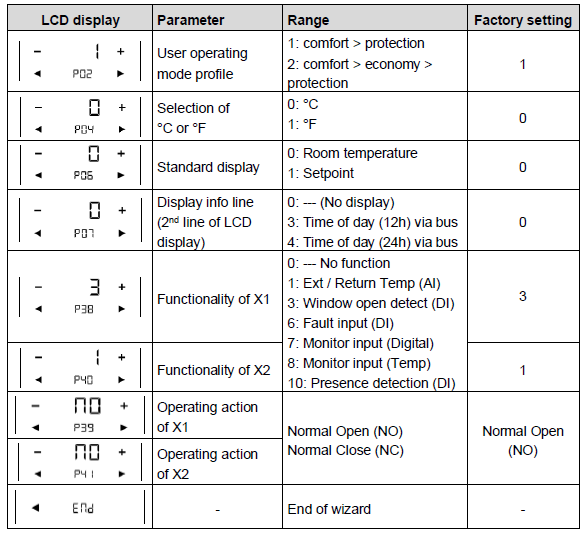
Wizard function: After powering up, the wizard function guides users to configure the basic parameters for normal operation according to the table below.
- Touch
 to advance/return to any parameter;
 - Touch + / – to change the value.
Applications
RDD810KN… thermostats are for heating applications. Configure or change parameter settings during commissioning using one of the following tools:
- Local HMI
- Synco ACS
- ETS5
Connect tool
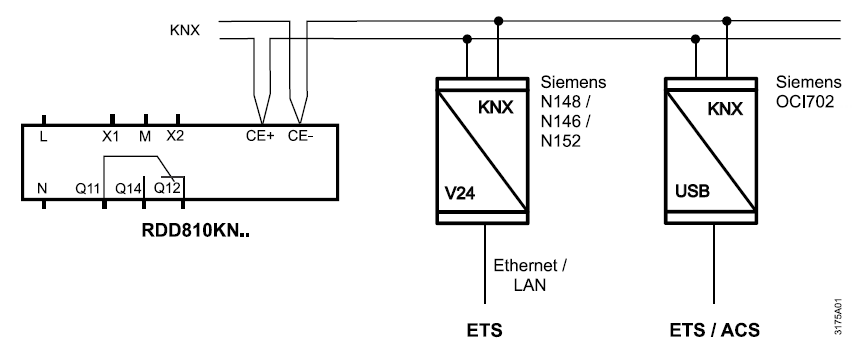
Connect the Synco ACS or ETS5 tools to the KNX bus cable at any point for commissioning ACS and ETS5 require an interface:
- Ethernet/LAN KNX interface (such as Siemens N148 / N146 / N152)
- OCI702 USB-KNX interface
Control parameters
The thermostat’s control parameters can be set to ensure optimum performance of the entire system (refer to basic documentation P3174).
The parameters can be adjusted using
- Local HMI
- Synco ACS
- ETS5
Control sequence: Only heating sequence is available
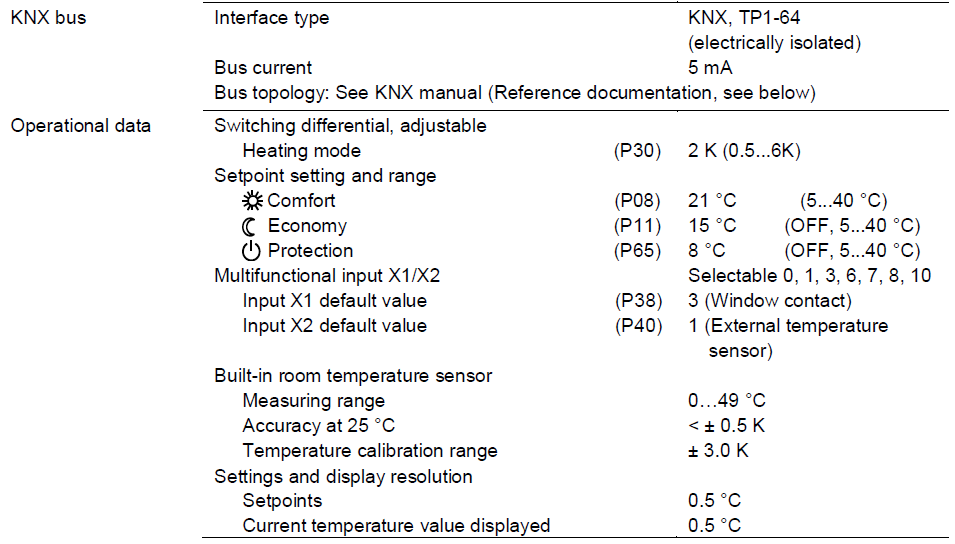
Calibrate sensor: Recalibrate the temperature sensor if the room temperature displayed on the thermostat does not match the room temperature measured (after min. 1 hour of operation). To do this, change parameter P05
Setpoint and range limitation: We recommend reviewing heating setpoint and their range limitation via parameters P08…P11. If necessary, adjust them to achieve maximum comfort and save energy
Programming mode: The programming mode helps identify the thermostat in the KNX network during commissioning. Touch and hold for more than 5 seconds to activate programming mode, which is indicated on the display with Pr09. The programming mode remains active until thermostat identification is complete.
Assign KNX device address: Assign device address (P81) via HMI, ACS or ETS5. With the device address set to 255, the communication is deactivated (no exchange of process data).
Assign KNX group addresses: Use ETS5 to assign the KNX group addresses of the RDD communication objects
KNX serial number: Each device has a unique KNX serial number inside the front panel. An additional sticker with the same KNX serial number is enclosed in the packaging box. This sticker is intended for installers for documentation purposes
Disposal
The device is considered electrical and electronic equipment for disposal in terms of the applicable European Directive and may not be disposed of as domestic garbage.
- Dispose of the device through channels provided for this purpose.
- Comply with all local and currently applicable laws and regulations
Technical data
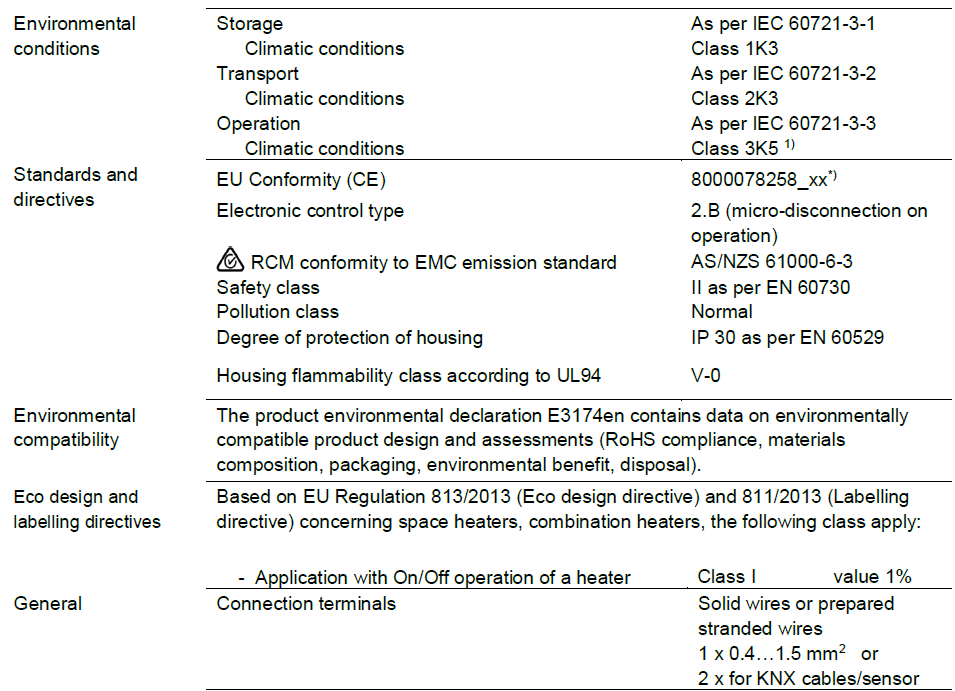
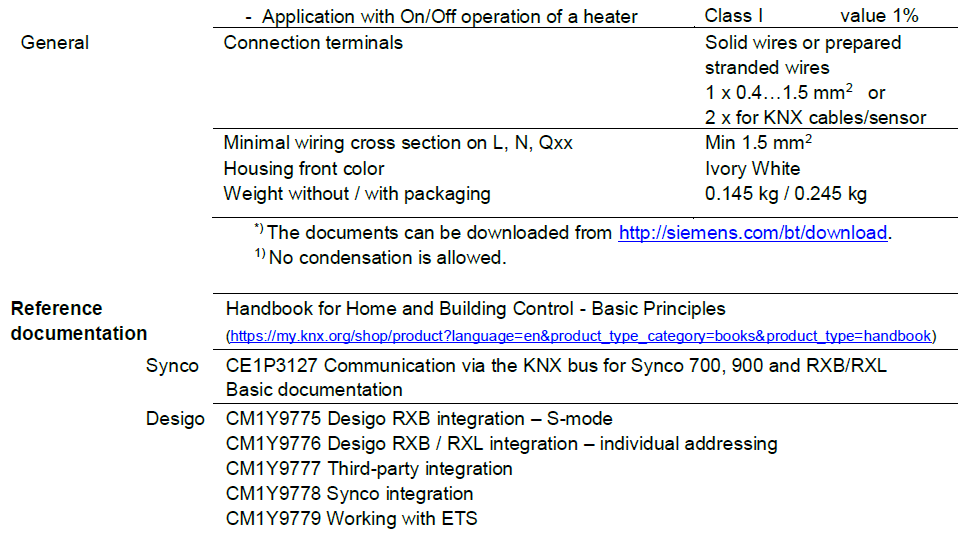
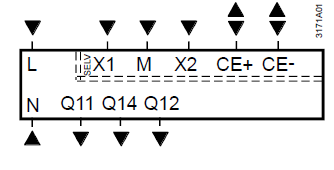
Connection terminals
- LN Operating voltage AC 230 V
- Q11, Q12 NC contact (for NO valves)
- Q11, Q14 NO contact (for NC valves)
- X1, X2 Multifunctional input for temperature sensor or potential free switch
Factory setting:
- X1 = Window contact
- X2 = External sensor
- (function can be selected via parameter P38 / P40)
- M Measuring neutral for sensor and switch
- CE+ KNX data +
- CE- KNX data –
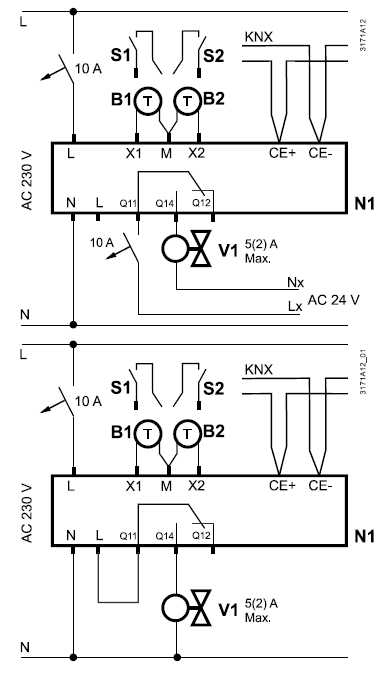
Connection diagrams
- N1 Room thermostat
- V1 Valve actuator
- Lx AC 24…230 V
- S1, S2 Switch (keycard, window contact, presence detector, etc.)
- B1, B2 Temperature sensor (return air temperature, external room temperature, changeover sensor, etc.)
- CE+ KNX data +
- CE- KNX data –
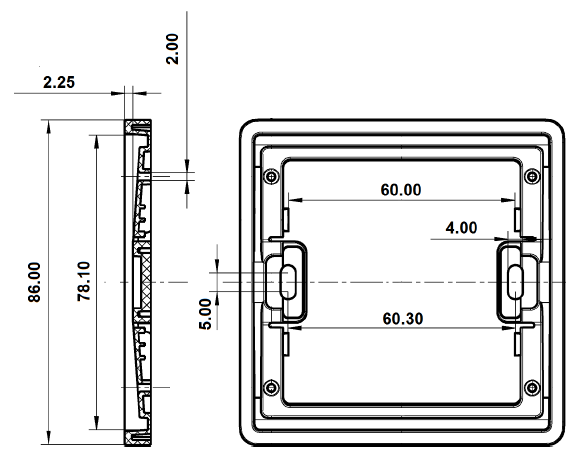
Dimensions (mm)
RDD810KN for round conduit boxes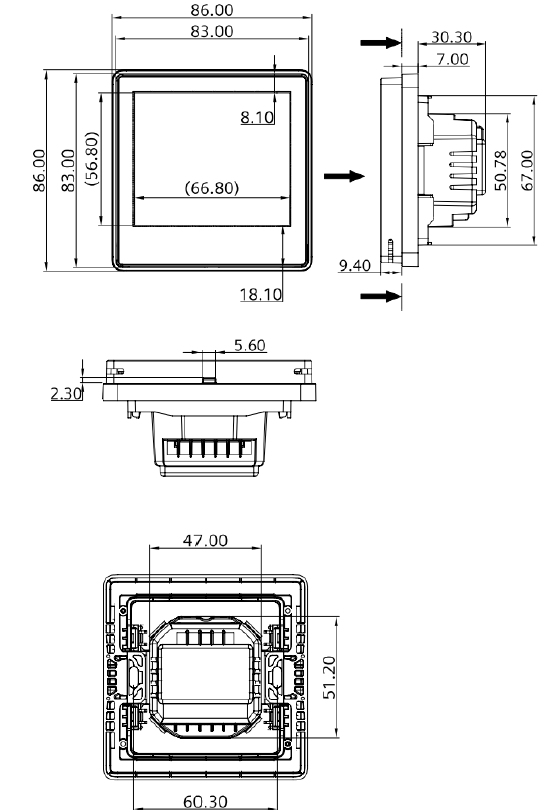
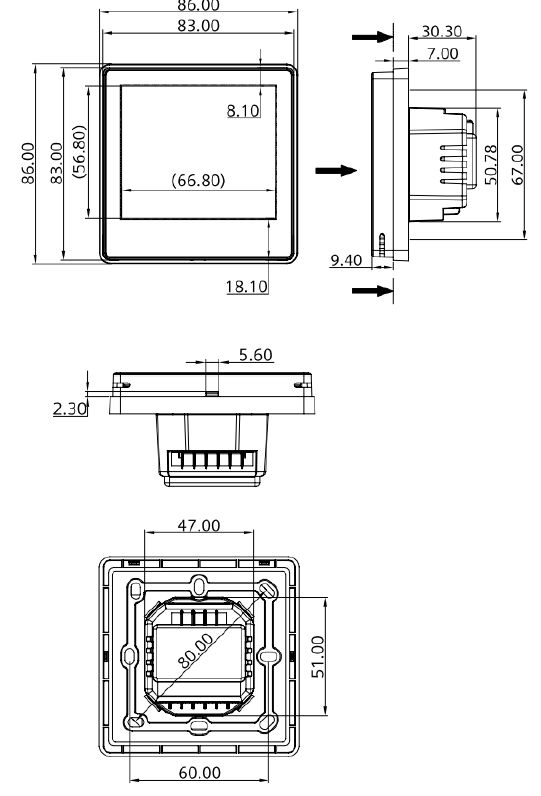
ARG800.1 single mounting frame for RDD810KN/NF
Issued by
- Siemens Switzerland Ltd.
- Building Technologies Division
- International Headquarters
- Theilerstrasse 1a
- CH-6300 Zug
- Tel. +41 58 724 2424
- www.siemens.com/buildingtechnologies
REFERENCE:
DOWNLOAD MANUALS:
SIEMENS RDD810KN Flush mount touch screen Thermostat Product Specifications Guide
SIEMENS RDD810KN Flush mount touch screen Thermostat Product Specifications Guide