SIEMENS RDD310/EH Flush-mount Room Thermostat
INTRODUCTION
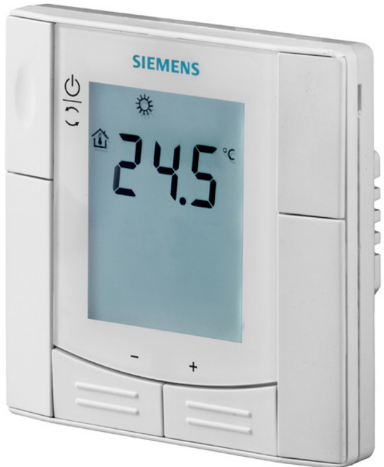
RDD310/EH and RDE410/EH – the room thermostats for use with electrical floor heating systems. The products feature a built-in room sensor to control the room temperature, and the user can connect a cable temperature sensor to limit the maximum floor temperature. The thermostat provides Comfort, Economy and Frost Protection mode. The RDE410/EH also features an Auto Timer with 8 programmable time switches. You can either rely on the factory settings or make adjustments that suit your individual needs.
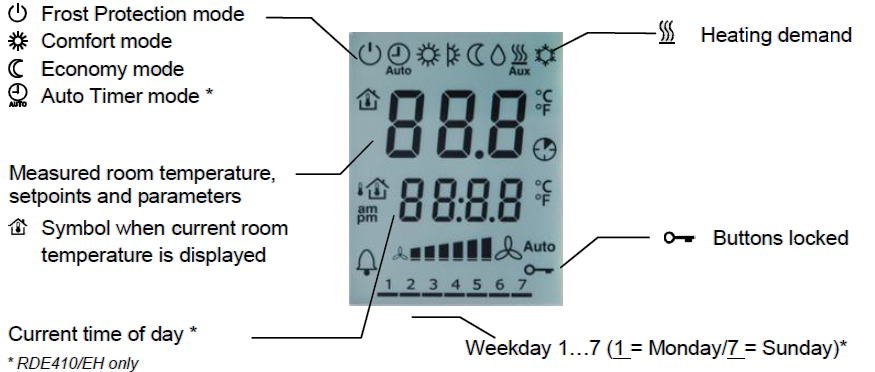
Display
Operation and settings
Are your rooms too warm or too cold?

- Press + or – to increase or decrease the current room temperature setpoint in increments of 0.5 C for Comfort mode. 5 seconds after the last push, the room temperature setpoint is automatically saved. The display stops flashing and shows the room temperature currently measured.
- The maximum setpoint setting range is 5…40 °C, unless limited by parameters P09 and P10.
Do you require continuous Comfort mode?

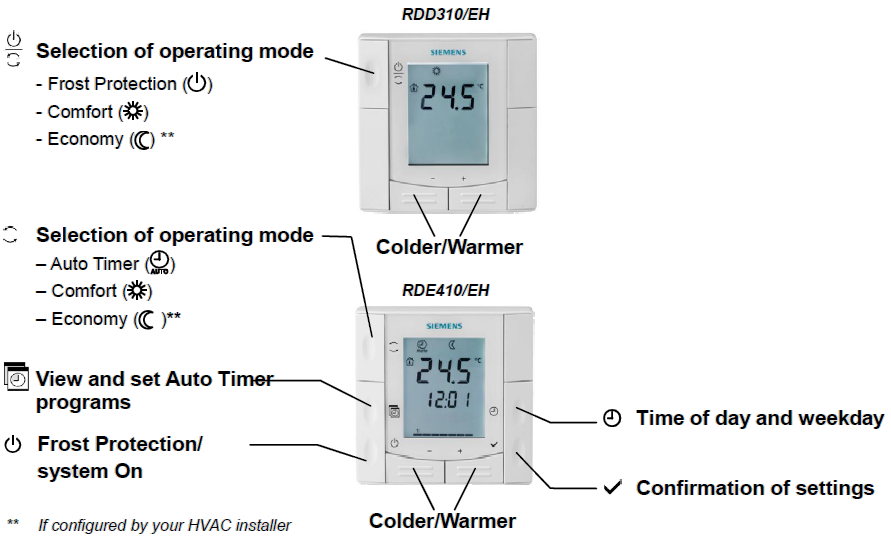
- Press the operating mode button
 to switch to Comfort mode
  . In that case, the room temperature setpoint is always maintained at the Comfort level.
 - The RDE410/EH has a dedicated button
 for the selection of the operating mode.
Do you want to set your thermostat to Frost Protection mode?

- Press the operating mode button several times until the display shows the
 icon to indicate that Frost Protection mode is selected.
 - The RDE410/EH has a dedicated button to set the system either to Frost Protection mode or to switch it on.
- In Frost Protection mode , the room temperature setpoint is maintained at 8 °C (factory setting), unless your HVAC installer made some other setting.
- Changes made by the installer.
Do you want to change to Economy mode?

- When Economy mode is enabled (parameter P02), press the operating mode button to select Economy mode
 . In that case, the room temperature setpoint is always maintained at the Economy level. The preset room temperature setpoint in Economy mode is 16 C (parameter P11).
 - The RDE410/EH has a dedicated button for selection of the desired operating mode.
Do you want to change to Auto Timer mode? (RDE410/EH only)

- Press the button to select Auto Timer mode
 . In this mode, the thermostat switches automatically between Comfort and Economy mode according to the 8 programmed time switches.
Setting the time of day and the weekday (RDE410/EH only)
- Keep the
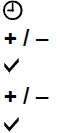
 button depressed until the time digits start to flash, then press + or – to set the time of day. If the current time format is the 24-hour format and you wish to change to the 12-hour format, keep + depressed to pass 23:59, or keep – depressed to pass 00:00. Vice versa to go back to the 24-hour format.
 - Confirm the time of day by pressing
 . The weekday indicator starts to flash.
 - Press + or – to set the current weekday.
- Confirm the current weekday by pressing .
Do you want to set the time switches? (RDE410/EH only)
To set the time switches, keep the button depressed for 3 seconds to go to Auto Timer mode. This mode is indicated by “Ax” appearing on the display (x = Auto Timer 1…8) and the time xx:xx flashing.
For each time switch, proceed as follows:
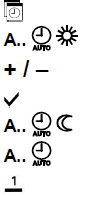
- Icons and are displayed. Press + or – to set the Comfort mode start time and confirm by pressing .
- Icons and are displayed. Press + or – to set the Comfort mode end time (or Economy mode start time) and confirm by pressing .
- Icon flashes. Press + or – to select or deselect each day and advance to the next day. Confirm setting for the current time switch by pressing and advance to the next time switch.
The thermostat exits the time switch setting mode automatically after 20 seconds if no button is pressed. All changes made after the last press of will not be saved!
Do you want to view the time switch settings? (RDE410/EH only)
- Press the button to sequentially review all 8 programmable time switches.
Do you want to reload the default time switch settings? (RDE410/EH only)

- Set the thermostat to Frost Protection mode .
- Press + and – simultaneously for 3 seconds. Release the buttons and, within 2 seconds, press twice the button.

Commissioning (by qualified HVAC installer)
- To adapt the thermostat to your system and to optimize the control performance, a number of control parameters can be set.
- This can also be made during operation without opening the thermostat.
Recalibrating the temperature sensor

- If the room temperature displayed by the thermostat does not accord with the temperature effectively measured, the temperature sensor can be recalibrated. Using parameter P05, the temperature can be adjusted by pressing + or – in increments of 0.5 °C. The maximum recalibration range is +/- 3 °C.
Economy mode
 If you want to change the factory-set temperature setpoint (16 °C for heating), readjust parameter P11.
Caution: The setpoint for Economy mode can be set to “Off”. This means that the thermostat will be deactivated! This means that there will be no protective heating function, therefore risk of frost!
Electrical floor heating/cable temperature sensor (floor sensor)
- The factory setting for this function is “Off” and must be set to “On” if electrical floor heating is used. This function is activated via parameter P38.
- The installer must select the approximate capacity of the heating system (in kW) via parameter P45 during commissioning.
- The cable temperature sensor is connected to input X1, M and acquires the floor temperature. If the floor temperature exceeds the parameterized limit xx ºC (P38 = 1, P51 = xx ºC), the heating system is turned off until the floor temperature returns to a level below the parameterized limit. A typical application are rooms (dry floor).
- If the application does not require floor temperature limitation but instead uses the external sensor for room temperature display and control, the parameters have to be set as follows: P38 = 1, P51 = Off. A typical application are bathrooms (wet floor) where a constant floor temperature is required
- It is not recommended to have only a built-in room sensor for floor heating since in that case there is a risk of overheating.
Energy saving tips without loss of comfort:

- Never allow room temperatures to exceed 21 °C
- When absent, set the thermostat to Economy mode (or Frost Protection), even for short periods of time
- Air out the rooms briefly, but with windows wide open
Control parameters
If you want to change the control parameters, proceed as follows:

- Set the thermostat to Frost Protection mode.
- Press + and – simultaneously for at least 3 seconds. Release the buttons and, within 2 seconds, press – again for 7 seconds. The display will show “P02”.
- Select the required parameter by repeatedly pressing + or –.
- Press + and – simultaneously. The current value of the selected parameter starts to flash. Adjust it by pressing + or –.
- Press + and – simultaneously again to display the next parameter.
- If you wish to display and change additional parameters, repeat steps 3 through 5.
- Service or expert level: 10 seconds after the last display or setting, all changes are stored and the thermostat will leave the parameter setting mode.
Expert level: Press + or – until “End” is displayed. Then, press + and – simultaneously to save the change and exit the parameter setting mode.
| No. | Thermostat’s parameter | Factory setting | Setting range | |
| P02 | Selection of operating mode via the operating mode button |
1 = Frost Protection – Comfort mode | RDD310/EH:
1 = Comfort – Frost Protection 2 = Comfort – Economy – Frost Protection RDE410/EH: 1 = Auto-Comfort – Frost Protection 2 = Auto – Comfort – Economy – Frost Protection |
|
| P05 | Temperature sensor calibration | 0.0 °C | -3…3 °C | |
| P06 | Standard temperature display | 0 = Room
temperature |
0 = Room temperature 1 = setpoint | |
| P08 | Comfort basic setpoint | 20 °C | 5…40 °C | |
| P09 | Min. setpoint limitation in Comfort mode (WminComf) | 5 °C | 5…40 °C | |
| P10 | Max. setpoint limitation in Comfort mode (WmaxComf) | 35 °C | 5…40 °C | |
| P11 | Heating setpoint in Economy mode | 16 °C | Off, 5…18 °C | |
| P14 | Button lock (press the operating mode button for 3 seconds to lock or unlock) |
0 = Disabled | 0 = Disabled 1 = Auto-lock
2 = Manual lock |
|
| P30 | Switching differential in heating mode | 1 K | 0.5…6 K | |
| P38 | External input | 0 | 0 = No input
1 = External sensor input |
|
| P45 | Heating system load in kW | 2.8 kW | 0…3.6 kW | |
| P51 | Floor heating temperature limit | Off | Off, 10…60 °C | |
| P65 | Setpoint of heating in Frost Protection mode (WheatStb) | 8 °C | Off, 5…18 °C | |
| P69 | Temporary setpoint in Comfort mode | Off | Off = Disabled On = Enabled | |
| P71 | Reloading factory settings Set value to “On” and confirm by pressing + and – | Off | Off = Idle On = Reset | |
| d02 | Status X1 | Diagnostics | 0…xx °C = Measured temperature | |
| d07 | Software version information | No adjustment | ||
(All temperature settings can be made in increments of 0.5 °C with the exception of P51, which is at 1 °C)
Please write down all changes you make!
REFERENCE:
DOWNLOAD MANUALS:
SIEMENS RDD310EH Flush-mount room thermostat Operating Instruction
OTHER MANUALS:
SIEMENS RDD310/EH Flush-mount room thermostat Product Specifications Guide

SIEMENS RDD310/EH Flush-mount Room Thermostat Operating Instruction