
Robertshaw 9415 Non-Programmable Thermostat

Application
The Robertshaw 9415 is a multi-stage thermostat designed to control 24 VAC gas or electric two-stage heating and two-stage cooling systems.
Features
- Summer and winter setpoints
- Large backlit display
- Adjustable 1st stage temperature differential: .5°F to 3.0°F (0.5°C to 1.5°C)
- Adjustable 2nd stage temperature differential: 1° to 6°F (.5°-3°C)
- Compressor short-cycle protection
- Accuracy within ±1°
- Zone system compatible as a master thermostat
- Permanent memory retention
- Fahrenheit/Celsius display option
- Adjustable from 45°F to 90°F (7°C – 32°C)
- Quick wire terminal block
- Automatic heating shutdown if the temperature exceeds 94°F (34°C)
IMPORTANT SAFETY INFORMATION
- Always turn off power at main fuse or circuit breaker panel before installing, removing, cleaning, or servicing thermostat.
- Read all the information in this manual before installing this thermostat.
- This is a 24 VAC low-voltage thermostat. Do not install on voltages higher than 30 VAC.
- All wiring must conform to local and national building and electrical codes and ordinances.
- Do not short (jumper) across terminals on the gas valve or at the system control to test installation. This will damage the thermostat and void the warranty.
- Do not connect ground to any terminal in this unit.
Replacing Existing Thermostat
- Turn off power to heating and cooling system.
- Remove cover from old thermostat to expose wires
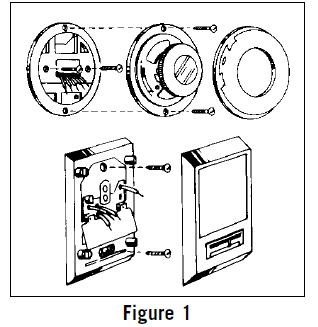
- Disconnect wires one at a time from existing terminals.
- Use enclosed labels to mark existing wires. Refer to cross references in Table 1 if existing wiring does not directly match the labels.
- Remove the existing thermostat base from wall
| Old Terminal | New Label | Description |
| R, V-VR or VR-R | R | 24 VAC, Return |
| Y, Y1 or M | Y1 | 1st Stage Cooling Circuit |
| O or R | O | Cool Active Accessory Terminal |
| B | B | Heat Active Accessory Terminal |
| F or G | G | Fan Control Relay |
| Y2 | Y2 | 2nd Stage Cooling Circuit |
| W2 or W-U | W2 | 2nd Stage Heating Control |
| C, X or B | C | 24 VAC, Transformer Common Side |
| W1 or W | W1 | 1st Stage Heating Circuit |
Recycling Thermostat
If this thermostat is replacing a thermostat that contains mercury in a sealed tube, do not place your old thermostat in the garbage. Contact your local waste management authority for instructions regarding proper disposal of the thermostat. If you have any questions, call Robertshaw technical support at 1-800-445-8299.
Installing Model 9415 Thermostat
- Turn the power off to the heating and cooling systems.
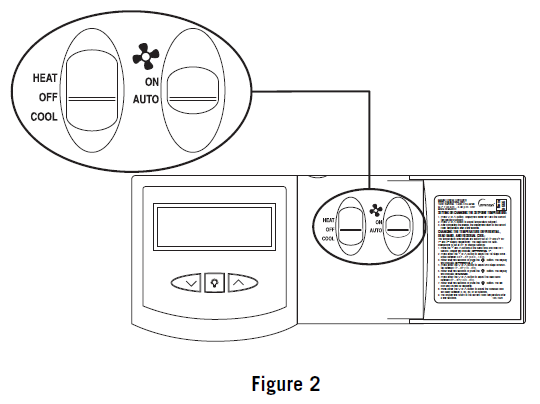
- Place HEAT-OFF-COOL in the OFF position ( .
- Place -ON-AUTO switches into the AUTO position ).
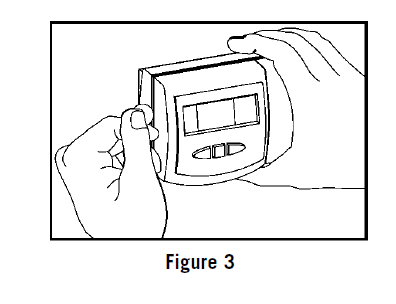
- Remove the cover using a coin or screwdriver Set aside
- Place the thermostat against the wall at the desired location. Make sure wires will feed through the opening (Figure 4) on the base of the thermostat.
- Mark placement of mounting holes Set base aside
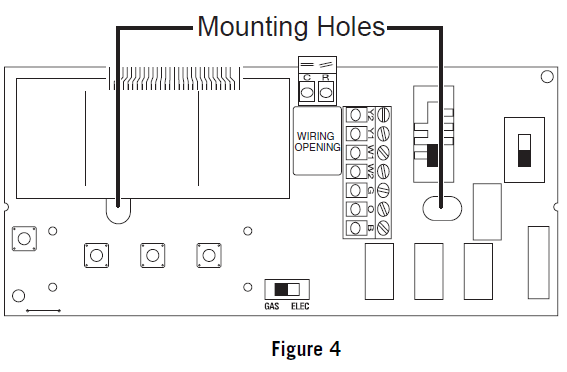
- If mounting on drywall, tap plastic anchors into the wall.
- NOTE: ENCLOSED PLASTIC ANCHORS DO NOT REQUIRE A DRILLED HOLE FOR DRYWALL.
- If mounting on a surface other than drywall, drill the marked holes using a 3/16″ drill bit.
- Align base with plastic anchors and feed wires through the opening.
- Secure base to wall with supplied screws.
- NOTE: THE THERMOSTAT WILL MOUNT HORIZONTALLY ON A SINGLE GANG JUNCTION BOX.
- Strip end of wires 5/16” if needed.
- Terminal screws are already loose and ready for wire insertion. Insert wires into the terminal strip matching the label to the corresponding terminal (see Wiring Diagrams). Tighten screws.
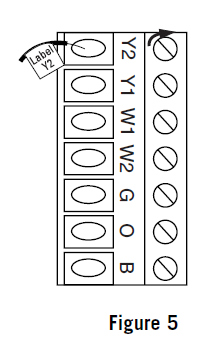
- Make sure wire connections are secure.
- Push excess wire back through the opening
- Set the GAS/ELEC switch to either GAS for a gas/oil heating system or ELEC for an electric heating system
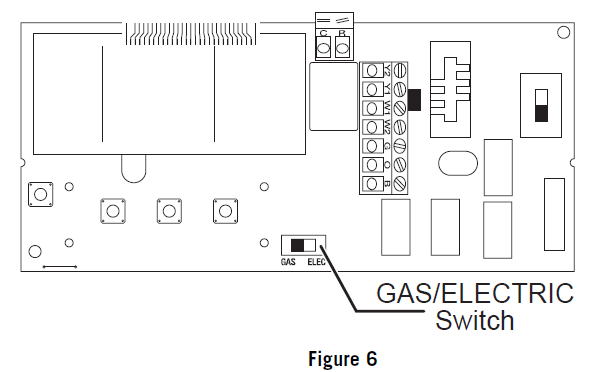
- Replace the thermostat cover by snapping into place.
- Turn on the power to the system. Test the thermostat as described in the following section.
Wiring Diagrams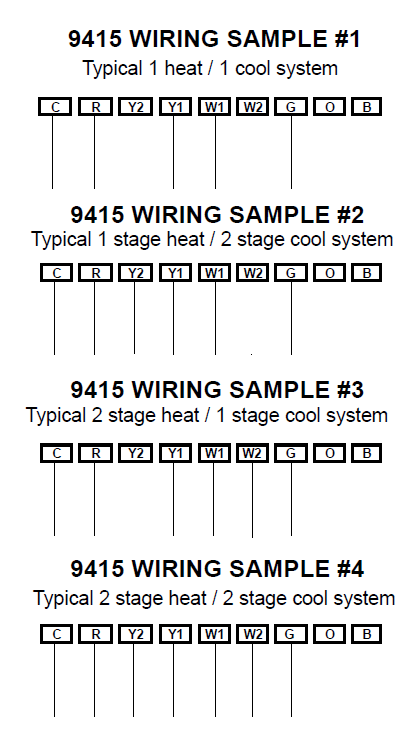
TERMINAL LEGEND – 9415
| TERMINAL LEGEND – 9415 | |||
| TERM | EQUIPMENT TO CONNECT | REQ? | TERMINAL FUNCTION |
| C | 24VAC common connection | Yes | For input of 24VAC common side of transformer |
| R | 24VAC hot connection | Yes | For input of 24VAC hot side of the transformer |
| Y2 | Second stage cooling connection | No | Energizes on a call for second stage cooling (aux.) |
| Y1 | First stage compressor connection | Yes* | Energizes on a call for first stage of cooling |
| W1 | First-stage heat convection | Yes* | Energizes on a call for first stage of heating |
| W2 | Second-stage heat connection | No | Energizes on a call for second stage heating (aux.) |
| G | Indoor fan connection | Yes | Energizes with W1, W2, Y1 and Y2 terminals or with FAN option switched to the ON position |
| O | Accessory** | No | Energizes when in the in COOL mode |
| B | Accessory** | No | Energizes when in the HEAT or EM modes |
Testing the Thermostat
- Place the HEAT-OFF-COOL switch into the COOL position. The display will read COOL.
- Press the
 button until the temperature setting is at least 3 degrees below the room temperature. The air conditioning system should turn on within a few seconds.
 - The snowflake icon will be displayed ( 1st Stage; 2nd Stage). NOTE: ONCE THE THERMOSTAT TURNS OFF WHEN IN THE COOL MODE, A BUILT IN 5-MINUTE DELAY PREVENTS THE SYSTEM FROM TURNING ON AGAIN.
- THIS PROTECTS THE COMPRESSOR. NO ADDITIONAL TIME DELAY RELAY IS REQUIRED. TO OVERRIDE THE 5-MINUTE DELAY FOR INSTALLATION, PRESS THE RESET BUTTON.
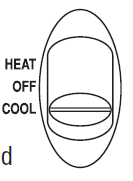
- Put the HEAT-OFF-COOL switch into the OFF position. The air conditioning system should turn off. The display will read SYSTEM OFF.
- Put the HEAT-OFF-COOL switch into the HEAT position. The display will read HEAT.
- Press the button until the temperature setting is at least 3 degrees above room temperature. The heating system should turn on.
- The fan may not turn on immediately, depending on the fan delay built into the furnace. The flame icon will be displayed ( 1st Stage; 2nd Stage).
- Put the HEAT-OFF-COOL switch into the OFF position. The heating system should turn off. The fan may continue to run for a short period of time. The display will read SYSTEM OF
- Put the
 -ON-AUTO switch into the ON position. The blower fan should turn on. The display will show a and ON.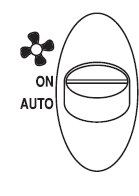
- Put the -ON-AUTO switch into the AUTO position. The blower fan should turn off.
Customizing the Thermostat
Settings
- System
- Cool: The thermostat controls the cooling.
- Off: The heating and cooling systems are off.
- Heat: The thermostat controls the heat.
- Fan
- Auto: Equipment controls the fan.
- On: The fan operates continuously.
Temperature
Heating: The default temperature for heating is 70°F (21°C). To change the default setpoint, put the system switch in HEAT and press the button to adjust the temperature setting up or down. The display will show SET. The display will return to the current room temperature three seconds after the last input and the new setpoint will be saved.
Cooling:
The default temperature for cooling is 78°F (25°C). To change the default setpoint, put the system switch in COOL and press the button to adjust the temperature setting up or down. The display will show SET. The display will return to the current room temperature three seconds after the last input and the new setpoint will be saved.
Temperature Differential 2nd Stage Delay
- The temperature differential is factory set at 1.0°F (.5°C) for the 1st stage differential and 2°F (1°C) for the 2nd stage. This means that whenever the room temperature changes by one degree Fahrenheit from the temperature setting, the system will turn on. If the system turns on too often, increase the temperature differential.
- This thermostat is equipped with an adjustable 2nd stage time delay. The delay is factory set at 20 minutes. The time delay setting prevents the 2nd stage system from activating until the delay time has expired. If the 2nd stage is turning on too often, increase the time delay.
- The 2nd stage will turn on when the room temperature changes from the desired temperature by the sum of the 1st and 2nd stage differential settings. The 2nd stage also will turn on if the temperature has not increased (or decreased in the event of cooling) for a period of 20 minutes.
Changing Fahrenheit (°F) to Celsius (°C), Temperature Differential, and 2nd Stage Delay
- The thermostat is preset to display the temperature in degrees Fahrenheit (US models) or degrees Celsius (Canadian models). The temperature display can be changed. Press and hold both the button for three seconds. The display will read F or C.
- Release buttons. Press thebutton to switch the display.
- After three seconds the display will switch to the 1st stage differential settings. The display will read DIFFERENTIAL 1st.
- After three seconds the display will switch to the 2nd stage differential setting. The display will read DIFFERENTIAL 2nd. The temperature differential is factory set at 2°F (1°C). Press the button to adjust the differential up or down.
- After 3 seconds, the display will switch to the 2nd stage delay setting. The second stage delay is factory set at 20 minutes. Press the button to adjust the time delay in 5 minute increments.
- Wait three seconds or press and the display will return to the original room temperature.
Backlit Display
This thermostat is equipped with a backlight to make nighttime temperature adjustments quick and easy. Press the button to activate the backlight. The backlight will turn off after about 5 seconds of inactivity.
Reset
To reset the thermostat press the RESET button located just below the lower left corner of the display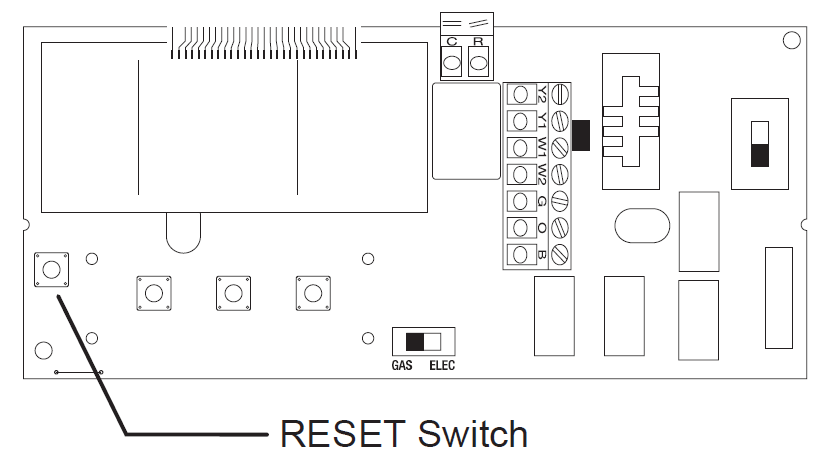
Troubleshooting
| Symptom | Remedy |
| Thermostat does not turn on system. | Check wiring (see Installation
section). |
| Thermostat turns system on and off too frequently. | Increase temperature differential (see Changing the Temperature Differential section). |
| System fan does not operate properly. | Move fan option switch to either gas or electric, to match system (see Installation section). |
| The thermostat does not display proper room temperature. | Check F/C (Fahrenheit/Celsius) setting. See Changing Fahrenheit
(F) to Celsius (C). |
If problems with the thermostat cannot be resolved, call:
Technical Support: (800) 445-8299
Monday-Friday 7:30 AM – 5:30 PM CST
Warranty
Two Year Limited Warranty
Climate Controls Americas warrants to the original contractor installer, or to the original consumer user, each new Robertshaw thermostat to be free from defects in materials and workmanship under normal use and service for a period of two (2) years from date of purchase. This warranty and our liability does not apply to batteries or merchandise that has been damaged by misuse, neglect, mishandling, alterations, improper installation, or use in a way other than in accordance with Climate Controls Americas recommendations and instructions. Climate Controls Americas agrees to repair or replace at its option any thermostat under warranty provided it is returned within the warranty period, postage prepaid, with proof of the date of purchase. The cost of thermostat removal or reinstallation is not the responsibility of Climate Controls Americas. Repair or replacement as provided under this warranty is the exclusive remedy of the consumer. Climate Controls Americas shall not be liable for any incidental or consequential damages for breach of any express or implied warranty on this product, or under any other theory of liability. Except to the extent prohibited by applicable law, any implied warranty of merchantability or fitness for a particular purpose on this product is limited to the duration of this warranty. Some states do not allow the exclusion or limitation of incidental or consequential damages, or allow limitations on how long an implied warranty lasts, so the above limitations or exclusions may not apply to you. This warranty gives you specific legal rights, and you may also have other rights which vary from state to state.
For warranty returns, send thermostat, shipping prepaid to:
- Invensys Climate Controls Americas
- Warranty Claims Department
- 515 S. Promenade
- Corona, CA 91719
Reference
Download Manual:
Robertshaw 9415 Non-Programmable Thermostat User Manual