Ritetemp 8082C programmable Thermostat
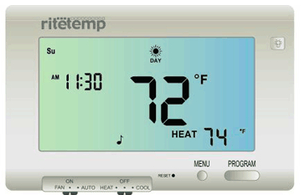
8082C Features
The 8082C can be used with most 24 volt gas, oil or electric heating and air conditioning systems, heat pumps with or without auxiliary heat, gas millivolt heating systems, or zoned heating systems using air or water control valves. It cannot be used with 120 volt heating systems. Ask The Home Depot for other thermostats to control those systems.
The 8082C is a very versatile programmable thermostat:
- The 8082C separately programs each weekday, Sat and Sun for both heat and cool.
- There are 4 programming periods per day on program (A).
- In addition, there are 2 or 6 programming periods per day on a 2nd program (B).
- Each program (A and B) can be programmed separately and easily selected.
- You can use the built in program for A or B or alter them to suit your life.
- The programming display and function is so easy to use, it is almost intuitive.
- You can easily override any program for as little as one period or as long as a vacation.
- Remote control allows temporary adjustment from w/in 50ft.
The large liquid crystal touch screen display shows: day of the week, time, present period, present room temperature, target temperature, humidity, and heating or cooling status. The word FILTER will come on to remind you when the air filter should be changed. Built in Electro Luminescent backlight gives high visibility of the display in the dark. When using a compressor for heat pump and/or for air conditioning, a 5 minute delay time protects your compressor from stalling in heat and cool.Two AA batteries are used to retain your programs and run the thermostat. In addition, the thermostat may be run with AC power if the C wire is available. The accuracy of the 8082c is +/- 1oF with display resolution of .5oF. The room temperature can be changed (calibrated) to match another thermostat or to compensate for a location. The 8082c has a humidistat built in to measure and display humidity. It also can be programmed to control high humidity, and/or low humidity (humidifier required).The 8082c changes the time display to daylight time (DST) by the push of a button. The 8082c is compatible with dual stage heating systems and heat pumps (with or without auxiliary heat). It also displays the status of each stage of these systems. If using a heat pump with (expensive) electric auxiliary heat, the 8082c allows you to choose comfort vs efficiency depending on your location. In AUTO mode the 8082c is able to automatically switch from HEAT to COOL modes as the weather changes
Install guide
Tools
- You will need #1 Phillips screwdriver (small)
- Drill with 3/16-in. (4.8mm) bit for this installation.
Location
- On replacement installations, mount the new thermostat in place of the old one if possible.
- On new Installations, follow the guidelines listed below.
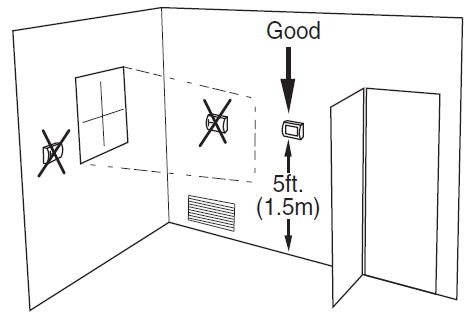
- Locate the thermostat on an inside wall, about 5 ft. (1.5m) above the floor, and in a room that is used often.
- Do not install it where there are unusual heating conditions, such as: in direct sunlight; near a lamp, radio, television, radiator register, or fireplace; near hot water pipes in a wall; near a stove on the other side of a wall.
- Do not locate in unusual cooling conditions, such as: on a wall separating an unheated room; or in a draft from a stairwell, door, or window.
- Do not locate in a damp area.
- This can lead to corrosion that will shorten thermostat life.
- Do not locate where air circulation is poor, such as: in a corner or an alcove; or behind an open door.
- Do not install the unit until all construction work and painting has been completed.
- This thermostat does not require leveling.
Remove old unit
- Switch electricity to the furnace and air conditioner OFF; then proceed with the following steps.
- Remove cover from old thermostat. Most are snap-on types and simply pull off.
- Some have locking screws on the side or front. These must be loosened. Note the letters printed near the terminals.
- Attach labels (enclosed) to each wire for identification.
- Label the wires one at a time. You must have all the wires labeled before you proceed. With all wires labeled, remove them from the old unit.
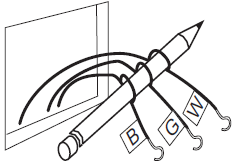
- Make sure the wires do not fall back inside the wall.
- Wind them around a pencil to keep them from falling.
- Loosen all screws on the old thermostat and remove it from the wall.
- Fill wall opening with non-combustible insulation to prevent drafts.
Mount the 8082C
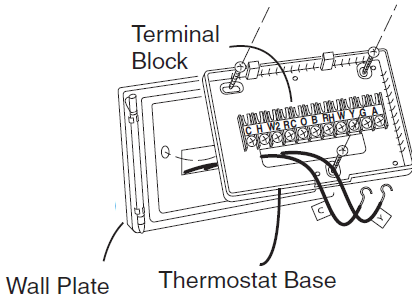
- Separate front from back of unit. Press up on the catch on bottom of thermostat and swing the body away from the base, lift up to remove the body from the base.
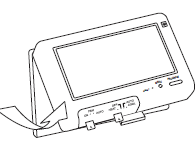
- Hold the base against the wall, with the wires coming through the opening below the terminal block.
- Position the base for best appearance. (If you chose to use the optional wall plate, hold the wall plate against the wall, with the wires coming through the opening. Then pull the wires through the opening in the base unit. Position the base unit for best appearance.)
- Attach the base to the wall with the three screws provided.
- If you are mounting the base to sheet rock or if you are using the old mounting holes, use the plastic anchors provided. Drill a 3/16-in.(4.8mm) hole for the insert at each screw location, then mount the base.
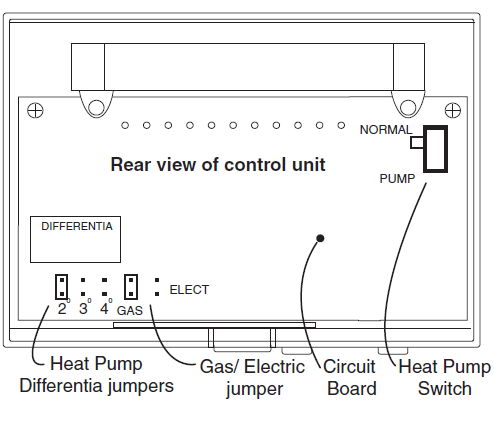
Gas-Electric Selection
- If you have Electric Heat or a Heat Pump you must place the Gas/Electric jumper in the ELECT position (thermostat controls the Fan).
- If you have Gas Heat the Gas/Electric Jumper should be in the GAS position (furnace controls the Fan ).
Heat Pump Switch
- If you have a HEAT PUMP switch the PUMP-NORMAL switch to the PUMP position. Reset the unit, the unit display appear PUMP word.
- Select the desired Temperature Differential jumper setting. This determines how much your AUX heat will come on.
- Select the 2,3,4, remember reset the unit. 2 is for comfort or cool climates 4 is for efficiency or warm climates
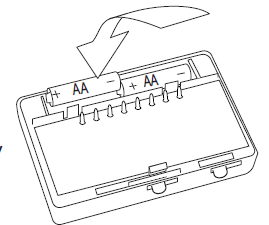
Install Batteries
- The 8082C requires batteries to operate your furnace and retain its programming in memory.
- Switch MODE switch to OFF and the FAN switch to AUTO.
- Insert 2 AA alkaline batteries according to the polarity noted in the compartment.
- Press the RESET button to clear transient program memory. Initially, all LCD segments will go off.
- NOTE: Replace the batteries when this LOW battery indicator appears on the display or once a year. When replacing batteries, you have approximately 1/2 minute before your custom program is lost
Power Options
Make sure your wires are labeled. This is necessary to determine which step-by-step wiring diagram you should use. This may require you to find the ‘other end’ connection for each wire on your heating or air conditioning equipment and read the label there. If you have a Zoned Heating/Cooling system with multiple thermostats, please refer to our website at www.ritetemp-thermostats.com for installation notes or call 1-888-515-2585
Before you Connect Wires
- Please refer back to these guidelines for safe and secure wire connections.
- Take care not to damage the labels for each wire in handling.
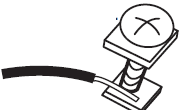
- strip insulation 3/8 in. (9.5mm) from wire ends.
- Connect labeled wires only to a terminal with corresponding letter.
- Bend the wire slightly, insert the wire under the contact plate and tighten the screw down onto the wire
WIRE LABEL LIST
- R – Single source power for heat/cool (R connected to
- RC and RH using the jumper wire)
- RH or R – Heating Power
- RC – Cooling Power
- W – Heating return
- G – Fan return
- Y – Compressor return
- H – Humidifier (built into the furnace)
- W2 – 2nd stage heat in NORMAL, auxiliary heat in PUMP mode.
- A – For 3 wire zoned heating systems
- C – AC power for the thermostat if available. Required for Remote Control operation
- O – Damper control (Zoned heating) or heat pump changeover valve (powered in COOL)
- B – Damper control (Zoned heating) or heat pump changeover valve (powered in HEAT) NOTE: Do not connect both O and B on a heat pump. Connect O to
- O & tape off B.
- X – Tape off X
- E – Tape off E
What Wires Do You Have?
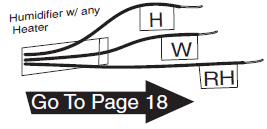
The Wire Label List shows wire labels used on Ritetemp thermostats. Please determine what wires you have and select the correct wiring diagram to “go to” on pages 8-9. If you have a HEAT PUMP select a wiring diagram on pg 9. If you have a Humidifier select a diagram on pg9.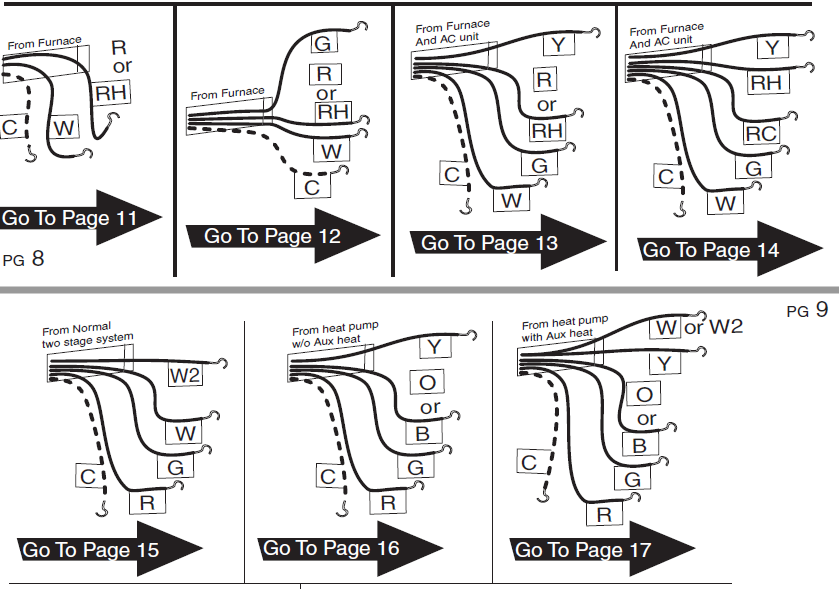
Wire Connections
When you have finished connecting the wires, close cover and attach control unit to wall unit. Hook the top of the body onto the base, swing the body down, and snap the body onto the base.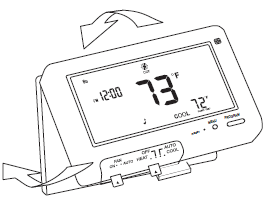
Check Unit
To check HEAT mode:
- Set the mode switch to HEAT. Set the fan switch AUTO.
- Touch the main temperature display then touch the TEMP UP arrow to raise the set point to 90o. Touch HOME. Wait 5 min.
- Verify that heat is blowing from the system.
To check COOL mode:
- Set the mode switch to COOL.
- Touch the main temperature display then touch the TEMP DOWN arrow to 5o below the room temperature.
- Touch HOME. Wait 5 min.
- Verify that cool air is blowing from the system.
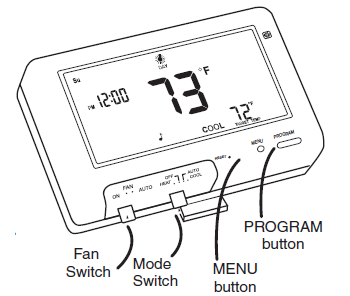
To check Fan:
- (If you connected the G wire)
- Switch Mode to OFF during fan test.
- Switch the FAN switch to the ON position. Verify air is blowing from vents.
- After test, return to Fan switch to AUTO, and Mode to HEAT or COOL
- Congratulations, you have successfully installed your unit. Please proceed to the OPERATING Guide to initialize the new thermostat
WIRE Heating
2 WIRE
- STEP 1 – Connect the R (or RH) wire to the RH terminal on the thermostat. This connects the Heater Power to the thermostat
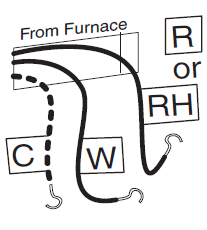
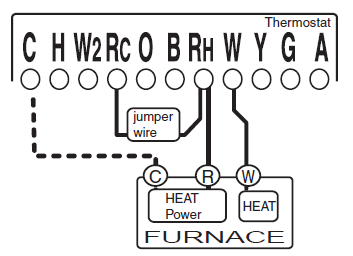
- STEP 2 – Connect the W wire to the W terminal on the thermostat. This connects the heater control line to the thermostat.
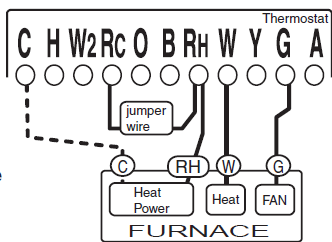
3 WIRE
- STEP 1 – Connect the R (or RH) wire to the RH terminal on the thermostat. This connects the Heater Power to the thermostat.
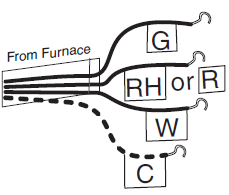
- STEP 2 – Connect the W wire to the W terminal on the thermostat. This connects the heater control line to the thermostat.
- STEP 3 – Connect the G wire to the G terminal on the thermostat. This connects the Fan to the thermostat
4 WIRE
- STEP 1 – Connect the Y wire to the Y terminal on the thermostat. This connects to the Cooler compressor.
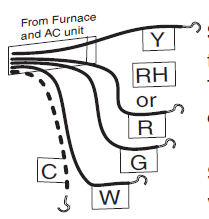
- STEP 2 – Connect the RH or R wire to the RH terminal on the thermostat. This connects the Heater/Cooler Power.
- STEP 3 – Connect the W wire to the W terminal on the thermostat. This connects to the heater control line
- STEP 4 – Connect the G wire to the G terminal on the Thermostat. This connects to the Fan
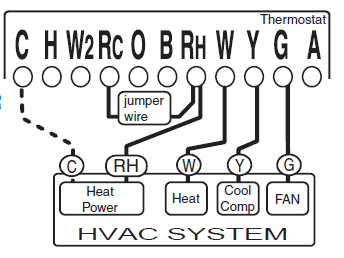
Your HVAC system is now connected to the thermostat
- STEP 1 – Remove the Jumper wire.
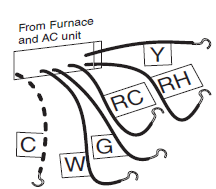
- STEP 2 – Connect the Y wire to the Y terminal on the thermostat. This connects to the Cooler compressor.
- STEP 3 – Connect the RH wire to the RH terminal on the thermostat. This connects to the Heater Power .
- STEP 4 – Connect the RC wire to the RC terminal on the thermostat. This connects to the Cooling Power .
- STEP 5 – Connect the W wire to the W terminal on the thermostat. This connects to the heater control line.
- STEP 6 – Connect the G wire to the G terminal on the Thermostat. This connects to the Fan.
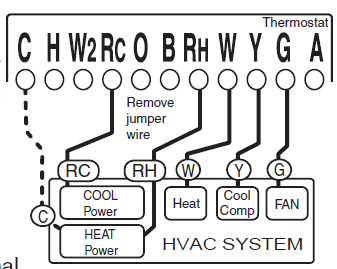
Your HVAC system is now connected to the thermostat
- STEP 1 – Connect the G wire to the G terminal on the thermostat. This connects the Fan.
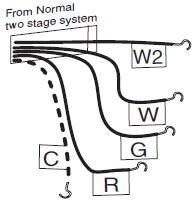
- STEP 2 – Connect the between W wire to W. This connects the 1st stage heat.
- STEP 3 – Connect the between W2 wire to W2. This connects the 2nd stage heat.
- STEP 4 – Connect the R wire to the RH terminal on the Thermostat. This connects to the 24vac power.
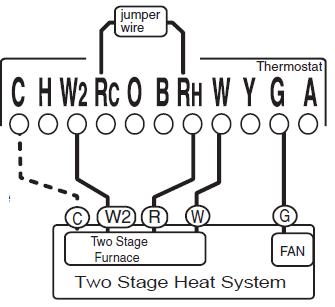
Your HVAC system is now connected to the thermostat. (If the system also has AC, connect it per instructions for RC and Y on pg 14
- STEP 1 – Connect the G wire to the G terminal on the thermostat. This connects the Fan.
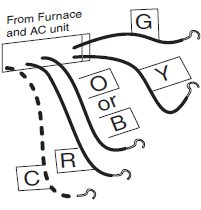
- STEP 2 – Add a jumper wire between W and Y.
- STEP 3 – Connect the Y wire to the Y terminal on the thermostat. This connects the Compressor.
- STEP 4 – Connect the O or B wire to the O or B terminal on the thermostat. (If you have both O and B contact Ritetemp or your local HVAC contractor for further help) This connects the change over valve.
- STEP 5 – Connect the R wire to the RC terminal on the Thermostat. This connects to the 24vac power. Your HVAC system is now connected to the thermostat
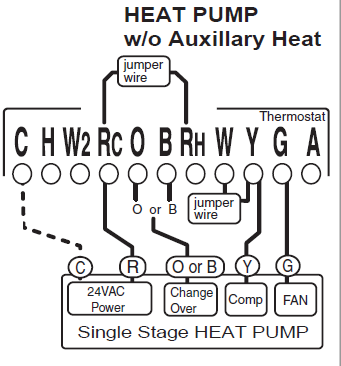
NOTE: Wires marked with the dotted line are optional. For your Remote Control to operate you must connect the C wire
- STEP 1 – Connect the G wire to the G terminal on the thermostat. This connects the Fan.
- STEP 2 – Add a jumper wire between W and Y.
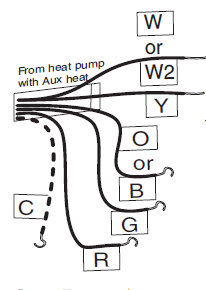 STEP 3 – Connect the Y wire to the Y terminal on the thermostat. This connects the Compressor.
- STEP 4 – Connect the O or B wire to the O or B terminal on the thermostat. (If you have both O and B wires, use the O and tape off the B).This connects the change over valve.
- STEP 5 – Connect the R wire to the RC ter minal on the Ther mostat. This connects to the 24vac power.
- STEP 6 – Connect W or W2 to W2 on the thermostat. This connects the AUX heat
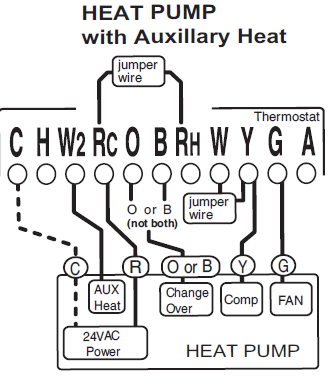
Your HVAC system is now connected to the thermostat
- STEP 1 – Connect the H wire to the H terminal on the thermostat. This connects the Humidifier.
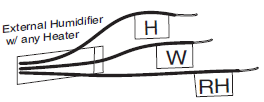
- STEP 2 – Connect the W wire to the W terminal on the thermostat. This connects the Heat control line.
- STEP 3 – Connect the R wire to the RH terminal on the thermostat. This connects the Heater’s Power

REFERENCE:
DOWNLOAD MANUALS:
Ritetemp 8082C programmable Thermostat Installational Guide
OTHER MANUALS:
Ritetemp 8082C programmable Thermostat Operaitional Manual
