RANRAO 1 Electronic Radiator Thermostat
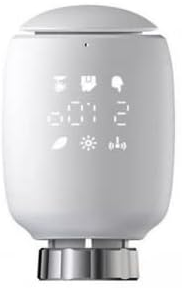
INTRODUCTION
It’s possible that the RANRAO 1 Electronic Radiator Thermostat is a clever, programmable gadget made to manage certain radiators in a heating system. Users can separately set and control the temperature of each radiator using these thermostats, which are mounted on the radiators. They offer a more effective approach to controlling the heating in various rooms or zones across your house. Typical characteristics and features of electronic radiator thermostats include the following:
- Temperature Control: Users can set and modify the preferred temperature for each radiator using electronic radiator thermostats.
- This aids in establishing a cozy atmosphere in various rooms based on personal preferences.
- Programmable Scheduling: A lot of electronic radiator thermostats allow users to schedule particular temperature levels at different periods of the day or week.
- Turning down the heat when it’s not necessary, such as at night or when you’re away from home, this feature aids in energy conservation.
- Advanced radiator thermostats with smart connectivity features, such as WiFi or Zigbee, enable customers to monitor and manage their radiators from a distance using a smartphone app or other compatible devices.
- Open Window Detection: This feature is made to recognize abrupt temperature decreases (which signify an open window) and turn off the radiator automatically to conserve electricity.
- Adaptive Learning: Some models have the ability to learn over time about your preferences for heating and make adjustments to the settings accordingly.
- Holiday Mode: When using holiday mode, you can set a lower temperature when you are gone for a long time. This helps you save energy while you are gone.
- Electronic radiator thermostats frequently have LCD displays that indicate the temperature and settings at any given time for simple monitoring and adjusting. Many electronic radiator thermostats today are battery-powered, which eliminates the need for intricate wiring after installation.
- It is important to refer to the product’s literature or the manufacturer’s website for precise information because the RANRAO 1 Electronic Radiator Thermostat’s specific features and functionality may differ.
SPECIFICATION
- Material: plastic + die-cast AL.
- Color: White (as picture shown)
- Size: (as picture shown)
- Temperature range: 5-30°C
- Display: LED.
- Maximum radiation power: 10dBm
- Dimensions (W x H x D): 55.3 x 54 x 98.3 mm.
- Operating Temperature: -10°C to +40°C
- Working environment: Indoor
- Safety: CE/RoHS
- Frequency: 2.4GHz
- Protection class: IP20.
- Thread specification: M30 * 1.5
- Battery: 2 x 5 AA batteries (not included)
Package includes
- 1 x radiator thermostat
- 1 x Converter
- 1 x Adapter for Danfoss (RA, RAV and RAVL)
- 1 x user manual (may be English language not guaranteed).
Note:
- The actual color of the item may be slightly different from the picture shown due to monitor settings and light effects.
- Please allow slight deviation for the size of the item. For roof tiles, roof tiles, roof tiles, roof tiles and roof tiles.
HOW TO OPERATE
- Installation: First, install the electronic radiator thermostat on your radiator by following the manufacturer’s instructions. Make sure to turn off the heating system before installation.
- Power On: If the thermostat has a display screen, it will likely light up when you insert batteries or connect it to a power source. Some models might have built-in rechargeable batteries or use replaceable batteries.
- Setting the Clock: Set the current time and date on the thermostat if it has a clock function. This step might be optional depending on the model.
- Temperature Setting: Use the thermostat’s buttons or touchscreen to set your desired room temperature. The display should show the current temperature and the temperature you’re setting.
- Programmable Schedule: If the thermostat is programmable, you can set different temperature levels for different times of the day. For example, you can set a lower temperature during the night or when you’re away to save energy.
- Manual Mode: Some thermostats have a manual mode that allows you to adjust the temperature manually without following the schedule.
- Holiday or Vacation Mode: Some thermostats have a vacation or holiday mode that you can use when you’ll be away for an extended period. This mode sets a lower temperature to save energy while you’re gone.
- Override Function: Most electronic radiator thermostats have an override function that allows you to temporarily adjust the temperature for a certain period without affecting the programmed schedule.
- Open Window Detection: Some advanced thermostats have open window detection to sense sudden drops in temperature and adjust accordingly to save energy.
- Connectivity (Optional): Some electronic radiator thermostats may have built-in WiFi or Zigbee connectivity, allowing you to control them remotely using a smartphone app or integrate them into a smart home system.
Please note that the specific steps and features of the RANRAO 1 Electronic Radiator Thermostat may vary. It’s essential to refer to the user manual provided by the manufacturer for detailed instructions on how to operate the specific model you have.
FAQS
What is an electronic radiator thermostat?
An electronic radiator thermostat is a device used to control the temperature of individual radiators in a heating system. It replaces the traditional manual radiator valve and allows for more precise temperature control.
How does the RANRAO 1 Electronic Radiator Thermostat work?
The specific operation of the RANRAO 1 Electronic Radiator Thermostat may vary, but in general, it uses a temperature sensor to detect the room’s temperature and automatically adjusts the flow of hot water into the radiator to maintain the desired temperature setting.
Is the RANRAO 1 Electronic Radiator Thermostat compatible with all radiators?
The compatibility of the RANRAO 1 Electronic Radiator Thermostat may vary depending on the type and model of the radiator. It is essential to check the product specifications and compatibility before purchasing.
Can I program heating schedules with this thermostat?
If the RANRAO 1 Electronic Radiator Thermostat is programmable, you can set customized heating schedules based on your daily routine, helping you save energy when heating is not required.
Does it have a user-friendly interface?
Electronic radiator thermostats often come with user-friendly interfaces for easy temperature adjustment and programming.
Can I control the thermostat remotely?
Remote control capability allows you to adjust the temperature settings of the RANRAO 1 Electronic Radiator Thermostat using a smartphone app or other compatible devices.
Does it support voice control?
Some electronic radiator thermostats are compatible with voice control platforms like Amazon Alexa or Google Assistant.
Is it easy to install the RANRAO 1 Electronic Radiator Thermostat?
The ease of installation can vary, and it’s important to follow the provided instructions or seek professional assistance if needed.
What are the energy-saving features of this thermostat?
Energy-saving features, if available, may include adaptive learning, open-window detection, and vacation mode to help optimize energy consumption.
Does the RANRAO 1 Electronic Radiator Thermostat have a display screen?
If available, a display screen on the thermostat can make it easier to read and adjust the settings.
What is the power source for this thermostat?
Electronic radiator thermostats may be powered by batteries or wired directly into the electrical system.
Does it have an open-window detection feature?
Open-window detection is a useful feature that automatically shuts off the radiator if a sudden drop in temperature is detected, helping to save energy.
Can I integrate it with other smart home devices?
Some electronic radiator thermostats can be integrated into a smart home ecosystem, allowing seamless communication with other compatible smart devices.
What is the warranty period for the RANRAO 1 Electronic Radiator Thermostat?
The warranty period can vary, so it’s best to check the manufacturer’s website or packaging for specific warranty details.
Does the RANRAO 1 Electronic Radiator Thermostat require regular maintenance?
Electronic radiator thermostats typically do not require regular maintenance, but it’s essential to keep them clean and free from dust for optimal performance.
