RADIO THERMOSTAT 3M-50 Digital Thermostat

Installation
Caution
- Your thermostat is a precise instrument, handle it with care.
- Turn off electricity to the HVAC system before installing or servicing thermostat or any part of the system.
- Do not turn electricity back on until work is completed.
- Do not short (jumper) across electric terminals at the control on the furnace or air conditioner to test the system.
- This may damage the thermostat.
- All wiring must conform to local codes and ordinances.
- This thermostat is designed for use with 3 AA alkaline batteries and/or 24 VAC C wire (or a 12-24 AC or DC source) and millivolt gas systems. Each thermostat relay load should be limited to 1.0 amp; higher amperage may cause damage to the thermostat.
- To avoid electrical shock and to prevent damage to the furnace, air conditioner, and thermostat, disconnect the power supply before beginning work. This can be done at the circuit breaker
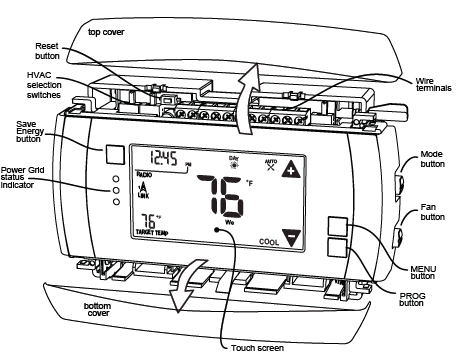
TOOLS
You will need a small Phillips screwdriver and a drill with 3/16-in. (4.8mm) bit for wall mounts.
LOCATION
- Replacement installations – mount the 3M-50 in place of the old thermostat.
- A new location will require moving your wiring.
- For new installations and relocating the 3M-50 – follow the guidelines listed below:
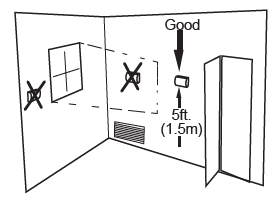
- Locate the thermostat on an inside wall, about 5 ft. (1.5m) above the floor, and in a room that is used often.
- Do not install it where there are unusual heating conditions, such as: in direct sunlight; near a lamp, radio, television, radiator register, fireplace; near hot water pipes in a wall; or near a stove on the other side of a wall.
- Do not locate in unusual cooling conditions, such as: on a wall separating an unheated room; or in a draft from a stairwell, door, or window.
- Do not locate in a damp area. This can lead to corrosion that will shorten thermostat life.
- Do not locate where air circulation is poor, such as: in a corner, an alcove; behind an open door.
- Do not install the 3M-50 until all construction and painting has been completed.
- This thermostat does not require leveling
REMOVE OLD UNIT
Then follow these steps:
- Remove cover from old thermostat. Most are snap-on types and simply pull off. Some have locking screws on the side or front.
- These must be loosened. DO NOT remove wires. Note the letters printed near the terminals. Attach labels (enclosed) to each wire for identification.
- Label the wires one at a time. You must label all the wires before you proceed.
- With all wires labeled, remove them from the old unit.
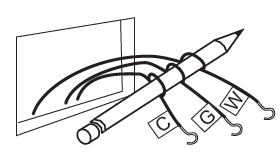
- Make sure the wires do not fall back inside the wall. You can wind them around a pencil to keep them from falling.
- Loosen all screws on the old thermostat and remove it from the wall.
What wires do you have?
Make sure your wires are labeled. This may require you to find the ‘other end’ connection for each wire on your heating or air conditioning equipment and read the label there. Refer to the Wire Reference page at the end of the install section for a better understanding of wire labels from different HVAC system makers.
IMPORTANT: The 3M-50 runs on 3 AA alkaline batteries and/or the C wire if available. If you do not have a C wire you can run a new wire from the HVAC or use a standard 12-24V [AC or DC] wall transformer. A constant power source is required when using a radio module.
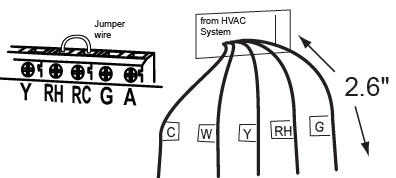
IMPORTANT: If you have both RH and RC you need to remove the jumper wire between these 2 terminals.
Prepare Wires
Please follow these guidelines for safe and secure wire connections:
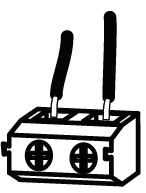
- You will need at least 2.6” of wire for each of your connections to the 3M-50.
- If you do not have enough wire, splice additional wire to allow enough slack.
- Terminals accept wires from 16-22awg.
- Fan out wires below the hole as shown.
- Remove insulation 1/8” from the tip of each wire.
- When handling, take care not to damage the labels for each wire.
Find the step-by-step diagram for your system
- Select the reference page with your wiring diagram and set-up information below.
- The C-wire is optional but preferred for all installations [shown dotted in diagrams]. Some radio modules will require 24VAC C-wire power.
- If your combination of wires is not above you can use the wiring table at the end if the install section to determine your connections. Contact customer support for help.

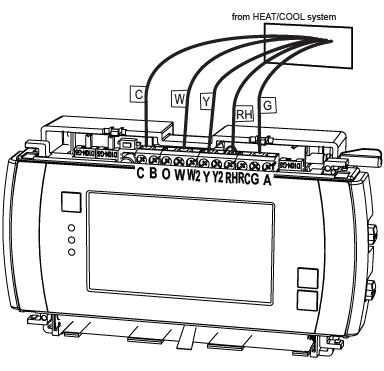
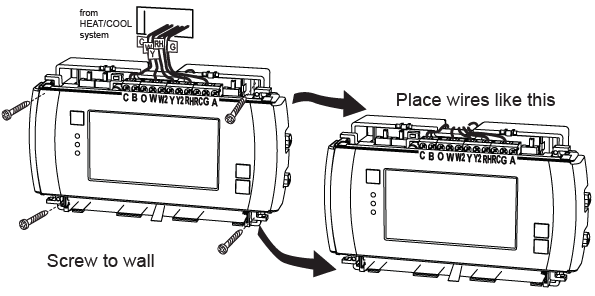
- “Fan out” wires as illustrated with 3M-50 below the wall opening. As in the example: fan out the wires so that the C wire is above the C terminal, the W above the W. This allows the 3M-50 to fit snugly to the wall
- Wires will position behind the 3M-50 and up over the terminal area.
- Do not bunch wires behind the 3M-50. Feed any slack back into the wall opening
Connect Your Wires
- Connect labeled wires only to a terminal with the same letter label.
- Insert the wire in the terminal well and tighten the screw securely.
- NOTE: If you wish you can mount the 3M-50 to the wall first, and then connect the wires.
- The 3M-50 can be externally powered with a power source rated from 12V to 24V, AC or DC, at 300ma or greater. If used, connect to the C and RH terminals (no polarity)
Mount the 3M-50 to Wall
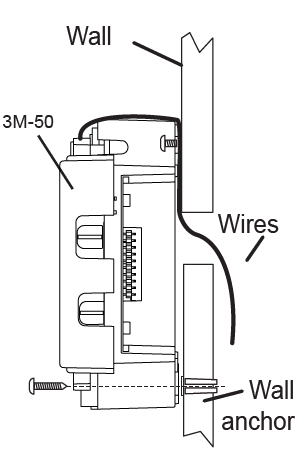
- Hold the 3M-50 against the wall, with the wires coming over the top; above terminal block. The 3M-50 will cover the hole in the wall.
- Position 3M-50 for best appearance.
- Attach the 3M-50 to the wall with the screws provided.
- If you are mounting the 3M-50 to sheet rock or if you are using the old mounting holes, use the plastic anchors provided.
- Mark first and drill a 3/16-in.(4.8mm) hole for the insert at each screw location, then mount the unit.
HVAC Selection
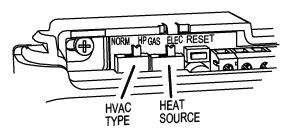
- Set the HVAC TYPE switch in the NORM position if you have conventional natural gas, propane, oil, or electric heat. If you have a HEAT PUMP system set the HVAC TYPE switch to HP.
- Set the HEAT SOURCE switch in the GAS position if you have normal gas or oil heat or if you have a heat pump with gas or oil auxiliary heat. Put the HEAT SOURCE in the ELEC position if you have normal electric heat or if you have a heat pump with electric auxiliary heat
Install 3 AA Batteries
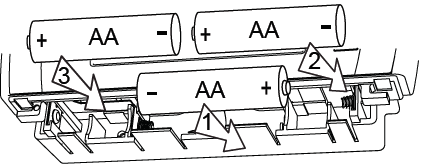
- Install 3 AA alkaline batteries [required] following the marked polarity in the battery compartment.
- Put the lower battery in the negative end first against the spring, then push the positive end in. Then insert the last 2 batteries as shown.
IMPORTANT: Press the RESET button (under top cover) to implement the HVAC switch selections.
- With all the wires connected it is time to turn the AC power back on. Do this at the breaker you used to switch it off.
- The 3M-50 will power up in the OFF mode. Your 3M-50 is not configured to operate your HVAC system yet. You must now configure your thermostat for your HVAC system.
Special Battery Warning
- Always replace the batteries as soon as the “Low Batt” flashes. The thermostat is a battery-powered device. You must be responsible to replace batteries before they run out. Failure to replace batteries can result in overheating or excessive cooling of your house.
- Even if the “Low Batt” indicator does not flash, you should always replace the batteries at least once a year. Replacing the batteries also helps to prevent leakage that can corrode and damage the thermostat.
- If you are leaving your home for a month or more, you should replace the batteries as a precaution against battery failure in your absence.
- Always use new alkaline batteries.
- Failing to replace the batteries, when necessary, could cause the thermostat to lose power or malfunction. If the thermostat loses power, then the thermostat will not control the temperature which could result in your HVAC system not functioning as you intended and lead to possible damage from overheating or excessive cooling.
- If the thermostat batteries fail with the heat OFF, this can result in NO HEAT and possible frozen or broken pipes and water damage.
- If the thermostat batteries fail with the cool OFF, this can result in NO COOL and could cause possible damage or excessive temperatures
HVAC Setup on Screen
- Make sure the 3M-50 is powered up and the mode is set to OFF. HVAC selection switches must be set first [pg 8].
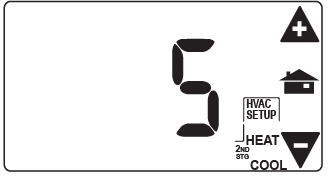
- With mode in OFF press MENU and touch HVAC SET UP.
- Use +/- icons to select HVAC SET UP number on the screen.
- The LCD display will show your selection and indicate the number of stages you have selected. During setup, 2nd stage will blink when both heat and cool have 2nd stages.
If you have a Normal HVAC system and you want fast temperature recovery
- HEAT and COOL select 1
- 2 stage HEAT, 1 stage COOL select 2
- 2 stage HEAT, 2 stage COOL select 3
If you want efficient [but slower] recovery…
- 2 stage HEAT, 1 stage COOL select 4
- 2 stage HEAT, 2 stage COOL select 5
If you have a HEAT PUMP HVAC system…
- HEAT PUMP with AUX heat select A (fast recovery)
- HEAT PUMP with AUX heat select b (efficient recovery)
- HEAT PUMP no AUX heat select C
NOTE:
- For 2-stage systems your 3M-50 can recover from a temperature setback in 2 ways: 1]
- Fast Recovery – This uses your 2nd stage to bring the house to Target Temperature.
- This may use slightly more energy. 2]
- Efficient Recovery -This uses the 2nd stage to bring your house to within a few degrees of the Target Temperature and then uses the 1st stage to go the last bit. (See setting the differential in the operating guide). This is more efficient.
Test Installation
Follow these procedures to verify you have correctly installed the 3M-50.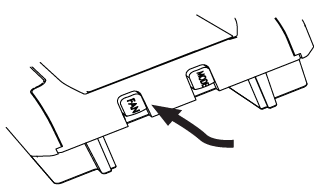
TO CHECK FAN (If you connected the G wire):
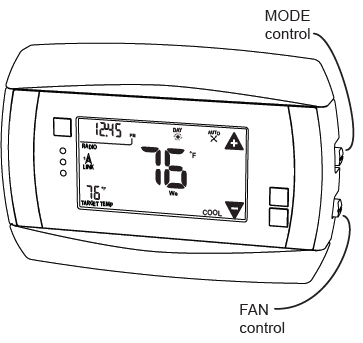
Press the fan button to turn the fan ON. Verify that air is blowing from the system. Press the fan button again to return to AUTO.
TO CHECK HEAT
Set the mode to HEAT by pressing the MODE button until HEAT is displayed. Touch the temperature display to bring up the MANUAL screen. Touch the + icon and raise the Target Temperature to 90oF; allow the system 2 minutes to respond. Verify that heat is blowing from the system. Return the Target Temperature to a nomal setting. Return mode to OFF by pressing the mode button. If you have a heat pump, leave in off for 4 minutes before checking COOL.
TO CHECK COOL
(Do not operate AC if the outside temp is below 65oF)Set the mode to COOL by pressing the MODE button until COOL is displayed. Touch the – icon to lower cool Target Temperature to 50oF. Allow the system 5 minutes to respond. Verify that cool air is blowing from the system. Return mode to OFF.
Congratulations, you have successfully installed your unit. Please proceed to the OPERATING Guide to initialize the 3M-50.
IMPORTANT: After you have labeled and connected your wires, followed the correct HVAC setup, and your system still does not operate, contact support at www.radiothermostat.com/filtrete or 888-607-5824 8 am-midnight EST.
STATEMENT OF USE: This thermostat can be used with 3 AA batteries, 24VAC (C wire), 24VAC adapter, heating and cooling systems, and also millivolt heating. It cannot be used with line voltage systems. This thermostat is digital and your desired heat or cool temperatures can easily be set on the large touch screen with the +/- buttons. A minimum 4 minutes off time protects the compressor from damage.
This thermostat runs on 3 AA batteries. The 3M-50 can be externally powered with a power source rated from 12V to 24V, AC or DC, at 300ma or greater. If used, connect to the C and RH terminals (no polarity). The 24VAC “C” wire is the other side of the 24VAC heating transformer and can be found where the other thermostat wires connect at the wall or at the furnace. Do not use the common or ground side of the line voltage
Step-by-Step Wiring Diagrams
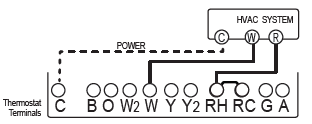
2 Wire Heat GAS MILLIVOLT or 24VAC system
- STEP 1 – Connect the R (or RH) wire to the RH terminal. This connects the heat power.
- STEP 2 – Connect the W wire to the W terminal. This connects the heat.
- STEP 3 – Set HVAC selection switches to NORMAL and GAS.
- Your heater is now connected to the 3M-50.
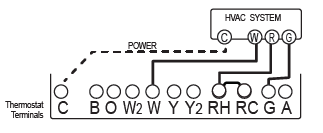
3 Wire Heat
- STEP 1 – Connect the R (or RH) wire to the RH terminal. This connects the heat power.
- STEP 2 – Connect the W wire to the W terminal. This connects the heat.
- STEP 3 – Connect the G wire to the G terminal on the thermostat. This connects the fan.
- STEP 4 – Set HVAC selection switches to NORMAL and:
- If you have gas or oil heat, set the HEAT TYPE to GAS.
- If you have electric heat, set the HEAT TYPE to ELEC.
- Your system is now connected to the 3M-50.
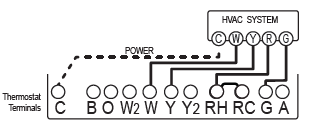
4 Wire Heat/Cool
- STEP 1 – Connect the W wire to the W terminal. This connects the heat.
- STEP 2 – Connect the Y wire to the Y terminal. This connects the cooling compressor.
- STEP 3 – Connect the RH or R wire to the RH terminal. This connects power.
- STEP 4 – Connect the G wire to the G terminal on the thermostat. This connects the fan.
- STEP 5 – Set HVAC selection switches to NORMAL and:
- If you have gas or oil heat, set the HEAT TYPE switch to GAS.
- If you have electric heat, set the HEAT TYPE switch to ELEC.
- Your HVAC system is now connected to the 3M-50
Wire Heat/Cool
- STEP 1 – Connect the W wire to the W terminal. This connects the heat.
- STEP 2 – Connect the Y wire to the Y terminal. This connects to the cooling compressor.
- STEP 3 – Disconnect the jumper between RH and RC terminals.
- STEP 4 – Connect the RH wire to the RH and the RC wire to the RC terminals. This connects power.
- STEP 5 – Connect the G wire to the G terminal. This connects the fan.
- STEP 6 – Set HVAC selection switches to NORMAL and:
- If you have gas or oil heat, set the HEAT TYPE to GAS.
- If you have electric heat, set the HEAT TYPE to ELEC.
- Your HVAC system is now connected to the 3M-50.
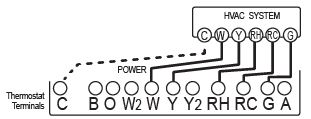
4 Wire Heat Pump (heat/cool) without Auxiliary Heat
- STEP 1 – Connect O wire to the O terminal or B wire to the B. This connects the change-over valve.
- If you have both O and B – connect only the O wire to the O terminal and DO NOT connect B to B terminal (see wire reference under Trane for B wire terminal).
- STEP 2 – Connect the Y wire to Y terminal. This connects the compressor.
- STEP 3 – Connect the R wire to RH. This connects power.
- STEP 4 – Connect the G wire to the G. This connects the fan.
- STEP 5 – Set the HVAC selection switch to HEAT PUMP and set the HEAT.
- TYPE to ELEC.
- Your HVAC system is now connected to the 3M-50.
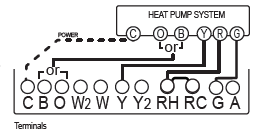
5 Wire Heat Pump w/ Aux Heat
- STEP 1 – Connect O wire to the O terminal or B wire to the B. This connects the change-over valve.
- If you have both O and B – connect only the O wire to the O terminal and DO NOT connect B to B terminal (see wire reference under Trane for B wire terminal).
- STEP 2 – Connect the W2 wire to W2 terminal. This connects the auxiliary heat.
- STEP 3 – Connect the Y wire to Y terminal. This connects the compressor.
- STEP 4 – Connect the R wire to RH terminal. This connects the power.
- STEP 5 – Connect the G wire to G terminal. This connects the fan.
- STEP 6 – Set HVAC selection switches to heat pump and:
- If you have gas or oil auxiliary heat, set the HEAT TYPE to GAS.
- If you have electric auxiliary heat, set the HEAT TYPE to ELEC.
- Your HVAC system is now connected to the 3M-50.
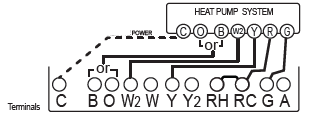
2 Stage Heat and 2 Stage Cool
- STEP 1 – Connect the W wire to the W terminal. This connects the 1st Stage of HEAT.
- STEP 2 – Connect the W2 wire to the W2 Terminal. This connects the 2nd Stage of HEAT.
- STEP 3 – Connect the Y wire to the Y terminal. This connects the 1st Stage of COOL.
- STEP 4 – Connect the Y2 wire to the Y2 terminal. This connects the 2nd Stage of COOL.
- STEP 5 – Connect the RH or R wire to the RH terminal. This connects power.
- STEP 6 – Connect the G wire to the G terminal. This connects the fan.
- STEP 7 – Set HVAC selection switches to NORMAL and:
- If you have gas or oil heat, set the HEAT TYPE to GAS.
- If you have electric heat, set the HEAT TYPE to ELEC.
- Your HVAC system is now connected to the 3M-50
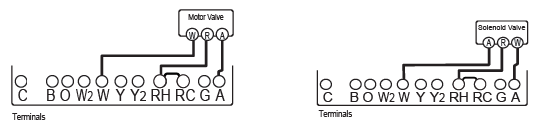
3 Wire Zoned Hot Water
For Solenoid valve or Motor valve connect the wires based on the diagrams below to the correct terminal on the 3M-50. USE ONLY IN HEAT MODE. The third wire on your valve may be called 6, Y, or G (see page 18).
Wire Reference Chart
- Possible Wires What They Control
- R or V or VR RH and RC Single power for HEAT and COOL
- RH or 4 RH Power for HEAT (RH not connected to RC jumper clip removed)
- RC RC Power for COOL (RH not connected to RC jumper clip removed)
- W W Heat control
- W2 W2 2nd stage HEAT or heat pump auxiliary heat
- W3 W3 3rd stage HEAT or 2nd stage of 2 stage auxiliary heat
- Y Y COOL control or 1st stage compression for heat pump
- Y2 Y2 2nd stage COOL control or 2nd stage compression for a heat pump
- G or F G FAN control
- C or X C 24VAC power (to power thermostat) NOTE: TRANE uses B for this connection
- H H External Humidifier
- DH DH External De-Humidifier
- EX EX external fresh air baffle
- B B Heat pump changeover (cool to heat, powered in heat)
- O O Heat pump changeover (heat to cool, powered in cool)
- B and O IMPORTANT: If there are both B and O wires (Trane pump products) DO NOT CONNECT B to B terminal, connect B to C terminal. If not a Trane product tape off B.
- E n/a Emergency heat (do not connect, tape off)
- L n/a System monitor (do not connect, tape off)
- T n/a Outdoor sensor (do not connect, tape off)
Lennox Heat Pump
- V or VR or R RH Power for HEAT
- M or Y Y COOL control
- Y or W or W2 W2 2nd stage HEAT
- F or G G Fan Control
- R or O O
- X or X2 or C C
Trane Products [American Standard]
- BC 24VAC power (to power thermostat)
- W or W1 W2 2nd stage HEAT
- X2 Emergency heat (do not connect, tape off)
Zoned Hot Water 2 wire
- Your Wires Thermostat Terminal
- R RH
- W W
3 Wire Motor Driven Valves
- R or 5 RH (power)
- W or 4 W (heat ON)
- Y or G or 6 (the 3rd wire) A (heat of)
3 Wire Solenoid Valves
- R RH (power)
- W A (heat ON)
- Y or G (the 3rd wire) W (heat of)
RADIO THERMOSTAT
- Customer support: [email protected]
- 888-607-5824 or
- www.radiothermostat.com/filtrete
REFERENCE:
DOWNLOAD MANUALS:
RADIO THERMOSTAT 3M-50 Digital Thermostat Install Guide
