PROSELECT PSTSL21P52 2H/1C Programmable Thermostat

Specifications
- Electrical Rating: 24 Volt AC (18-30 Volt AC)
- 1 amp maximum load per terminal
- 2 amp total maximum load (all terminals) (Model PSTS11NP)
- 3 amp total maximum load (all terminals) (Model PSTS21NP)
- Control Range: 45° – 90° F (7°- 32° C)
- Accuracy: +/- 1° F (+/- .5° C)
- AC Power: 18-30 Volt AC
- DC Power: 3.0 Volt DC (2 AA Alkaline batteries included)
- Model PSTS11NP: Compatibility with low voltage single stage gas, oil or electric heating or cooling systems, including single stage heat pumps, can also be used on 250mv to 750mv millivolt heating only systems.
- Model PSTS21NP: Compatibility with low voltage multi-stage gas, oil or electric heating or cooling systems, including multi-stage heat pumps.
- Terminations, Model PSTS11NP: Rc, Rh, B, O, Y, W, G, C
- Terminations, Model PSTS21NP: R, O, B, C, Y1, E/W1, G, W2
WARNING
- Always turn off power to the air conditioning or heating system prior to installing, removing, cleaning or servicing thermostat.
- This thermostat is a dual power thermostat and either requires 24 Volts AC Power or two (2) properly installed “AA” alkaline batteries for normal operation and control of the heating or cooling system.
- Refer to “Low Battery Detection and Replacement” section for more information.
- This thermostat should only be used as described in this manual. Any other use is not recommended and will void the warranty.
Installation
- Always turn off power to the air conditioning or heating system prior to removing existing thermostat.
- Remove the cover of your old thermostat and locate the wire terminals. Do not remove wires from terminals yet.
- Using small pieces of masking tape, label wires prior to removal from terminals. Use the chart below to determine the new terminal designations for your new thermostat.
- After labeling and removing all wires from terminals, unscrew the existing thermostat sub-base from wall. Secure wires to prevent them from slipping into the hole in the wall
Installing Your New Thermostat
NOTE: If installing this thermostat in a new installation, locate the thermostat 4 to 5 feet above the floor in accordance with applicable building codes. Install the thermostat in a location that provides good airflow characteristics and avoid areas behind doors, near corners, air vents, direct sunlight or heat generating devices. Installation in these areas could impact thermostat performance. Wiring must conform to all building codes and ordinances as required by local and national code authorities having jurisdiction.
- Turn off power to the air conditioning or heating system prior to installing thermostat.
- Place system switch on front of thermostat to OFF position.
- Place fan control switch on front of thermostat to AUTO position.
- Remove front of thermostat body from sub-base by pressing release latch.
- Place the thermostat sub-base against wall in the desired thermostat location.
- Guide thermostat wires through hole in sub-base. Continue to hold against wall.
- Mark placement of mounting holes as appropriate and drill using a 3/16″ drill bit.
- Gently tap supplied plastic anchors into the holes in the wall.
- Place the thermostat sub-base against the wall in the desired location, making sure the mounting holes are aligned and the thermostat wires are inserted into the opening in sub-base.
- Fasten sub-base to wall using supplied screws.
- Connect wires to quick wiring terminal block using the new terminal designations. See section 9.
- Make sure all of the wire connections are secure and not touching any other terminal to prevent electrical shorts and potential damage to the thermostat.
- Turn the front thermostat body over, exposing the rear view of the circuit board.
- Locate the internal °F /° C switch on the circuit board. Using your fingers, flip the switch toward the preferred temperature °F / °C scale.
- Locate the internal fan option switch, HG (Gas) / HE (Elec) on the circuit board. This switch controls the heating system fan delay. Select gas for gas or oil fired systems. This will allow the furnace to run for a few seconds before initiating the fan. Select electric for systems with electric furnace elements that require the fan to come on immediately.
- Using your fingers, flip the switch toward HG (Gas) or HE (Elec). Locate the internal NORM / HP switch on the circuit board. This switch configures the thermostat for conventional (NORM) heating and cooling systems or heat pump (HP) systems. Using your fingers, gently flip the switch toward NORM or HP.
- Attach front body of thermostat to sub-base of thermostat, being careful to align the terminal pins on the front body with the terminal block on the sub-base.
- Open front thermostat door and open battery compartment door.
- Install two new “AA” alkaline batteries. Locate the positive (+) ends of the batteries and match them with the positive (+) terminals located in the battery compartment. Close battery compartment.
- Restore system power so you can test installation
NOTE:
- If the thermostat was powered (batteries installed) prior to accomplishing steps 14 through 16, you will need to reset the thermostat to register thermostat switch configurations prior to programming any user settings. Gently press the RESET button on the front of the thermostat using a paperclip or a small pencil tip.
- MODEL PSTS21NP: If the thermostat is configured for a conventional system and the system switch is in the EMER position, the unit will still function in a conventional 2 stage HEAT mode, but the display will flash NO AUX SET.

Testing Your New Thermostat
- Do not short (or jumper) across terminals on the gas valve or at the heating or cooling system control board to test the thermostat installation.
- This could damage the thermostat and void the warranty. • Do not select COOL mode if the outside temperature is below 50° F (10° C).
- This could damage the controlled cooling system and cause personal injury.
- This thermostat includes an automatic compressor protection feature to avoid potential damage to the cooling system from short cycling.
- This thermostat automatically provides a 5-minute delay after turning off the cooling or heating system output to protect the compressor Place the system switch in the HEAT position.
- Press the button on the keypad until the set point temperature setting is a minimum of 3 degrees higher than the current room temperature.
- The heating system should start within several seconds.
- The fan may not turn on immediately due to the heating system built-in fan delay.
- Place the system switch in the OFF position.
- The heating system should stop within several seconds with conventional heating or cooling systems.
- On heat pump systems you must wait 5 minutes for the automatic compressor short cycle protection period to expire, or press the RESET button to bypass this feature for initial testing purposes. Pressing the
- RESET button will erase any user program settings.
- Place the system switch in the COOL position.
- Press the button on the keypad until the set point temperature is a minimum of 3 degrees lower than the current room temperature.
- The cooling system should start within several seconds. Place the system switch in the OFF position. The cooling system should stop within a few seconds.
- Place the fan switch in the ON position. The system blower should start. 8. Place the fan switch in the AUTO position. The system blower should stop
Programming User Settings
Default Thermostat Settings
Setting Temperature Differentials
The default settings for the first and second stage differentials are compatible with most systems and applications. This is normally set at time of installation and usually does not require any modification under normal operating conditions. If you feel that your system is turning on too often, simply follow the instructions below.
Setting First Stage Differential
- The default setting is 0.5° F (0.25° C). The room temperature must change .5° F (0.25° C) from the set point temperature before the thermostat will initiate the system in heating or cooling.
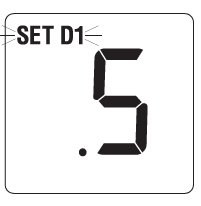
- In normal operating mode, press and hold the and buttons at the same time for 3 seconds. LCD display will show “SET D1 x°”, where “x” equals the °F / °C differential setting. This is the current first stage differential setting.
- Press the or buttons to set the first stage differential to your desired setting of .5°, 1°, or 2° F (.2, .5° or 1.0° C).
Setting Second Stage Differential
- The default setting is 2° F (1.0° C). The room temperature must change 2° F (1.0° C) in addition to the first stage differential setting before the thermostat will initiate the second stage of the system in heating.

- Press and hold the and buttons at the same time again and the LCD display will show “SET D2 x°”, where “x” equals the °F / °C differential setting. This is the current second stage differential setting.
- Press the or buttons to set the second stage differential to your desired setting of 2°, 3°, 4°, 5° or 6° F (1°, 1.5°, 2°, 2.5° or 3° C).
Temperature Adjustment
Review Set Temperature
- Press and hold the or button. The current set point temperature will be displayed in place of the current room temperature, and the indicator SET will be displayed.
- The display will return to normal operating mode when the or buttons are released. The SET indicator will turn off, indicating that the current temperature shown in the display is the room temperature

Changing Set Temperature
- Press and hold the or button for more than 1 second.
- The entire display will flash once and the SET indicator will be flashing. Release the or button and press the or button again to adjust the set temperature.
- The display will return to normal operating mode after 5 seconds, or you can press both the and buttons at the same time to return to normal operating mode.
- The SET indicator will turn off in the display, indicating that the current temperature shown in the display is the room temperature
Additional Operation Features
Compressor Protection Feature
This thermostat includes an automatic compressor protection feature to avoid potential damage to the system from short cycling. This thermostat automatically provides a 5-minute delay after turning off the cooling system output to protect the compressor. This protection is also present in the heat mode of operation on heat pump systems to protect the compressor.
Low Battery Detection and Replacement
This dual power thermostat requires two (2) new, properly installed “AA” Alkaline batteries to provide proper thermostat power when 24 volt AC power fails or is not connected to the thermostat. When the batteries start to become too weak to provide proper operation, the thermostat will begin to display a 3 stage low battery indicator.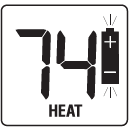
Non-Volatile Memory
In the event of a power failure, the Non-Volatile Memory feature allows all settings to be recovered, eliminating the need to reset temperature and differential settings. When AC power is restored after an outage or batteries are reinserted, all settings are retrieved from memory and reinstated.
Additional Operation Features
Status Indicators
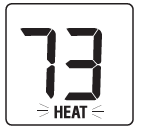
- HEAT: This will turn on whenever the system switch is in the HEAT mode. “HEAT” will flash when the heating system is running.
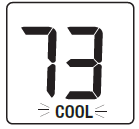
- COOL: This will turn on whenever the system switch is in the cool mode. “COOL” will flash when the cooling systems is running.
- AUX (PSTS21NP ONLY): This will turn on when the auxiliary (second stage) of heating is active. The auxiliary stage of heating is usually the least economical stage of heat and typically runs when the first stage of heatcannot keep up with the temperature demand.
Battery Replacement
Replacing the Batteries
- Open front cover and locate the battery compartment door.
- Gently remove the two “AA” alkaline batteries located in the battery compartment.
- Install two new “AA” alkaline batteries into battery compartment. Make sure to match the positive (+) ends of the batteries with the positive (+) terminals located in the battery compartment.
- Close battery compartment. The low battery indicator should not appear in the display.
Troubleshooting
Symptom: The thermostat does not turn on heating or cooling system.
Potential Solution: Check to see if OFF is shown in display. This indicates that the system is turned off at the thermostat. Move system selector switch to HEAT or COOL position. After the compressor short cycle protection 5-minute period expires, the system should start. Compressor protection feature may be in effect due to compressor short cycle conditions. See Section 6. Heating or cooling system may be malfunctioning. Call a professional service technician immediately to verify system operation.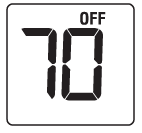
Symptom: Thermostat turns on heating instead of cooling, or cooling instead of heating.
Potential Solution: Check thermostat wiring to make sure the heating and cooling stages are connected to the correct terminals on the wiring block. See Section 9.
Symptom: The thermostat turns heating or cooling system on too often or not often enough.
Potential Solution: Increase or decrease temperature differential settings as appropriate to provide the desired performance level. See Section 4.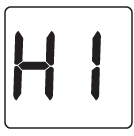
Symptom: Low battery indicator is blinking in thermostat display.
Potential Solution: Replace batteries immediately to maintain proper system operation. See Section 7.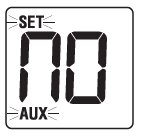
Symptom: OFF is shown in thermostat display and heating or cooling system will not start.
Potential Solution: This indicates that the system is turned off at the thermostat. The thermostat must be in HEAT or COOL mode of operation to control the heating or cooling system. Move the system selector switch to the HEAT or COOL position.
Symptom: Thermostat display is blank.
Potential Solution: It is possible that AC power is not present at the thermostat, and/or the batteries are drained. Check fuse, circuit breaker and thermostat wiring as appropriate to verify AC power is available. Replace batteries before reprogramming thermostat. See Section 7. If AC power is present, call a professional service technician to verify thermostat and system performance.
Symptom: HI is shown in the thermostat display.
Potential Solution: The temperature sensed by the thermostat is higher than the 99° F (37° C) upper limit of the thermostat’s display range. The display will return to normal after the sensed temperature lowers within the 40° to 99° F (4° to 37° C) display range. Turn on the cooling system or use other methods to lower the temperature accordingly. This condition could occur from the system being turned off during an exceptionally warm period or upon installation when the thermostat has been stored for a long period of time in a warm vehicle or location prior to being installed.
Symptom: NO AUX SET is shown in the thermostat display. (PSTS21NP only)
Potential Solution: The thermostat (PSTS21NP only) is configured for a conventional system, and the system switch is in the EM HEAT position. The unit will still function in a conventional 2 stage HEAT mode, but the display will flash NO AUX SET. Move the system switch to the HEAT position.
Symptom: LO is shown in the thermostat display.
Potential Solution: The temperature sensed by the thermostat is lower than the 40° F (4° C) lower limit of the thermostat’s display range. The display will return to normal after the sensed temperature rises within the 40° to 99° F (4° to 37° C) display range. Turn on the heating system to raise the temperature as needed for comfort within the room. This condition could occur from the system being turned off during a cold weather period or upon installation when the thermostat has been stored for a long period of time in a cold vehicle or location prior to being installed. The thermostat should be allowed to warm up prior to installation to allow proper heating control once installed.
Symptom: Cannot program a set point temperature higher than 90° F (32° C).
Potential Solution: This is above the normal thermostat temperature setting range of 45° to 90° F (7° to 32° C).
Symptom: Fan continues to run whether the system is on or off.
Potential Solution: Check that the fan control switch is in the AUTO position. This will allow the fan to run only when the heating or cooling system is turned on and running. Check the thermostat wiring to make sure that the fan control wiring is connected to the correct terminals on the wiring block. See Section 9.
Symptom: The room is too warm or too cold.
Potential Solution: See Section 5. Review current set point and change as necessary.
Symptom: HEAT or COOL is flashing, but the system is not running.
Potential Solution: The thermostat is telling the heating or cooling system to run, but the system is not responding. You may need to call your local heating and air conditioning contractor.
Wiring Diagrams
PSTS11NP: Single Stage Conventional Systems (Single Transformer
PSTS11NP: Single Stage Conventional Systems (Dual Transformer

PSTS11NP: Single Stage Heat Pump System

PSTS21NP: Conventional Systems (Single Transformer)

PSTS21NP: Multi-Stage Heat Pump Systems

REFERENCE
DOWNLOAD MANUAL
PROSELECT PSTSL21P52 2H/1C Programmable Thermostat Installation Guide
Other manuals:
PROSELECT PSTSL21P52 2H/1C Programmable Thermostat Product Specification Guide

PROSELECT PSTSL21P52 2H/1C Programmable Thermostat Installation Guide