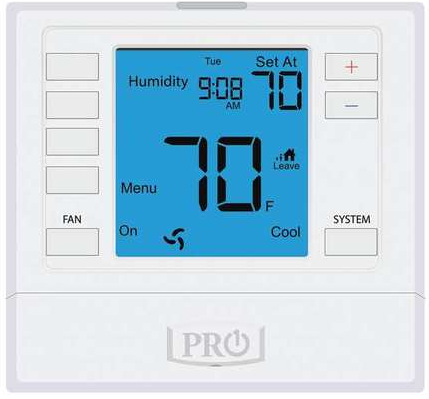
Pro1 Technologies Z955W Wireless Non-Programmable Thermostat
Thermostat Applications Guide
| Description | |
| Gas or Oil Heat | Yes |
| Electric Furnace | Yes |
| Heat Pump (No Aux. or Emergency Heat) | Yes |
| Heat Pump (with Aux. or Emergency Heat) | Yes |
| Multi-stage Systems | Yes |
| Heat Only Systems | Yes |
| Cool Only Systems | Yes |
| Dual Fuel Systems | Yes |
| Millivolt | No |
Power Type
- Base Module: Hardwire
- Z260W: Hardwire
- Z955W: Hardwire (Common Wire) with Battery Backup
Additional zoning system equipment not included in this package.
- RZ251W Zone Remote Thermostat (Battery Power)
- Z260W: Additional Damper Modules (Hardwire)
- RZ250W Outdoor Remote Sensor (Battery Power)
- ZDA250W Discharge Air Sensor (Hardwire)
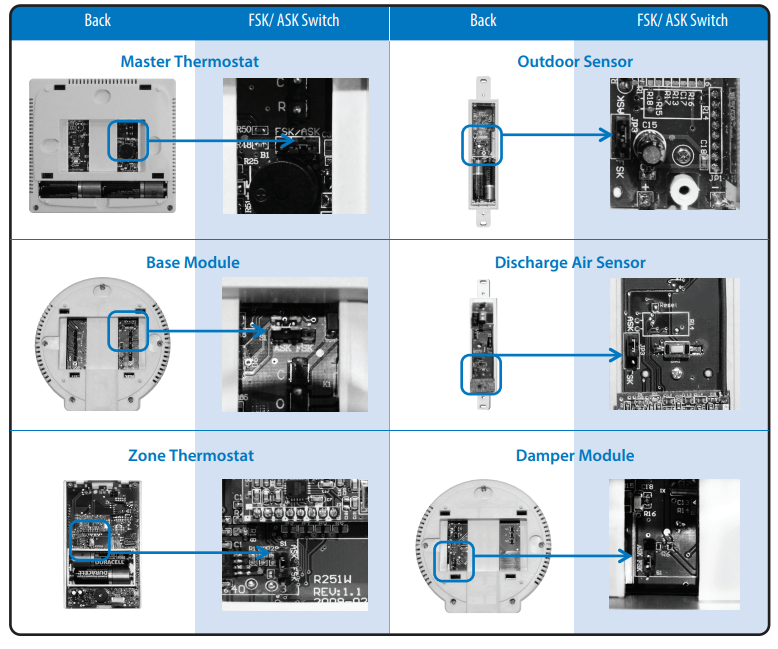
WIRELESS TYPE SELECTION
This Wireless Zoning System contains selectable wireless communication. Each component has a jumper switch labeled FSK and ASK. Default setting: FSK
- All components must be set to the same position for wireless communication.
- Both modes utilize a 916 MHz frequency.
- FSK: frequency-shift keying, this mode improves the signal transmission through dense materials.
- ASK: amplitude-shift keying, set all components to this mode in applications requiring use of the W150W Wireless Repeater. All components are compatible with the Wireless Repeater in this mode.
ESTABLISHING COMMUNICATION
Establishing Communication between Master Thermostat and the Base Module
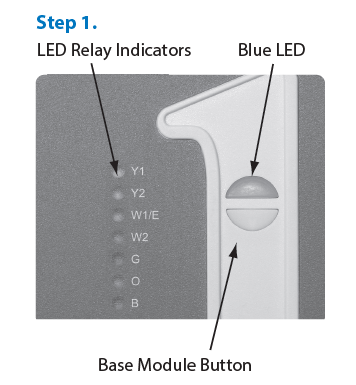
- The thermostat and base module come factory linked out of the box. However, If communication is lost follow this easy- Two Step process to
re-establish the communication link. - Press and hold the Base Module button for 3 seconds. The Blue LED will flash when ready to recieve initial signal from the Master Thermostat.
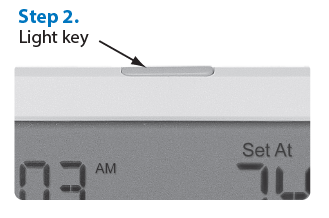
(Base Module must be powered by 24V. Blue LED will be continuously on when 24V power is present. - Hold the Light key (shown here) of the Master Thermostat for 10 seconds, the Blue LED on the base module will stop flashing after communication has been established between base module and the Master Thermostat.
Note:
- The Blue LED on the base module will be on when power is present. The Blue LED will flash 3 times every time it recieves a signal from Master Thermostat. When a relay is on the corresponding LED relay indicator will be on.
Note:
- If the base module does not recieve a signal from the Master Thermostat for 15 minutes it will turn off all relays until communication is reestablished. The Blue LED on the base module will also turn off to show communication has been lost.
Note:
- If communication has been lost for 1 hour and if freeze protection is enabled, heat and emergency heat relays will be turned on. The heat and emergency heat relays will turn on for 10 minutes every hour if there has been a call for heat in the last 24 hours.
Getting to know your thermostat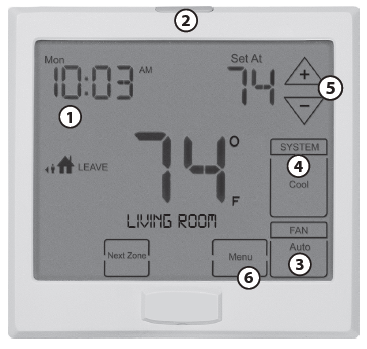
- LCD (right)
- Glow in the Dark Light Button
- Fan Button
- System Button
- Temperature Setpoint Buttons
- Menu Button
Removing the private label badge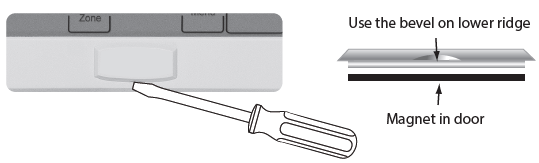
About the Badge
All our thermostats use the same universal magnetic badge. Visit our website to learn more about our free private label program.
Wall locations
The thermostat should be installed approximately 4 to 5 feet above the floor. Select an area with average temperature and good air circulation.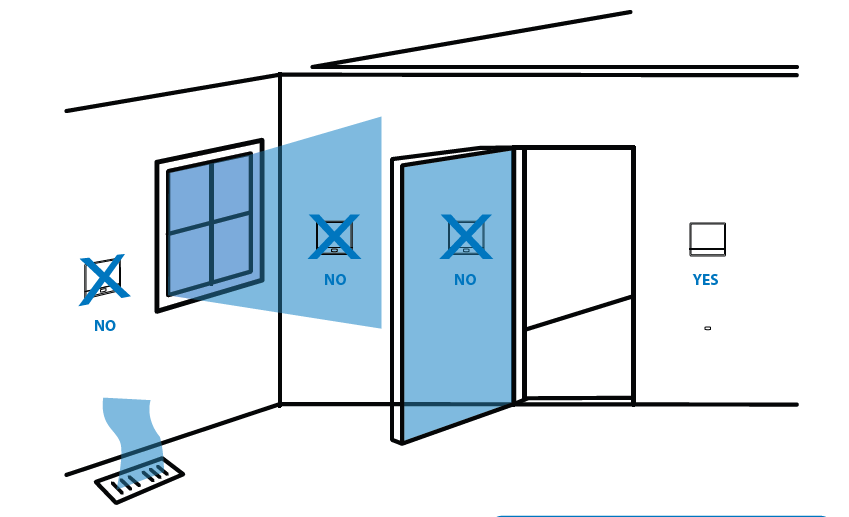
Master Thermostat Subbase Installation
NOTE:
To ensure a solid fit between the thermostat and the subbase, mount the subbase on a flat wall with the drywall anchors flush to the wall. Using the screws and drywall anchors that were provided with the thermostat.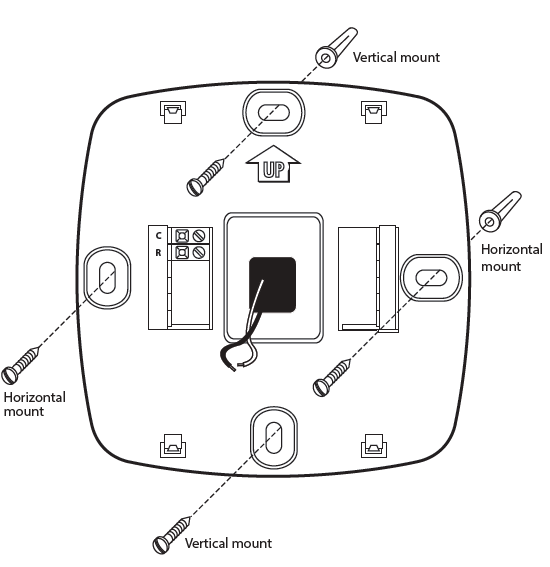
Equipment Base Module Installation Tips
Basement Installation
Wire Base Module with 8ft pigtail and temporarily mount. If you are not able to establish communication, this will allow you to relocate the Module to an area with less obstruction, without having to rewire.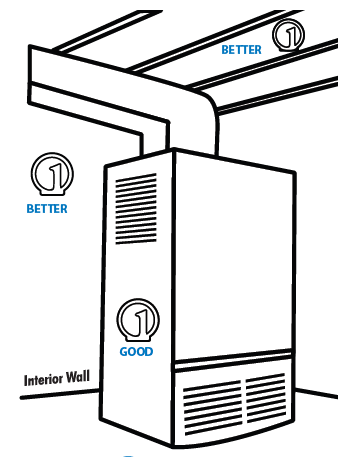
Attic Installation
Locate a closet nearest the equipment. Then mount the base module high on the wall or on the ceiling inside the closet. This location will insure keeping below maximum temperature specification.
Wireless Range
The range between this module and the Master Thermostat is approximately 50ft in standard residential construction. To extend the range try placing the module higher, if in a basement try further away from large metal objects.
Attic Installation
Locate a closet nearest the equipment. Then mount the base module high on the wall or on the ceiling inside the closet. This location will insure keeping below maximum temperature specification.
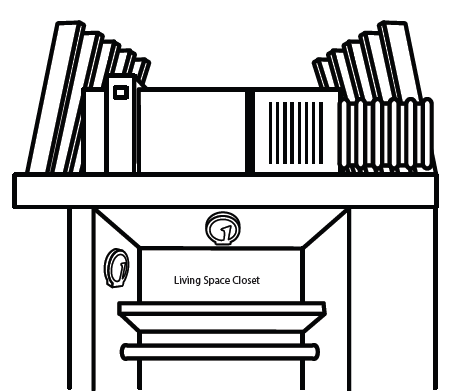
Installation Tip
- Do not install the base module in locations:
- That are behind a chimney
- Where temperature could exceed 150ºF
- Where rain or snow or extreme hot or cold is possible
Base Module Subbase Installation
Wiring Note:
Wire the base module subbase the same way you would wire a hardwired thermostat subbase.
Note:
To connect the base module to master thermostat, refer to the directions on page 3 of this manual.
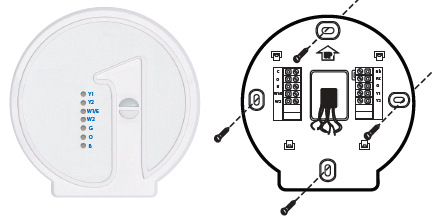
For vertical mount put one screw top and one screw on bottom. For horizontal mount put one screw left and one screw right.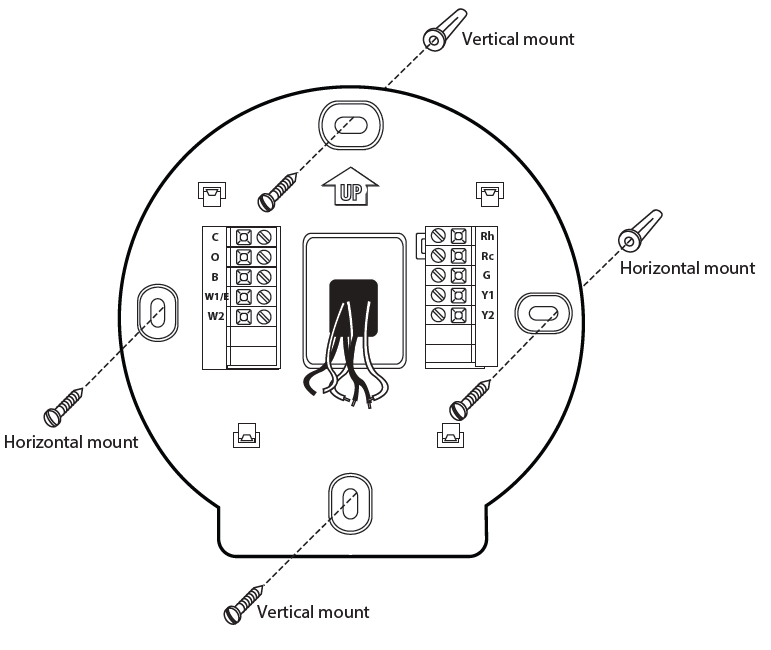
MOUNT THERMOSTAT & BATTERY INSTALLATION
Mount Thermostat and Base Module
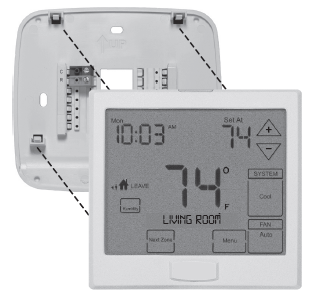
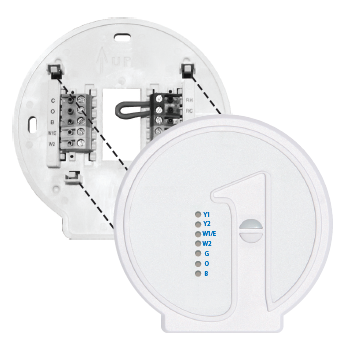
Align the 4 tabs on the subbase with corresponding slots on the back of the thermostat or base module. Then push gently until the thermostat or base module snaps in place.
- Mount subbase to a flat wall
- Use screws provided
- Drywall anchors should be flush with the wall
- Wires should be pushed into the wall
Battery Installation
Battery Tip
The Master Thermostat must be hardwired (R and C terminals connected to 24 VAC). Batteries may be used for clock backup during power-outages, batteries are also recommended to simplify establishing communication process. This allows the installer to take the master thermostat to each zone they are connecting.
WIRING
Equipment Base Module Wiring
- If you are replacing a thermostat, make note of the terminal connections on the thermostat that is being replaced. In some cases the wiring connections will not be color coded. For example, the green wire may not be connected to the G terminal.
- Loosen the terminal block screws. Insert wires then retighten terminal block screws.
Terminal Designations on Base Module
This thermostat is shipped from the factory to operate a conventional heating and cooling system. This thermostat will also operate a heat pump system. See the “heat pump” configuration step on page 14 of this manual to configure the thermostat for heat pump applications.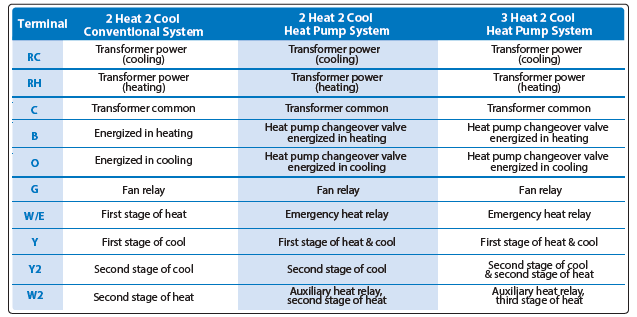
Terminal Designations on Z955W Master Thermostat

Equipment Base Module Wiring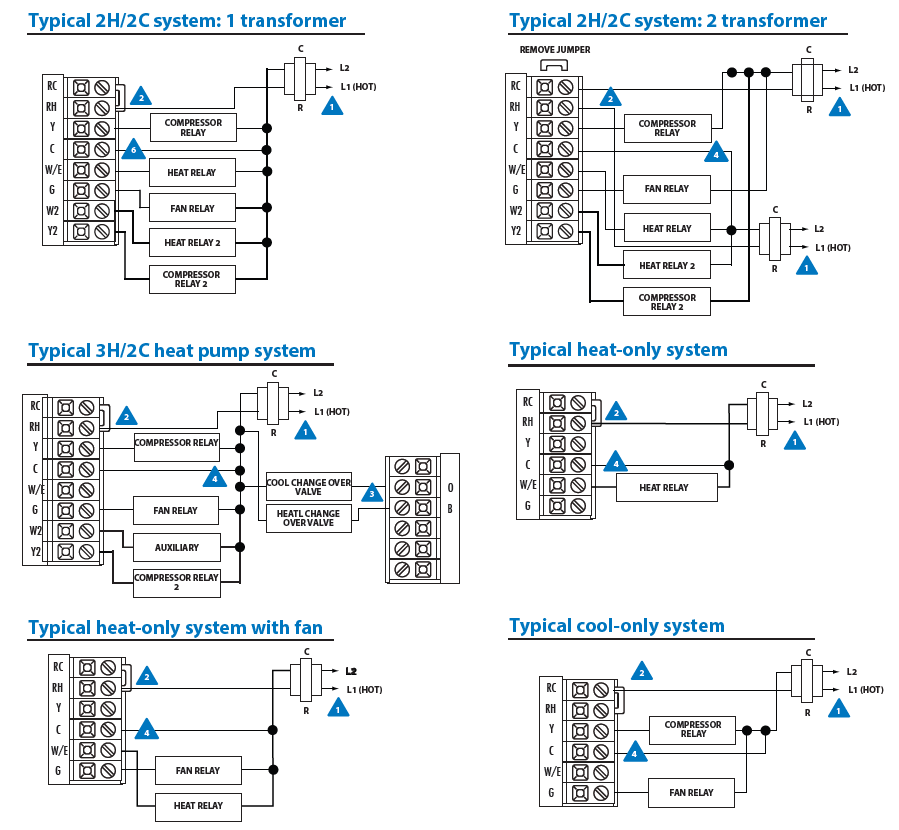
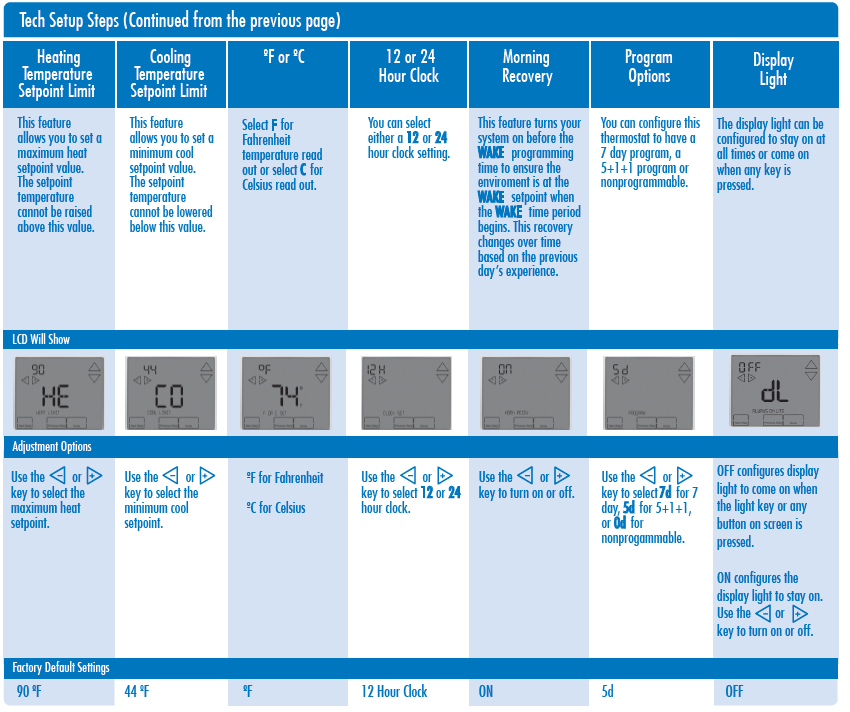
- Press MENU button
- Press and hold the TECHNICIAN SETUP button for 3 seconds.
- This 3-second delay is designed so that homeowners do not accidentally access the installer settings.
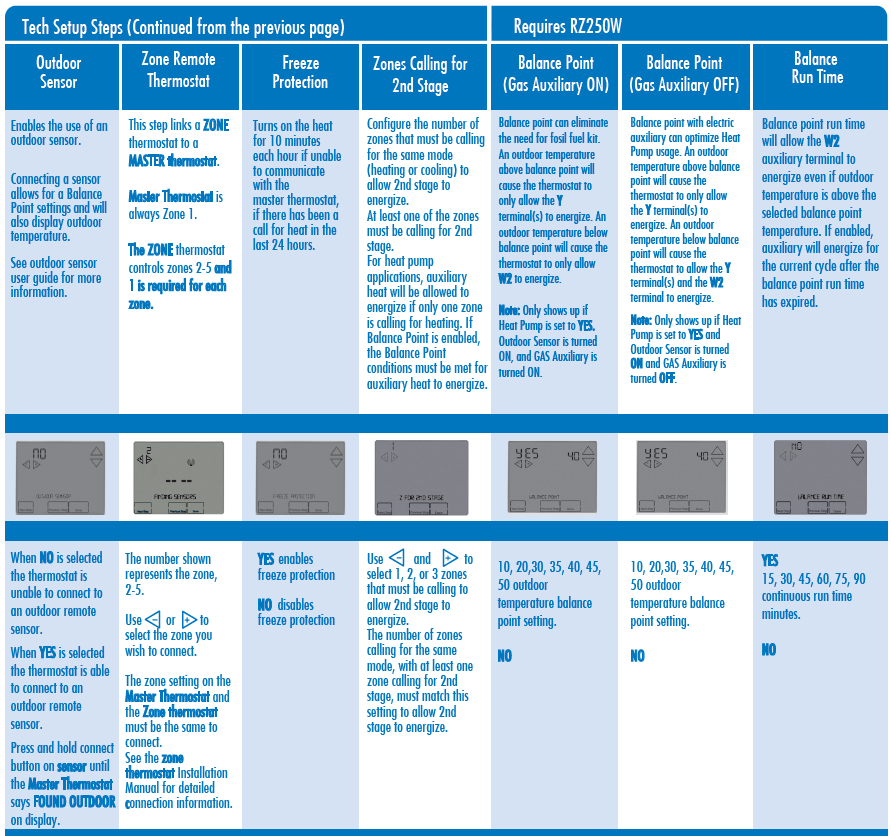
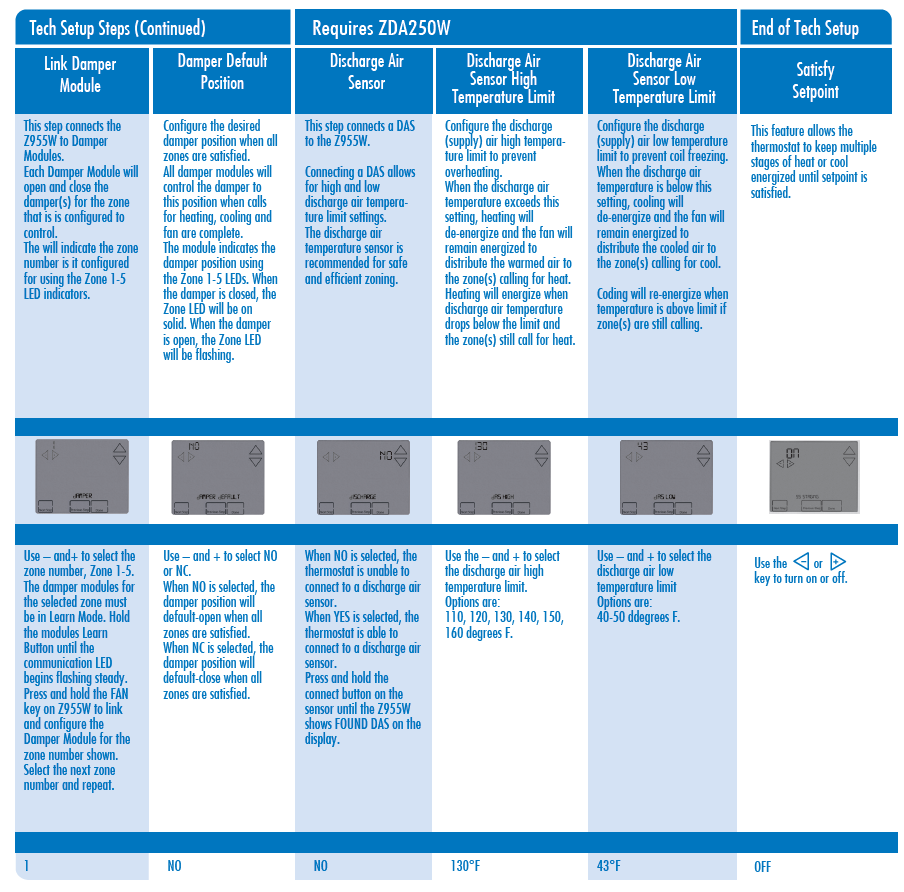
- Configure the installer options as desired using the table below.
- Use the
 keys to change settings and the NEXT STEP or PREV STEP key to move from one step to another.
Swing setting Tip
The second stage will turn on at 2x the swing setting. The second stage will turn off when 1x the swing is reached. For example, if the swing setting is .5 degrees for heating and the thermostat is set at 70ºF, the first stage will turn on at approximately 69.5ºF. The second stage will turn on at 69.0ºF. The second stage will turn off at 69.5ºF and the first will turn off at 70.5ºF. If third stage is used, it will turn on at 3x the swing and turn off at approximately 2x the swing.
PROGRAMMING THE THERMOSTAT
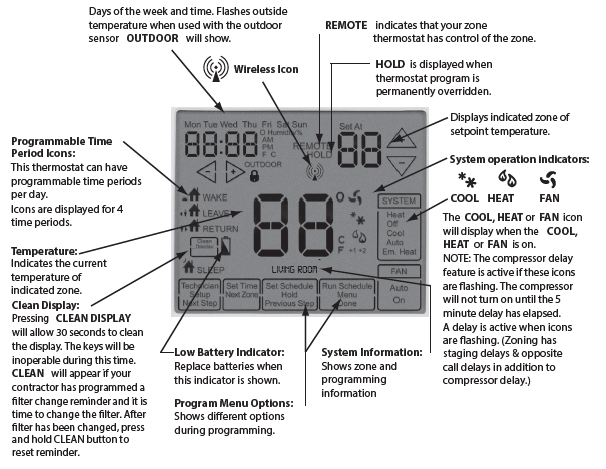
Set Time
- Press MENU
- Press SET TIME
- Day of the week will be Flashing Use the
 key to select the current day of the week.
 - Press NEXT STEP
- The current hour is Flashing. Use the key to select the current hour.
- When using 12-hour time, make sure the correct a.m. or p.m. choice is selected.
- Press NEXT STEP
- Minutes are now Flashing. Use the key to select current minutes.
- Press DONE when completed
Programming
All programmable thermostats are shipped with an energy saving pre-program. You can customize this default program by following the Set Program Schedule. Your thermostat can be programmed to have each day of the week programmed uniquely (7days), all the weekdays the same with a separate program for Saturday and a separate program for Sunday (5+1+1), or nonprogrammable. There are four time periods for each day (WAKE, LEAVE, RETURN , SLEEP ). This thermostat has a programmable fan feature, which allows you to run the fan continuously during any time period. Programmable fan is available for Local Zone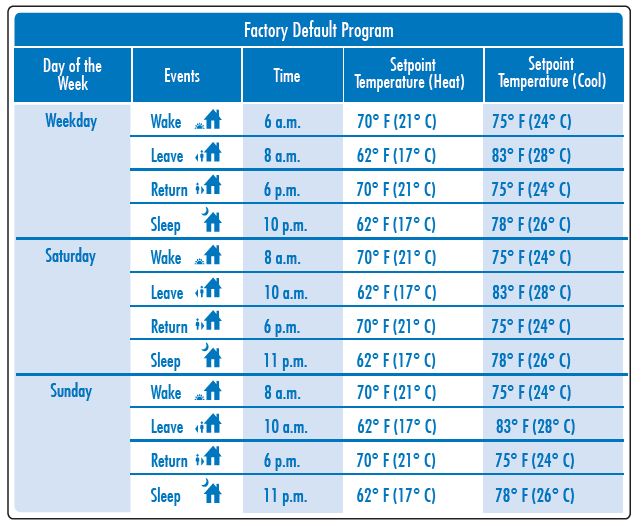
You can use the table below to plan your customized program schedule if using 5+1+1
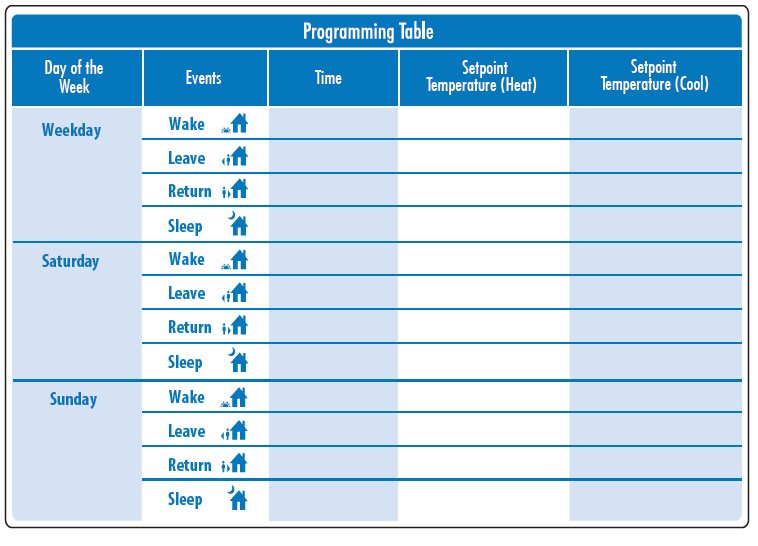
Set 5+1+1 Program Schedule
Weekday:
- Select HEAT or COOL using the SYSTEM key.
- Note: You have to program heat and cool each separately.
- Press MENU
- Press SET SCHED . Note: Monday-Friday is displayed and the WAKE icon is shown.
- You are now programming the WAKE time period for the weekday setting.
- The first zone to be programmed will be named LOCAL. Use the key to make your time selection for the weekday WAKE time period.
- Note: If you want the fan to run continuously during this time period, select ON with the FAN key. This can only be done for your LOCAL ZONE 1.
- Use the key to make your setpoint selection for the weekday WAKE period.
- Press NEXT ZONE. Repeat steps 4 and 5 for each remaining zone. Press NEXT ZONE to toggle zones.
- NOTE: Zones can have names such as LIVING ROOM, BEDROOM, etc.
- Press NEXT STEP
- Repeat steps 4 through 7 for weekday LEAVE time period, for weekday RETURN time period, and for weekday SLEEP time period
Saturday:
- Repeat steps 4 through 7 for
- Saturday WAKE time period, for
- Saturday LEAVE time period, for
- Saturday RETURN time period, and for Saturday SLEEP time period
Sunday:
- Repeat steps 4 through 7 for
- Sunday WAKE time period, for
- Sunday LEAVE time period, for
- Sunday RETURN time period, and for Sunday SLEEP time period.
Set 7 Day Program Schedule
Monday
- Select HEAT or COOL using the SYSTEM key.
- Note: You have to program heat and cool each separately.
- Press MENU
- Press SET SCHED. Note: Monday-Friday is displayed and the WAKE icon is shown. You are now programming the WAKE time period for the weekday setting.
- The rst zone to be programmed will be named LOCAL. Use the or key to make your time selection for the weekday WAKE time period. Note: If you want the fan to run continuously during this time period, select ON with the FAN key. This can only be done for your local zone 1.
- Press NEXT STEP
- Press NEXT ZONE. Repeat steps 4 and 5 for each remaining zone. Press NEXT ZONE to toggle zones.
- NOTE: Zones can have names such as LIVING ROOM, BEDROOM, etc.
- Use the or key to make your setpoint selection for the weekday WAKE period.
- Repeat steps 4 through 7 for the weekday LEAVE time period, for the weekday RETURN time period, and for the weekday SLEEP time period.
Specifications
Master Thermostat
- The display range of temperature 41ºF to 95ºF (5ºC to 35ºC)
- The control range of temperature 44ºF to 90ºF (7ºC to 32ºC)
- Load rating 1 amp per terminal, 1.5 amp maximum for all terminals combined
- Display accuracy ± 1 ºF
- Swing (cycle rate or differential) Heating is adjustable from 0.2ºF to 2.0ºF Cooling is adjustable from 0.2ºF to 2.0ºF
- Power source 18 to 30 VAC, NEC Class II, 50/60 Hz for hardwire (common wire)
- Operating ambient 32ºF to +105ºF (0º to +41ºC)
- Operating humidity 90% non-condensing maximum
- Dimensions of thermostat
Reference
Download Manual:
Pro1 Technologies Z955W Wireless Non-Programmable Thermostat Installation Manual
OTHER MANUALS
Pro1 Technologies Z955W Wireless Non-Programmable Thermostat Operational Manual
Pro1 Technologies Z955W Wireless Non-Programmable Thermostat Product Specifications Guide

Pro1 Technologies Z955W Wireless Non-Programmable Thermostat Installation Manual