Pro1 Technologies T955S Non-Programmable Thermostat
Pro1 Technologies
- P.O. Box 3377
- Springfield, MO 65808-3377
- Toll Free : 888-776-1427
- Web: www.pro1iaq.com
- Hours of Operation: M-F 9AM – 6PM Eastern
Caution Equipment damage hazard. Do not operate the cooling system if the outdoor temperature is below 50 ˚F (10 ˚C) to prevent possible compressor damage.
Thermostat Operation
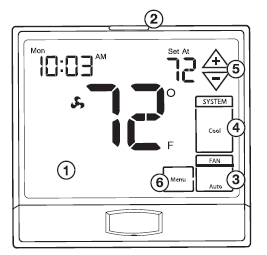
- LCD Display
- See page 6 for details about this display read out.
- Glow in the dark light button
- The glow in the dark light button will self illuminate for several hours after exposure to ambient light. This button turns on the display light when pressed.
- Fan Button
- Select ON or AUTO or IAQ. The ON key will run the fan continuously. The AUTO key will cycle the fan on only when the heating or cooling system is on. IAQ will enable IAQ FAN MODE, if programmed. A Note About Programmable Fan: The programmable fan feature will run the fan continuously during any time period it is programmed to be on. This is the best way to keep the air circulated and to eliminate hot & cold spots in your building.
- System Button
- Selects the operation mode on your HVAC system. Selecting HEAT turns on
the heat mode. Selecting COOL turns on the cool mode. Selecting OFF turns both heating and cooling off. Selecting AUTO will turn the HEAT or COOL on as needed. (EM HEAT will appear as an option if operating a heat pump. EM HEAT setting will turn on emergency heat)
- Selects the operation mode on your HVAC system. Selecting HEAT turns on
- Temperature Setpoint Buttons
- Press the or buttons to select the desired room temperature.
- Menu Button
- Use this key to set up your programming options. Refer to page 8-12 for instructions.
Thermostat Quick Reference
Battery Information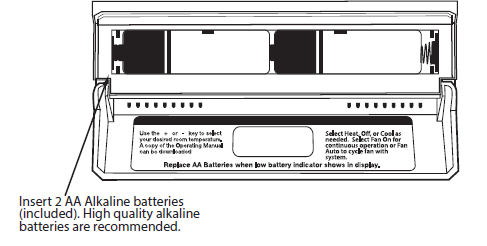
Important: The low battery indicator is displayed when the AA battery power is low. If the user fails to replace the battery within 21 days, the screen will only show the low battery indicator but maintain all functionality. If the user fails to replace the batteries after an additional 21 days (days 22-42 since first “low battery” display) the setpoints will change to 55˚F (Heating) and 85˚F
(Cooling). If the user adjusts the setpoint away from either of these, it will hold for 4 hours then return to either 55˚F or 85˚F. After day 63 the batteries must be replaced immediately to avoid freezing or overheating because the thermostat will shut the unit off until the batteries are changed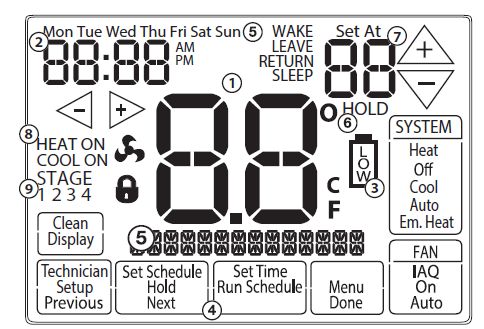
- Indicates the current room temperature
- Time and day of the week
- Low Battery Indicator: Replace batteries when this indicator is shown.
- Program Menu Options: Show different options during programming.
- Period Icons – This thermostat can have 2 or 4 programmable time periods per day. Icons are displayed for 4 time periods. Occupied and Unoccupied will display in the text field for 2C and 4C time periods.
- Hold: Is displayed when the thermostat program is permanently overridden.
- Setpoint: Displays the user selectable setpoint temperature.
- System Operation Indicators: If these or the Fan indicator are flashing, it means that they are in a delay of some type (compressor delay, cooling fan delay, staging delay).
- Staging Indicators: +1 will appear in the display when second stage of heat or cool is on. +2 will appear for third stage of heat.
Programming
Set Time
- Press the MENU button.
- Press SET TIME.
- Day of the week will be flashing. Use the
 key to select the current day of the week.
 - Press NEXT STEP.
- The current hour is flashing. Use the key to select the current hour. When using 12-hour time, make sure the correct a.m. or p.m. choice is selected.
- Press NEXT STEP.
- Minutes are now flashing. Use the key to select current minutes.
- Press DONE when completed.
Set Program Schedule For Four Time Periods
Weekday:
- Select HEAT or COOL with the system switch. Note: You have to program heat and cool each separately.
- Press the MENU button (If menu does not appear first press RUN SCHED). Press SET SCHED.
- Note: Monday-Friday (Monday if in 7 day) is dis played and the WAKE/ OCC1 icon is shown. You are now programming the WAKE/OCC1 time period for that day.
- Time is flashing. Use the key to make your time selection for that day’s WAKE/OCC1 time period.
- Note: If you want the fan to run continuously during this time period, select ON with the FAN key. If you want to use IAQ mode during this time period, select IAQ with the fan key.
- Press NEXT STEP.
- The setpoint temperature is flashing. Use the key to make your setpoint selection for that day’s WAKE/OCC1 period.
- Press NEXT STEP.
- Repeat steps 4 through 7 for that day’s LEAVE/UNOCC1 time period, RETURN/OCC2 time period, and SLEEP/UNOCC2 time period.
Saturday:
Repeat steps 4 through 7 for the Saturday WAKE/OCC1 time period, for the Saturday LEAVE/UNOCC1 time period, for the Saturday RETURN/OCC2 time period, and for the Saturday SLEEP/UNOCC2 time period
Sunday:
Repeat steps 4 through 7 for the Sunday WAKE/OCC1 time period, for the Sunday LEAVE/UNOCC1 time period, for the Sunday RETURN/OCC2 time period, and for the Sunday SLEEP/UNOCC2 time period
To customize your 7 day Program schedule, follow these steps:
Monday:
- Select HEAT or COOL with the SYSTEM key.
- Note: You have to program heat and cool each separately.
- Press the Menu button (If menu does not appear first, press Run Schedule).
- Press Set Schedule. Note: Monday is displayed and the WAKE/OCC1 icon is shown. You are now programming the WAKE/OCC1 time period for that day.
- Use the or key to make your time selection for that day’s WAKE/OCC1 time period.
- Note: If you want the fan to run continuously during this time period, select On with the FAN key. If you want to use IAQ mode during this time period, select IAQ with the fan key
- Then use the or key to make your setpoint selection for that day’s WAKE/OCC1 period.
- Press Next.
- Repeat steps 4 through 6 for that day’s LEAVE/UNOCC1 time period, for that day’s RETURN/OCC2 time period, and for that day’s SLEEP/UNOCC2 time period.
To customize your 5+1+1 Program schedule, follow these steps:
- Select HEAT or COOL with the SYSTEM key.
- Note: You have to program heat and cool each separately.
- Press the Menu button (If menu does not appear first, press Run Schedule).
- Press Set Schedule. Note: Monday-Friday is displayed and the OCCUPIED text is shown. You are now programming the OCCUPIED time period for the weekday setting.
- Use the or key to make your time selection for the weekday OCCUPIED time period.
- Note: If you want the fan to run continuously during this time period, select On with the FAN key. If you want to use IAQ mode during this time period, select IAQ with the fan key.
- Then use the or key to make your setpoint selection for the weekday OCCUPIED period.
- Press Next.
- Repeat steps 4 through 6 for the weekday UNOCCUPIED time period.
Saturday:
Repeat steps 4 through 7 for the Saturday WAKE/OCC1 time period, for the Saturday LEAVE/UNOCC1 time period, for the Saturday RETURN/OCC2 time period, and for the Saturday SLEEP/UNOCC2 time period
Sunday:
Repeat steps 4 through 7 for the Sunday WAKE/OCC1 time period, for the Sunday LEAVE/UNOCC1 time period, for the Sunday RETURN/OCC2 time period, and for the Sunday SLEEP/UNOCC2 time period
To customize your 7 day program schedule, follow these steps
Monday:
- Select HEAT or COOL with the SYSTEM key.
- Note: You have to program heat and cool each seperately.
- Press the Menu button (If menu does not appear first press Run Schedule).
- Press Set Schedule. Note: Monday is displayed and the OCCUPIED text is shown. You are now programming the OCCUPIED time period for that day.
- Use the or key to make your time selection for that day’s OCCUPIED time period.
- Note: If you want the fan to run continuously during this time period, select On with the FAN key. If you want to use IAQ mode during this time period, select IAQ with the fan key.
- Then use the or key to make your setpoint selection for that day’s OCCUPIED period.
- Press Next.
- Repeat steps 4 through 6 for that day’s UNOCCUPIED time period
Temporary & Permanent Hold Feature
Temporary Hold: The thermostat will display HOLD and RUN SCHED on the bottom of your screen when you press the or key. If you do nothing, the temperature will remain at this setpoint temporarily for 4 hours. After this, the program setpoint will then replace your temporary setpoint.
Permanent Hold: With a temporary hold set, if you press the HOLD key at the bottom of your screen, you will see HOLD appear below the setpoint temperature in the display. The thermostat will now
permanently stay at this setpoint and can be adjusted using the or keys.
To Return To Program: Press the RUN SCHED key at the bottom of your screen to exit temporary and permanent holds
Features
If your HVAC contractor has configured the thermostat to remind you when the air filter needs changed, you will see a reminder in the display when your air filter needs to be changed. Resetting the filter change reminder: When the reminder is displayed, you should change your air filter and reset the reminder by holding down the “Clean” key on the left side of the thermostat for 3 seconds. This thermostat also has other maintenance reminders ( Humidity Pad, UV Lamp, and IAQ Cell ), that are reset with the same procedure.
Warranty Information
Warranty Registration
Your new thermostat has a 5 year limited warranty. You must register your thermostat within 60 days of installation. Without this registration the warranty period will begin on date of manufacture. For warranty issues please contact the HVAC professional that installed this product. You can register your new thermostat in 2 ways:
Online
Go to the company website, select warranty registration and fill out a short registration form.
Mail
Complete the form below and mail it to the address shown.
Warranty Registration
- Name:
- Address:
- City:
- State:
- Zip:
- Thermostat Model:
- Date Installed:
- Complete form and mail to:
Thermostat Warranty Registration
Pro1iaq
P.O. Box 3377
Springfield, MO 65808-3377
www.pro1iaq.com
Reference
Download Manual:
Pro1 Technologies T955S Non-Programmable Thermostat Operational Manual
OTHER MANUALS
Pro1 Technologies T955S Non-Programmable Thermostat Installational Manual
Pro1 Technologies T955S Non-Programmable Thermostat Product Specifications Guide

Pro1 Technologies T955S Non-Programmable Thermostat Operational Manual