Pro1 Technologies T855iSH Non-Programmable Thermostat

Pro1 Technologies
- P.O. Box 3377
- Springfield, MO 65808-3377 Toll-Free: 888-776-1427
- Web: www.pro1iaq.com
- Hours of Operation: M-F 9 AM – 6 PM Eastern
Thermostat Application Guide
| Description | |
| Gas or Oil Heat | Yes |
| Electric Furnace | Yes |
| Heat Pump (No Aux. or Emergency Heat) | Yes |
| Heat Pump (With Aux. or Emergency Heat) | Yes |
| Multi-Stage Systems | Yes |
| Heat Only Systems | Yes |
| Heat Only Systems – Floor or Wall Furnace | Yes |
| Cool Only Systems | Yes |
| Millivolt Conventional Systems | Yes |
| Two Transformer Systems | No |
Power Type
- Battery Power
- Hardwire (Common Wire)
- Hardwire (Common Wire) with
- Battery Backup
A trained, experienced
the technician must install this product. Carefully read these instructions. You could damage this product or cause a hazardous condition if you fail to follow these instructions.
Installation Tips
Wall Locations
The thermostat should be installed approximately 4 to 5 feet above the floor. Select an area with average temperature and good air circulation.

Subbase Installation

- Horizontal Mount
- Vertical Mount
Mount Thermostat
Align the 4 tabs on the subbase with corresponding slots on the back of the thermostat, then push gently until the thermostat snaps in place.

Getting to know your thermostat
- LCD Display
- Glow in the dark light button Setpoint buttons
- Program buttons
- Menu button
- Fan button
- System button
- Button access door
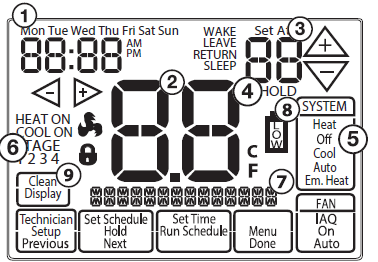
- Day of the Week
- Setpoint Indicator: Displays the user selectable setpoint temperature.
- Time of Day / Outdoor Temp / % Humidity
- Indicates current room temperature
- Indicates if heating or cooling equipment is running
- Energy Efficient Globe: Indicates the setpoint temperature chosen is a efficient choice.
- Hold Indicator: Displayed when the thermostat is in permanent hold Indicates the number of heating or cooling stages running
- Keypad Lockout: Indicates the thermostat is in keypad lockout
- WIFI Indicator: Indicates if WIFI is connected.
- Program Menu Buttons: Shows different options during programming.
- Fan Button: Changes the fan operation between Auto, IAQ, and On.
- System Button: Changes the system operation between Off, Cool, Auto, Heat, and Emergency Heat based on system tech setting.
About The Badge
All of our thermostats use the same universal magnetic badge. Visit the company website to learn more about our free private label program.
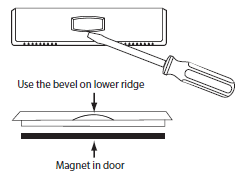
Battery Installation
Battery installation is recommended even if the thermostat is hardwired (C terminal connected). When the thermostat is hardwired and batteries are installed, the thermostat will activate a compressor delay of 5 minutes when the thermostat detects a power outage from the hardwired power supply.
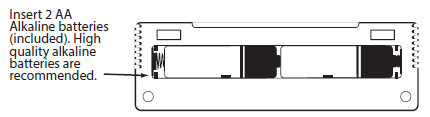
Important
The low battery icon is displayed when the AA battery power is low. Whenever the thermostat detects low battery voltage from the AA batteries, the low battery icon will begin flashing on the screen for 21 days (if the batteries are not changed). If the batteries are not changed 22 days after the thermostat detects low battery voltage, the thermostat screen will only show the flashing battery icon until the buttons are pressed. If the batteries are not changed 43 days after the thermostat detects low battery voltage, the thermostat screen will only show the flashing battery icon until buttons are pressed and the set points will offset to 85°F/29°C in cooling and 55°F/13°C in heating. At this stage, set point changes can be made temporarily but, the set points will change back to defaulted values after a 4-hour period. The thermostat will continue to perform this low battery flashing, temperature offset condition until the internal voltage threshold is reached. When the thermostat internal voltage threshold is reached, all relays will be opened and the thermostat will become inoperable until new batteries are installed.
Wiring
Caution: Electrical Hazard Failure to disconnect the power before beginning to install this product can cause electrical shock or equipment damage.
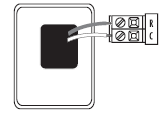
- If you are replacing a thermostat, make note of the terminal connections on the thermostat that is being replaced. In some cases, the wiring connections will not be color coded. For example, the green wire may not be connected to the G terminal.
- Loosen the terminal block screws. Insert wires then retighten terminal block screws.
- Place non-flammable insulation into the wall opening to prevent drafts. All components of the control system and the thermostat installation must conform to Class II circuits per the NEC Code. Do not overtighten terminal block screws, as this can damage the terminal block. A damaged terminal block can keep the thermostat from fitting on the sub base correctly or cause system operation issues.
Wiring Tips
- C Terminal This thermostat requires a 24V common wire to the C terminal.
- Wire Specifications Use shielded or non-shielded 18-22 gauge thermostat wire.
Terminal Designations
|
Terminal |
2 Heat 2 Cool Conventional System | 2 Heat 1 Cool Heat Pump System | 4 Heat 2 Cool Heat Pump System | 5 Heat 3 Cool Heat Pump System |
| RC | Transformer power (cooling) | Transformer power (cooling) | Transformer power (cooling) | Transformer power (cooling) |
| RH | Transformer power (heating) | Transformer power (heating) | Transformer power (heating) | Transformer power (heating) |
| C | Transformer common | Transformer common | Transformer common | Transformer common |
| B | Reversing valve
/ configurable terminal |
Reversing valve
/ configurable terminal |
Reversing valve
/ configurable terminal |
Reversing valve / 3rd stage of heat & cool |
| O | Reversing valve
/ configurable terminal |
Reversing valve
/ configurable terminal |
Reversing valve
/ configurable terminal |
Reversing valve / 3rd stage of heat & cool |
| G | Fan relay | Fan relay | Fan relay | Fan relay |
| W/E | First stage of heat | Emergency Heat | First stage of auxiliary heat | First stage of
auxiliary heat (4th stage of heat) |
| Y | First stage of cool | First stage of heat & cool | First stage of heat & cool | First stage of heat & cool |
| Y2 | Second stage of cool | N/A | Second stage of heat & cool | Second stage of heat & cool |
| W2 | Second stage of heat | Auxiliary heat | Second stage of auxiliary heat | Second stage of auxiliary heat
(5th stage of heat) |
| S1/S2 | Remote Sensor | Remote Sensor | Remote Sensor | Remote Sensor |
| H | Humidify | Humidify | Humidify | Humidify |
| D | Dehumidify | Dehumidify | Dehumidify | Dehumidify |
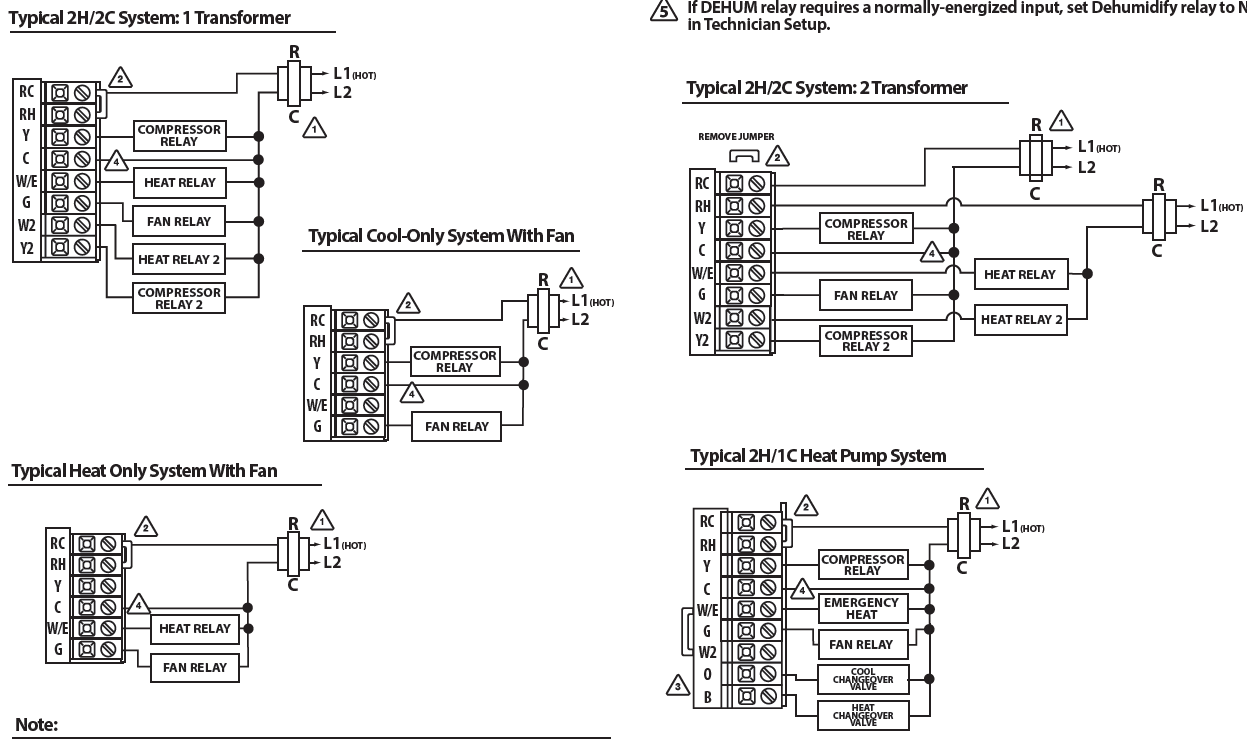
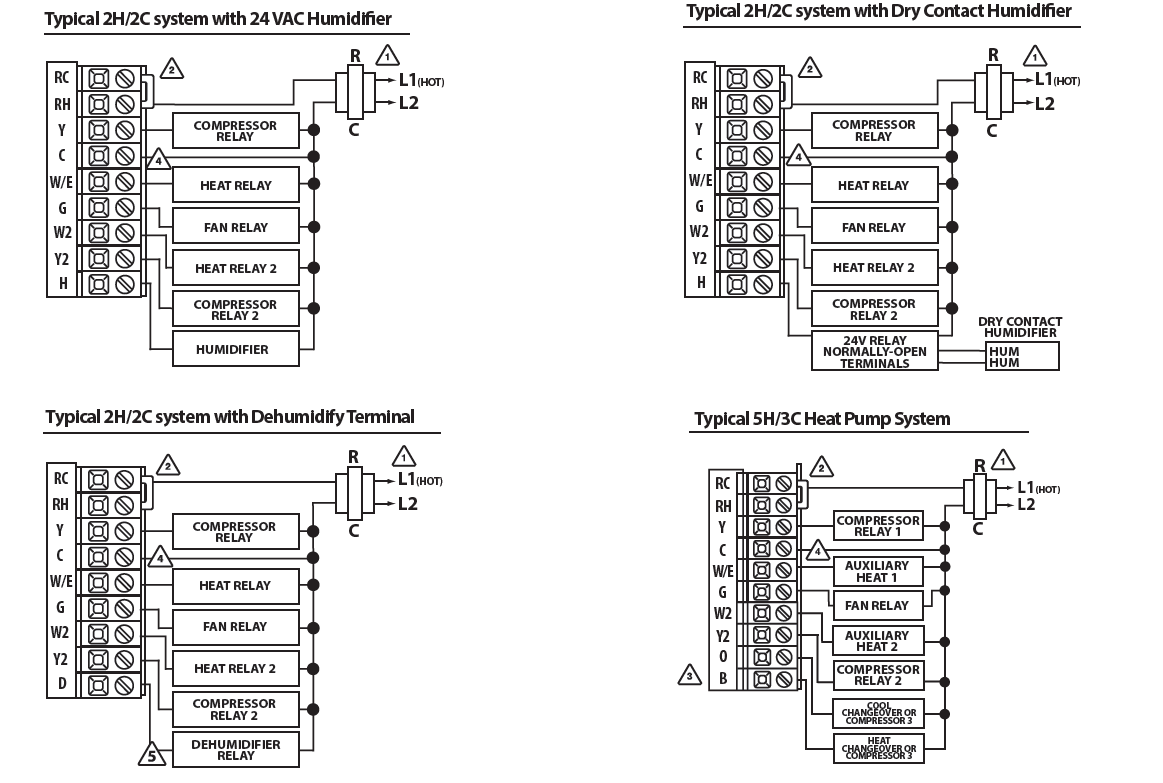
Wiring Diagrams
- Power supply
- Factory-installed jumper. Remove only when installing on 2-transformer systems.
- Use either O or B terminals for changeover valve A 24 VAC common connection is required with this thermostat.
- If DEHUM relay requires a normally-energized input, set Dehumidify relay to NC in Technician Setup.
- Typical 2H/2C System: 2 Transformer
Technician Setup
- Press the MENU button.
- Press and hold the TECH SET button for 3 seconds. This 3 second delay is designed so that homeowners do not accidentally access the installer settings.
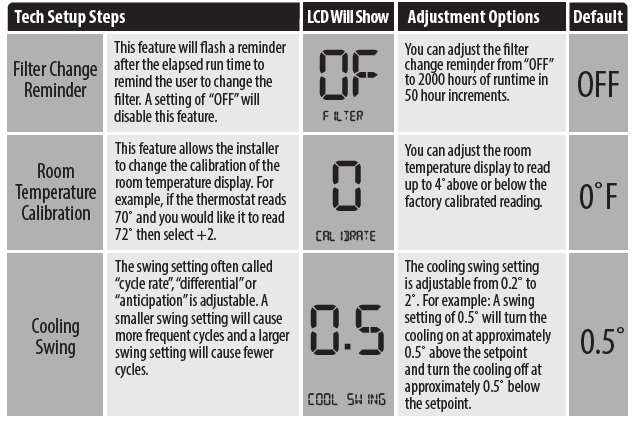
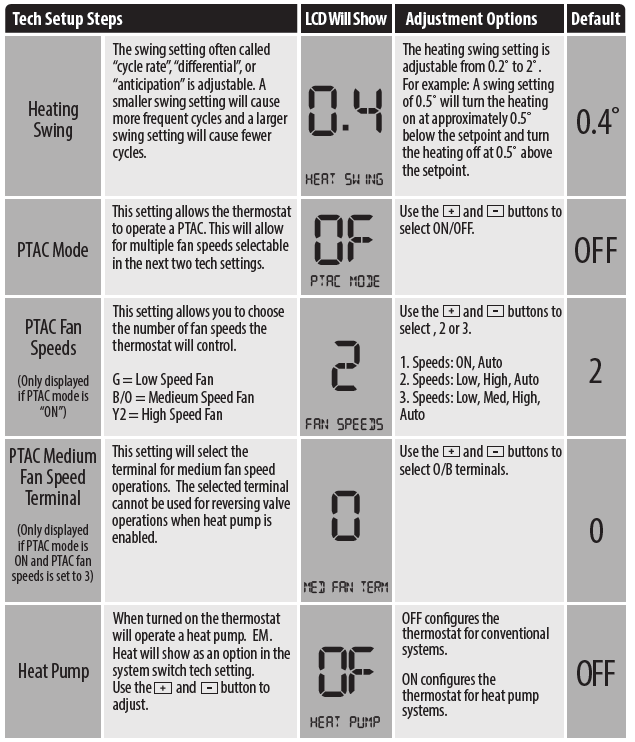
- Configure the installer options as desired using the table below. Use the or keys to change settings and the NEXT or PREV key to move from one step to another.
- Note: Only press the DONE key when you want to exit the Technician Setup options.
- Press the DONE key to exit.

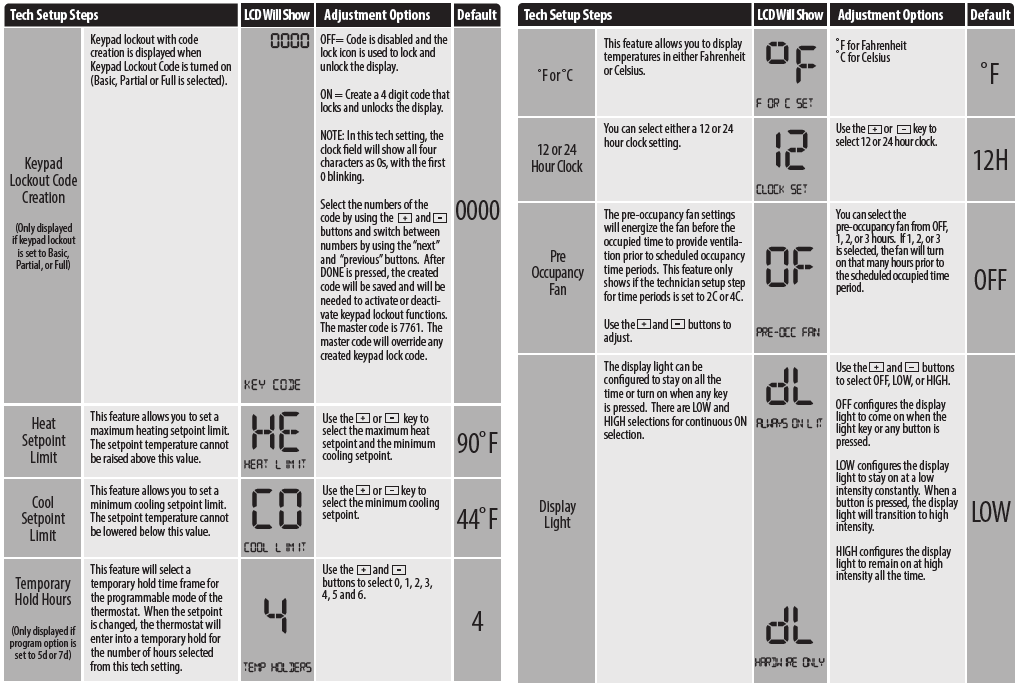
Technician Setup Menu
This table references different humidity levels the thermostat will conform to, based on the outdoor temperature measurements. When the Automatic Humidity Adjusting tech setting selection is ON1 or ON2, the thermostat humidity will stay adjusted to the humidity level that correspond to the outdoor temperature based on the chart index below.
HUM Terminal
| OPTIONS | HUM terminal energizes when the ambient humidity is… |
| 1 | Below the humidity setpoint and heat or fan is energized. |
| 2 | Below the humidity setpoint and heat is energized. |
| 3 | Below the humidity setpoint. It will also energize the fan during a call for humidity. |
| 4 | Below the humidity setpoint. |
DHM Terminal
| OPTIONS | DUM terminal energizes when the ambient humidity is… |
| 1 | Above the humidity setpoint and cool or fan is energized. |
| 2 | Above the humidity setpoint. It will also energize the fan during a call for dehumidity. |
| 3 | Above the humidity setpoint. |
| 4 | Above the humidity setpoint and the compressor is not running. |
Setting the Humidity
| Temperature
50 |
20%-25%
50 |
26%-35%
50 |
36%-45%
50 |
46%-55%
50 |
56%-65%
50 |
66%-75%
50 |
76%-85%
50 |
86%-90%
50 |
| 51 | 50.6 | 50.7 | 50.7 | 50.9 | 51 | 51 | 51 | 51.2 |
| 52 | 51.2 | 51.5 | 51.5 | 51.7 | 52 | 52 | 52 | 52.5 |
| 53 | 52.3 | 52.5 | 52.5 | 52.8 | 53 | 53 | 53 | 53.5 |
| 54 | 52.9 | 53.3 | 53.3 | 53.6 | 54 | 54 | 54 | 54.8 |
| 55 | 53.5 | 54 | 54 | 54.5 | 55 | 55 | 55 | 56 |
| 56 | 54.1 | 54.6 | 54.7 | 55.3 | 56 | 56 | 56 | 57 |
| 57 | 54.7 | 55.2 | 55.4 | 56.2 | 56.9 | 56.9 | 56.9 | 57.9 |
| 58 | 55.8 | 56.3 | 56.6 | 57.3 | 58.1 | 58.1 | 58.1 | 59.1 |
| 59 | 56.4 | 56.9 | 57.3 | 58.2 | 59 | 59 | 59 | 60 |
| 60 | 57 | 57.5 | 58 | 59 | 60 | 60 | 60 | 61 |
| 61 | 58 | 58.5 | 59.1 | 60.1 | 60.9 | 60.9 | 61.1 | 61.9 |
| 62 | 58.9 | 59.4 | 60.1 | 61.1 | 61.9 | 61.9 | 62.1 | 62.9 |
| 63 | 60.1 | 60.6 | 61.4 | 62.4 | 63.1 | 63.1 | 63.4 | 64.1 |
| 64 | 61 | 61.6 | 62.4 | 63.4 | 64.1 | 64.1 | 64.4 | 65.1 |
| 65 | 62 | 62.5 | 63.5 | 64.5 | 65 | 65 | 65.5 | 66 |
| 66 | 62.7 | 63.3 | 64.3 | 65.3 | 65.9 | 65.9 | 66.5 | 66.9 |
| 67 | 63.4 | 64.1 | 65.1 | 66.1 | 66.8 | 66.8 | 67.6 | 67.8 |
| 68 | 64.6 | 65.4 | 66.4 | 67.4 | 68.2 | 68.2 | 68.9 | 69.2 |
| 69 | 65.3 | 66.2 | 67.2 | 68.2 | 69.1 | 69.1 | 70 | 70.1 |
| 70 | 66 | 67 | 68 | 69 | 70 | 70 | 71 | 71 |
| 71 | 67.2 | 68.2 | 69.1 | 70.1 | 71.1 | 71.4 | 72.4 | 72.6 |
| 72 | 68.3 | 69.3 | 70.3 | 71.3 | 72.3 | 72.8 | 73.8 | 74.3 |
| 73 | 69.7 | 70.7 | 71.7 | 72.7 | 73.7 | 74.2 | 75.2 | 75.8 |
| 74 | 70.8 | 71.9 | 72.9 | 73.9 | 74.9 | 75.6 | 76.6 | 77.4 |
| 75 | 72 | 73 | 74 | 75 | 76 | 77 | 78 | 79 |
| 76 | 72.9 | 73.9 | 74.9 | 76.1 | 77.1 | 78.6 | 79.6 | 80.6 |
| 77 | 73.8 | 74.7 | 75.7 | 77.2 | 78.2 | 80.2 | 81.2 | 82.7 |
| 78 | 75.2 | 76.3 | 77.3 | 78.8 | 79.8 | 81.8 | 82.8 | 84.3 |
| 79 | 76.1 | 77.1 | 78.1 | 79.9 | 80.9 | 83.4 | 84.4 | 86.2 |
| 80 | 77 | 78 | 79 | 81 | 82 | 85 | 86 | 88 |
| 81 | 77.9 | 79.1 | 80.3 | 82.3 | 83.6 | 86.6 | 88.3 | 91 |
| 82 | 78.7 | 80.2 | 81.7 | 83.7 | 85.1 | 88.1 | 90.6 | 94.1 |
| 83 | 80.3 | 81.8 | 83.3 | 85.3 | 86.9 | 89.9 | 92.4 | 96 |
| 84 | 81.1 | 82.9 | 84.7 | 86.7 | 88.4 | 91.4 | 94.7 | 99 |
| 85 | 82 | 84 | 86 | 88 | 90 | 93 | 97 | 102 |
| 86 | 82.8 | 85.1 | 87.3 | 89.5 | 92 | 95.8 | 100.5 | 106.4 |
| 87 | 83.7 | 86.1 | 88.6 | 91.1 | 94.1 | 98.5 | 104 | 110.9 |
| 88 | 85.3 | 87.9 | 90.4 | 92.9 | 96 | 100.5 | 106.1 | 113.1 |
| 89 | 86.2 | 88.9 | 91.7 | 94.5 | 98 | 103.2 | 109.5 | 117.6 |
| 90 | 87 | 90 | 93 | 96 | 100 | 106 | 113 | 122 |
Setting Target Humidity Setpoint
- Follow the steps below to change your target humidity setpoint.
- Press the HUMIDITY key
- Use the or key to select the target humidity setpoint.
- Press DONE when completed
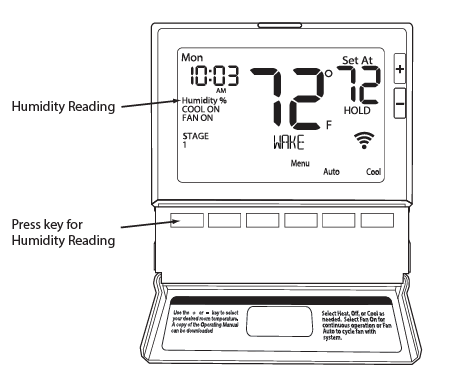
Ambient humidity will flash in the time field when Humidify or De-Humidify is set to ON. HON will also flash when the Humidity terminal is energized. dON will also flash when the De-Humidify terminal is energized.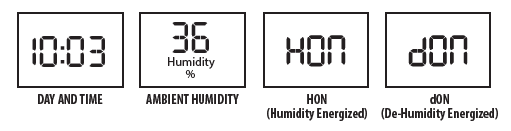
Recommended Heating Settings
Increasing Humidity The table below shows recommended indoor humidity levels in relation to outdoor temperatures during heating (adding humidity).
Recommended Cooling Settings
Consult your professional HVAC technician for recommended settings for your climate.
Programming
Set Time
- Press the MENU button
- Press SET TIME
- Day of the week will be flashing. Use the
 key to select the current day of the week.
 - Press Next Step.
- The current hour is flashing. Use the key to select the current hour. When using 12-hour time, make sure the correct a.m. or p.m. choice is selected.
- Press Next Step.
- Minutes are now flashing. Use the key to select current minutes.
- . Press DONE when completed
All our programmable thermostats are shipped with an energy saving default program. You can customize this default program by following the instructions in the set program schedule section starting on page 24. Your thermostat can be programmed to have each day of the week programmed uniquely (7 days) or non-programmable. For the 7-day programming modes, there are three time period options.
- “4” Residential (WAKE, LEAVE, RETURN, SLEEP)
- “2C” Commercial (OCCUPIED, UNOCCUPIED)
- “4C” Commercial (OCCUPIED 1, UNOCCUPIED 1, OCCUPIED 2, UNOCCUPIED 2)
Custom Program
| Day of the Week | Events | Time | Setpoint Temperature (HEAT) | Setpoint Temperature (COOL) |
|
Weekday |
Wake/OCC1 | |||
| Leave/UNOCC1 | ||||
| Return/OCC2 | ||||
| Sleep/UNOCC2 | ||||
| Occupied | ||||
| Unoccupied | ||||
|
Saturday |
Wake/OCC1 | |||
| Leave/UNOCC1 | ||||
| Return/OCC2 | ||||
| Sleep/UNOCC2 | ||||
| Occupied | ||||
| Unoccupied | ||||
|
Sunday |
Wake/OCC1 | |||
| LeaveUNOCC1 | ||||
| Return/OCC2 | ||||
| Sleep/UNOCC2 | ||||
| Occupied | ||||
| Unoccupied | ||||
To customize your 7 day 4 time period Program schedule, follow these steps
- Select HEAT or COOL with the SYSTEM key.
- Note: You have to program heat and cool each separately.
- Press the MENU button (If menu does not appear first, press RUN SCHED).
- Press SET SCHED. Note: Monday is displayed and the WAKE/OCC1 icon is shown. You are now programming the WAKE/OCC1 time period for that day.
- Time is flashing. Use the or key to make your time selection for that day’s WAKE/OCC1 time period.
- Note: If you want the fan to run continuously during this time period, select ON with the FAN key. If you want to use IAQ mode during this time period, select IAQ with the FAN key.
- press NEXT.
- The setpoint temperature is flashing. Use the or key to make your setpoint selection for that day’s WAKE/OCC1 period.
- press NEXT.
- Repeat steps 4 through 7 for that day’s LEAVE/UNOCC1 time period, for that day’s RETURN/OCC2 time period, and for that day’s SLEEP/UNOCC2 time period
Monday:
- Select HEAT or COOL with the SYSTEM key.
- Note: You have to program heat and cool each seperately.
- Press the MENU button (If menu does not appear first press RUN SCHED).
- Press SET SCHED. Note: Monday is displayed and the OCCUPIED text is shown. You are now programming the OCCUPIED time period for that day.
- Time is flashing. Use the or key to make your time selection for that day’s OCCUPIED time period.
- Note: If you want the fan to run continuously during this time period, select ON with the FAN key. If you want to use IAQ mode during this time period, select IAQ with the fan key.
- Press NEXT.
- The setpoint temperature is flashing. Use the or key to make your setpoint selection for that day’s OCCUPIED period.
- Press NEXT.
- Repeat steps 4 through 7 for that day’s UNOCCUPIED time period.
Default Programming
| Day of the Week | Events | Time | Setpoint Temperature (HEAT) | Setpoint Temperature (COOL) |
|
Weekday |
Wake/OCC1 | 6 AM | 70˚F (21˚C) | 78˚F (24˚C) |
| Leave/UNOCC1 | 8 AM | 62˚F (17˚C) | 85˚F (28˚C) | |
| Return/OCC2 | 6 PM | 70˚F (21˚C) | 78˚F (24˚C) | |
| Sleep/UNOCC2 | 10 PM | 62˚F (17˚C) | 82˚F (26˚C) | |
|
Saturday |
Wake/OCC1 | 6 AM | 70˚F (21˚C) | 78˚F (24˚C) |
| Leave/UNOCC1 | 8 AM | 62˚F (17˚C) | 85˚F (28˚C) | |
| Return/OCC2 | 6 PM | 70˚F (21˚C) | 78˚F (24˚C) | |
| Sleep/UNOCC2 | 10 PM | 62˚F (17˚C) | 82˚F (26˚C) | |
|
Sunday |
Wake/OCC1 | 6 AM | 70˚F (21˚C) | 78˚F (24˚C) |
| LeaveUNOCC1 | 8 AM | 62˚F (17˚C) | 85˚F (28˚C) | |
| Return/OCC2 | 6 PM | 70˚F (21˚C) | 78˚F (24˚C) | |
| Sleep/UNOCC2 | 10 PM | 62˚F (17˚C) | 82˚F (26˚C) |
| Day of the Week | Events | Time | Setpoint Temperature (HEAT) | Setpoint Temperature (COOL) |
|
Weekday |
Wake/OCC1 | 6 AM | 70˚F (21˚C) | 78˚F (24˚C) |
| Leave/UNOCC1 | 8 AM | 62˚F (17˚C) | 85˚F (28˚C) | |
| Return/OCC2 | 6 PM | 70˚F (21˚C) | 78˚F (24˚C) | |
| Sleep/UNOCC2 | 10 PM | 62˚F (17˚C) | 82˚F (26˚C) | |
|
Saturday |
Wake/OCC1 | 6 AM | 70˚F (21˚C) | 78˚F (24˚C) |
| Leave/UNOCC1 | 8 AM | 62˚F (17˚C) | 85˚F (28˚C) | |
| Return/OCC2 | 6 PM | 70˚F (21˚C) | 78˚F (24˚C) | |
| Sleep/UNOCC2 | 10 PM | 62˚F (17˚C) | 82˚F (26˚C) | |
|
Sunday |
Wake/OCC1 | 6 AM | 70˚F (21˚C) | 78˚F (24˚C) |
| LeaveUNOCC1 | 8 AM | 62˚F (17˚C) | 85˚F (28˚C) | |
| Return/OCC2 | 6 PM | 70˚F (21˚C) | 78˚F (24˚C) | |
| Sleep/UNOCC2 | 10 PM | 62˚F (17˚C) | 82˚F (26˚C) |
Features
Filter Change & Other Reminders
If the filter change reminder is enabled, you will see a reminder in the display when your air filter needs changed. The reminder will be shown in the display after your system has run long enough to require an air filter change
Resetting The Filter Change Reminder
When the reminder is displayed, you should change your air filter and reset the reminder by holding down the 3rd button from the left side of the thermostat for 3 seconds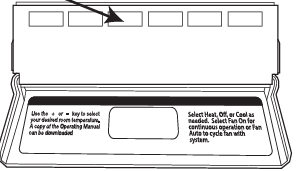
Temporary & Permanent Hold Feature
- Temporary Hold: The thermostat will display HOLD and RUN SCHED on the bottom of the screen when you press the or key. If you do nothing, the temperature will remain at this setpoint temporarily for 4 hours. The program setpoint will then replace the temporary setpoint.
- Permanent Hold: With a temporary hold set, If you press the HOLD key at the bottom of your screen, you will see HOLD appear below the setpoint temperature in the display. The thermostat will now permanently stay at this setpoint and can be adjusted using the or keys.
- To Return To the Program: Press the RUN SCHED key at the bottom of the screen to exit temporary and permanent holds.
Remote Sensor Operation
- Option #1 – Indoor / Local Temperature Sensor “ON”:
- The displayed room temperature will display the average temperature of the thermostat and all remote sensors.
- By pressing the far left (Prev Step) button, the average temperature of just the remote sensor(s) will be displayed briefly in the clock field.
- Option #1 – Indoor / Local Temperature Sensor OFF”:
- The displayed room temperature will only show the average temperature of the remote sensor(s).
- Option #2 – Outdoor:
- The outdoor temperature will alternate briefly with the clock display.
- Option #3 (Floor)
- by pressing the far left (Prev. Step) button, the temperature of the floor sensor will be displayed briefly in the clock field.
Specifications
- The display range of temperature …………….. 41˚F to 95˚F (5˚C to 35˚C)
- The control range of temperature……………….44˚F to 90˚F (7˚C to 32˚C)
- Load rating……………………………………………………..1 amp per terminal, 1.5 amp maximum all terminals combined
- Swing (cycle rate or differential) ……………….. The heating is adjustable from 0.2˚ to 2.0˚
- Cooling is adjustable from 0.2˚ to 2.0˚
- Power source …………………………………………………18 to 30 VAC, NEC Class II, 50/60 Hz for hardwire
- Battery power from 2 AA Alkaline batteries
- Operating ambient …………………………………….. 32˚F to +105˚F (0˚C to +41˚C)
- Operating humidity …………………………………… 90% non-condensing maximum
- Dimensions of thermostat ………………………… 4.7”W x 4.4”H x 1.1”D
Reference
Download Manual:
Pro1 Technologies T855iSH Non-Programmable Thermostat Installational Manual
OTHER MANUALS
Pro1 Technologies T855iSH Non-Programmable Thermostat Operational Manual
Pro1 Technologies T855iSH Non-Programmable Thermostat Product Specifications Guide
Pro1 Technologies T855iSH Non-Programmable Thermostat User Guide

Pro1 Technologies T855iSH Non-Programmable Thermostat Installational Manual