
Pro1 Technologies T755 Non-Programmable Thermostat
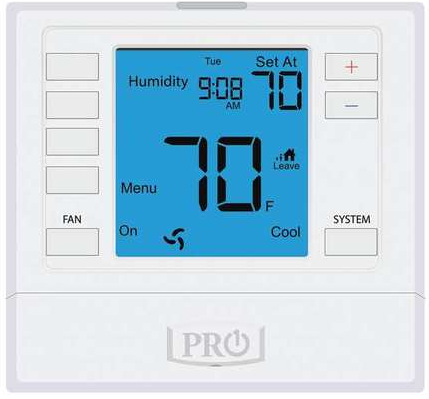
Thermostat Operation
- LCD Display See page 6 for details about this display read out.
- Glow in the dark light button The glow in the dark light button will self illuminate for several hours after exposure to ambient light. This button turns on the display light when pressed.
- Fan Button Auto will cycle the fan on only when the heating or cooling system is on. ON will run the fan continuously. L, M, and H may be selectable when the thermostat is in PTAC mode and will run the fan continuously at low, medium or high speeds.
- System Button Selects the operation mode on your HVAC system. Selecting HEAT turns on the heat mode. Selecting COOL turns on the cool mode. Selecting OFF turns both heating and cooling off. Selecting
- AUTO will turn the HEAT or COOL on as needed. (EM HEAT will appear as an option if operating a heat pump. EM HEAT setting will turn on emergency heat)
- Temperature Setpoint Buttons Press the
 buttons to select the desired room temperature.
 - User Program Buttons See page 8 for further information.

- Indicates the current room temperature
- Time and day of the week
- Low Battery Indicator: Replace batteries when this indicator is shown.
- Menu Options: Shows different options.
- Program Time Periods: This thermostat has 4 programmable time periods per day.
- System Operation Indicators:
- The COOL ON, HEAT ON or FAN ON will display when the COOL, HEAT, or FAN is on. The compressor delay feature is active if these are flashing.
- Hold is displayed when the thermostat program is permanently overridden.
- Setpoint: Displays the selected setpoint temperature.
- System: Indicates current mode of operation.
- Stages: +1 will appear in the display when second stage of heat or cool is on. +2 will appear for third stage of heat.
- Globe: Globe is displayed if an energy efficient temperature has been selected.
Battery Door Information
Important:
The low battery indicator is displayed when the AA battery power is low. If the user fails to replace the battery within 21 days, the screen will only show the low battery indicator but maintain all functionality. If the user fails to replace the batteries after an additional 21 days (days 22-42 since first “low battery” display) the setpoints will change to 55˚F (Heating) and 85˚F (Cooling). If the user adjusts the setpoint away from either of these, it will hold for 4 hours then return to either 55˚F or 85˚F. After day 63 the batteries must be replaced immediately to avoid freezing or overheating because the thermostat will shut the unit off until the batteries are changed.
Filter Change Reminder
If your HVAC contractor has configured the thermostat to remind you when the air filter needs changed, you will see FILT in the display when your air filter needs to be changed.
Resetting The Filter Change Reminder: When FILT reminder is displayed, you should change your air filter and reset the reminder by holding down the second button down from the top left of the thermostat for 3 seconds.
Remote Information
- When the R250S is used as an outdoor sensor and a dual fuel balance point is enabled, an outdoor temperature above balance point will cause the thermostat to only allow Y terminal(s) to energize. An outdoor temperature below balance point will cause the thermostat to only allow the W2 to energize.
- The temperature shown is the average of all remotes, when using R251S indoor sensors.
- When using the R250S as a floor sensor, High Limit may cause system to be off even when temperature isn’t yet satisfied. This is to avoid heating beyond setpoint.
Programming
Set Time
- Press the MENU button.
- Press SET TIME.
- Day of the week will be flashing. Use the
- Press NEXT.
- The current hour is flashing. Use the key to select the current hour. When using 12-hour time, make sure the correct a.m. or p.m. choice is selected.
- Press NEXT.
- Minutes are now flashing. Use the select current minutes.
- Press DONE when completed.
Important:
You will see a Tech Set option after the MENU key is pressed. This Tech Set key is for installer configuration and should NOT be changed unless you consult your professional heating and air conditioning technician.
Set Program Schedule 5+1+1 or 7 Day
To customize your Program schedule, follow these steps:
- Select HEAT or COOL with the system switch. Note: You have to program heat and cool each seperately.
- Press the MENU button (If menu does not appear first press RUN SCHED)
- Press SET SCHED. Note: Monday-Friday or (Monday if in 7 Day) is displayed and the WAKE icon is shown. You are now programming the wake time period for that day.
- Time is flashing. Use the key to make your time selection for that day’s WAKE time period. Note: If you want the fan to run continuously during this time period, select ON with the FAN key
- Press NEXT STEP
- The setpoint temperature is flashing. Use the key to make your setpoint selection for that day’s WAKE time period.
- Press NEXT STEP
- Repeat steps 4 thru 7 for that day’s LEAVE time period,
- RETURN time period, and SLEEP time period.
Saturday:
Repeat steps 4 through 7 for the Saturday WAKE time period, LEAVE time period, RETURN time period, and for the Saturday SLEEP time period.
Sunday:
Repeat steps 4 through 7 for the Sunday WAKE time period, LEAVE time period, RETURN time period, and for the Sunday SLEEP time period.
If using 7-Day Programming:
Use these same steps for every individual day
Features
Temporary & Permanent Hold Feature (If using Programming)
Temporary Hold: The thermostat will display HOLD and RUN SCHED on the left of your screen when you press the or
key. If you do nothing, the temperature will remain at this setpoint
temporarily for 4 hours. After this, the program setpoint will then replace your temporary setpoint
Permanent Hold: With a temporary hold set, if you press the HOLD key at the left of your screen, you will see HOLD appear below the setpoint temperature in the display. The thermostat will now
permanently stay at this setpoint and can be adjusted using the
or keys
To Return To Program: Press the RUN SCHED key at the bottom of your screen to exit temporary and permanent holds
A Note About Auto Changeover:
When in Auto you have the ability to switch between auto heat or auto cool by pressing the system key. This can be done once the current mode has reached its setpoint. For example: if in auto heat, the heat
setpoint must be satisfied before the thermostat will allow you to switch to auto cool. You can switch out of auto by holding down the system key. To get back into auto, you must toggle the system key to auto.
Warranty Information
Warranty Registration
Your new thermostat has a 5 year limited warranty. You must register your thermostat within 60 days of installation. Without this registration, the warranty period will begin on the date of manufacture. For warranty issues please contact the HVAC professional that installed this product. You can register your new thermostat in 2 ways:
Online
Go to the company website, select warranty registration and fill out a short registration form.
Mail
Complete the form below and mail it to the address shown.
Pro1 Technologies
- P.O. Box 3377
- Springfield, MO 65808-3377
- Toll Free : 888-776-1427
- Web: www.pro1iaq.com
- Hours of Operation: M-F 9 AM – 6 PM Eastern
Reference
Download Manual:
Pro1 Technologies T755 Non-Programmable Thermostat Operational Manual
OTHER MANUALS
Pro1 Technologies T755 Non-Programmable Thermostat Installational Manual
Pro1 Technologies T755 Non-Programmable Thermostat Product Specifications Guide
Pro1 Technologies T755 Non-Programmable Thermostat Operational Manual