PERRY 1TP-TE011B ELECTRONIC DIGITAL THERMOSTAT

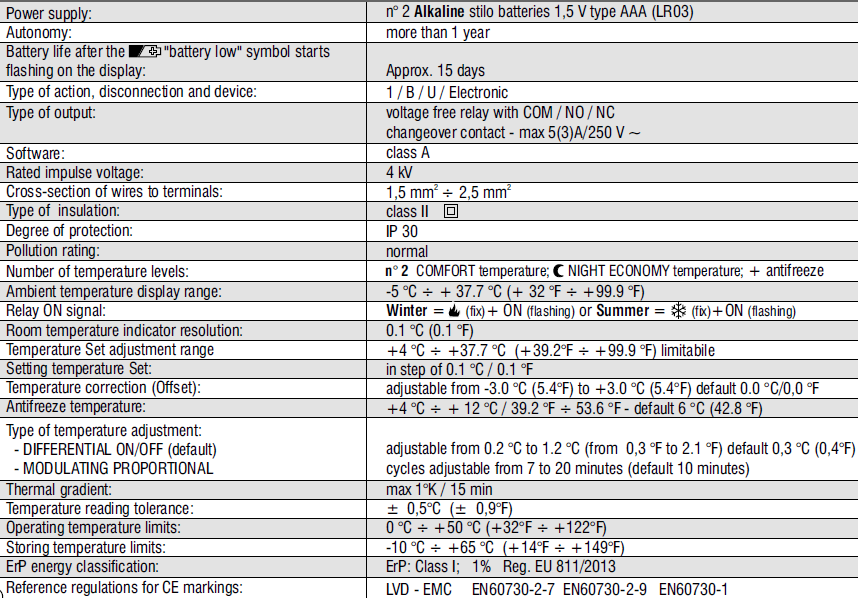
TECHNICAL DATA
SAFETY WARNINGS!
- Read this manual carefully before using the product as it provides important guidelines regarding safety, installation, and use. The manual must be preserved with care for future reference.
- The installation and electrical connection of the devices and appliances must be implemented by a person with electrotechnical expertise only and in conformity with current laws and regulations.
- The thermostat is not intended for use by persons (including children) with reduced physical, sensory, or mental capabilities, or by those with a lack of experience and knowledge of the instructions unless they are supervised or have received the necessary instructions concerning the use of the device by a person responsible for their safety. Children should be supervised to ensure that they do not play with the device.
- If -5 °C or+37.7 °C (+23°F or+99.9 °F) room temperature on the display, the measured temperature is beyond the scale.
- If “Err” flashes on the display, it indicates a faulty probe: any temperature control activity is suspended.
- Use 2 stilo alkaline 1.5V batteries type AAA (LR03); batteries are not included.
- N.B.: the product has been tested and its characteristics are guaranteed when alkaline DURACELL or ENERGIZER batteries are used.
- If necessary, gently clean the thermostat and the display with a soft, dry cloth.
- The manufacturer reserves the right to introduce any technical and/or constructive changes deemed necessary, with no prior notice.
KEY FUNCTIONS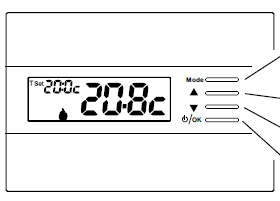
Multifunction Key «Mode»
its use changes depending on the function or active menu:
Mode
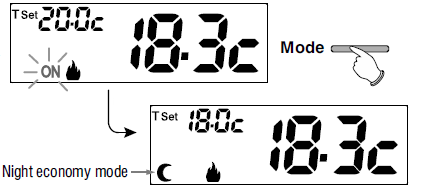
- Press briefly to switch the temperature from comfort to night economy and vice-versa,
- Press and hold (3 sec.) access to menus
Back = go back to the previous item, exit from menus
- Key increases the desired Set temperature;
- navigation through the menus: to increase a setting value;
- Key decreases the desired Set temperature;
- navigation through the menus: to decrease a setting value;
- Press the pulse arrow key to increase/decrease per unit and keep pressed to increase/decrease rapidly.
Multifunction Key OK
- The thermostat in OFF (disabled temperature control)
- OK access to selected menu / confirm function or set value (within the menus)
DISPOSAL OF ELECTRICAL&ELECTRONIC EQUIPMENT
- This symbol on the product or its packaging indicates that this product shall not be treated as household waste.
- Instead, it shall be handed over to the applicable collection point for the recycling of electrical and electronic equipment, such as for example:
- sales points, in case you buy a new and similar product;
- local collection points (waste collection center, local recycling center, etc…).
- By ensuring this product is disposed of correctly, you will help prevent potential negative consequences for the environment and human health, which could otherwise be caused by inappropriate waste handling of this product.
- The recycling of materials will help to conserve natural resources. For more detailed information about recycling of this product, please contact your local city office, your house hold waste disposal service or the shop where you purchased the product.
DISPLAY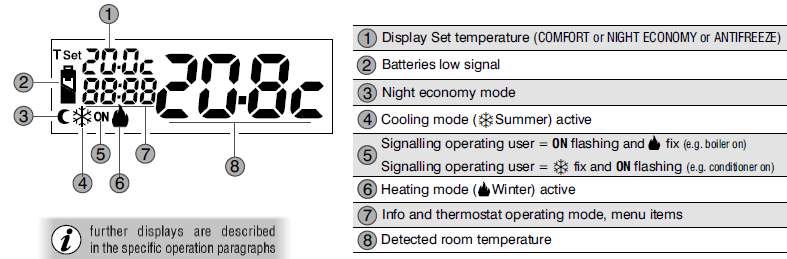
INSTALLATION
INSTALLING THE DEVICE: FREE-STANDING – FIXED
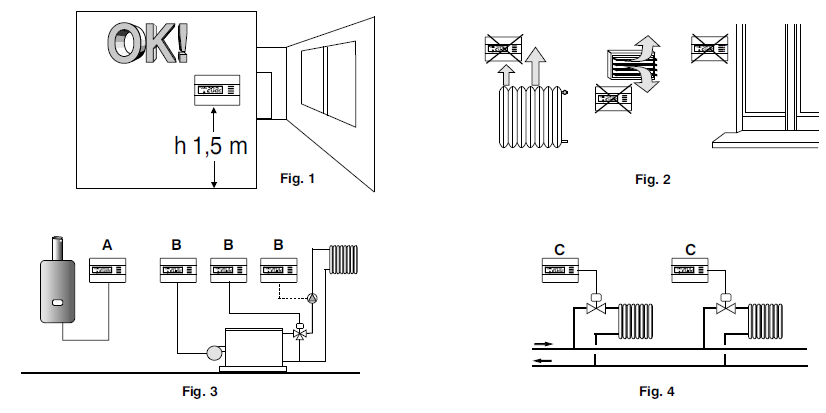
Install the thermostat preferably at a height of 1.50 to 1.60m from the floor, far from sources of heat, air inlets, doors or windows and anything that may alter its operation (fig. 1 – 2).
EXAMPLES OF INSTALLATION
Examples of installation in heating systems with a thermostat that controls
- A) Wall-mounted boiler
- B) Burner or Circulation pump or Motorized solenoid valve
- C) Area solenoid valve
THERMOSTAT INSTALLATION
- Disconnect the power supply from the device
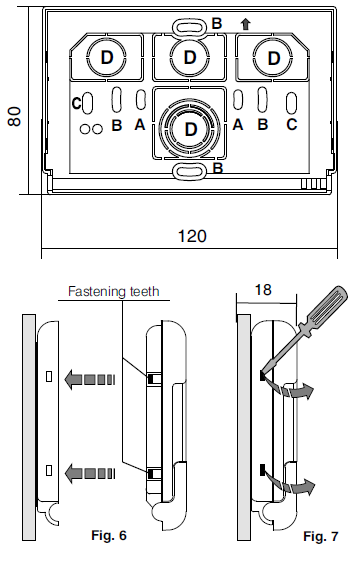
- Fasten the base of the thermostat to the recessed box (or to the wall) via the paired holes
- A-A for a round box (60 mm diameter) with clips
- B-B for a round or square box with screws
- C-C for a rectangular box (3 places) with screws
- N.B.: fig.5, “D” = removable areas for wires to be inserted (only flexible ones)
- Implement the electrical connections as shown in the relative paragraph, whilst paying particular attention when mounting on a wall without a recessed box as the wiring must be placed properly for it to not interfere when the body is closed.
- Apply the thermostat body to the base
- Press slightly until you hear the fastening teeth click into place.
- To remove the thermostat from the base, use a small screwdriver to lever the fastening teeth
ELECTRICAL CONNECTIONS
- Disconnect the power supply from the device.
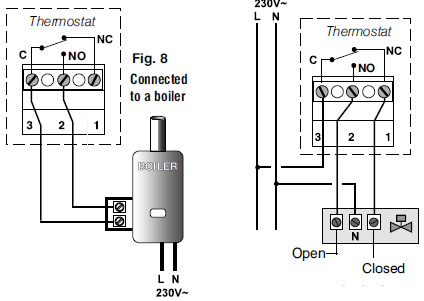
- Connect the wires of the device that is to be controlled to the terminal block on the back part of the thermostat body.
- Terminal No. 3 = common
- Terminal No. 2 = normally open contact
- Terminal No. 1 = normally closed contact
- With heavy inductive loads (pumps and solenoid valves) it is recommended to connect an RC filter in parallel to the load.
INSERTING OR REPLACING BATTERIES
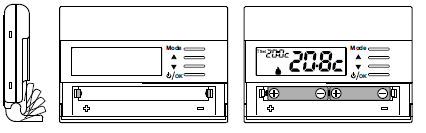
- Open the battery cover
- Fit or replace with 2 alkaline 1.5V batteries type AAA-LR03 paying attention to the polarity.
- ONLY USE GOOD QUALITY ALKALINE BATTERIES (Duracell or Energizer batteries are recommended)
SIGNALLING BATTERIES LOW OR DOWN
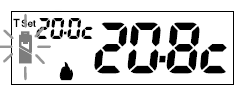
- When the
 symbol blinks, this indicates that the batteries are running out and as of this moment, there are 15 days to replace them.
 - The fixed symbol indicates low batteries, replace them immediately.
- All thermoregulation is suspended and all settings are saved to be restored when the new batteries are inserted.
START THE THERMOSTAT
Upon the first insertion of the batteries, the thermostat performs a lamp test by switching on all display segments, displaying the installed software version for a few seconds. The thermostat is operative, displaying: Winter «heating» mode, the temperature Set at 20°C COMFORT, and room temperature detected.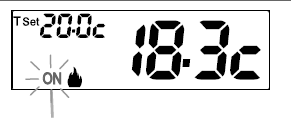
MODIFICATION OF T Set TEMPERATURE SET
- Press the Mode key briefly
- Directly press the keys.
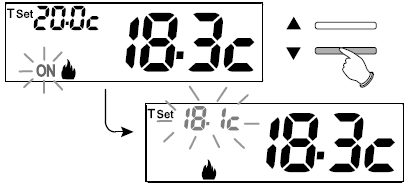
- Every time the or keys are pressed, it changes by 0.1 degrees; pressing and holding enables you to scroll through the values rapidly.
- Range from +4 °C (antifreeze temperature) to +37,7°C (+39,2°F ÷ 99,9°F).
Factory setting
Range from+6 °C (antifreeze temperature) to +37,7°C (+42,8°F ÷ 99,9°F).
OFF (disabling the thermostat)
This setting has the purpose of locking thermostat functions when heating or cooling must remain off.
- In the condition of the normal operation of the thermostat, press the /OK button briefly to set the thermostat to OFF and consequently «Switch off the system».
- The display shows OFF, to indicate that the thermostat is disabled and all functions are inactive; the display only shows room temperature reading and the Antifreeze protection temperature set (for winter mode
- Press the key / OK to reactivate the thermostat.
User Menu:
- SET TEMP (modification or disabling of Set antifreeze temperature)
- STAG SET (Winter or Summer mode)
- PASS UT (set user password)
Installer or skilled user menu:
- SET REG (selection of temperature control mode)
- SET UNIT (selection of temperature unit of measure °C/°F)
- SET CORR (correction of detected room temperature)
- SET BLOC (it lets you limit the value of set temperature points)
- POMP ON (disabling/enabling the descaling function)
- CONTRAST (to change display contrast)
- PASS UT (to restrict the use of user and/or installer functions of the thermostat)
- FACTORY (RESET operation)
- INFO (information about the firmware version installed)
ACCESS TO MENUS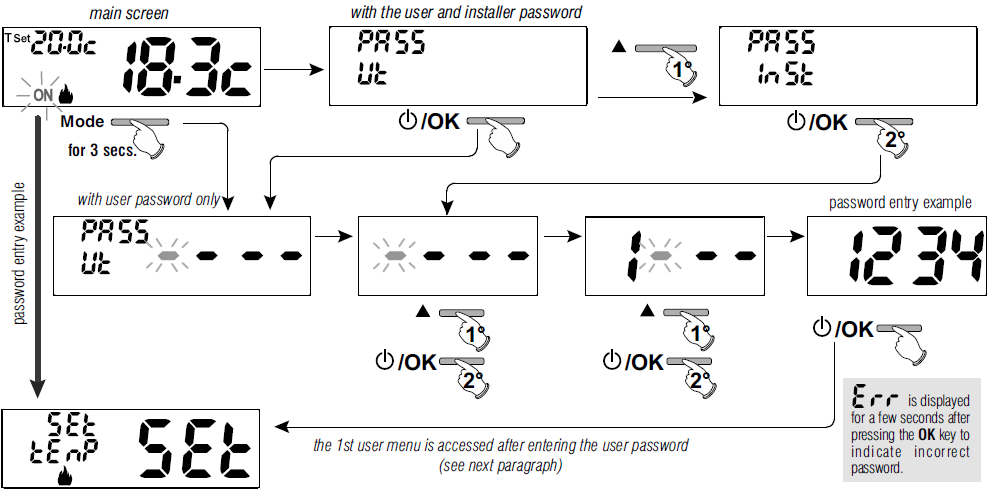
MODIFICATION OR DISABLING OF SET ANTIFREEZE TEMPERATURE
- From normal thermostat operation, access the menus by pressing for 5 secs. the «Mode» key.
- Item SET TEMP Set, confirmwith OK.
- The screen displays SEt TEMP Set
- Press 3 times the OK key.
- Use the
 keys to set the desired antifreeze temperature (default 6.0°c).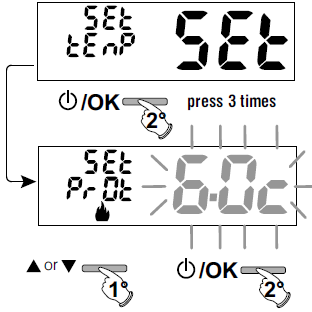
- Every time the keys are pressed, it changes by 0.1 degrees; pressing and holding enables you to scroll through the values rapidly. Range: +4 °C a +12°C
To disable antifreeze temperature, go below+4.0 °C (39.2 °F).

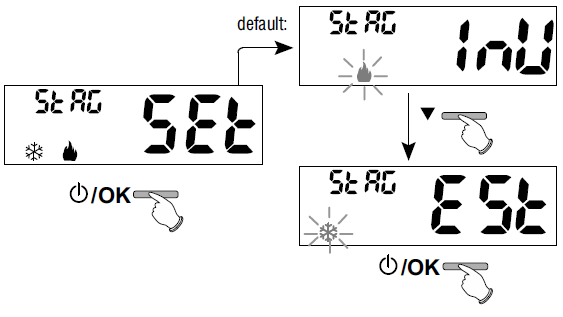
SET WINTER OR SUMMER MODE
- From normal thermostat operation, access the menus by pressing for 5 secs. the «Mode» key.
- Select with the keys the item StAG SET.
- Confirm with OK.
- Select with the keys the WINTER (heating) or
- SUMMER (cooling)mode and confirmwith OK
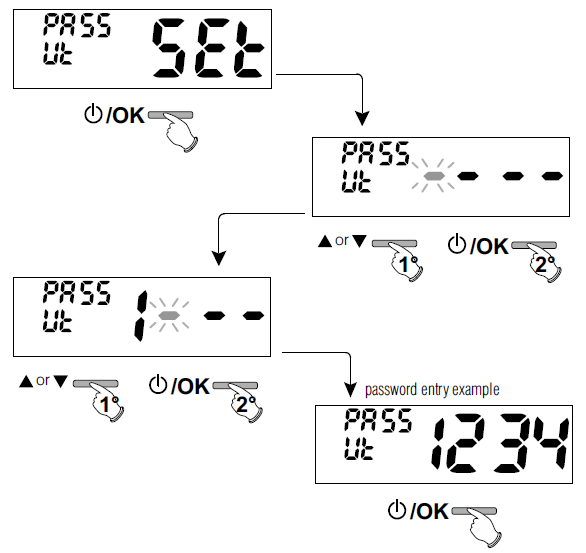
- Select item PASS Ut SEt with the keys and confirm with OK.
- Use the keys to enter 4 digits (dashes not included) between 0000 and 9999, individually confirm them with «OK».
ACCESS TO THE CONFIGURATION MENU
- From normal thermostat operation, access the menus by pressing for 5 secs. the «Mode» key.
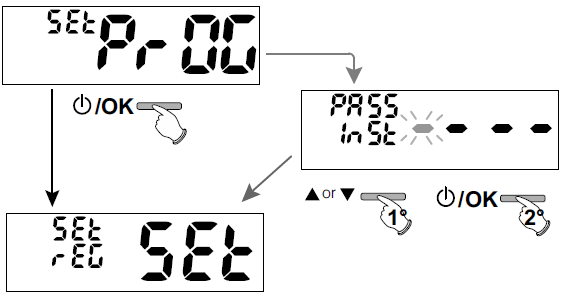
- Access the 1st item in the menu Set rEG SET «Type of temperature adjustment».
- See this and other possible settings in the paragraphs below.
- Using the keys scroll through the Set PrOGmenu items (see paragraph 8), press OK to enter the selected menu, and press Mode to go back to the previous item.
- Settings in the menu must be confirmed by pressing the OK key where required, otherwise, after 60 seconds have elapsed, the thermostat goes back to normal stand-by operation and changes will not be saved
Modification or cancellation of the UT password
Press any key press the Mode key for 5 seconds, and enter the Ut password previously set; follow the procedure described above to access the
PASS Ut Set menu:
- set 4 hyphens (- – – -), the password will be canceled,
- set another number and it will be modified.
ACCESS TO THE CONFIGURATION MENU
ATTENTION: access to the configuration menu is recommended for the installer or experienced users since the modification of some settings might affect correct system operation.
- From normal thermostat operation, access the menus by pressing for 5 secs. the «Mode» key.
- Access the 1st item in the menu Set rEG SET «Type of temperature adjustment».
- See this and other possible settings in the paragraphs below.
- Using the keys scroll through the Set PrOGmenu items (see paragraph 8), press OK to enter the selected menu, and press Mode to go back to the previous item.
- Settings in the menu must be confirmed by pressing the OK key where required, otherwise, after 60 seconds have elapsed, the thermostat goes back to normal stand-by operation and changes will not be saved.
TYPE TEMPERATURE ADJUSTMENT METHODS
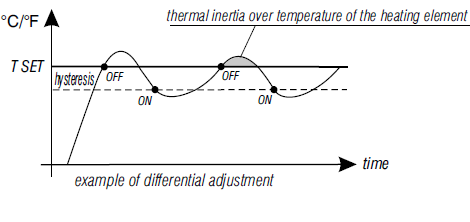
The thermostat is factory set to work in THERMAL DIFFERENTIAL mode ON/OFF with a preset thermal differential value (Hysteresis) of 0,3 °C. Note: adjustable from 0,2 °C to 1,2 °C (from 0,3 °F to 2,1 °F). The hysteresis value must be set according to the system’s thermal inertia; a low value is recommended for systems with radiators made of (e.g. cast iron) and a high value for systems with fan coils.
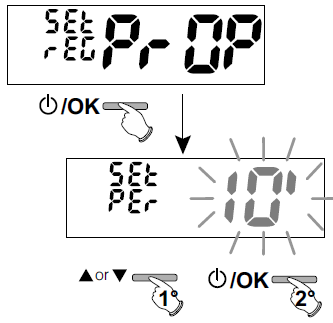
As opposed to the thermal differential, the temperature can be adjusted by MODULATING PROPORTIONALLY (PrOP) setting cycles from 7 to 20 minutes (default 10 minutes). This system maintains the desired temperature more stable, whilst increasing the user’s comfort sensation and saving on energy consumption. A long cycle is recommended for systems with high thermal inertia (cast iron radiators, floor systems) and a short cycle for systems with low thermal inertia (fan coils).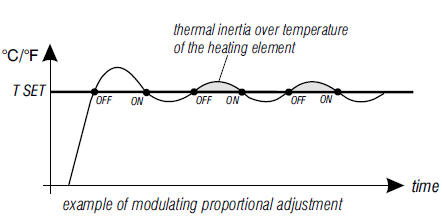
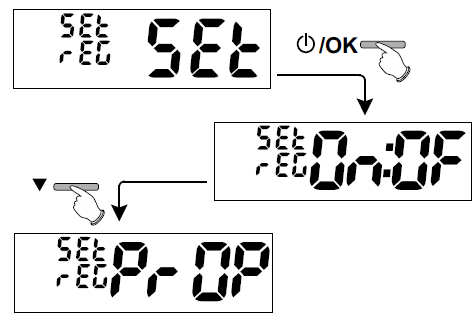
Selection of the temperature adjustment mode (Differential ON/OFF or Proportional)
- With the keys select la item Set REG.
- Press OK to confirm.
- It will be possible to select temperature adjustment mode between
- Thermal differential (On: OFF) factory setting or Modulating proportional (PrOP) operation.
- Use the keys to select the desired temperature adjustment mode.
- After making your choice press OK to confirm and display the screen to set
- HYSTERESIS if you have opted for On: OFF, or to set the PERIOD if you have opted for PrOP (see next paragraphs: 11.2.2 e 11.2.3).
Setting hysteresis for thermal Differential ON/OFF
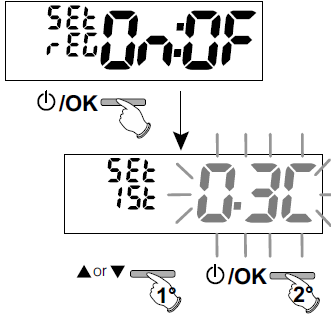
- Through the path ->Set PROG ->Set REG ->select On: OF, then press OK.
- With the keys enter the desired hysteresis value (values may be set from 0.2 °C to 1.2 °C / from 0.3 °F to 2.1 °F – default 0.3 °C/0.4 °F).
- Press OK to confirm.
- Press the Mode key twice to exit.
Setting period duration for modulating Proportional
- Through the path ->Set PROG ->Set REG ->select PrOP, then press OK.
- With the keys enter the duration of the desired period (adjustable from 7 to 20 minutes, default 10min.).
- Press OK to confirm.
- Press the Mode key twice to exit.
CHANGE UNIT OF MEASURE FOR TEMPERATURE READING
- The thermostat is pre-set in the factory to display temperatures in degrees Centigrade (Celsius), it is possible to switch to the Fahrenheit scale or vice versa with the following procedure:
- From normal thermostat operation, access the menus by pressing for 5 secs. the «Mode» key.
- Through the path ->Set PROG ->select Set UNIT, then press OK.
- Select the desired unit of measure with the keys: °C or °F, then press OK to confirm.
- All temperature set points will be updated according to the new scale.
- Press the Mode key twice to exit.
CORRECTION OF ROOM TEMPERATURE READING
If for any reason the thermostat must be installed in a position where the measured room temperature might be affected (e.g. perimeter wall which is on average colder in winter and warmer in summer than the rest of the dwelling) the device has 2 separate parameters to adjust the room temperature measured in the Winter and Summer modes. From normal thermostat operation, access the menus by pressing and holding the «Mode» key Through the path ->Set PROG ->, select itemSet COrr. Press OK to confirm
OFFSET for winter mode(  )
)
The display alternates the empty fields to be inserted (- – – -) with the current temperature value. Use the  key to enter positive values, and the
 key to enter negative values (sign «-»).
- Possible correction -3.0 °C (-5.4 °F) ÷ 3.0 °C (5.4 °F)
- default 0.0 °C/°F = – – – –
At each selection, the display will show the new correction value (e.g.: 0.6°C) alternated to the detected temperature value (e.g.: 21.2°C). After performing the correction press «OK». The display shows the OFFSET for the Summer mode ( ); proceed with the correction as per the above procedure or press the Mode key twice to exit.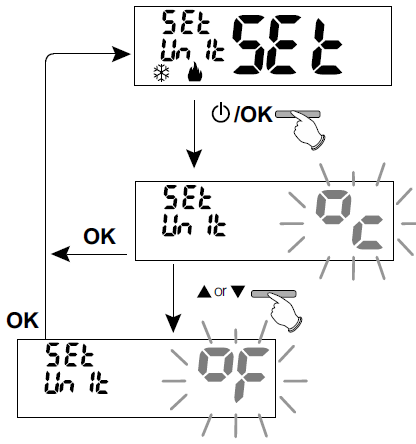
MAX AND MIN SET TEMPERATURE LOCK (Winter and Summer mode)
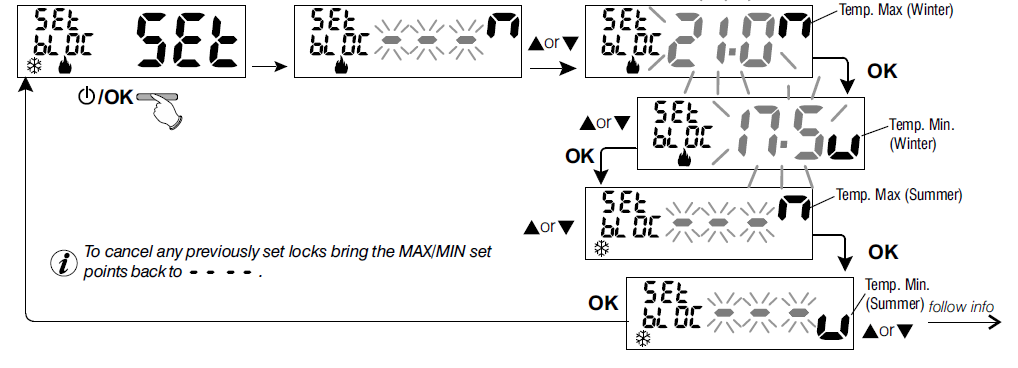
- In certain thermostat installations (public buildings, hotels, etc.) it might be useful to limit the maximum and minimum temperature set points.
- This avoids incorrect settings by unauthorized personnel (energy savings).
- It is possible to limit (lock) the maximum, minimum or both temperature values settable on the thermostat.
- The restriction may be applied either to the Winter or Summer mode
- From normal thermostat operation, access the menus by pressing for 5 secs. the «Mode» key.
- Through the path Set PROG->, select the item Set BLOC. Press OK to confirm
- In a sequential manner, it is possible to set maximum temperature locks (Comfort) and/or minimum(night economy) for the winter mode and/or maximum temperature (Comfort) and/or minimum(night economy) for the Summer mode.
- If no locks have been entered yet, the display shows empty flashing fields (- – – -).
- Use the keys to set the desired temperature lock values from time to time.
- Upon completing each setting pressOKto confirm and move to the next lock item.
- Press the OK impulse key to move to a different item. Press the Mode key to exit.
General rule
If the Set temperature comfort is greater than the maximum entered lock, it will level out with it. If the Set temperature t or t2 is less than the minimum entered lock, it will level out with it.
The following rule will apply to all other temperatures:
- WINTER ( )=COMFORT temperature>
 night economy temperature>antifreeze temperature
 - SUMMER (
 )=COMFORT temperature< night economy temperature
IMPORTANT!
During thermostat operation, the use rmay not set a temperature Set t higher or lower than the max admin. locks entered.
DESCALING CYCLE
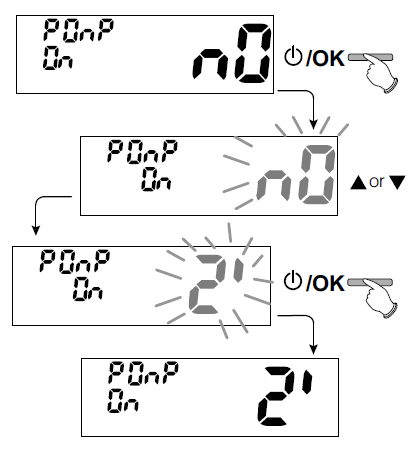
If the function is activated, the programmable thermostat activates every day of the year (24h after the last intervention of the relay), for 2 minutes. It activates the controlled device (pump, valve etc.) to prevent scaling or jamming caused by prolonged inactivity
- From normal thermostat operation, press the mode key for 5 secs., follow the
- path -> Set PROG -> POMP ON -> press «OK» and with the keys
- select the desired item: POMP ON nO (NO) or POMP ON 2′.
- Press «OK» to confirm.
- Press the mode key twice to exit.
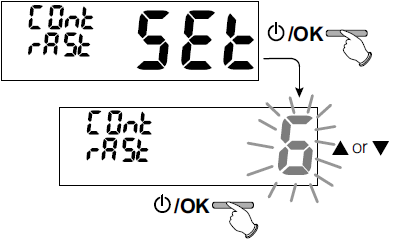
DISPLAY CONTRAST ADJUSTMENT
8 adjustment levels are available. Level 6 is set in the factory. From normal thermostat operation, press the Mode key for 5 secs., follow the path ->Set PROG ->use keys to select item CONTRAST Set.
- Press OK to confirm.
- Select the desired level with the keys.
- The contrast variation obtained will be visible at every selection.
- Press OK to confirm.
- Press the Mode key twice to exit
ENTERING AND MANAGING PASSWORDS
Some functions of the thermostat may be protected by a user password (Ut) and/or installer (InST), so that they may be only modified by authorized persons. No password is active in the factory settings
Entering the new password
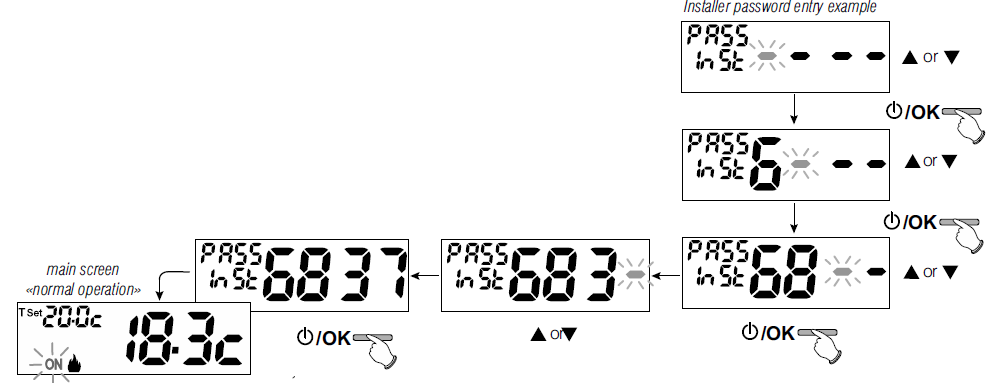
From normal thermostat operation, press the Mode key for 5 secs. and follow the path ->Set PROG ->PASS Ut SEt ->press «OK» to access the screen to create a secret User code (PASS Ut), confirm with OK, or select itemPASS InSt with the keys and confirm with OK to create the Installer code.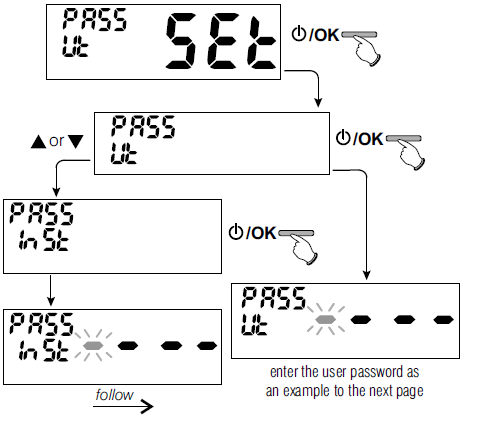
- Using the keys enter 4 digits (dashes not included) between 0000 and 9999, and individually confirm them with «OK».
- The thermostat goes back to the main normal operating screen.
- The «User» password lets you access available functions through the Mode key.
- If an installer password is also present the Set PROGmenumay not be accessed
- The «Installer» password lets you access all «Configurations» (Set PROG) menu functions as well as User settings
Password modification or cancellation
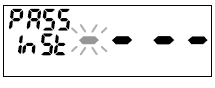
When required, enter the previously created User or Installer password; follow the above procedure and access itemPASS SEt Ut or InSt :
- enter 4 hyphens (- – – -) to cancel the password
- enter 4 new digits to modify the password
RESET OPERATION (FACTORY SET
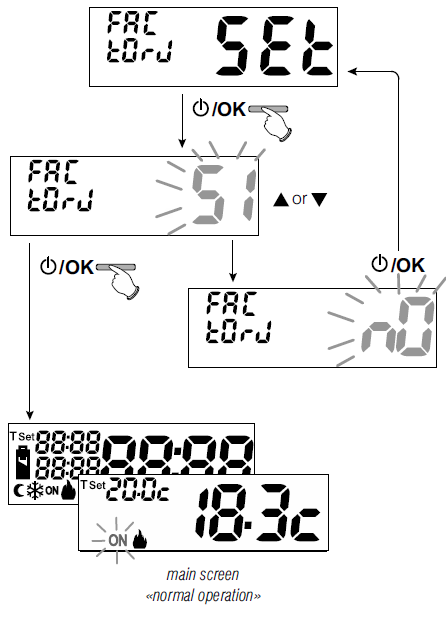
- The operation may be carried out by pressing the Mode key for 5 secs., follow the path -> Set PROG ->: using keys select item FACTORY SEt confirm with OK.
- The display will ask to choose between FACTORY «YES» and «NO».
- Use the keys, to select then press OK to confirm
- If you opt for NO the display exits the function and goes back to the initial
- FACTORY SEt. Press the mode key twice to exit
- if you confirm YES, the control deletes all previously entered settings by restoring the factory settings (default), the thermostat enters normal operation.
SYSTEM SOFTWARE INFORMATION
From normal thermostat operation, press for 5 secs. the Mode key, select and confirm with OK the item Set PROG ->, using keys select item INFO to obtain information about the installed firmware. Press theMode key to return to the previous menu or press OK to exit the menu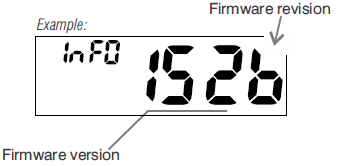
POSSIBLE PROBLEMS AND SOLUTIONS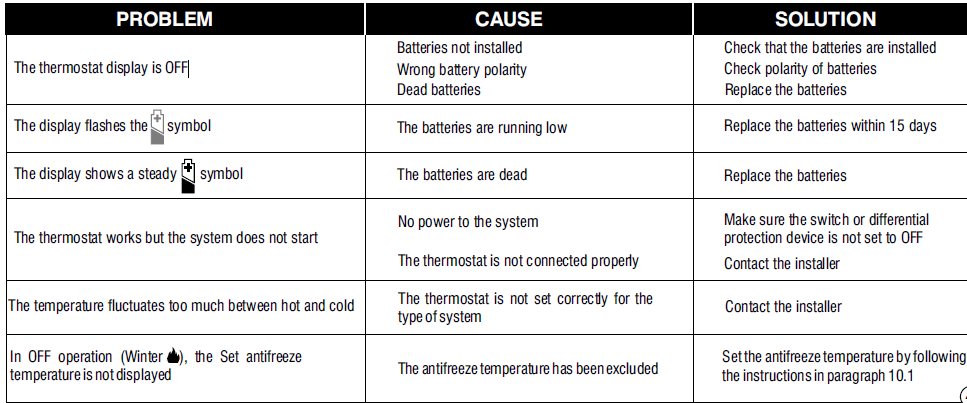
Reference:
DOWNLOAD MANUALS:
PERRY 1TP-TE011B ELECTRONIC DIGITAL THERMOSTAT User Manuals