Peco T4900 Programmable Thermostat
INTRODUCTION
THE PECO PERFORMANCE PRO T8000 SERIES
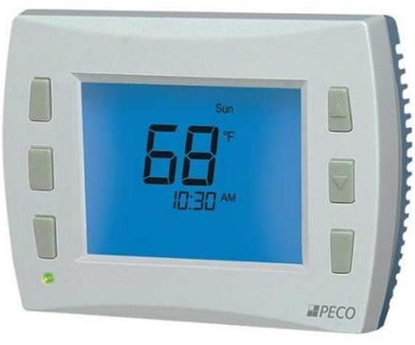
Thank you for choosing a PECO® Performance PRO™ thermostat. The Performance PRO T8000 Series is intended for use in residential and commercial environments. It is designed for and can support up to 3-HEAT/ 2-COOL configurations in conventional systems and heat pump applications. The Performance PRO also provides the capability to meet the requirements for ASHRAE 90.1-2004 and California Building Code Title 24 (2008 edition). The Performance PRO T8000 Series is comprised of the T8000 non-programmable thermostat models and the T8500 programmable thermostat models. The T8500 model features an 8 square inch blue backlit display with dynamic menus, accessed using soft keys. All Performance PRO T8000 Series offer the following standard features: auto-changeover, optional remote sensors, occupancy sensors, three levels of keypad lockout, a PIN access code, filter replacement reminder, and a heat/cool Demand Indicator. The T8500 programmable models contain: up to four scheduled events per day, a 365-day calendar, 20 holidays, holiday override, temporary override, a Power Harvesting feature (also known as “power stealing”) to preserve battery life, Secure Digital (SD) card capability (card not included), and optional humidity control (T8532-IAQ only). The T8000 Series can be powered by 24 VAC or batteries or both (recommended). The T8000 Series can control up to 7 outputs and monitor three external sensors. The T8000 Series mounts onto any PECO Performance PRO Series wallplate
CAUTION
- READ INSTRUCTIONS CAREFULLY BEFORE ATTEMPTING TO OPERATE THIS THERMOSTAT.
- FOLLOW THE PERFORMANCE PRO INSTALLATION INSTRUCTIONS BEFORE PROCEEDING.
- Failure to observe safety information and comply with instructions could result in PERSONAL INJURY, DEATH AND/OR PROPERTY DAMAGE.
- Use this thermostat only as described in this manual.
- This is a 24 VAC low-voltage thermostat. Do not install on voltages higher than 30 VAC.
- Contact a qualified service person if at any time the thermostat does not operate properly.
- Use care to avoid static discharge to the thermostat.
- To avoid electrical shock or damage to equipment, disconnect power before installing or servicing and use only wiring with insulation rated for full thermostat operating voltage.
- To avoid potential fire and/or explosion, do not use in potentially flammable or explosive atmospheres.
- This product, when installed, will be part of an engineered system whose specifications and performance characteristics are not designed nor controlled by PECO.
- All wiring and applications must conform to local and national building codes and ordinances Applications and national codes must be reviewed prior to installation to assure the installation is functional and safe.
QUICK REFERENCE: DEFAULT DISPLAY MODE
Default Display
The factory programmed settings show the time, temperature, and setpoint. This is called the Default Display. The Default Display appears after a short period of inactivity. The Default Display can be custom configured to show user-selected items only (see Service Menu 520 in “Performance PRO T8000 Series Installation Guide”).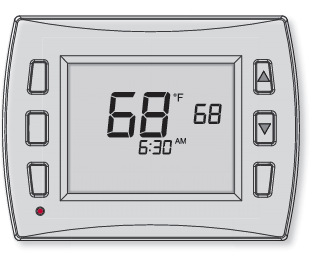
Home Display
The Performance PRO T8000 Series has two ▲/ ▼(Up and Down) keys and four soft keys( 1-3; 6 below). Press any key to enter Home Display from Default Display. Press soft keys to enter submenus. Soft keys have multiple functions; available submenus depend on menu navigation.
Navigate submenu options to customize thermostat settings. Available options are:
- Next – Advances to the next menu item in sequence; current selections are held in temporary memory until user completes the menu sequence by pressing “Done.”
- Go Back – Returns back one step in menu sequence or reverts to Home Display. Changes are not saved if user selects “Go Back” from the first option in sequence.
- Done – Saves settings and reverts to the Home Display.
- Cancel – Discards changes and reverts to the Home Display
HOME DISPLAY SCREEN
KEY OPERATION
System key
Used to control the operating mode of the Performance PRO T8000 Series thermostats. The options available are dependent on System Type selected in Service Menu 110 (see Advanced Configuration in “Performance PRO T8000 Series Installation Guide”).
System modes are:
- HEAT – Select for the system to operate in heating mode only. Only one setpoint is displayed.
- COOL – Select for system to operate in cooling mode only. Only one setpoint is displayed.
- AUTO – Allows system to control to both the Heat and Cool Setpoints. The system will automatically changeover between heating and cooling modes as room temperature varies. Cool Setpoint must always be greater than Heat Setpoint by the deadband value.
- OFF – Disables all thermostat outputs; only zone temperature and time are displayed.
- EMERGENCY (Em)– Emergency heat can be used when the Heat Pump cannot keep up with the heat load. Use Service Menu 110 (System Type 6 & 11) to enable.
- Note: Deadband is the user-defined minimum difference between the Cool Setpoint and
- Heat Setpoint (see Service Menu 380).
- Fan key Used with two different menu options:
- ON – Continuous fan operation.
- AUTO – Fan is activated only when there is demand for heat or cool, with some exceptions.
- Note: Several Service Menu options affect the fan operation (See Advanced
- Configuration in the “Performance PRO T8000 Series Installation Guide.”)
- More key Used to view more menu options. From the Default Display, press More to show more menu options that may be accessed by pressing the soft keys.
- Demand Indicator Light emitting diode (LED) on lower left front panel that displays red when heating and green when cooling. Available only when 24 VAC power is connected to the thermostat.
- Up and Down keys (▲/▼) Used in menus to increase or decrease variable settings, or switch to the next input.
- Note: Pressing ▲/▼ keys show the Override display unless Holiday mode is set.
- Override key Used to create a temporary override of current setpoint temperature. Pressing Override will display the “Next” and “Done” options and the setpoint will begin flashing.
- Temporary Override – The active setpoint is taken from setpoints defi ned in the Override menu. (In Home Display, “Override” fl ashes during the override time period if selected.)
 The service Indicator Icon appears to notify the user that the remote temperature sensors are reading out of range.
 Battery Indicator Icon appears only when the battery level is low and flashes when the battery level is critically low. Two AA alkaline batteries (2.6 – 3.1VDC) have an approximate 1-year life expectancy.
 Keypad Lockout Icon appears if any type of keypad lockout is active. Keypad lockout blocks access to certain features of the thermostat. (See Service Menu 340 to enable Keypad Lockout).
- Filter Indicator Icon appears in the Default Display when the reminder timer expires (see Service Menu 230). The thermostat will continue to return to the filter menu until the Done key is pressed. After the
- Filter Indicator icon appears, pressing Done will restart the filter timer.
 Secure Digital (SD) Icon appears (flashes) when SD card is inserted. Optional SD card not provided. SD card functionality allows user to upload/download settings to/from a PECO-formatted SD card (see also “Load SD card settings”)
SET THE CLOCK, MONTH, AND DAY
PRESS ANY KEY TO BEGIN
- Press More to view menu options.
- Press Clock to access menu options.
- Press ▲/ ▼ to select 12 or 24 HR format, then press Next.
- Press ▲/ ▼to select clock hour, then press Next.
- Press ▲/▼to select clock minutes, then press Next.
- Press ▲/ ▼ to select clock year, then press Next.
- Press ▲/ ▼ to select current month, then press Next.
- Press ▲/ ▼to select current date. Days and Mo (month) appears.
- Press Done to fi nish clock mode.
SELECT FAHRENHEIT OR CELSIUS TEMPERATURE
- Press the lower left and lower right keys simultaneously for about fi ve seconds. Go Back, Next, and Done appear.
- Press Next continuously until menu “260” appears.
- In Service Menu 260, Press ▲/ ▼to select the desired temperature display:
- “1” for Fahrenheit (default)
- “0” for Celsius
- Press Done when you have completed your selection.
SELECT THE FAN MODE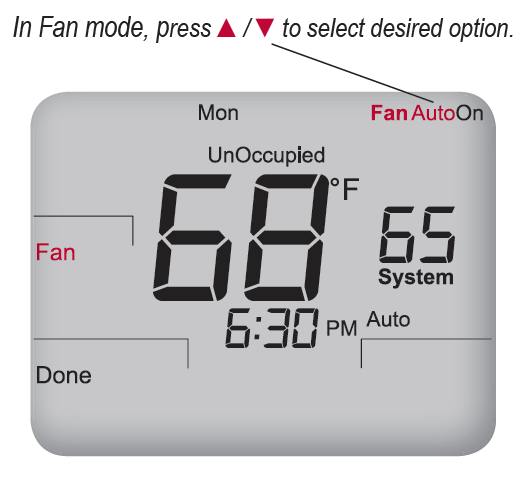
PRESS ANY KEY TO BEGIN
- Press Fan to set fan operation.
- Press ▲/ ▼ to select “On,” or “Auto.”
- Note: Selected option fl ashes.
- Select Done to save changes.
SELECT SYSTEM MODE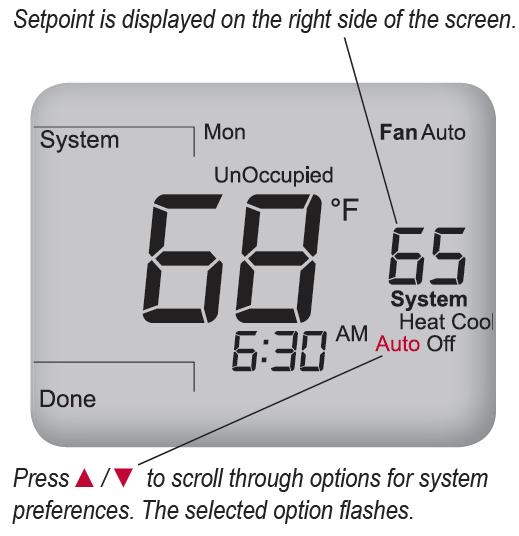
PRESS ANY KEY TO BEGIN
- Press System to select system preferences.
- Note: Selected option fl ashes.
- Press ▲/ ▼ to select Heat, Cool, Auto, Off, or Em (Emergency).
- Press Done to save changes..
INTRODUCTION
THE PECO PERFORMANCE PRO T8000 SERIES
Thank you for choosing a PECO® Performance PRO™ thermostat. The Performance PRO T8000 Series is intended for use in residential and commercial environments. It is designed for and can support up to 3-HEAT/ 2-COOL configurations in conventional systems and heat pump applications. The Performance PRO also provides the capability to meet the requirements for ASHRAE 90.1-2004 and California Building Code Title 24 (2008 edition). The Performance PRO T8000 Series is comprised of the T8000 non-programmable thermostat models and the T8500 programmable thermostat models. The T8500 model features an 8 square inch blue backlit display with dynamic menus, accessed using soft keys. All Performance PRO T8000 Series offer the following standard features: auto-changeover, optional remote sensors, occupancy sensors, three levels of keypad lockout, a PIN access code, filter replacement reminder, and a heat/cool Demand Indicator. The T8500 programmable models contain: up to four scheduled events per day, a 365-day calendar, 20 holidays, holiday override, temporary override, a Power Harvesting feature (also known as “power stealing”) to preserve battery life, Secure Digital (SD) card capability (card not included), and optional humidity control (T8532-IAQ only). The T8000 Series can be powered by 24 VAC or batteries or both (recommended). The T8000 Series can control up to 7 outputs and monitor three external sensors. The T8000 Series mounts onto any PECO Performance PRO Series wallplate
CAUTION
- READ INSTRUCTIONS CAREFULLY BEFORE ATTEMPTING TO OPERATE THIS THERMOSTAT.
- FOLLOW THE PERFORMANCE PRO INSTALLATION INSTRUCTIONS BEFORE PROCEEDING.
- Failure to observe safety information and comply with instructions could result in PERSONAL INJURY, DEATH AND/OR PROPERTY DAMAGE.
- Use this thermostat only as described in this manual.
- This is a 24 VAC low-voltage thermostat. Do not install on voltages higher than 30 VAC.
- Contact a qualified service person if at any time the thermostat does not operate properly.
- Use care to avoid static discharge to the thermostat.
- To avoid electrical shock or damage to equipment, disconnect power before installing or servicing and use only wiring with insulation rated for full thermostat operating voltage.
- To avoid potential fire and/or explosion, do not use in potentially flammable or explosive atmospheres.
- This product, when installed, will be part of an engineered system whose specifications and performance characteristics are not designed nor controlled by PECO.
- All wiring and applications must conform to local and national building codes and ordinances Applications and national codes must be reviewed prior to installation to assure the installation is functional and safe.
QUICK REFERENCE: DEFAULT DISPLAY MODE
Default Display
The factory-programmed settings show the time, temperature, and setpoint. This is called the Default Display. The Default Display appears after a short period of inactivity. The Default Display can be custom configured to show user-selected items only (see Service Menu 520 in “Performance PRO T8000 Series Installation Guide”).
Home Display
The Performance PRO T8000 Series has two ▲/ ▼(Up and Down) keys and four soft keys( 1-3; 6 below). Press any key to enter Home Display from Default Display. Press soft keys to enter submenus. Soft keys have multiple functions; available submenus depend on menu navigation.
Navigate submenu options to customize thermostat settings. Available options are:
- Next – Advances to the next menu item in sequence; current selections are held in temporary memory until user completes the menu sequence by pressing “Done.”
- Go Back – Returns back one step in menu sequence or reverts to Home Display. Changes are not saved if user selects “Go Back” from the first option in sequence.
- Done – Saves settings and reverts to the Home Display.
- Cancel – Discards changes and reverts to the Home Display
HOME DISPLAY SCREEN
KEY OPERATION
System key
Used to control the operating mode of the Performance PRO T8000 Series thermostats. The options available are dependent on System Type selected in Service Menu 110 (see Advanced Configuration in “Performance PRO T8000 Series Installation Guide”).
System modes are:
- HEAT – Select for the system to operate in heating mode only. Only one setpoint is displayed.
- COOL – Select for system to operate in cooling mode only. Only one setpoint is displayed.
- AUTO – Allows system to control to both the Heat and Cool Setpoints. The system will automatically changeover between heating and cooling modes as room temperature varies. Cool Setpoint must always be greater than Heat Setpoint by the deadband value.
- OFF – Disables all thermostat outputs; only zone temperature and time are displayed.
- EMERGENCY (Em)– Emergency heat can be used when the Heat Pump cannot keep up with the heat load. Use Service Menu 110 (System Type 6 & 11) to enable.
- Note: Deadband is the user-defi ned minimum difference between the Cool Setpoint and
- Heat Setpoint (see Service Menu 380).
- Fan key Used with two different menu options:
- ON – Continuous fan operation.
- AUTO – Fan is activated only when there is demand for heat or cool, with some exceptions.
- Note: Several Service Menu options affect the fan operation (See Advanced
- Configuration in the “Performance PRO T8000 Series Installation Guide.”)
- More key Used to view more menu options. From the Default Display, press More to show more menu options that may be accessed by pressing the soft keys.
- Demand Indicator Light emitting diode (LED) on lower left front panel that displays red when heating and green when cooling. Available only when 24 VAC power is connected to the thermostat.
- Up and Down keys (▲/▼) Used in menus to increase or decrease variable settings, or switch to the next input.
- Note: Pressing ▲/▼ keys show the Override display unless Holiday mode is set.
- Override key Used to create a temporary override of current setpoint temperature. Pressing Override will display the “Next” and “Done” options and the setpoint will begin flashing.
- Temporary Override – The active setpoint is taken from setpoints defined in the Override menu. (In Home Display, “Override” fl ashes during the override time period if selected.)
- The service Indicator Icon appears to notify the user that the remote temperature sensors are reading out of range.
- Battery Indicator Icon appears only when the battery level is low and flashes when the battery level is critically low. Two AA alkaline batteries (2.6 – 3.1VDC) have an approximate 1-year life expectancy.
- Keypad Lockout Icon appears if any type of keypad lockout is active. Keypad lockout blocks access to certain features of the thermostat. (See Service Menu 340 to enable Keypad Lockout).
- Filter Indicator Icon appears in the Default Display when the reminder timer expires (see Service Menu 230). The thermostat will continue to return to the filter menu until the Done key is pressed. After the
- Filter Indicator icon appears, pressing Done will restart the filter timer.
- Secure Digital (SD) Icon appears (flashes) when SD card is inserted. Optional SD card not provided. SD card functionality allows user to upload/download settings to/from a PECO-formatted SD card (see also “Load SD card settings”)
SET THE CLOCK, MONTH, AND DAY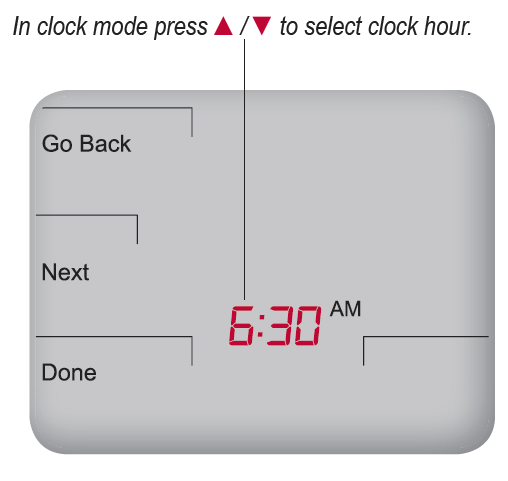
PRESS ANY KEY TO BEGIN
- Press More to view menu options.
- Press Clock to access menu options.
- Press ▲/ ▼ to select 12 or 24 HR format, then press Next.
- Press ▲/ ▼to select clock hour, then press Next.
- Press ▲/▼to select clock minutes, then press Next.
- Press ▲/ ▼ to select clock year, then press Next.
- Press ▲/ ▼ to select current month, then press Next.
- Press ▲/ ▼to select current date. Days and Mo (month) appears.
- Press Done to fi nish clock mode.
SELECT FAHRENHEIT OR CELSIUS TEMPERATURE
- Press the lower left and lower right keys simultaneously for about fi ve seconds. Go Back, Next, and Done appear.
- Press Next continuously until menu “260” appears.
- In Service Menu 260, Press ▲/ ▼to select the desired temperature display:
- “1” for Fahrenheit (default)
- “0” for Celsius
- Press Done when you have completed your selection.
SELECT THE FAN MODE
PRESS ANY KEY TO BEGIN
- Press Fan to set fan operation.
- Press ▲/ ▼ to select “On,” or “Auto.”
- Note: Selected option fl ashes.
- Select Done to save changes.
SELECT SYSTEM MODE
PRESS ANY KEY TO BEGIN
- Press System to select system preferences.
- Note: Selected option fl ashes.
- Press ▲/ ▼ to select Heat, Cool, Auto, Off, or Em (Emergency).
- Press Done to save changes.
Reset the furnace filter timer
Press any key to begin
The Furnace Filter icon serves as a reminder to change the furnace fi lter (see note below). When the fi lter timer expires, the Filter icon is lit continuously.
- From the Default Display, press any key to enter the Filter mode (Filter, Go Back and Done appear).
- Press Done to reset the fi lter timer.
- Note: Pressing Done restarts fi lter timer with previous time value selected.
- Press Go Back to bypass the reminder and return to the Home Display.
SET PIN ACCESS TO SERVICE MENUS
- Press the lower left and lower right keys simultaneously for about fi ve seconds.
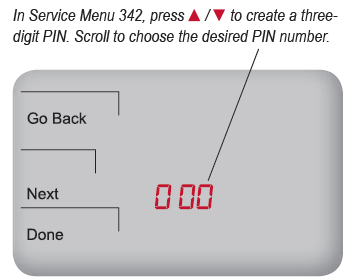
- Press Next until Service Menu 341 appears. Note: Default “00” appears.
- Press ▲to select 1 (enable), then Next.
- In Service Menu 342, press ▲/ ▼to create a three-digit PIN access code.
- Write down/save the PIN access code.
- Press Done when finished.
Verification of PIN Number
- Press the lower left and lower right keys simultaneously for about fi ve seconds.
- Enter PIN: Press ▲/ ▼to change the righthand column value, then press Next.
- Moving right to left, change each value.
- Press Done. Note: Display shows Service Menu 100, default value below.
PROGRAM A HOLIDAY
- Press More to view more options.
- Press Holiday to enter menu.
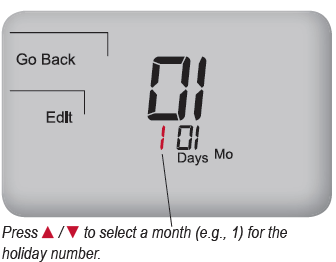
- Press ▲/ ▼to select holiday number (1-20). Note: Month number and day of month appear below in clock area.
- Press Edit to select holiday month (“Mo” icon will appear).
- Press ▲/ ▼to select a month (numerical), then press Next.
- Press ▲/ ▼ to select day (numerical) that holiday starts (Days icon will appear), then press Next.
- Press ▲/ ▼ to select holiday length, which is number of days that the holiday period lasts (1-99), then press Next.
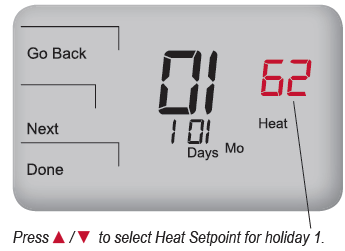
- Press ▲/ ▼to select the Heat Setpoint, then Next.
- Press ▲/ ▼to select the Cool Setpoint, then Next.
- Optional: To program multiple holidays, wait for the Holiday number to fl ash (after step 9).
- Press ▲/ ▼to select a new Holiday number; repeat steps 3-9.
- Press DONE to complete the holiday display mode
Program the thermostat
The T4900 School Series may also be operated with standard Performance PRO settings. Each day has two or four scheduled events per day (Occupied1,Occupied2, unocc1, and unocc2), depending on user selection. Each one of these events can be programmed with a start time and Heat and Cool Setpoints. Heat Setpoint controls the heating system during cold weather. Cool Setpoint controls the cooling system during hot weather. T4900 School Series is preprogrammed with factory default settings for seven days of the week as follows:
PROGRAM SCHEDULED EVENTS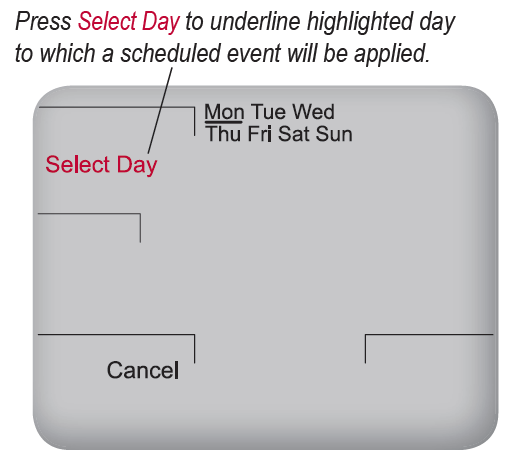
PRESS ANY KEY TO BEGIN
Schedule two or four events per day Occupied1, Occupied2, Unocc1, and Unocc2.
- Press More to view options.
- Press Schedule to enter main menu.
- Press ▲/ ▼to highlight day.
- Note: Selected day fl ashes. (Optional: Select View to modify existing event.)
- Press Edit to apply scheduled events for the selected day(s).
- Press Select Day. Note: Selected day fl ashes. (Continue pressing ▲/ ▼then press Select Day for multiple days.)
- Press ▲/ ▼to highlight the day(s) to be programmed. Note: Selected day(s) for scheduled events must be underlined.
- Press Next to advance to event.
Press ▲/ ▼to select a desired Heat Setpoint for the currently selected scheduled event (Occupied1).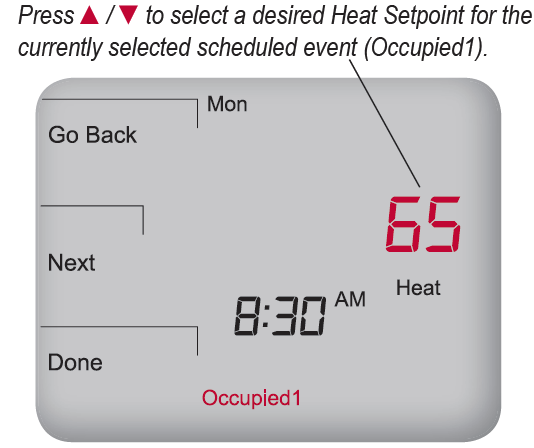
- Press ▲/ ▼ to select a scheduled event (e.g, Occupied1, etc.), then Next.
- Press ▲/ ▼to schedule start time for the event (in 15-minute periods), then Next Press ▲/ ▼to select desired Heat Setpoint, then press Next.
- Press ▲/ ▼to select desired Cool Setpoint, then press Next. Note: The next event (e.g., Unocc1) begins flashing after Next is selected. Complete steps 3-11 for each scheduled event.
- Press Done to exit schedule mode.
- Note: Pressing Go Back after step 11 will show Select Day on display.
PROGRAM OVERRIDE
Example shows how to select a Cool Setpoint for a temporary period in System Auto mode
PRESS ANY KEY TO BEGIN
- From the Default Display, press any key to enter the Filter mode. (Filter, Go Back and Done appear)
- Press Done to reset the fi lter timer.
- Note: Pressing Done restarts fi lter timer with previous time value selected.
- Press Go Back to bypass the reminder and return to the Home Display
load SD CARD SETTING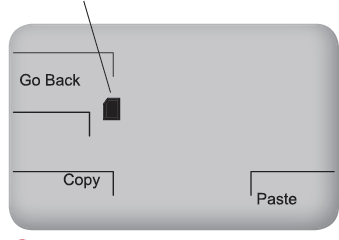
Press anY KeY To beGIn
- Insert the SD card into the slot located on top of thermostat, where indicated. Go Back, Copy, and Paste appear.
- Press Paste to copy settings from the SD card to the thermostat.
- Press Copy to transfer settings from the thermostat to the SD card.
- Press Go Back to complete process. note: Remove SD card only after Step 4
Enable Humidification/ Dehumidification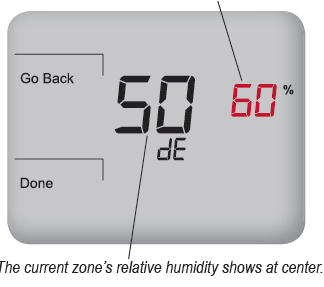
If the thermostat is model T4932SCH-002, a humidity sensor is present, but it must be enabled. A humidity sensor allows the user to set dehumidify/ humidify control setpoints.
- Enter Service Menu 490, and select option “01” (for Dehumidify Control).
- Press Done. Return to Default Display.
- Press More to view more options.
- Select Humidity in the lower right. note: “dE” appears in clock area. Dehumidify Setpoint (e.g. 60%) fl ashes.
- Press ▲/ ▼to select the desired Dehumidify Setpoint.
- Press Done. Settings are saved
Enable School Schedule/Teacher key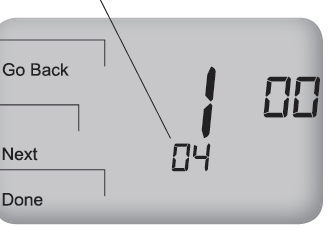
School Schedule allows the installer to limit thermostat operation during Enabled/ Disabled periods and select Heat/Cool Setpoints. Activation requires the user to press Teacher /Override. If equipped with an occupancy sensor, it initiates activation.
- Press and hold down simultaneously More and Teacher/Override (lower left and lower right keys) to enter Service Menus. note: Service Menu 100 appears, and “01” flashes below.
- Press ▲/ ▼to highlight option “04,” thereby selecting “School Schedule.”
- Press Done to complete the configuration. When School Schedule is active, the installer can select Heat/Cool Setpoints for Occupied/unoccupied periods.
Press the Teacher/Override key to apply temporary Heat/Cool Setpoints for Occupied/ unoccupied periods while thermostat is operating in Enabled or Disabled modes.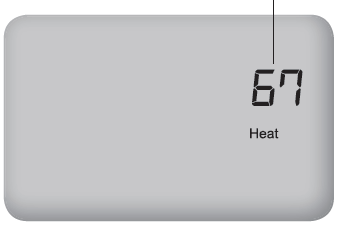
- Press Teacher/Override twice. (Last active setpoint appears.)
- Press ▲/ ▼to adjust Setpoint. Press Teacher/Override to advance.
- Press ▲/ ▼to set occupied duration. Hold Until means the thermostat applies occupied settings until time is shown. note: Default time (4 hours) applied (see Service Menu 396). Press Teacher/Override to advance.
- Press ▲/ ▼to adjust other Setpoint.
- Press Teacher/Override to apply settings and exit to Home Display.
Set Adaptive Pre-Conditioning Schedule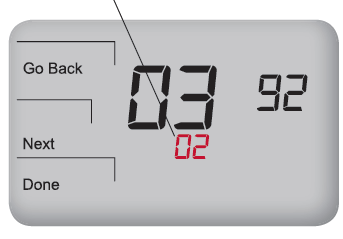
Adaptive Pre-Conditioning Schedule (APCS) is a schedule that learns occupancy patterns quickly and forgets them slowly. APCS learns only when Teacher/ Override is pressed or an occupancy sensor is applied. APCS activates pre-purge and heat/cool recovery before room occupancy, adapting to occupancy events. APCS must be enabled by the user (APCS meets regulatory requirements).
- Press, hold down simultaneously More and Teacher /Override (lower left and lower right) keys to enter Service Menus. Service Menu 100 appears.
- Press Next to go to Service Menu 391.
- Press ▲/ ▼to select “01” to enable.
- Press Done when finished.
Enable Random Stagger Start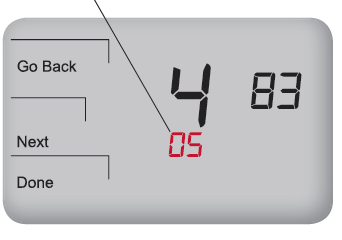
PRESS ANY KEY TO BEGIN
Random start greatly reduces the probability of high peak electricity loads, avoiding potentially high energy costs. Random start (only available for School Schedule) applies to starting equipment at specific event transitions.
- Enter Service Menu 482. Select Options 01, 02, depending on power source.
- Press Done. Return to Default Display.
- Enter Service Menu 483 (Maximum start-time offset), which refers to time period in which random value is generated.
- Select preference: 3, 5,10,15, 30 min. note: Default is 5.
- Press ▲/ ▼to select the desired time.
- Press Done. Settings are saved
Peco
- Automation and Controls
- Division of PECO, Inc.
- PO Box 82189, Portland, OR 97282
- Phone: 503-233-6401 | 800-874-8547
- E-mail: [email protected]
- www.pecomanufacturing.com
REFERENCE:
DOWNLOAD MANUALS:
Peco T4000 Programmable Thermostat Operating Manual
OTHER MANUALS:
Peco T4900 Programmable Thermostat Installation Guide
