
OMNIE CSQ-STAT230V ZigBee Temperature Controller Wireless Thermostat
Introduction
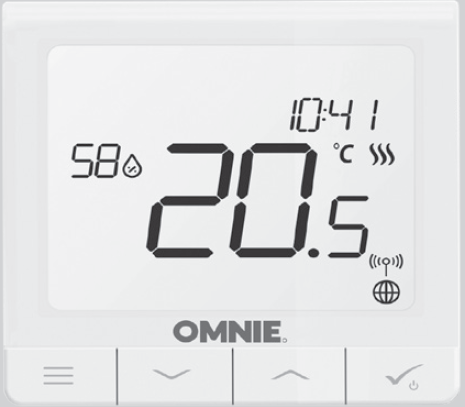
The CSQ-STAT230 V is a ZigBee temperature controller for wireless control of a series devices, compatible with product such as a wiring centre, mini TRV head or a boiler control module. In order to control CSQSTAT230V via the OMNIE Home app (ONLINE mode), it must be installed together with the OMNIE Communications Gateway (sold separately). From the application level, it is possible to pair CSQ-STAT230V with other system elements, e.g. Smart Plug, OMNIE Smart Relay or window/door sensor. CSQ-STAT230Vcan be used locally without an Internet connection (OFFLINE mode
Product Compliance
This product complies with the essential requirements and other relevant provisions of Directives 2014/30/ EU, 2014/35/EU, 2014/53/EU and 2011/65/EU. The full text of the EU Declaration of Conformity is available at the following internet address: www.omnie.co.uk/legal 868.0-868.6MHz; <13dBm
Safety Information
Use in accordance to national and EU regulations. Use the device as intended, keeping it in dry condition. Product for indoor use only. Installation must be carried out by a qualified person in accordance to national and EU regulations. Disconnect your equipment before cleaning it with a dry cloth.
Package Content
- CSQ-STAT230V thermostat
- Mounting screws
- Manual instruction
Before you start
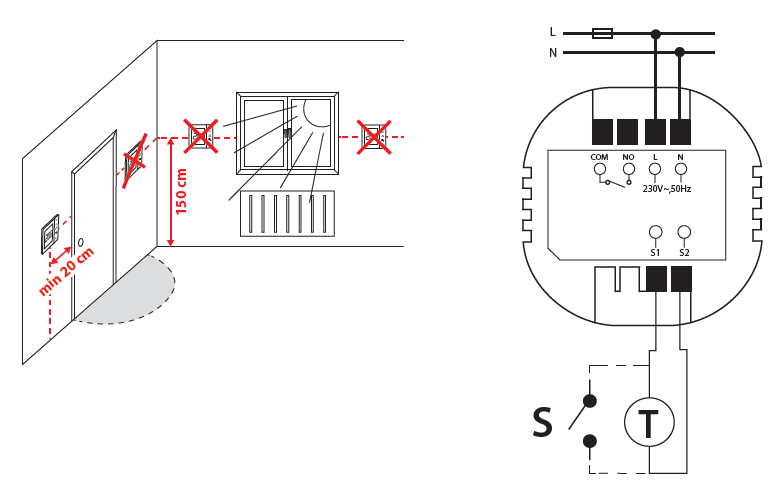
Wiring diagram
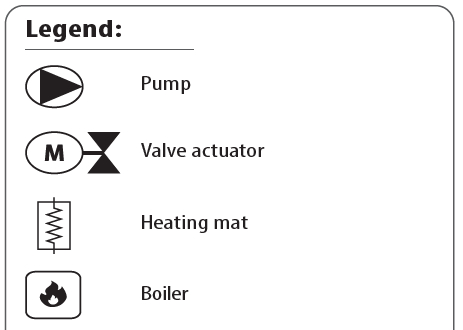
Symbols explanation:
- S – volt-free contact
- T – temperature sensor
S1,S2 Terminals:
- air or floor temperature sensor
- external volt-free contact to connect any ON/OFF switch or occupancy sensor (Hotel card)
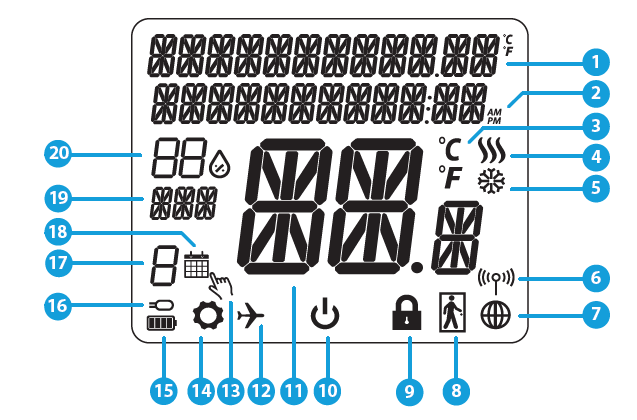
LCD Icon Description
- Menu/Settings Description + Clock
- AM/PM
- Temperature unit
- Heating indicator (icon is animating when there is heating demand)
- Cooling indicator (icon is animating when there is cooling demand)
- RF Connection indicator
- Internet connection indicator
- Occupancy sensor (hotel card)
- Key lock function
- Standby mode icon
- Current Temperature / Setpoint Temperature
- Holiday mode
- Temporary override mode
- Settings icon
- Baterry status indicator
- External / Floor temp sensor indicator
- Schedule program number
- Schedule mode icon
- Day indicator/ SET information
- Current Humidity value
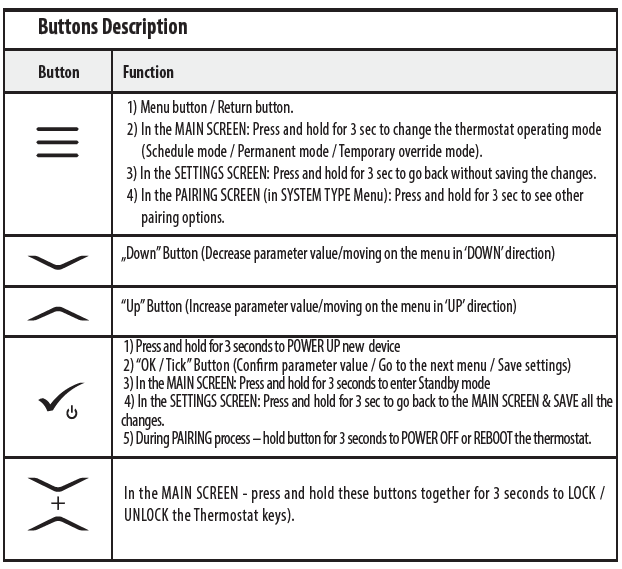
Compatibility with Other OMNIE devices: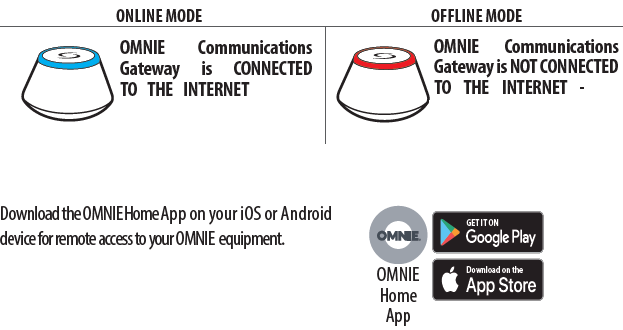
Compatible devices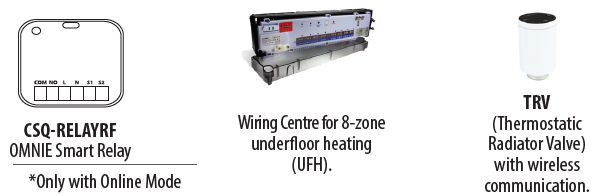
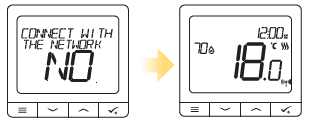
First Power Up Sequence
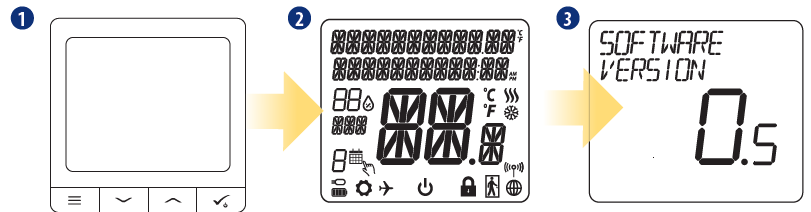
- To power on the Thermostat you have to connect it to the 230V power then…
- display will show all icons….
- then thermostat will display the software version…
- Now, choose your language by „
 ” or „
 ” buttons. Confirm your language by button
 .
.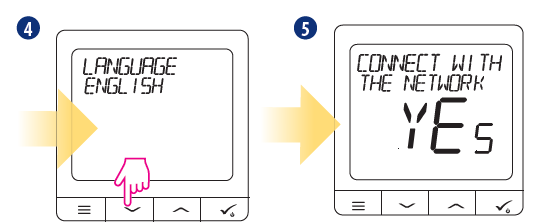
YES-ONLINE, OFFLINE MODE
You can configure your thermostat with OMNIE Communications Gateway. That is, add it to the OMNIE Home system
NO- STANDALONE.
Thermostat work as a standalone device for pump, boiler, receivers etc. That is, you can directly connect thermostat to selected device without any network system. You can add it later anytime.
Installation
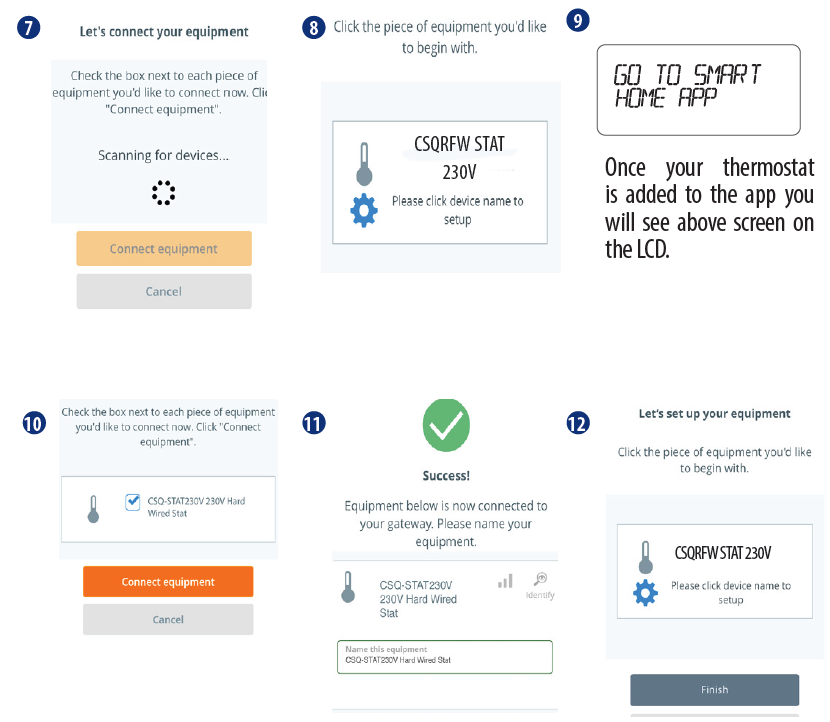
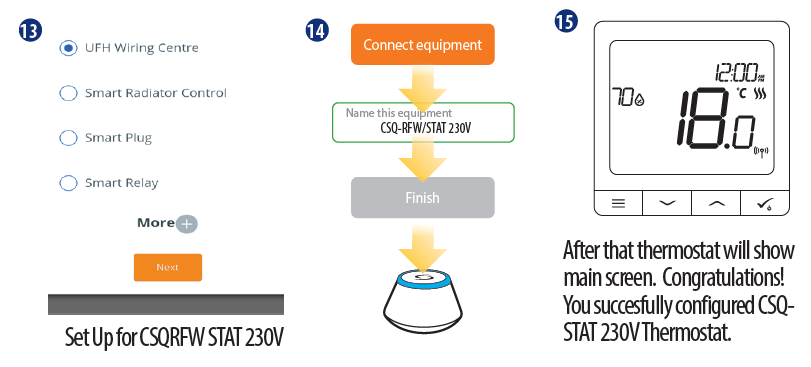
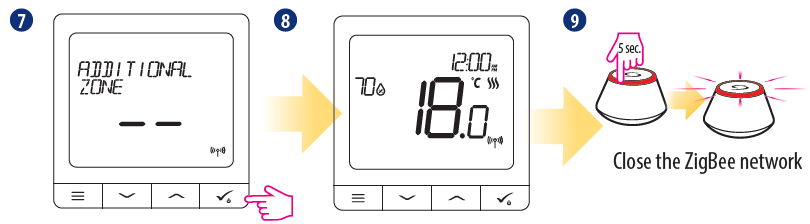
Installation in ONLINE mode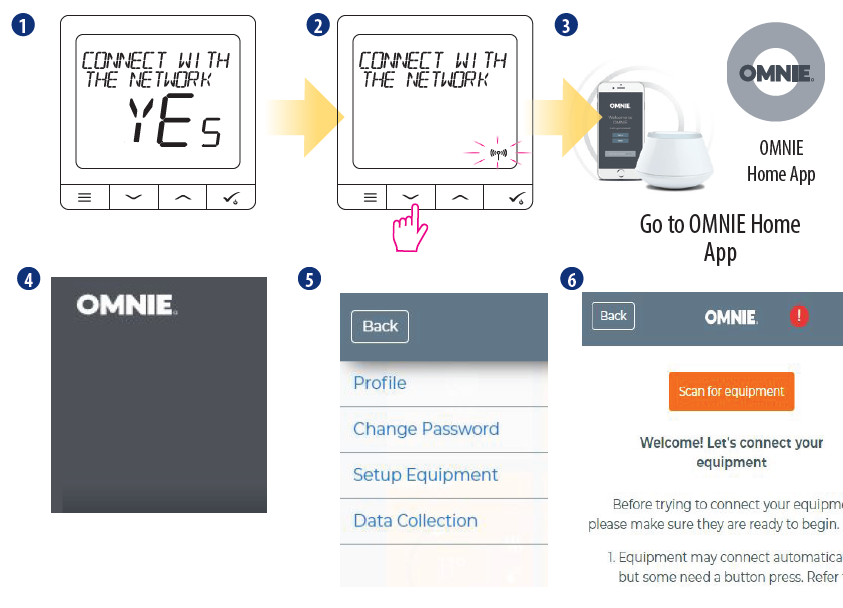
Installation in OFFLINE mode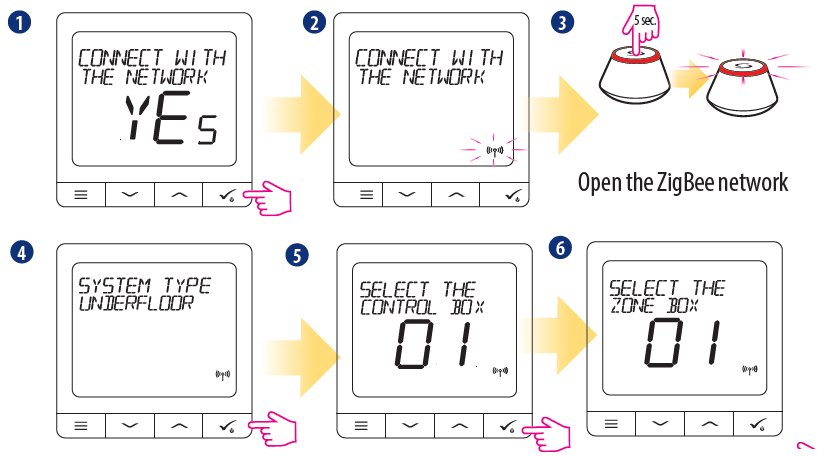
Pairing with a Thermostatic Radiator Valve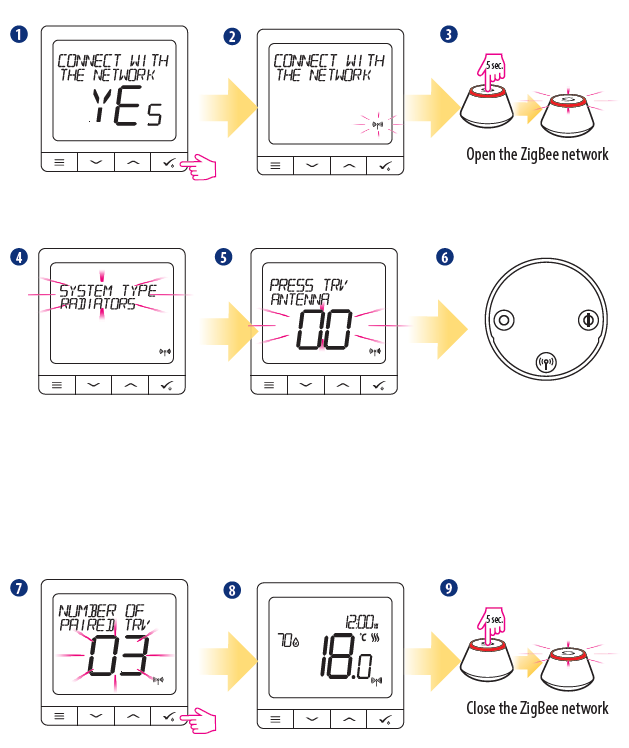
Wired Device
1 Wiring diagram for volt-free connection (e.g. boiler control):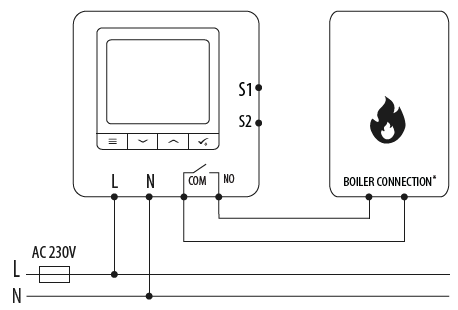 Wiring diagram for 230VAC connections: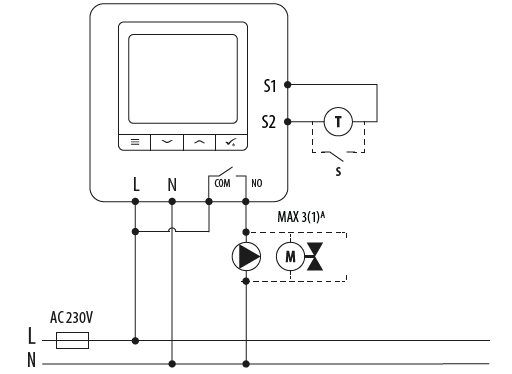
Wiring diagram for control box connection: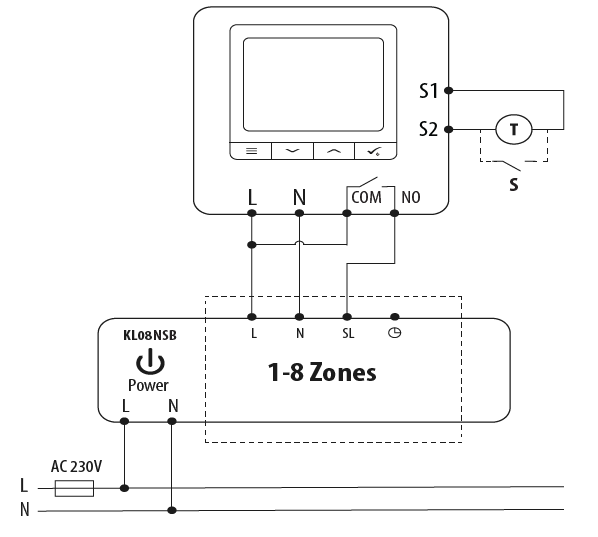
CSQ-STAT230V Full menu structure
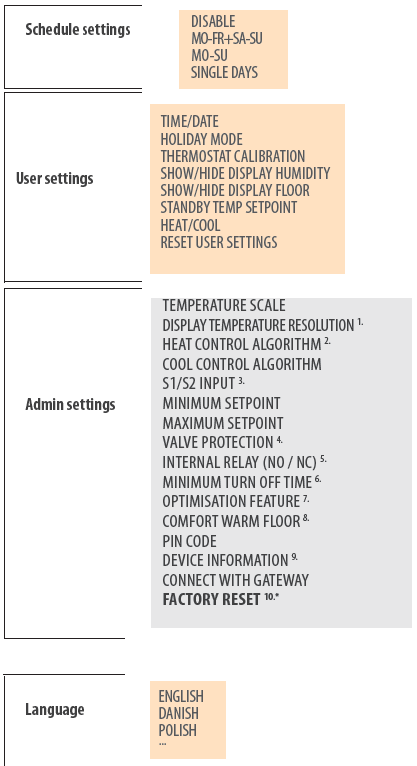
Short description of some selected functions (all functions are described in the full version of the CSQ-STAT230V manual):
- DISPLAY TEMP RESOLUTION: This function determines the resolution of the displayed temperature ( 0.5°C or 0.1°C ). Temperature unit
- CONTROL ALGORITHM: This function defines how to control the room temperature. Available options are: ITLC for Underfloor Heating / Radiators / Electrical Heating (that’s advanced algorithm for precise maintenance of room temperature), hysteresis +/-0.5°C or +/-0.25°C.
- S1/S2 INPUT: A floor sensor, an external temperature sensor or an occupancy sensor can be connected to the S1/S2 input of CSQ-STAT230V Additionally, by connecting a NO type of ON/OFF voltage-free contact, you can use this input as a OneTouch rules trigger (programmed in the OMNIE OMNIE Home App) or as a Heat/Cool changeover.
- VALVE PROTECTION: This function activates all actuators once a week for 5 minutes (in summer, this function helps to prevent the actuators stuck). r
- INTERNAL RELAY (COM/NO): Internal relay activation or deactivation with COM/NO outputs use. Default is enable.
- MIN TURN-OFF TIME: Minimum switch-off time (thermostat will not send the signal for heating/cooling more often than specified in this parameter)
- OPTIMISATION FEATURE: Optimum Start and Optimum Stop functions are energy saving feature that makes thermostat most cost effective (in combination with ITLC control algorithm).
- COMFORT WARM FLOOR: This function helps to keep the floor warm, even if the room is warm enough and there is no need to turn on the heating. User can select 3 levels of warm floor feature. Please note it is not an economy feature, as your heating system may be ON even if there is no heating demand from the room thermostat. It is COMFORT feature which keeps your floor warm all the time.
- DEVICE INFORMATION: In this menu user can check: Software Version, RF range value, Paired devices or also user can activate Identification mode.
- FACTORY RESET: Here you can RESET your device to factory settings. After successfull reset device will be removed from ZigBee network and you will need to add / pair your device again.
REFERENCE
DOWNLOAD MANUALS:
OMNIE CSQ-STAT230V ZigBee Temperature Controller Wireless Thermostat Quick Guide
OMNIE CSQ-STAT230V ZigBee Temperature Controller Wireless Thermostat Quick Guide