OJ ELECTRONICS UDG4 Touch Thermostat
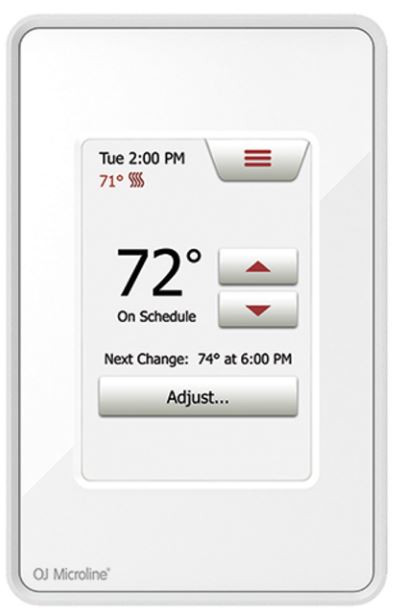
HOME SCREEN
ITEMS
- Day and time
- Current temperature
- Target temperature or setpoint
- Heating indicator – when visible, the system is heating.
- Next scheduled change
- Access Main Menu
- GFCI/EGFPD Test Button
- On/Off/GFCI/EGFPD Reset Button Press to turn the system ON Hold to turn the system OFF Press to reset the GFCI/EGFPD
WARNINGS
To avoid electric shock, disconnect the heating system power supply at the main panel before installation and maintenance of the thermostat. Keep thermostat air vents clean and free from obstruction. This thermostat is an electrical device and must be installed in compliance with national and/or local electrical codes. Installation must be performed by qualified personnel where required by law. If a power module with an equipment ground fault protection device (EGFPD) is to be installed where national and/or local electrical codes require a ground fault circuit interrupter (GFCI), a separate GFCI must also be installed.
CLASSIFICATION
The product is a Class II device (reinforced insulation) and must be connected to the following leads:
- Phase L1 (L) 120/208/240 V
- Neutral L2 (N)
- Max. load 15 A (resistive load)
- The thermostat is intended to be used with underfloor heating.
The heating element is in accordance with the supply voltage. The terminals are suitable for field wiring cables of 12 to 22 AWG.
TECHNICAL DATA
- Supply Range…………………………………………………….. 120/240 Vac 50/60 Hz
- Load ………………………………………………………….max. 15 A (resistive load)
- Max. power at e.g. …………………………………………………..1800 W at 120 Vac
…………………………………………………………………..3120 W at 208 Vac
…………………………………………………………………..3600 W at 240 Vac- UDG4 (GFCI)………………………………………………… Class A (5 mA trip level)
- ADG4 (EGFPD)……………………………………………………….. (15 mA trip level)
- Temperature range …………………………………… +5 to +40°C / +41 to +104°F
- Amb. temp. range ……………………………………….. 0 to +25°C / +32 to +77°F
- Construction of Control…………………………….Electronic room thermostat for
- regulating electrical underfloor heating.
- Method of Mounting Control……………………………….Independently mounted
- control for flush mounting
- Type of Action……………………………………………………………………….Type 2. B.
- Rated Impulse Voltage……………………………………………………………….2500 V
- Control Pollution Degree…………………………………………………………………….2
- USA – Design Patent No. ……………………………………………………….. D768092
- Canada No. …………………………………………………………………………….161353
This product uses FreeRTOS (www.FreeRTOS.org) and ChibiOS/RT.
CERTIFICATION
- UL Listed for the US and Canada
- According to the following standards:
- Thermostat: UL 60730-1, UL 60730-2-9
- CSA E60730-1, CSA E60730-2-9
- UL file number: E157297
- UDG4
- GFCI: UL 943 4th ed.
- CSA C22.2 No. 144.1-06
- ADG4
- EGFPD UL 1053
- CSA C22.2 No. 0.8
- UDG4
Scan the QR code for the full user manual. 
- http://www.ojelectronics.com/UDG4 . For support please contact your installer or retailer.
QUICK START GUIDE
- The floor sensor is recommended placed in a nonconductive installation pipe, which is embedded in the floor. The pipe must be sealed in the end and placed as high as possible in the concrete layer. The floor sensor must be centered in between the heating cable. The power supply voltage must match the voltage rating of the heating cable.
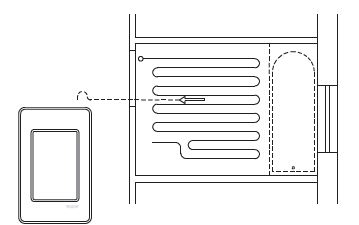
- Loosen the screw at the bottom and remove the faceplate. Do not attempt to remove the screw completely.
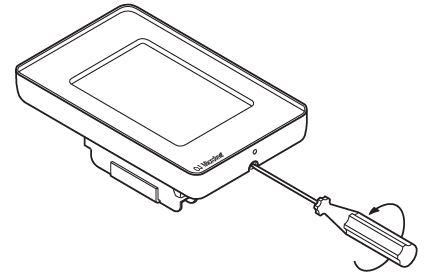
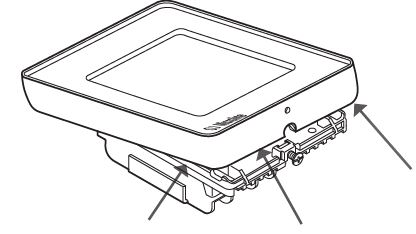
- Turn the power source OFF at the breaker panel. Connect power supply wires to the line side and heating cable wiring to the load side of the power base. AWG between 12 – 20. Note! Do not detach the screws from the terminal. When fastening the screws use a torque between 0.8 – 1.2 Nm / 0.6 – 0.9 lb-ft.
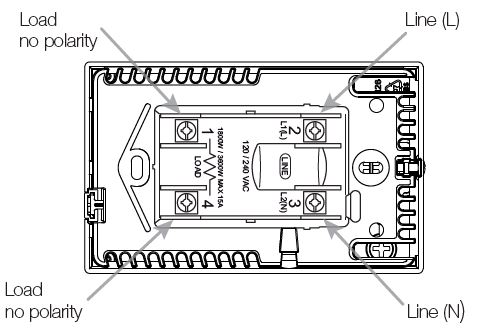
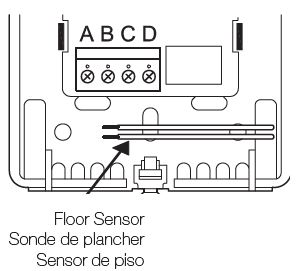
- The floor sensor cable must be routed to the junction box separate from the power wires and the heating cable cold lead. Ensure that the insulation on the electrical wiring and the floor sensor inside the junction box is not damaged. Thread the floor sensor cable through the hole in the power base. Push the electrical wires to the back of the electrical box.
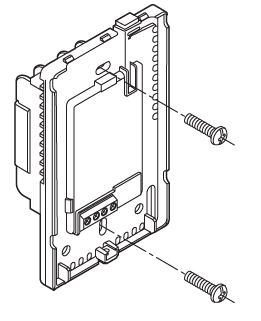
- Install the power base into the electrical box. Secure the power base to the wall.
- The Floor sensor has no polarity. Connect it to terminals C and D. The power module connects to terminals A and B Module de puissance see accord aux bornes A et B Make the sensor connections.

- Remount the faceplate. Tighten the screw at the bottom.
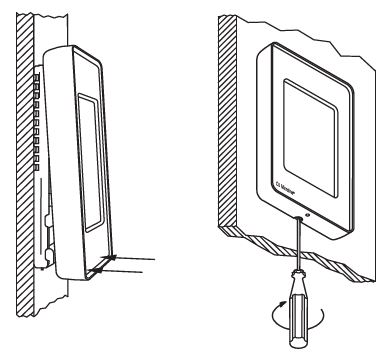
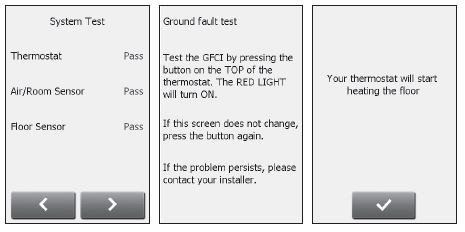
- Perform system and GFCI/EGFPD tests. Once the thermostat setup is complete, confirm “Your thermostat will start heating the floor” to complete the startup wizard.
OJ Electronics
- Stenager 13B
- DK-6400 Sønderborg
- © 2021 OJ Electronics. All rights reserved.
- This manual and parts thereof are protected under Danish and international copyright laws.
® The OJ trademark is a registred trademark belonging to OJ Electronics A/S
REFERENCE:
DOWNLOAD MANUALS:
OJ ELECTRONICS UDG4 Touch thermostat QUICK START GUIDE
OTHER MANUALS:
OJ ELECTRONICS UDG4 Touch thermostat Product Specifications Guide
OJ ELECTRONICS UDG4 Touch Thermostat User Manual