Myson MPRT RF WIRELESS PROGRAMMABLE THERMOSTAT
About Your MPRT RF
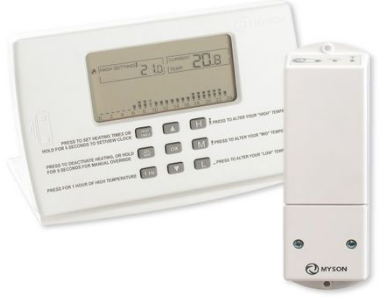
The MPRT RF consists of a room unit and a relay box. The ROOM UNIT is programmable a room thermostat. It measures the temperature of your room and then controls the heating to maintain the room at the chosen temperature. IMPORTANT: Do not place or fi t the ROOM UNIT where it will be affected by heat from radiators, sunshine, or other heat source. The relay box is wired to your heating equipment by your electrician. The room unit communicates with the relay box by radio waves, thus switching on/off your heating. If your MPRT RF has already been installed you need only follow the section ‘THREE EASY STEPS’, to operate your heating.
“THREE EASY STEPS”
On your MPRT unit you set the value of three temperatures, Low, Medium and High. “Low” is typically a night setting, “Medium” an afternoon setting, and “High” a morning and evening setting. Your MPRT will then operate your heating to maintain these temperature settings. Follow steps 1 to 3 below.
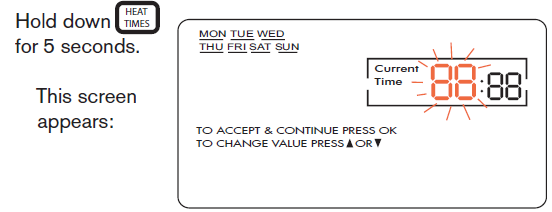
SETTING THE CLOCK
- Use
 to alter the blinking text (hours). Press
 to proceed to minutes and change using
 - Press to proceed to day and change using
- Press
- The time is now set and the screen returns to normal.
SETTING YOUR 3 TEMPERATURES
- Use to set the “High” temperature.
- Your have now set your high temperature.
- Press The screen returns to normal.
- To set your “Medium” temperature, follow the same procedure as above except press
 instead of
- To set your “Low” temperature, follow the same procedure as above except press
 instead of
SETTING YOUR HEATING TIMES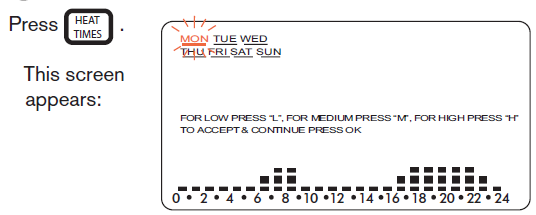
NOTE:
- If the screen above appears without the days of the week displayed it means the room unit has been set up to give the same temperatures every day.
- If you wish to change this set up to enter for individual days press to exit. Then press together and hold down for 10 seconds.
- Press
 to enable daily time settings. Press to accept. Now press and follow the instruction below.
 - (To revert to t e same programme each day repeat the above process.)
- When the daily program is enabled, the bar graph shows the temperatures for the 24 hours of Monday.
- A Low temperature is indicated by- , a Mid temperature by
 2, and a High temperature by’ .
 - If you are happy with the temperatures entered for Monday, press Tuesday’s temperatures appear.
- If you are happy with these temperatures press again, and so on to Sunday. Press The screen returns to normal.
- If you are not happy with the temperatures on any particular day, you can change them.
- For example, in the figure below, to change the settings on the left (LLLLLLMHHLL) to those on the right you would press the button sequence LLLLLMMHHHH

SMART START
“SMART START” varies the start-up times to ensure that the build- ing achieves temperature by the required time. The smart start system is continually learning the temperature rise requirement, delaying the start up of the system, therefore saving energy during milder weather.
SETUP FOR SMART-START.
To toggle the Smart-Start function between enabled and disabled, hold down for 10 seconds. The  button can now be used to toggle Smart-Start between active and deactivated.
OTHER SIMPLE FUNCTIONS
ONE HOUR OF HIGH TEMPERATURE.
If you press you will get an hour of High heat, irrespective or whether your times are set for Low or Mid heat. If you want to cancel this function you simply press 
MANUAL OVERRIDE.
If you hold for 5 seconds, the room unit will go into manual mode. In this mode there is only one temperature. Press either see this temperature change. Set it to the temperature you require. The thermostat will continue to control your heating at this temperature until you deactivate manual override by pressing
DEACTIVATING YOUR HEATING:
If you press your heating will be deactivated. The screen will continue to indicate the room temperature but the heating will never come on. To reactivate your heating simply press
Note:
Provided you deactivate via the MPRTRF, the system will have frost protection at 60C. If the system is to be left shut down for a long period over winter, ensure there is sufficient battery life to maintain protection..
MORE ADVANCED FUNCTIONS
KEYPAD LOCKING.
Hold  for 5 seconds to lock the key pad. The locked symbol appears on the screen
 No changes can be made to the settings. To unlock the screen hold for 5 seconds.
RETURN TO FACTORY SETTINGS.
Holding  down for 10 seconds returns the H, M and L temperatures to the values they had when they left the factory. It also returns the heating times to their factory values.
COPY FUNCTION.
Pressing for 5 seconds when setting your heating times (step 3), will copy the current day’s times into the next day.
HOLIDAY FUNCTION.
Pressing H while holding the room unit into holiday mode. Press to enter the number of days you will be away on holidays. Press Now press to alter the room tem- perature you require while away on holidays. Press to accept and exit. The function can be cancelled by pressing
SMART-START FUNCTION
The message “SMART START” displayed on the screen indicates that this function is operating. Smart-Start works by switching the heat on in advance – so that the room can warm up. As an example, lets say you get out of bed at 8am and you want the room to be warm at that time. Without Smart-Start you must programme your High temperature for 7am. With Smart-Start you need only programme your High temperature for 8am. Smart-Start will know that you want the room warm at 8am and bring the heating on before that. But Smart-Start is even more intelligent than this. It remembers how cold it was on the previous mornings. Thus, in Winter it might start the heating 1 hour before 7a.m. and in Spring start half an hour before 7a.m. In this way it provides optimum comfort and energy saving.
Note:
In extreme low temperatures and dependant on your heating system capability, the desired temperature set may not be reached by the set time. Thus an earlier higher temperature may need to be set.
RELAY BOX OPERATION
Once your Relay Box has been installed, it becomes part of your heating equipment. It operates automatically
REPLACING THE BATTERIES IN YOUR ROOM UNIT.
Dependant on type and manufacturer the batteries in your MPRT RF should last approximately 2 years. When they go low, a battery symbol appears on the LCD screen telling you to replace the batteries.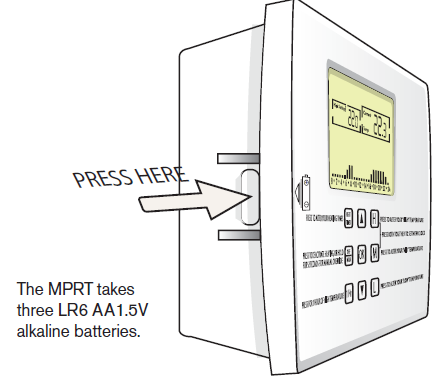
To access the batteries release the cover from the base by pressing the base at arrow shown above. The batteries are then visible.
NOTE: Changing the battery in 1 minute or less will retain all your settings. If it takes longer than 1 minute, you may have to re-enter your settings.
MYSON CONTROLS
- MYSON LTD., EASTERN AVENUE, TEAM VALLEY, GATESHEAD,TYNE & WEAR, NEI 1 OPG
- SALES OFFICE No. 0845 402 3434
REFERENCE
DOWNLOAD MANUALS:
Myson MPRT RF WIRELESS PROGRAMMABLE THERMOSTAT USER INSTRUCTIONS

Myson MPRT RF WIRELESS PROGRAMMABLE THERMOSTAT USER INSTRUCTIONS