MOES TV01 Radiator Thermostat
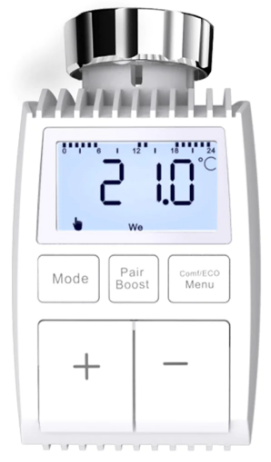
Information about this manual
Please read this manual completely and carefully before starting to use the device. The manual contains important information about the intended use of the device. Especially observe the safety notes. Keep the manual for later consultation. If you hand over the device to other persons for use, please hand over the operating manual as well.
Product Description
- The device moves a valve to intelligently control the flow of heat to the radiator. With the Thermostat Radiator Valve TV01 you can conveniently adjust the room temperature between 5-30°C, and save more than 15% of energy.
- The device is part of the Tuya smart home system and works with the ZigBee 3.0 protocol. All devices on the system can be configured comfortably and individually with the Tuya smartphone app.
- The temperature can be controlled individually, room by room.
- The radiator thermostat fits to all common radiator valves and is easy to mount-without having to drain any water or intervene in the heating system. The additional boost function enables the radiator to be heated up quickly for a brief period of time by opening the valve for 5 minutes. There will be a pleasant room temperature right away because of the radiated heat.
Device Overview
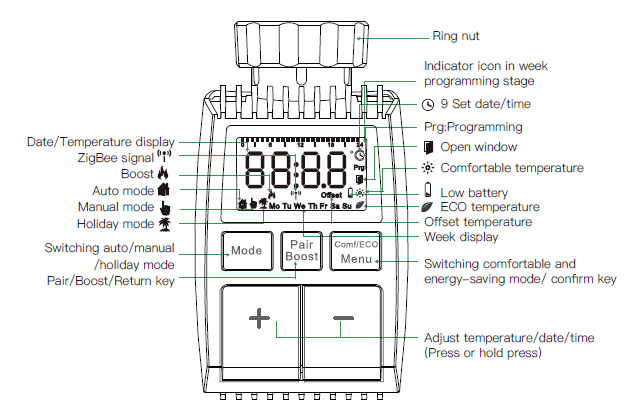
Start-up
Before we get started
- 2×AA batteries are required for TV01 to work, please get prepared.
- A smart gateway hub is required for the TV01 to work.
- Temperature is shown in degrees Celsius.
Inserting(replacing) batteries.
- Pull off the battery compartment cover on the underside of the device.
- Insert 2 new LR6(mignon/AA) batteries in the battery compartment making sure they are the right way round.
- Reattach the battery compartment cover and latch it into place.
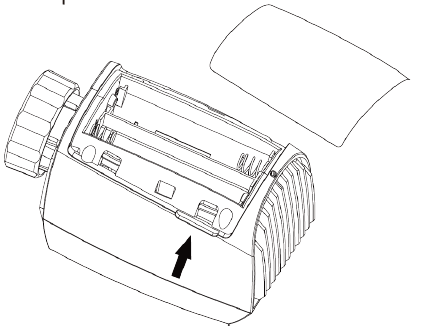
The service life of new alkaline batteries is approximately 1.5 years. A battery symbol( ) on the display indicates that the batteries need to be replaced. After removing the empty batteries, wait approx.1 minute before inserting the new ones. This device does not support operation with rechargeable batteries.
Set date and time
If batteries are inserted or replaced, the date and time is automatically requested after a brief display of the fimware version number.
- Set the year, month, dayhour and minute with the +/- button, and confim with the Menu button.
- You can press the Boost button to return to the previous menu during the setting of date and time.
- The display of ‘InS’ with the rotating ‘
 ’ shows that the motor is still traveling back.
 - When ‘AdA’ is shown in the display, the radiator thermostat can be installed on the valve. After installation, press the Boost button to run adaptive.
- The display of ‘AdA’ with the rotating ‘ ’ shows that an adapting run to adapt the thermostat to the valve.
- If the adapting runs is initiated before installation, press Boost button and the motor travels back to the ‘InS’position. If an error message (F1,F2,F3) is displayed, press the Pair /Boost button and the motor similarly travels back to the ‘InS’ position.
Installation of the radiator thermostat
The radiator thermostat is easy to install and can be done without draining heating water or intervening in the heating system. No special tools are required, nor does the heating have to be switched off. The ring nut attached to the radiator thermostat can be used universally and without accessories for all valves with a thread size of M30×1.5 from the most popular manufacturers such as.
- Danfoss
- Heimeier
- MNG
- Junkers
- Landis&Gyr(Duodyr)
- Honeywell-Braukmann
- Oventrop
- Schlösser
- Comap
- Valf Sanayi
- Mertik Maxitrol
- Watts
- Wingenroth(Wiroflex)
- R.B.M
- Tiemme
- Jaga
- Siemens
- ldmar54
By means of the adapters in the delivery, the device can be installed on radiator valves of type Danfoss RA, Danfoss RAV and Danfoss RAVL.
Unscrew your existing radiator thermostat
No worries, water will not leak during this process.
M30×1.5
- Screw the TV01 smart radiator thermostat directly onto the radiator if the connector type is M30x 1.5(picture shown as below). You can adjust the angle to make the screen facing the viewer properly.
- Rotate the thermostat dial to the maximum value, themaxvaluemaybe 6or8.
- Check the is active.
- Install the device.
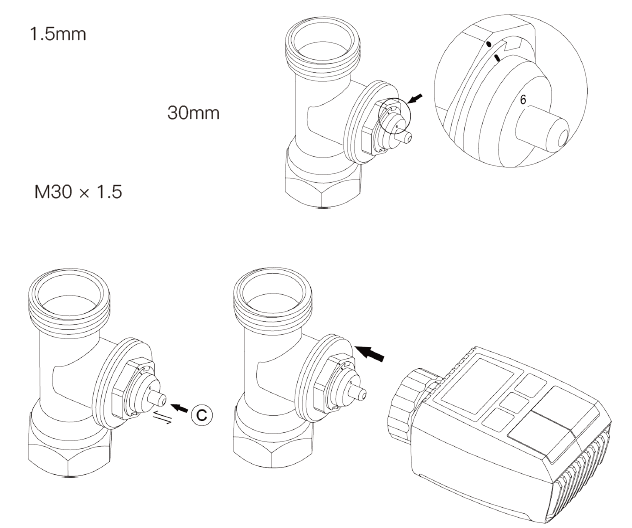
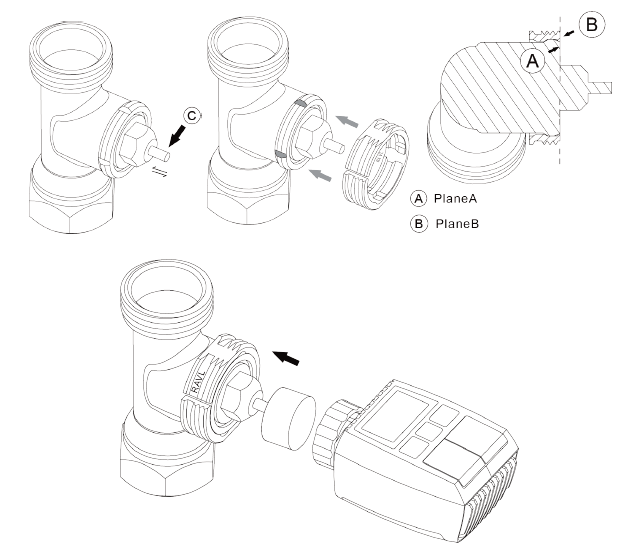
Danfoss RAVL Valve
- Check the is active.
- The valve bodied have elongated notches around their circumference, which ensure that the adapter is properly seated when it snaps on: snap on the adapter completely, so that the pins inside the adapter are lined up with the notches on the valve.
- Install the adapter, Plane A is aligned with Plane B.
- Install the round tube into the device.
- Install the device.
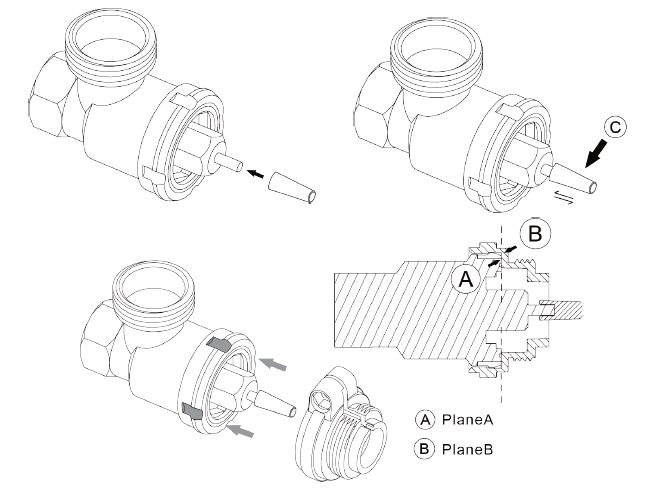
Danfoss RAV Valve
- Rotate the thermostat dial to the maximum value, the max value may be 6 or 8.
- Check the is active.
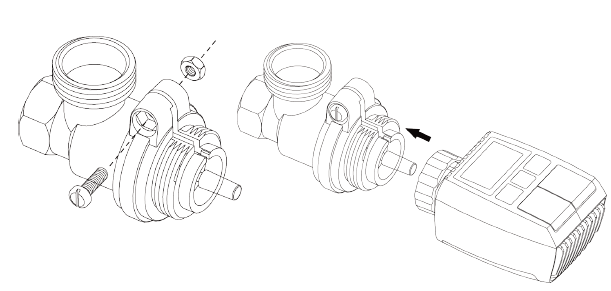
- The valve bodied have elongated notches around their circumference, which ensure that the adapter is properly seated when it snaps on: snap on the adapter completely,so that the pins inside the adapter are lined up with the notches on the valve.
- Install the adapter, Plane A is aligned with Plane B.
- Union nut,
- Install the device.
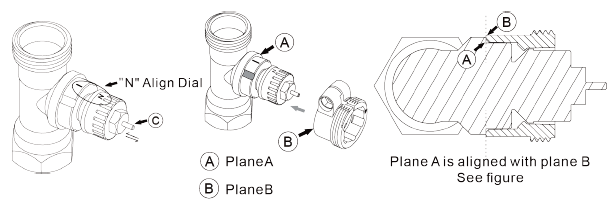
Danfoss RA Valve
- Rotate the thermostat dial to the maximum value, “N” Align Dial.
- Check that is active.
- The valve bodied has elongated notches around its circumference, which ensures that the adapter is properly seated when it snaps on: snap on the adapter completely, so that the pins inside the adapter are lined up with the notches on the valve.
- Install the adapter, Plane A is aligned with Plane B.
- Union nut.
- Install the round tube into the device.
- Install the device.
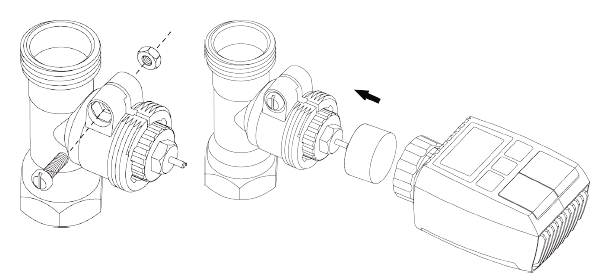
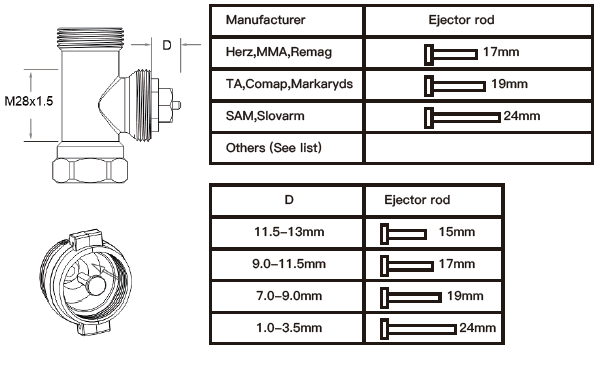
M28x1.5mm
- Select the length of the ejector rod according to the following brands or valve sizes, and the size of ejector rod is 15 / 17 / 19 / 24mm.
- To install the ejector rod with the correct size into the hole.
- To install the adapter onto M28 * 1.5 valve.
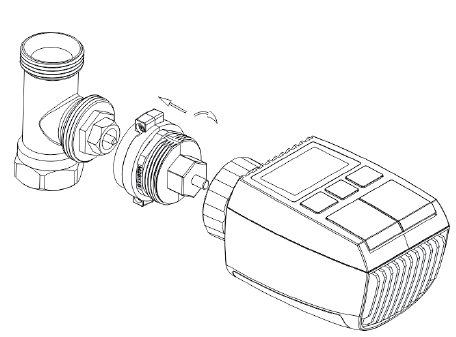
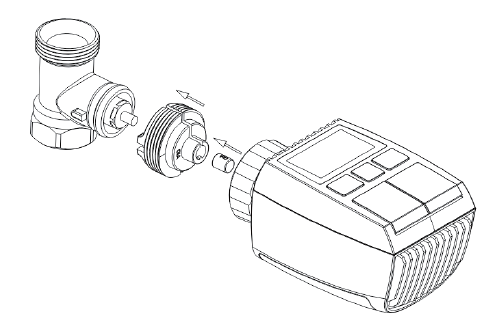
Giacomini
- To install the adapter onto the Giacomini valve in the correct direction;
- To install the GIA ejector rod into the hole.
Caleffi
- Open the valve flow to the maximum, as shown in pic 1;
- To install the adapter onto the Caleffi valve in the correct direction.
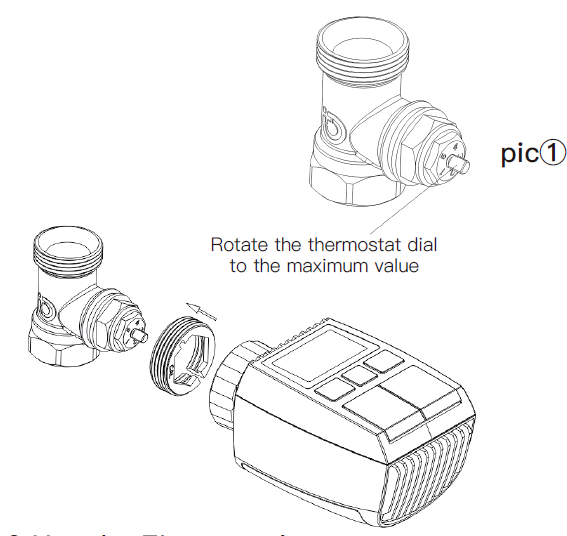
Use the Ejector rod
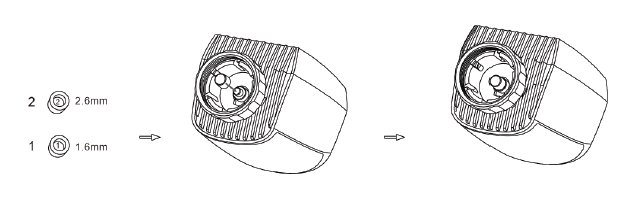
Due to the dimensional and assembly tolerance of the metal valve, it may result in the following situations:
- When the device is failure, F2 is displayed.
- The metal valve cannot be fully closed and is kept heating all the time.
- Handling method: Please use the ejector rod 1.6 mm (1) first, if the above two situations still exist, try to use the ejector rod 2.6mm (2) instead.
Interface screen
When you see the LCD screen is showing information as below, the radiator thermostat is ready for configuration. If not, please uninstall and re install the batteries and redo step 4.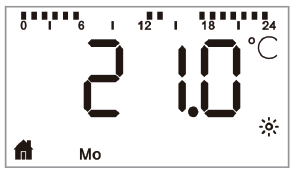
Software Installation
MOES App is upgraded as much more compatibility than Tuya Smart/Smart Life App, functional well for scene controlled by Siri, widget and scene recommendations as the fully new customized service.
(Note: Tuya Smart/Smart Life App still works, but MOES App is highly recommended)
- Open MOES App , use your phone number or email address to register and login. Tap + on the top right, choose Gateway Control-> Wireless Gateway (ZigBee) and simply follow the inbuilt setup wizard for device installation and configuration.
- After the ZigBee smart gateway hub is added successfully, you can add the sub-device on the gateway hub interface.
- Long press Pair button on the radiator thermostat for 5 seconds until the ZigBee signal icon flashed, which means the device has entered the pairing mode.
- The blue LED indicator of gateway hub flashes during pairing mode.
- When the radiator thermostat is successully added, the blue LED indicator will extinguish within 1 second, the device ZigBee signal is always on.
Product features
Auto Mode
In automatic mode, the temperature is controlled in accordance with the set heating profile. Manual changes are actived until the next point at which the profile changes. Afterwards, the defined heating profile will be activated again. To activate the automatic mode, please proceed as follows:
- Press the mode button to select
 icon.
icon. - Default temperature: 17°C and 21°C.
- Temperature range: 5-30 °C, step: 0.5 °C.
- App operation: Click the auto mode icon in the App control panel.
Manual Mode
In manual mode, the temperature is controlled in accordance with the current temperature set via ‘+/-’ button. The temperature remains activated until the next manual change. To activate the manual mode, please proceed as follows:
- Press the mode button to select
 the icon.
 - Default temperature: 20°C.
- Temperature range: 5-30°C, step: 0.5 °C. App operation: Click the manual mode icon in the App control panel.
Holiday Mode
When you go out or go to a party, you will use the holiday mode. The holiday mode will automatically start at the set time starting point and run the holiday temperature. When the holiday mode is not activated, and you want to view the holiday mode settings, please press the Mode button to view, the holiday mode icon will flash for 5 seconds and then it will automatically return to the auto mode.lf you want to end your holiday mode earlier, press the Mode button to cancel.
App operation: Click the Mode icon to switch to the holiday mode in the App control panel, and switch to any other mode to cancel the holiday mode.
Open Window Detection
- The device automatically stop heating when it detects a sudden temperature drop(5°C in 5 minutes as default).
- This is usually caused by an opened window or door and the open window icon will display(
 ) on the screen.
 - The device will resume to its previous status after detection if no actions is implemented. Or you canmanually resume the device by pressing the mode button.
- App operation: Click the open window icon in App control panel to cancel the window opening function. *The open window detection only operates in automatic mode and manual mode.
Offset Temperature
As the temperature is measured on the radiator thermostat, the temperature distribution can vary throughout a room.To adjust this, a temperature offset of +5°C can be set. If a nominal temperature of e.g. 20 °C is set but the room presents with only 18°C an offset of -2.0°C needs to be set. An offset temperature of 0.0°C is set in the settings. To adjust the offset temperature, please proceed as follows.
- Long press the menu button for 5 seconds, it will enter the setting interface.
- Select “Offset” option via ‘+/-’ button, and press menu button to enter the offset temperature interface.
- Set the desired offset temperature using ‘+/-’ button and confirm with the menu button. App operation: Click the offset icon in the App swttings screen.
Eco and Comfortable Temperature
The comfort and Eco temperature button makes switching between comfort and Eco temperature simple and user friendly. These have been set at the factory at 21.0°C (comfort temperature) and 17.0°C (Eco temperature). They can be adjusted as follows:
Press menu button to select comfortable temperature( ) or Eco temperature(
 ).
).
App operation: Click the Comfortable/Eco temperature icon in the App control panel to select the corresponding temperature mode.
Even in auto mode, the temperature can be changed at any time using the button. It will then remain the same until the next point at which the program changes.
Child Lock
Operation of the device can be locked to avoid settings being changed unintended(e.g. through involuntary touch).
To activate/deactivate the child lock, please proceed as follows:
- Long press the mode button for 5 seconds, it will show LOC symbol on the screen and the device button cannot be used.
- Long press the mode button for 5 seconds to unlock child lock.
App operation: Click the child lock icon in the App settings screen.
Anti-Freezing Mode
The device operation
- In the manual mode, when the temperature is manually adjusted to less than 5 degrees, the screen will display “AF”, and the anti-freezing function will be started to ensure that the indoor temperature is “8” degrees.
- Press any button to cancel anti-freezing function and return to automatic mode.
App operation
Click the anti-freezing icon(  ) to turn on/off the function in the App settings screen.
Note: Once this function is activated, other functions are not available unless the function is deactivated.
Heating stop (Power Saving) Mode Battery life can be prolonged by switching the heating off.
To achieve this, the valve is closed fully. To activate the heating stop, please proceed as follows:
The device operation
• In manual mode, manually adjust the temperature to more than 30 degrees, display “HS” on the screen, start the heating stop function, and the device will no longer be able to adjust the temperature.
• Press any button to cancel the heating stop function and return to automatic mode.
App operation
Click the Heating stop icon (  ) to turn on/off the function in the App settings screen.
Note: Once the function is activated, other functions are not available unless the function is deactivated.
Anti-Calcification (Descaling) Protection
The equipment will automatically run for a period of time every week to prevent calcification of the valve.
Boost
Sometimes people go home earlier than usual, and the rapid heating function will make you feel the warmth of the room faster. When activated, the valve will be fully opened for 5 minutes. The heating of a room takes longer than 5 minutes, but the heat given off by the radiator can be felt immediately.
- Press the boost button to activate the boost function.
- The remaining time for the function will be counted down in seconds(‘299’to‘000’).
- After these 5 minutes have elapsed, the actuator changes to the mode which was previously active (auto/manual) with the previously set temperature.
- The function can be deactivated at any time by pressing the boost button again.
App operation: Click the Boost icon( ) in the App control panel to cancel the boost function.
Press the menu button for 5 seconds, enter Setting/Date Week programming stage/Open window/Comfortable temp/ECO temp/Offset/Holiday setting.
App operation: Click the settings icon ( ) in the App control panel.
Setting
Date
To set the date and time, please proceed as follows:
- Long press the menu button for 5 seconds, it will enter the setting interface.
- Select “Date/Time” option via ‘+/-’ button, and press menu button to enter the Date/Time setting interface.
- Select the desired year/month/day/hour/minute using the “+/-” button and confirm with the menu button. To confirm, the time flashes three times.
- Use the boost button to return.
Note: When the device is successfully paired with the phone, the divice time is synchronized with the phone time.
Week Programming Stage
In this menu item, you can create a heating profile with heating and cooling phases according to your personal needs. You can set up to ten stages of temperature every day. The factory default is five stages.
- Press the menu button for 5 seconds to open the configuration menu.
- Select “Prg” using the “+/-” button and confirm with the menu button.
- In the menu item “dAy” , use the “+/-” button to select single days of the week, all weekdays, the weekend or the entire week for your heating profile and confirm with the menu button.
- Confirm the start time 00:00 pm with the menu button.
- Select the desired temperature and start time using the “+/-” button and confirm with the menu button.
- The next time is shown in the display. You can adjust the time via the “+/-” button.
- Select the desired temperature for the next time period using the “+/-” button and confirm with the menu button.
- Temperature range: 5-30°C, step: 0.5 °C.
- Repeat this procedure until temperatures are stored for the entire period between 0:00 and 24:00 h. To confirm, the time flashes three times.
- Use the boost button to return.
App operation: Click the week programming stage icon(  )in the App control panel.
Open Window
- Press the menu button for 5 seconds to open the configuration menu.
- Select open window( ) via the “+/-” button in the menu.
- Confirm with the menu button.
- Select the desired temperature using the “+/-” button and confirm with the menu button. To confirm, the time flashes three times.
- Temperature range: 5-30°C, step: 0.5°C.
- Use the boost button to return.
APP operation: Click the open window icon( ) in the App settings screen.
Comfortable Temperature
- Press the menu button for 5 seconds to open the configuration menu.
- Select comfortable temperature icon( ) via the “+/-” button in the menu.
- Confirm with the menu button.
- Select the desired temperature using the “+/-” button and confirm with the menu button. To confirm, the temperature flashes three times.
- Temperature range: 5-30°C, step: 0.5°C.
- Use the boost key to return.
APP operation: Click the comfortable temperature icon ( ) in the App settings screen.
ECO Temperature
- Press the menu button for 5 seconds to open the configuration menu.
- (Select ECO temperature icon)( ) via the “+/-” button in the menu, confirm with the menu button.
- Select the desired temperature using the “+/-” button and confirm with the menu button. To confirm, the temperature flashes three times.
- Temperature range: 5-30°C, step: 0.5°C.
- Use the boost button to return.
APP-Betrieb: Klicken Sie auf das ECO-Temperatursymbol (  ) im App-Einstellungsbildschirm.
Offset
- Press the menu button for 5 seconds to open the configuration menu.
- Select offset icon( )via the “+/-” button in the menu.
- Confirm with the menu button.
- Select the desired temperature using the “+/-” button and confirm with the menu button. To confirm, the temperature flashes three times.
- Temperature range: -5~5°C, step:0.1°C.
- Use the boost button to return.
APP operation: Click the Offset temperature icon()in the App settings screen.
Holiday Setting
- Press the menu button for 5 seconds to open the configuration menu.
- (Select holiday mode icon)( ) via the “+/-” button in the menu.
- Confrm with the menu button.
- Select the start date using the “+/-” button and confirm with the menu button.
- Select the end date using the “+/-” button and confirm with the menu button.
- Select the desired temperature using the “+/-” button and confirm with the menu button. To confirm, the temperature flashes three times.
- Temperature range: 5-30°C, step: 0.5°C.
- Use the boost button to return.
APP operation: Click the holiday mode icon ( ) in the App settings screen.
Note: if there is no operation in the setting interface within one minute, the setting will exit automatically.
Voice Control
Amazon Alexa
Amazon Alexa is an intelligent personal assistant developed by Amazon, and is capable of voice interaction. Smart radiator thermostat works with Alexa to allow you to regulate the temperature of each room in your system by using a wake-word and an instruction. The wake-work is “Alexa” followed by an instruction such as “increase temperature.” Currently, Amazon has made interaction and communication with Alexa only available in English.
Alexa requires explicit instructions. You must inform Alexa of the room to which you wish to address followed by an instruction, such as “increase temperature.” If no specific room is mentioned, Alexa will ask you which room you want to address, and then will increase the setpoint temperature by 1°C only based on the room reply from you. If you want the setpoint temperature to increase by 4°C in the living room, you must explicitly state to Alexa to “increase the temperature in the living room by 4°C.”
Note: If Alexa is asked to increase the temperature by 2°C, then Alexa will add 2°C to your set-point. If the ambient temperature is already > 2°C above the current set-point then the actual temperature will not change and smart radiator thermostat will not turn the heating ON.
Example: If the current set-point is 16°C, the current room temperature is 19°C and you ask Alexa to increase the temperature by 2°C – the current set-point will change to 18°C but the not start because the room temperature is already higher than 18°C.
Common commands for Alexa
Listed below are common commands used with Alexa:
- Discover Devices: “Alexa, discover devices.”
- Reduce Temperature: “Alexa, decrease the DEVICE NAME by 4 degrees” / “Alexa, make it cooler in here.”
- Increase Temperature: “Alexa, increase the DEVICE NAME by 3 degrees” / “Alexa, make it warmer in here.”
- Set Temperature: “Alexa, set the DEVICE NAME to 20 degrees.”
- Get Temperature: “Alexa, what is the DEVICE NAME temperature?”
- Get Set Point: “Alexa, what is the upstairs set to?” Note: Alexa considers the smart thermostat and room names as the devices.
Google Home
Google Home is a brand of smart speakers that work similary to Amazon Echo. Google’s intelligent PA, Google Assistant, is equivalent to Amazon’s Alexa. Google Home is also available on all Android devices and does not require the use of the ‘Smart Speakers’.
The user can speak a profusion of commands to request information, or ask the Google Assistant to perform an action such as play music, video playback, report news, access home automation. All of this can all be controlled from a Google Home device. Common commands for Google Home
Listed below are common commands used with Google Home:
- Discover Devices: “Hey Google, discover devices.”
- Reduce Temperature: “Hey Google, decrease the DEVICE NAME by 4 degrees” / “Hey Google, make it cooler in here.”
- Increase Temperature: “Hey Google, increase the DEVICE NAME by 3 degrees” / “Hey Google, make it warmer in here.”
- Set Temperature: “Hey Google, set the DEVICE NAME to 20 degrees.”
- Get Temperature: “Hey Google, what is the DEVICE NAME temperature?”
- Get Set Point: “Hey Google, what is the upstairs set to?”
Note: Google home considers the smart thermostat and room names as the devices.
Set an automation scenarios linkage
lf you have a door sensor installed in your home, then you can realize an automation scenarios linkage between TRV and door sensor.
- Under “Automation” in the “Smart” page, click “+” on the upper right comer, you will see a page called Create Smart that will guide you through the setting.
- Here, we take When device status changes setting.
- After you click When device status changes, you will see all the devices you added to the Tuya Smart app.
- Select Smart Door Sensor->Select Function-> Smart Door Sensor->ON/OFF->Set up Task-> Run the device->TRV->Open Window Detection ->ON/OFF-> Save->Next-> Save.
- A prompt box “Automation created.Start using it?” will pop up, select “Yes”, you can see all the automation scenarios you’ve created.
- When the door/window sensor is opened, the Tuya Smart app interface will pop up a message that the door/window sensor is turned, and an ( ) icon will appear on the TRV device interface.
- When the door/window sensor is closed, the Tuya Smart app interface will pop up a message that the door/window sensor is tumed off, and an ( ) icon will disappear on the TRV device interface.
Low Battery
When the battery power is less than 12%, the low power prompt icon ( )will be displayed. Please replace the battery as soon as possible, When the screen displays( )the device is not available.
Reset
The device operation: Press the “+” and “-” buttons for 5 seconds to enter the reset mode, and the screen will display “FAC”
- Press the menu button to confirm.
- Press the boost button to exit.
- After the device runs reset, the data will not be saved,the device will automatically connect to the gateway.
Troubleshooting and maintenance
| Error code
on display |
Problem | Solution |
| Battery
symboly |
Battery
output too low |
Replace batteries |
| F1 | Valve drive
sluggish |
Check installation, check
the heating valve |
| F2 | Actuating
range too wide |
Please check the fastening
of the radiator thermostat |
| F3 | Actuating
range too small |
Please check whether
the valve pin is stuck |
Technical Data
- Batteries: 2×1.5 V LR6/mignon/AA
- Battery life: 1.5 years
- Temperature range: 5-30°C
- Degree of protection: Ip20
- Display: LCD with LED
- RF: ZigBee
- Frequency: 2.4GHz
- Maximum radiated power: 10dBm Dimensions(W xHx D): 55.3×54×98.3 mm Weight: 190g(ind. batteries)
- Working temperature: -10°C~40°C
- Working environment: Indoor
- Safety: CE/ROHS
Package contents
- ZigBee Radiator Thermostat
- AA batteries
- Adapters for Danfoss(RA, RAV and RAVL)、 M28x1.5mm、Caleffi、Giacomini、Ejector rod Screw for adapter
- Operating manual
Safety Information
- Do not disassemble, reassemble, modify, or attempt to repair the product by yourself. If there iare any issues, please contact the company’s professional maintenance.
- The product’s battery should be recycled or disposed of separately from household waste according to local environmental regulations.
Storage
Products should be put in the warehouse where the temperature is between the range -10℃ ~ +40℃,and the relative humidity ≤ 70%RH, indoor environment with no acid, alkali, salt and corrosive, explosive gas, flammable matter, protected from dust, rain and snow.
Instructions for disposal
- Do not dispose of the device with regular domestic waste
- Electronic equipment must be disposed of at local collection points for waste electronic equipment in compliance with the Waste Electrical and Electronic Equipment Directive.
- The device is not a toy, do not allow children to play with it. Do not leave packaging material lying around.
- Plastic films/bags, pieces of polytyrene, etC. can be dangerous in the hands of a child.
- Used batteries should not be disposed of with regular domestic waste! Instead, take them to your local battery disposal point.
- This device complies with the EN62368/EN300328/EN301489 of the CE Rules.
- This device complies with the ROHS 2.0 Rules.
SERVICE
Thank you for your trust and support to our products, we will provide you with a two-year worry-free after-sales service (freight is not included), please do not alter this warranty service card, to safeguard your legitimate rights and interests. If you need service or have any questions, please consult the distributor or contact us. Product quality problems occur within 24 months from the date of receipt, please prepare the product and the packaging, applying for after-sales maintenance in the site or store where you purchase; If the product is damaged due to personal reasons, a certain amount of maintenance fee shall be charged for repair.
We have the right to refuse to provide warranty service if:
- Products with damaged appearance, missing LOGO or beyond the service term
- Products that are disassembled, injured, privately repaired, modified or have missing parts
- The circuit is burned or the data cable or power interface is damaged
- Products damaged by foreign matter intrusion (including but not limited to various forms of fluid, sand, dust, soot, etc.)
RECYCLING INFORMATION
All products marked with the symbol for separate collection of waste electrical and electronic equipment (WEEE Directive 2012/19 / EU) must be disposed of separately from unsorted municipal waste. To protect your health and the environment, this equipment must be disposed of at designated collection points for electrical and electronic equipment designated by the government or local authorities. Correct disposal and recycling will help prevent potential negative consequences for the environment and human health. To find out where these collection points are and how they work, contact the installer or your local authority.
EVATOST CONSULTING LTD
- Address: Suite 11, First Floor, Moy Road Business Centre, Taffs Well, Cardiff, Wales, CF15 7QR
- Tel: +44-292-1680945
- Email: [email protected]
- AMZLAB GmbH
- Laubenhof 23, 45326 Essen
- Made In China
Manufacturer:
- WENZHOU NOVA NEW ENERGYCO.,LTD Address: Power Science and Technology Innovation Center, NO.238, Wei 11 Road, Yueqing Economic Development Zone, Yueqing, Zhejiang, China
- Tel: +86-577-57186815
- After-sale Service: [email protected]
REFERENCE
DOWNLOAD MANUALS:
MOES TV01 Radiator Thermostat User Guide
