Midea HD-Y388 Programmable Room Thermostat
Specification
- Set-point Range: 5°C to 35°C (Adaptable)
- Display Accuracy: ‡ 1°C
- Switch Current Rating: < 3A
- Sensing Element: NTC
- Display: Large Screen LCD
- Power Supply: 220VAC ‡15% 50/60 Hz
- Dimensions: 86 × 86 × 13.5 mm
- Housing: Flame Retarding PC
MOUNTING
- The thermostat is flush mount, and a back box of ideally 45mm depth should be sunk into the wall prior to installation.
- Installation should be carried out by a qualified electrician.
- Choose a location about 5 feet(1.5 meters) above the floor with good air circulation.
- To avoid electrical shock and to prevent damage to the furnace, air conditioner, and thermostat, disconnect the power supply before beginning work. This can be done at the fuse box, at the circuit breaker, or at the appliance.
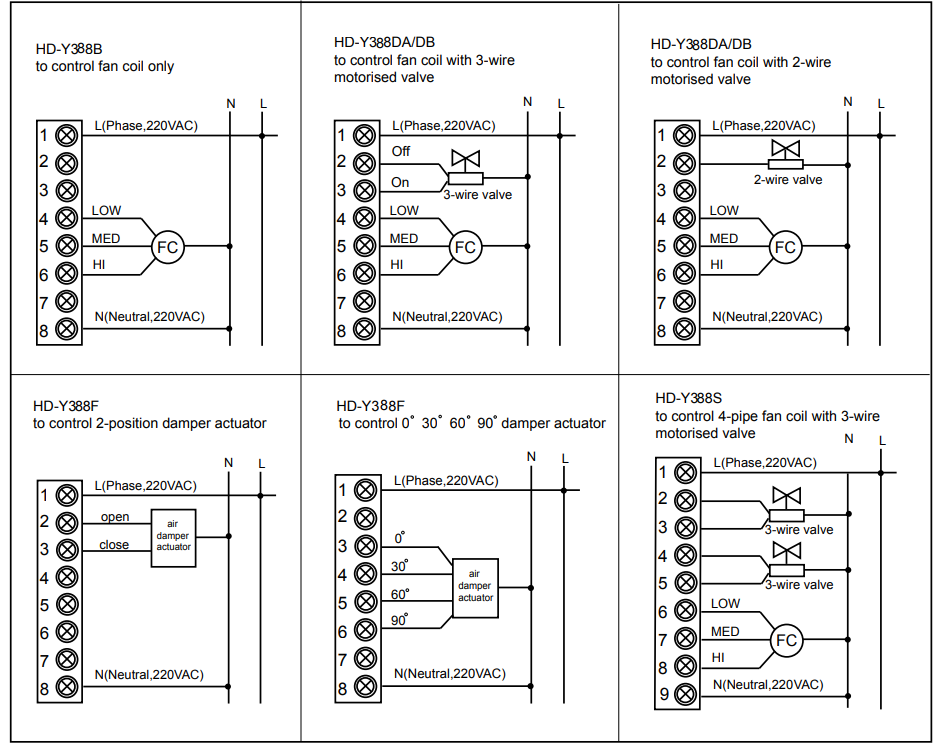
WIRING DIAGRAMS
STAND BY STATE
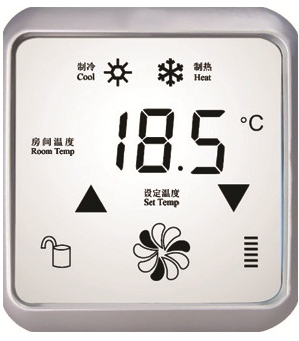
When the thermostat is first connected to power, the thermostat will be in the standby state, the LCD displays RT with the current room temperature.
TO TURN THE THERMOSTAT ON/OFF
- To turn the thermostat on, press “
 ”.
”. - To turn the thermostat off, press “ ” again.
When the thermostat is turned on, the LCD displays:
- ST(set temperature, this is the temperature the thermostat is currently controlling to)
- RT(room temperature, this is actual room temp)
- operating mode, for example:
- heating mode, with the icon“
 ”
” - cooling mode, with the icon“

- heating mode, with the icon“
- fan speed display status, for example,

TO ADJUST THE SET ROOM TEMPERATURE
- Press the up or down key to set the desired temp.
- Press any other button to accept or automatically accept after 5 seconds of inactivity.
TO ADJUST THE FAN SPEED
With each press of the “fan speed key” “ ”, the thermostat will change the speed among high, medium, low, and auto speed. When the thermostat is turned on, the default fan speed is medium speed. When in auto fan speed mode, the fan speed will be displayed on the screen along with the auto symbol.
HEATING MODE/COOLING MODE
Press or select the heating or cooling mode
KEYBOARD LOCK
- Press
 the button for 5 seconds to lock the keyboard.
 - Press the button for 5 seconds to unlock the keyboard.
HEATING MODE
In heating mode, “ ”will display on the LCD. Also in heating mode, when the fan speed is set to auto, the fan coil will run at high speed if the actual room temperature is 3 C below the set temperature; Medium speed if 2 C below the set temperature; Low speed if 1 C below the set temperature.
COOLING MODE
In cooling mode, an icon“ ”will display on the LCD. Also in cooling mode, if the fan speed is set to auto, the fan coil will run at high speed if the actual room temperature is 3 C above the set temperature; Medium speed if 2 C above the set temperature; Low speed if 1 C above the set temperature.
REFERENCE
DOWNLOAD MANUALS:
Midea HD-Y388 Programmable Room Thermostat Instruction Manual

Midea HD-Y388 Programmable Room Thermostat Instruction Manual