MI-HEAT MTS200 WiFi Room Thermostat

Operating range
The MTS200 WiFi room thermostat is intended for comfortable and economical heating operation and can control electric underfloor heating and other electric heating devices such as convectors, infrared heating panels and fan heaters with a maximum switching capacity of 16A (amps). Connection to a WLAN home network is possible via the integrated 2.4 GHz WLAN module. Operation is either via the touch display or a smartphone or tablet app. In addition to the free Meross app (for iOS and Android), a connection to the SmartHome assistants Apple HomeKit, Amazon Alexa, Google Assistant and Samsung SmartThings is possible
Safety instructions and measures
- Please read these operating instructions carefully before using the product for the first time.
- Use the product strictly as intended, as described in the operating instructions.
- To avoid electric shock, never immerse the unit in water or other liquids and make sure that no water drips on it.
- Make sure that the mains voltage in your home corresponds to the operating voltage indicated on the rating plate.
- The electrical connection must only be carried out by qualified personnel in accordance with the applicable electrical safety regulations.
- Do not use the appliance if it is obviously damaged.
- This appliance is not intended for use by persons (including children) with reduced physical, sensory or mental capabilities, or lack of experience and knowledge, unless they have been given supervision or instruction concerning use of the appliance by a person responsible for their safety.
- Children should be supervised to ensure that they do not play with the appliance.
Display and operating options
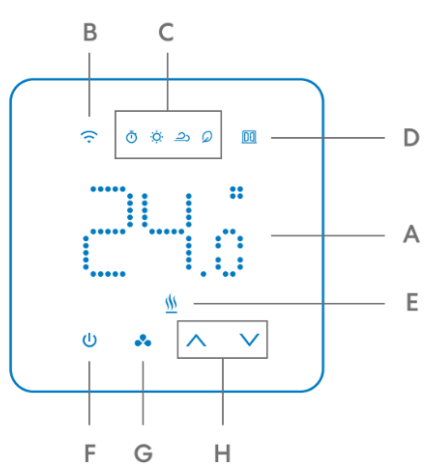
Symbols:
- Current temperature / set temperature
- WLAN symbol
- Operating mode (Auto, Heating, Cooling, Eco)
- Window open detection
- Output switched on
Buttons:
- On/Off
- Operating mode*
- Up/Down*
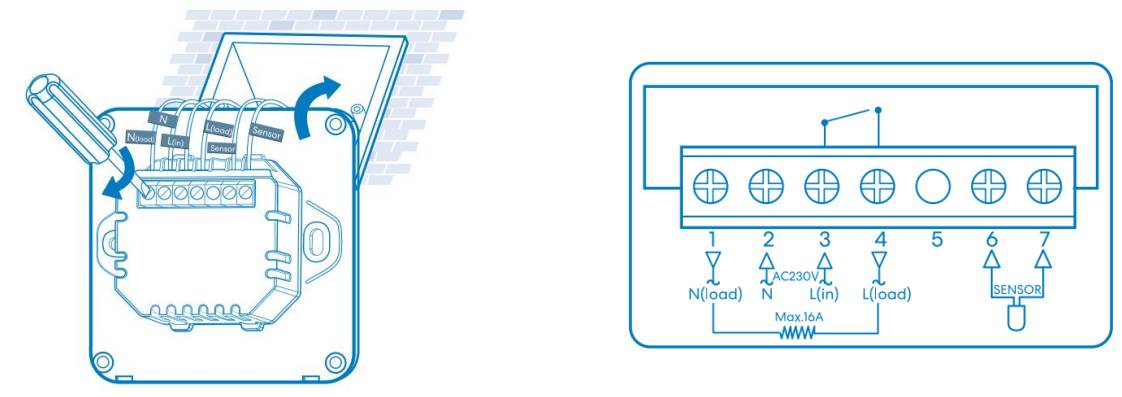
Assembly and installation diagram
Erstinbetriebnahme
- First download the free Meross app for your smartphone or tablet.
- Make sure that your smartphone or tablet is connected to your 2.4 GHz Wi-Fi network and that the MTS200 is also within range of the Wi-Fi signal.
- Log in with your Meross user account. If you do not already have a Meross user account, click Register and follow the on-screen instructions
Connect to Amazon Alexa or Google Assistant
- After successfully setting up the Meross app, you can now link it to your voice assistant.
- Amazon Alexa: In the Meross App, select the menu item Account → Amazon Alexa and allow Meross to link to Alexa.
- Google Assistant: In the Meross app, select the menu item Account → Google Assistant and follow the instructions step by step, to link to the Google account.
Technical data
Mounting type: flush-mounted Operating voltage: 230 volts / 50 Hz Max. Switching capacity: 16A / 3680 Watt Operating temperature: 0-40°C Temperature control range: 5-35°C Floor limitation range: 20-50°C IP protection class: IP20 Dimensions (WxHxD): 86x86x42mm
Disposal note
Do not dispose of this appliance in household waste! Electronic devices must be disposed of in accordance with the Waste Electrical and Electronic Equipment Directive via the local collection points for waste electronic equipment
Note on conformity
The CE mark is an over-the-counter mark that is addressed exclusively to the authorities and does not imply any assurance of properties.
Reference
Download Manual:
MI-HEAT MTS200 WiFi Room Thermostat INSTALLATION INSTRUCTIONS

MI-HEAT MTS200 WiFi Room Thermostat INSTALLATION INSTRUCTIONS