MI-HEAT Mi600RF Wireless Room Thermostat
Range of application
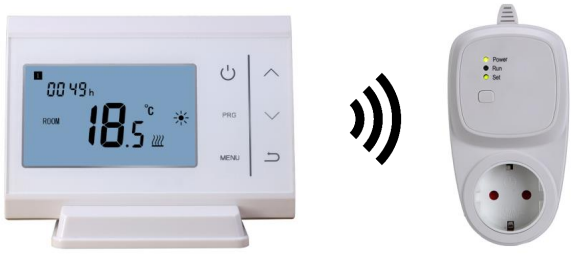
The Mi600RF is an 868 MHz wireless room thermostat set and consists of a battery-powered transmitter (Mi600S) and a mains-powered receiver (Mi600E). The wireless room thermostat set is intended for comfortable and economical heating operation and can control both centrally the boiler, electric heaters or other consumers with a maximum switching capacity of 16A / 3680W. The temperature is monitored via the integrated sensor on the wireless thermostat. The radio range is up to 60 metres. An integrated WLAN module enables control via smartphone and tablet using the free Tuya Smart app.
Properties
- Large illuminated display for optimal readability
- Quick and easy commissioning
- Intuitive operation via 6 touch keys
- 4 programmable switching times per day
- Display of set and actual temperature in °C, time and weekday
- Open window detection with adjustable temperature and time
- Frost protection function and child lock/key lock
- 868 MHz radio connection between transmitter and receiver, up to 60m range
- WLAN connection and free Tuya Smart App
- Wall bracket and table stand included
- Load capacity up to 16A / 3680 Watt
Safety notes and measures
- Please read these operating instructions carefully before using the product for the first time.
- Use the product strictly as intended, as described in the operating instructions.
- To avoid electric shock, never immerse the unit in water or other liquids and make sure that no water drips on it.
- Do not use the unit if it has obvious damage (e.g. to the casing).
- Make sure that the mains voltage in your home corresponds to the operating voltage indicated on the rating plate.
- Only operate the unit indoors and make sure that the sockets are clean and dust-free.
- Only plug the receiver into permanently installed sockets and not into extension cords or power strips.
- This appliance is not intended for use by persons (including children) with reduced physical, sensory or mental capabilities, or lack of experience and/or knowledge, unless they have been given supervision or instruction concerning use of the appliance by a person responsible for their safety.
- Children should be supervised to ensure that they do not play with the appliance.
Display and operating options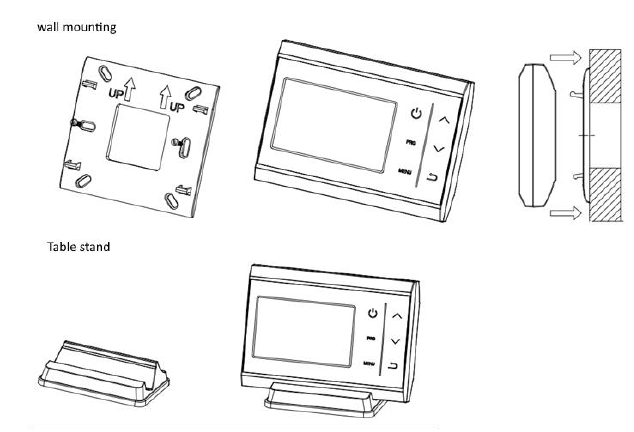
Setting the time, day and mode select button
- To set the time and day of the week, first tap any button on the Mi600S control unit to activate the display illumination.
- Then press and hold the menu button for 3 seconds until the minute display starts flashing. Use the arrow buttons to make the desired setting.
- Press the menu button again to access the hour display and select the desired value using the arrow buttons.
- Press the menu button again to set the day of the week. The numbers 1-7 stand for the weekdays (Monday 1, Tuesday 2, Wednesday 3, Thursday 4, Friday 5, Saturday 6, Sunday 7).
- Press the menu button again to switch to the holiday temperature (suitcase symbol) and enter the desired value using the arrow buttons. Confirm the entry again with the menu button.
Set weekly program
- To access the settings of the weekly program, press and hold the PRG button. The weekdays from Monday to Sunday (1-7) each have 4 switching times per day (1-4).
- You can easily adjust the switching times and temperatures to your individual needs using the arrow buttons.
- By repeatedly pressing the PRG Button, you can switch to the next input option.
- Work your way through the programming from Monday (day 1 / switching time 1) to Sunday (day 4 / switching time 4).
- As soon as all settings have been made, you can exit programming by pressing the Return button.
Example:
| Monday (1) | …. | Friday (5) | Saturday (6) | Sunday (7) | |||||||||||||
| Switching
Time |
1 | 2 | 3 | 4 | …. | 1 | 2 | 3 | 4 | 1 | 2 | 3 | 4 | 1 | 2 | 3 | 4 |
| Time | 6:30 | 8:00 | 17:00 | 22:30 | …. | 6:30 | 8:00 | 17:00 | 22:30 | 7:00 | 10:00 | 15:00 | 23:00 | 7:00 | 10:00 | 15:00 | 23:00 |
| Temperature | 21°C | 18°C | 21°C | 16°C | …. | 21°C | 18°C | 21°C | 16°C | 21°C | 19°C | 21°C | 16°C | 21°C | 19°C | 21°C | 16°C |
Set operating mode
Press the menu button briefly to switch between the operating modes Programme / Holiday / Manual. Different symbols appear on the screen according to the set operating mode. The display “PRG” stands for programme, the “suitcase” for holiday mode and in manual operating mode no additional symbol is shown in the display.
Advanced settings
To enter the menu for the advanced settings, first switch off the thermostat using the ON/OFF button. Then press and hold the Menu button and the Up arrow button (↑) simultaneously for 3 seconds. You can switch between the individual setting options using the menu button and adjust the values in each case using the arrow buttons. Exit the advanced settings by pressing the Return button.
| Function | Description | Range | Default value |
| 01 | Calibration of the temperature sensor | -8 ℃ ~8 ℃ | 0 |
| 02 | Maximum temperature setting | 5 ℃ ~35℃ | 35 ℃ |
| 03 | Minimum temperature setting | 5 ℃ ~35℃ | 5 ℃ |
| 05 | Frost protection function | ON: 5 ℃ ~15℃
OFF: — |
5 ℃ |
| 09 | Deadband
(difference between heating and cooling mode) Note: Cooling mode is not supported in this set! |
0 ℃ ~3℃ | 0 ℃ |
| 11 | Child lock/key lock
(To temporarily release the lock, the menu button is pressed until the “LOC” indicator disappears from the display). |
0: Unlock
1: Lock |
0 |
| 12 | Open window detection | 0: OFF
1: ON |
OFF |
| 13 | Detection time for open window detection | 2~30 Minutes | 15 Minutes |
| 14 | Temperature drop for open window detection (within detection time) | 2-4°C | 2 ℃ |
| 15 | Duration for open window detection (return to previous operating mode) | 10~60 Minutes | 30 Minutes |
| 17 | Reset | Select 1, then press the On/Off button until the unit restarts | 0 |
| 18,19 | Software version |
Connect transmitter and receiver
- Plug the receiver (Mi600E) into the socket and wait 10 seconds.
- Press and hold the teach-in button on the receiver for 2 seconds until the lower radio connection LED flashes.
- Switch off the thermostat (Mi600S) via the On/Off button first and then press and hold the Menu button, to access the paring setting.
- Press the Up Arrow button (↑) to send a paring command to the receiver.
- As soon as the receiver receives the command, the radio connection LED stops flashing and pairing is complete.
Notes:
- Please make sure that the receiver is switched on for more than 10 seconds before starting the pairing.
- To start paring, press and hold the learn button on the receiver for 2 seconds.
- For a factory reset, press and hold the learn button on the receiver for 8 seconds.
- To temporarily switch off the consumer, press the teach-in button briefly once. The LED display for the consumer switches off.
Child lock/key lock
If the child lock/key lock has been activated via the advanced menu (item 11), “LOC” appears in the display when the display is locked. To release the lock briefly, press and hold the menu key until the “LOC” indicator disappears from the display. If no further operation is performed, the lock is automatically reactivated after a few seconds. If the lock is to be completely deactivated again, it must be switched off again in the advanced menu (item 11) (0: Unlock).
Set up smartphone app
Download the free “Tuya Smart” app on your Android / iOS end device.
- In the app, press the plus button (+) in the upper right-hand corner and select “Add device”.
- Click on the heading “Small household appliance” and then on “Thermostat (Wi-Fi)”.
- Now press and hold the teach-in button on the Mi600E receiver for 2 seconds.
- In the app, confirm the message “The indicator light flashes quickly” and then enter your Wi-Fi password.
- Wait a moment until the connection is established. The paring process is complete.
- As the Tuya Smart App receives regular updates, changes in the procedure are not excluded. You will therefore always find the latest operating instructions on our website www.infrarot-fussboden.de
Assembly
Technical data
Transmitter
- Operating voltage: 2xAAA (2×1.5V) micro batteries
- Temperature range int. sensor: 5°C-35°C (41°F-95°F)
- Tolerance range: +/-1°C, +/-1°F
- Mounting type: surface mounting / table stand
- Dimensions: 118x86x25mm
- Protection class: IP20
Receiver
- Power supply: 230V / 50Hz
- Switching voltage: max. 230V
- Output: 230V, max. 16A / 3680W
- Dimensions: 139x68x66mm
- Protection class: IP20
Disposal note
Do not dispose of this appliance in household waste! Electronic devices must be disposed of in accordance with the Waste Electrical and Electronic Equipment Directive via the local collection points for waste electronic equipment.
Conformity notice
The CE mark is an over-the-counter mark that is addressed exclusively to the authorities and does not imply any assurance of properties.
Documentation © 2022 Mi-Heat Heizsysteme GmbH
All rights reserved. No part of this manual may be reproduced or duplicated in any form without the written consent of the publisher. It is possible that this manual contains typographical defects or printing errors. We accept no liability whatsoever for errors of a technical or printing nature and their consequences
Reference
Download Manual:
MI-HEAT Mi600RF Wireless Room Thermostat INSTALLATION INSTRUCTION

MI-HEAT Mi600RF Wireless Room Thermostat INSTALLATION INSTRUCTION