MI-HEAT C16 Programming Thermostat
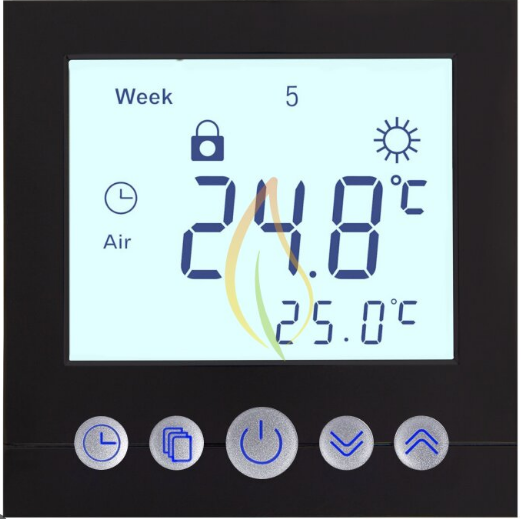
General
- Heating Thermostat with weekly programming adopts the latest single-chip computer control technology.
- It has the high reliability and powerful anti-jamming. It can realize the energy-saving and comfortable living environment
- The application is the electric heating equipment and Water heating system of electric heating or actuator control.
- According to the preset temperature, the thermostat will automatically start and stop the controlled object (valve, floor heating, the heating wall, electric heater etc).
- Multiple lime modes: 5+2/6+1/7 days, the heating equipment supports different temperature setting accordingly with 6 lime modes daily. Users are free to choose a manual mode or fully automatic mode for different purposes.
- Using flame resistance material, the healing equipment is safe and reliable. Its appearance is stylish and its mirror screen would be very easy to clean.
- Keypad locking function is designed to prevent the children from misusing it.
Technical parameters
- Power Supply: 85-250VAC 50/60 Hz (24V optional)
- Internal sensor measurement range: 0 – 40’C.
- Setting range: 5 – 35’C (factory settings: 25’C)
- Inside sensor: NTC B=3380 1 Ok @25degrees Celsius
- Display resolution: 0.1 ‘C Setting Unit: 0.5’C/step
- Themaximumswilchpower: 3A [C16.GH1]
- The maximum switch power: 16A [ C16.GH3]
- External sensor measurement range: 0 – 99’C.
- Setting range: 5 – 95’C (factory settings: 50’C)
- Extra sensor: NTC B=3380 1 Ok @25 degrees
- Celsius, length=3 meters (optional)
Operation Guide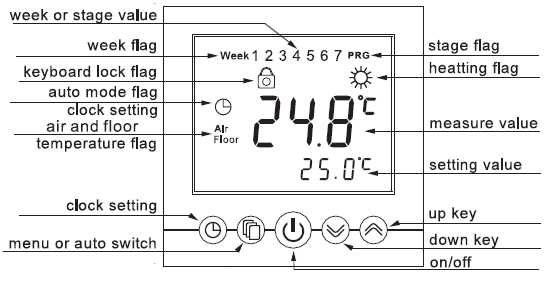
On and off 1
Press  keys you can turn on or turn off the thermostat. The display would be as the following When turned off.
Children Lock
Press key  I for 2 seconds at the same time, and the controller keypad would be locked. The screen would show
  . Press the at the same time for 2 seconds under the locked status, keypad would be unlocked.
System time
How to set the system time: Keep pressing  for 5 seconds, it will enter into the time setting. The current revisable object will flash and display. Press and choose the time you want to revise (week/hour/minute), and press
  to modify the current setting. If you need to modify the previous parameters, please press
 the key. After the modified minutes you can press to exit the system clock settings.
Temperature control mode
According to the sensor setting of the thermostat, there are three different control modes, enter the advanced function to set. Internal control (IN): Only enable built-in sensor temperature measurement, the temperature control is based on the built-in temperature sensor. It is suitable for the detection of air temperature or room temperature.
External control (OUT): Only enable the external sensor to temperature measurement, the temperature control is based on the external sensor. II is suitable for the detection of the heating body temperature.
Dual temperature control (ALL): Temperature control is based on the built-in temperature sensor and an external temperature sensor (over-temperature protection). It is suitable for the detection of room temperature and heating body whether over temperature monitoring. If the external sensor is over-temperature, the thermostat will shut down the heater.
Display three kinds of temperature
- The thermostat works for temperature control in mode !!’f and mode ALL. The main screen shows air temperature or room temperature when the AIR icon lit, the vice-monitor would set the temperature every 5 seconds and alternatively display the current time.
- When the thermostat is in OUT mode, the FLOOR icon will be Iii. The main screen will display floor temperature or external sensor location.
- When the temperature is in mode ALL, press and can detect floor temperature or external sensor location, and the FLOOR icon will be Iii. The main screen will automatically display air temperature 5 seconds later after the AIR icon Iii.
Automatic/manual switch
- Press you can choose the manual mode or automatic mode.
- Manual mode: The system will control temperature under the set value without any change.
- Automatic mode: The system would control the temperature according to the preset temperature values in different lime.
- The icon will be lit, which means that the system is running under automatic mode.
- The week and Stage icons would alternately display every 5 seconds, 1-7 is systematic reuse.
- When the screen shows WEEK, 1-7 would display the values of the week. When the screen shows STAGE, 1-6 would display the current values.
Setting the periods of time modes
- The period setting can realize the control of temperature and time under automatic mode. Once set up, the values could be saved and reused in the thermostat forever. The thermostat can’t quit when you set the periods and ii will automatically save data and exit when all setting is finished.
- The thermostat can save three kinds of schedules (5+2 / 6+1 / 7) in 6 periods; One week for a cycle.
- Each data is saved as the start lime (hours: minutes) and the temperature values of this period. The end time of the period would be saved as the start time of the next period. You can also shut down a certain period according to your needs.
- Press the for 5 seconds, you will enter into the period setting interface. The number is blinking in the WEEK area, It means the mode of your set (5+2 or 6+1 or 7).
- You can press the button to select the object you want to modify (the period start time: hours, minutes, and set temperature).
- Press to modify the value. If you want to turn off a period, please press ~ until the OFF shows.
- For example: in the 5+2 mode, the period setting sequence,
- Press the weak area will blink 1-5, Reference on the right Image
- P1 :hr>min>setting value-> P2:hr>min>setting value-> P3:hr>min>setting value-> > P6:hr>min>setting value The week area will auto change 6-7 and blink.
- P1 :hr>mln>settlng value-> P2:hr>mln>settlng value-> P3:hr>mln>settlng value-> … -> P6:hr>mln>settlng value
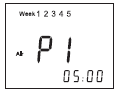
- Total setting value is 12 sets (<5>P1-P6,<2>P1-P6), you will setting 12X3 values. If you want to skip the setting Item you can press , You can use the to back to the previous setting.
- The automatic default mode of the machine factory is 5+2 mode. Time-specific data see the following table. You can modify it when you enter the programming interface:
| 5+2 mode | ID | P1 | P2 | P3 | P4 | P5 | P6 |
| Monday to Friday | Start time | 06:00 | 08:00 | 11:30 | 12:30 | 17:00 | 22:00 |
| Set value | 22’C | 15’C | 15’C | 15’C | 22’C | 15’C | |
| Saturday to Sunday | Start time | 06:00 | 08:00 | 11:30 | 12:30 | 17:00 | 22:00 |
| Set value | 22’C | 15’C | 15’C | 15’C | 22’C | 15’C |
System setting
Warning: System setting is used to set some important parameters of the professionals. Do not make any improper modifications. The item has already been debugged and tested by professionals. there is no need to reset.
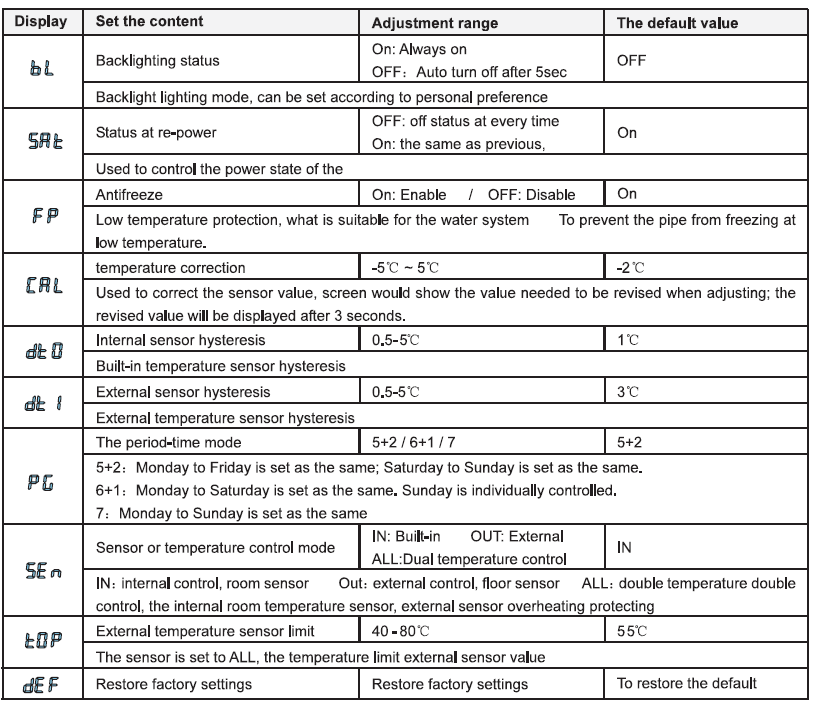
Enter the system setting: Press to switch on the thermostat when the unit is turned off. Within the next second please press Key as soon, as you will enter into the system setting. You can press to switch the system parameters. At the same time press to modify settings. Select a set value. If you do not press the , the parameters would not be modified. If you want to save the data, you must go through all the functions and then exit the system menu.
Dimension in mm
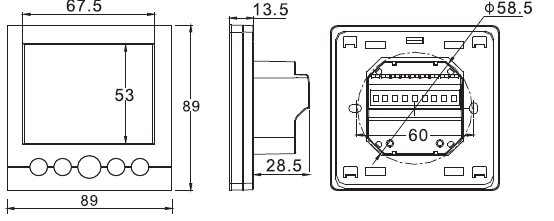
The error and solution of common —————-
- Fault phenomenon: There is no display
- Reason & solution:
- The power supply system is having problems or power is supplied incorrectly, please check if the inlet wire is normal.
- If the connection is not right, please wired up as the wiring diagram on the back side.
- The actual temperature is too low, please note the thermostat temperature range. If the temperature is lower than -5 ·c, the unit cannot normally display.
- The power supply box and the motherboard Coupling is not connected correctly, please connect them correctly.
- The power supply box and the motherboard Coupling are opposite inserted, please mind the direction
- The power supply box and the motherboard Coupling is broken, please don’t overexert. The coupling length is 6cm, the installation must be careful. If damaged, no warranty and replacement
- Fault phenomenon: Display rupture
- Reason solution: Display encounters hard objects or sudden force, no replacement and warranty
- Fault phenomenon: Display a black screen
- Reason solution: If the display surface temperature is too high, please note whether there is a heater nearby, if so please remove it.
- Fault phenomenon: Display ERO or ER1
- Reason solution:
- ERO, If the built-in sensor is abnormal, please pay attention to whether the small black dot in the temperature sensing window was damaged during the removal
- ER1, The system is set in the dual temperature control (ALL) mode, or it is not connected with an external sensor, or the external sensor is abnormal.
- Reason solution:
- Fault phenomenon: No pen on LCD
- Reason solution: Please check whether the iron plate is deformation when installation. If it is a deformation, please correct it.
- Fault phenomenon: No backlight
- Reason solution: Please check whether the backlight lamp connection is broken when removing the panel.
- Fault phenomenon: Backlight is always bright
- Reason solution: 1, The ON is set in the system menu bl 2, If it is damaged, please replace it.
- Fault phenomenon: Large deviation of measurement temperature and the actual temperature
- Reason solution: 1, The thermostat should be installed a ventilated place. It can not be installed at a place in direct sunshine or nearby the heater 2, Back connection screw is not locked, causing terminal serious fever
- Fault phenomenon: Display O degrees
- Reason solution: It is normal if the thermostat displays O degrees when the actual environment is below O degrees. The above is some of the most common errors, if you can’t solve them, please contact the local dealer!
- Reason & solution:
Installation guide
- step 1: Separate the Polycarbonate Bezel unit from the LCD screen.
- step 2: In Laka buckle, outside at the same time lift up the movement, it is necessary to separate the iron with the movement
- step 3: Fixing plate with screws to the wall to ensure that the de-energized state product back wiring diagram connected electrical lines.
- Combinations: Align the four hooks, press down on the movement, the iron plate with movement combinations, and then fasten the frame

Reference
Download Manual:
MI-HEAT C16 Programming Thermostat User Manual
