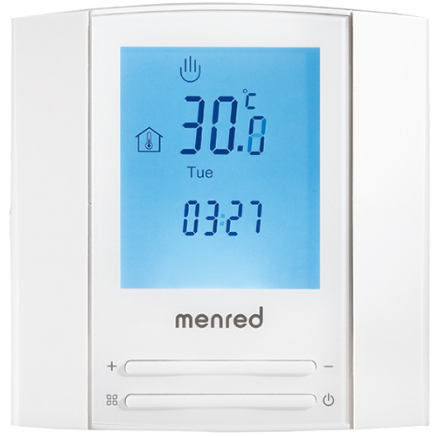
Menred Bell1 MF Wireless Room Thermostat
SPECIFICATION
- Warranty: 3 years
- Material: Anti-flammable PC
- Application: room, gas boiler
- Place of Origin: Zhejiang, China
- Model Number: Bell 1 MF
- Voltage: AC230V
- Radio frequency: 470MHz
- Ambient temperature range: -5℃-55℃
- Deviation of switch: 0.5°C~10.0°C(1℃ default)
- Design Style: Modern
- Brand Name: menred
- Type: Floor Heating Systems
- Function: Adjustable Thermostat
- Valid transmit distance: 200m without block
- Measured temperature range: -9.5℃-99.5℃
- Measure method: Built-in NTC temperature sensor
INTRODUCTION
The Menred Bell1 MF Wireless Room Thermostat is a device designed to control the temperature of a room or space in a building. It uses wireless communication to communicate with a heating or cooling system, allowing users to remotely adjust the temperature from a convenient location. This thermostat features a large LCD display that shows the current temperature and allows users to easily set the desired temperature. It also has a range of programmable features, including daily and weekly scheduling, allowing users to set the temperature to automatically adjust based on their desired schedule.
The Menred Bell1 MF Wireless Room Thermostat is designed to be easy to install and use, making it an ideal solution for homes, offices, and other spaces where temperature control is important. It is compatible with a wide range of heating and cooling systems, including gas boilers, electric heating, and underfloor heating systems. One to one wireless receiver, with individual and adjustable limit temperature control circuit, is applied to the on/off valve actuator of hydraulic heating system.
WHAT IS IN THE BOX
- Thermostat
- Screws
- External Sensor
- User Manual
Technical Data
- Voltage: AC 230V, 2 pieces size AAA batteries
- Radiofrequency: 470MHz
- Valid transmit distance: 200m without block
- Ambient temperature range: -5℃-55℃
- Measured temperature range: -9.5℃-99.5℃
- Control temperature: 5℃-90℃(5℃-35℃ default)
- Deviation of switch: 0.5°C~10.0°C(℃ default)
- Measure method: Built-in NTC temperature sensor
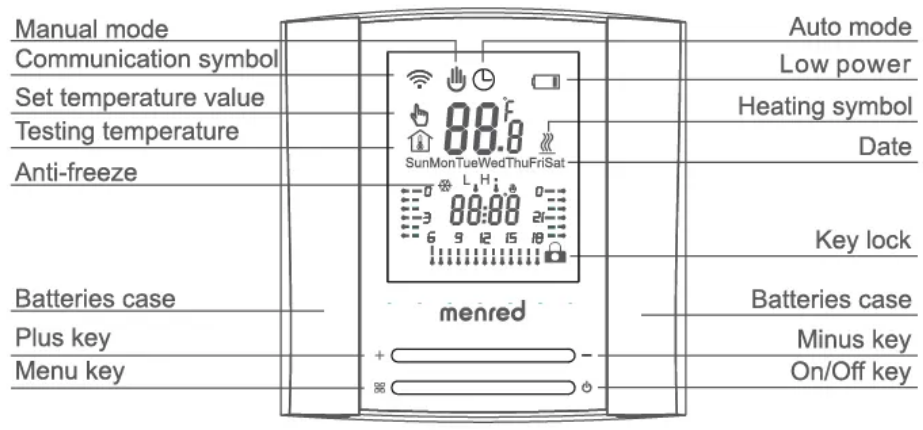
Display interface and User settings
HOW TO USE
- On/Off
- Press the key to turn on or off.
- Setting the temperature
- Key + and Key – are used to increase and decrease the value, respectively. 0.5 degrees Celsius each.
- Selecting an operation mode
- To switch between Manual and Auto mode, press key 88. The LCD display will display “&” if the controller is now in the Auto mode. If the controller is in the Temporary mode, the set temperature value will not be saved, and it will automatically return to the Auto mode after working for one hour.
- The Lock Key
- To lock the controller, hold keys + and – for 5 seconds. To release it, do the same.
- Change in time
- For 3 seconds, hold down Keys + and 88 to access the time modification interface. Under this interface, the date symbol twinkles; to change the date, hit + or -. When the hour symbol starts to glitter, press key 88 once more to change the hour by pressing + or -. Press the + or – keys to change the minute sign when it starts to twinkle.Please update the date and time each time you replace the batteries.
- Low power signal
- Change the batteries as soon as you can because the LCD screen will display “ca” and the backlight will turn off when the gadget detects low power.
- The anti-freeze feature
- When the controller is turned off and the built-in air sensor detects that the indoor room temperature is below the predetermined anti-freeze temperature, the room controller will activate the heat resource device. The factory setting for this anti-freeze feature is closed.
Decide on the factory-set program.
Please switch on again after setting the 4PRG to 1-6 in the advanced configuration. To enter the comfort or energy-saving mode, hold down the key for three seconds. To modify the temperature in the comfort or energy-saving mode, press the key 88. To access the pre-set programme interface, hold key once more. To select P1–P6, press key +– and to preview the Monday–Sunday programming, hit key a. To exit the current operating mode, press the key • or wait 20 seconds without functioning.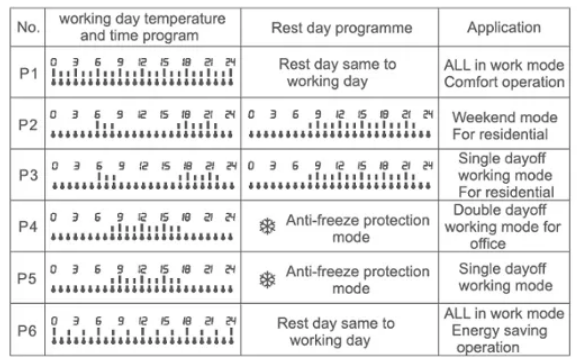
Selecting the factory-set program
Please change the 4PRG’s advanced setting to 1-6, then turn it back on. Hold key 88. To alter the temperature in the comfort or energy-saving mode, press the 88 key for 3 seconds. To set the temperature, hit the + or – key. To access the pre-set program interface, hold the key and press it again. To preview the programming from Monday through Sunday, hit key 88 after selecting P1–P6 using key + –. Press the key for 20 seconds without working to end the current operating mode.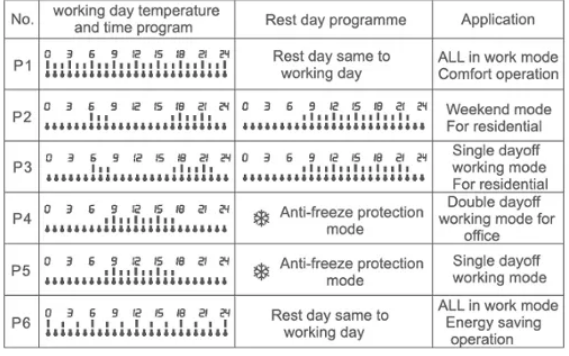
Self-program
If the factory settings (P1..P6) program wasn’t able to meet the user’s needs, you might adjust it in the PEt mode to your preferences.
Operations
- Select the PEt by going to the 5PrG under the advanced settings, then restart the controller.
- After turning on the controller, hold key 88 to access the comfort or energy-saving interface, push key 88 to adjust the comfort or energy-saving temperature, and press + or – to select the temperature setting.
- To reach the PEt self-program state while the temperature is in the comfort or energy-saving mode, hold key 88 for three seconds.
- To select a date from Monday to Sunday, press key 88.
- Press key + to see the programming time for the current date and key – to adjust the temperature for comfort or energy efficiency.
- To set the current day to be anti-freeze, hold the key down for three seconds. To remove the whole day’s anti-freeze, hold the key down for three seconds, after which the day will be used for an event program.
- Press key A to enter the program for the following day, then repeat to finish the week’s programming..
Advanced mode
Authorized installers should use these settings. Typically, all of the settings are accomplished on the initial installation. When the switch is on, press keys + and -88 simultaneously to access advanced settings. For a menu changeover, press the 88 key. To quit the current operating mode, press the key O or wait 20 seconds if nothing happens.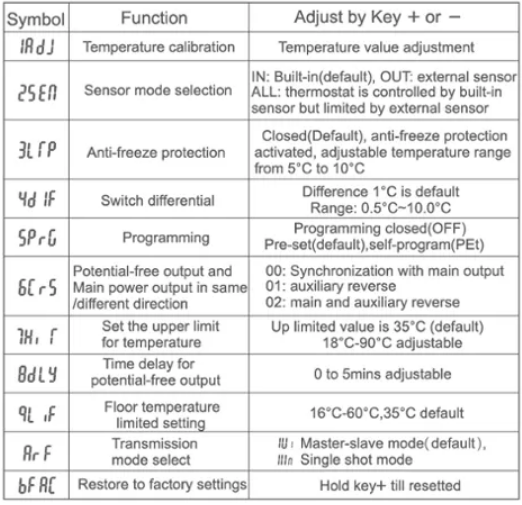
Program numbers and factory pre-setting specifications
- P1: The seven days from Monday through Sunday are all working days. Comfortable temperature is available around-the-clock, as opposed to places like a mall, motel, equipment room, and other places that require it constantly. In comparison to the P2…P6, the P1 requires more power to operate. P1 is the default set; if the controller applies, please change to a better program.
- P2: Use in residential areas that can provide for comfort and energy efficiency. Workdays are Monday through Friday, and leisure days are Saturday and Sunday. This mode has two days off.
- P3: Use in residential areas that can provide for comfort and energy efficiency. Workdays are Monday through Saturday, and Sunday is a day off. The single-day off mode is this.
- P4: Apply to the business office; the working days are Monday through Friday, and the working daytime temperature is pleasant. It is a double day off on Saturday and Sunday, and during the weekend it will go into anti-freeze protection mode.
- P5: Apply to the business office; the working days are Monday through Saturday, and the working daytime temperature is pleasant. On Sundays, when there is just one day off, the system will go into anti-freeze protection mode.
- P6: Like P1, which is applicable to locations with low comfort requirements, this working mode conserves energy.
Program numbers and factory pre-setting specifications
- P1: The seven days from Monday through Sunday are all working days. Comfortable temperature is available around-the-clock, as opposed to places like a mall, motel, equipment room, and other places that require it constantly. In comparison to the P2…P6, the P1 requires more power to operate. P1 is the default set; if the controller applies, please change to a better program.
- P2: Use in residential areas that can provide for comfort and energy efficiency. Workdays are Monday through Friday, and leisure days are Saturday and Sunday. This mode has two days off.
- P3: Use in residential areas that can provide for comfort and energy efficiency. Workdays are Monday through Saturday, and Sunday is a day off. The single-day off mode is this.
- P4: Apply to the business office; the working days are Monday through Friday, and the working daytime temperature is pleasant. It is a double day off on Saturday and Sunday, and during the weekend it will go into anti-freeze protection mode.
- P5: Apply to the business office; the working days are Monday through Saturday, and the working daytime temperature is pleasant. On Sundays, when there is just one day off, the system will go into anti-freeze protection mode.
- P6: Like P1, which is applicable to locations with low comfort requirements, this working mode conserves energy.
INSTALLATION DIAGRAM
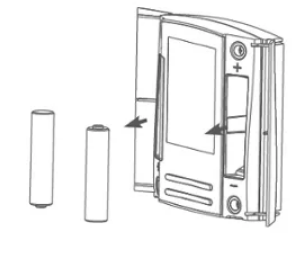
- Open the batteries cover and take out the batteries
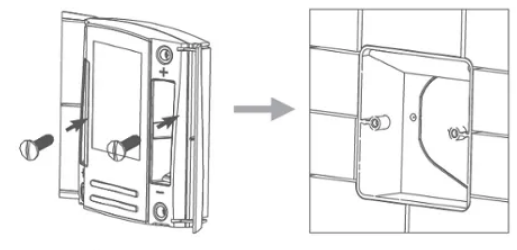
- Fixed thermostat by two pieces of screws
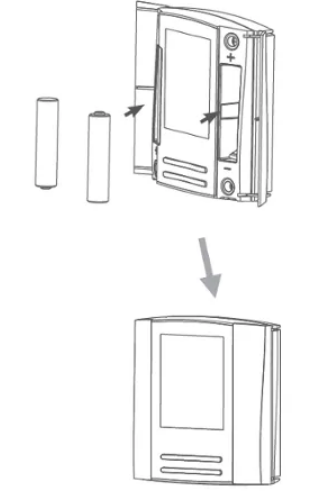
- After fixed the thermostat,put the batteries back then close the cover
Application
Bell1 MF can control 1 piece of Bell1 MN or multi Bell1 MN, when in the single external control that only can control one Bell1 MN.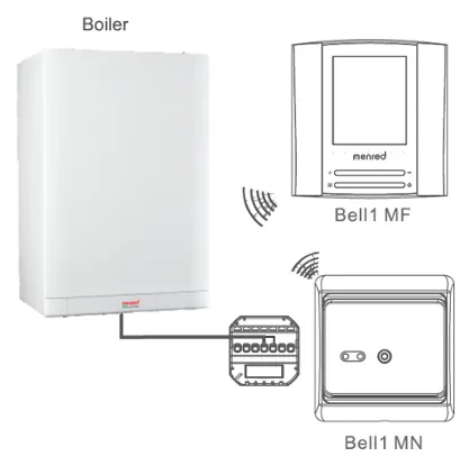
Working condition description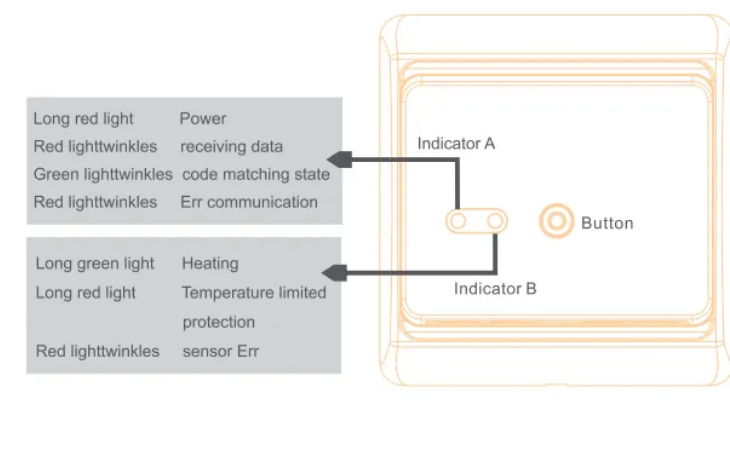
FAQS
Q: What is the Menred Bell1 MF Wireless Room Thermostat?
A: The Menred Bell1 MF Wireless Room Thermostat is a programmable thermostat that allows you to control your heating system wirelessly. It can be used with a range of heating systems, including gas boilers, electric heating, and underfloor heating.
Q: How does the Menred Bell1 MF Wireless Room Thermostat work?
A: The Menred Bell1 MF Wireless Room Thermostat uses wireless communication to control your heating system. You can set the temperature and programming options using the thermostat’s interface, and it will send signals wirelessly to your heating system to adjust the temperature accordingly.
Q: What are the benefits of using the Menred Bell1 MF Wireless Room Thermostat?
The thermostat allows you to set a schedule for your heating system, so you can avoid heating your home unnecessarily. This can lead to significant energy savings and a reduction in your energy bills. The wireless design of the thermostat means that you can control your heating system from anywhere in your home. The thermostat allows you to set the temperature to your desired level, ensuring that your home is always at a comfortable temperature.
Q: Is the Menred Bell1 MF Wireless Room Thermostat easy to install?
A: Yes, the Menred Bell1 MF Wireless Room Thermostat is designed to be easy to install. It can be installed by a qualified electrician or heating engineer in a matter of minutes.
Q: Can I control the Menred Bell1 MF Wireless Room Thermostat remotely?
A: Yes, you can control the Menred Bell1 MF Wireless Room Thermostat remotely using the Menred Smart app. The app allows you to adjust the temperature and programming options from anywhere using your smartphone or tablet.
Q: Is the Menred Bell1 MF Wireless Room Thermostat compatible with Amazon Alexa or Google Assistant?
A: Yes, the Menred Bell1 MF Wireless Room Thermostat is compatible with Amazon Alexa and Google Assistant. You can control the thermostat using voice commands through a compatible smart speaker or device.
Does the Menred Bell1 MF Heating Thermostat have a vacation mode?
A: To save energy while you are away, you can choose a lower temperature on the Menred Bell1 MF Heating Thermostat’s vacation mode.
Q: The Menred Bell1 MF Heating Thermostat has a touchscreen display, right?
The Menred Bell1 MF Heating Thermostat doesn’t have a touchscreen. You may control it using the Jiahong app on your smartphone or tablet, which has a brilliant LCD display.
Q: Does the Menred Bell1 MF Heating Thermostat work with voice assistants like Amazon Alexa or Google Assistant?
A: Your Menred Bell1 MF Heating Thermostat can be controlled by voice commands because it works with Google Assistant and Amazon Alexa.
Q: How accurate are heating thermostats?
A: If your thermostat and thermometer both indicate the same temperature, your thermostat’s accuracy and efficiency are satisfactory.
Why isn’t my Menred Bell1 MF heating thermostat working?
A: If your thermostat isn’t operating, try changing the batteries, turning it on, ensuring that it’s in the proper mode, and inspecting the power source and airflow.
How can I tell if my heating Menred Bell1 MF thermostat is working?
A quiet clicking sound may possibly be heard when air passes through the ducting. You may feel a vent to check the temperature of the air. If nothing happens after making the changes for a minute or two, your thermostat may need to be replaced.