
Meitay-tec ERT100-LCD-IR Non-Programmable Thermostat
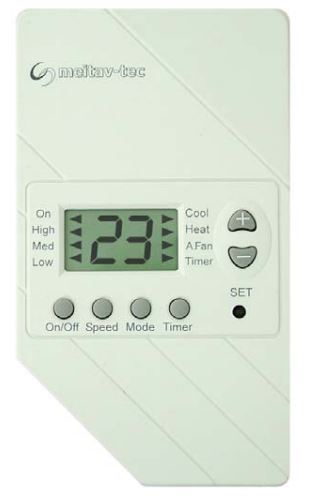
Control Panel
ON\OFF
Press the On/Off button to activate/deactivate the thermostat.
Fan Speeds
Press the Speed button to switch between fan speeds:
- Low speed
- Medium speed
- High speed
- Auto speed
Modes
Press the Mode button to switch between modes:
- Cool
- Cool & Auto fan1
- Heat
- Heat & Auto fan1
- Auto change-over2
- Auto change-over & Auto fan1
- Fan only
X1 – Auto Fan – The fan will stop when ther is no demand for cooling or heating.
X2 – Auto change-over – The thermostat will automatically switch between cooling and heating according to the current temperature and the requested temperature.
Adjust Temperature
Use the SET buttons (“+” or “-“) to change the requested temperature.
Timer
Use the timer to turn the thermostat On or Off (opposite to current status) after a set number of hours (0-12 Hours).
- Press the Timer button – an arrow will apear next to the word “Timer”.
- Use the SET buttons (“+” or “-“) to adjust the number of hours.
- Press the Timer button again to return to normal display mode.
The timer function will be cancelled in case of power failiure.
Remote control unit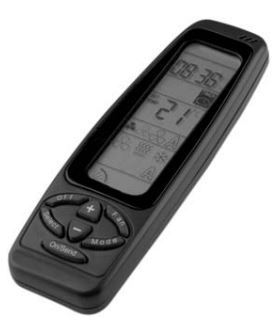 General
- Each time you press the ON/SEND button all the information on the display is sent to the panel.
- Point the remote control towards the panel to send the information.
- The red led will blink to indicate that the information was recieved.
- In order to turn the unit off, simply press the OFF button. All the information on the remote control display will be sent to the panel and the unit will turn off.
- If no button is pressed for 10 seconds the display will return to normal display mode.
- The Timer program will repeat itself until cancellation (timer OFF)
Operating Manual
On/Send
Activate the air conditioner and/or updating information.
Mode
- Press the MODE button to switch between: COOL, HEAT, AUTO CHANGE and FAN ONLY.
- Press the ON/SEND button to send information to the thermostat.
Fan
- Press the FAN button to switch between: High speed, Medium speed, Low speed and AUTO FAN (A).
- Press the ON/SEND button to send information to the thermostat.
Set Temperature
- Adjust the set temperature using the “+” and “-“ buttons.
- Press the ON/SEND button to send the information to the thermostat.
Real time clock and day
IMPORTANT: If no button is pressed for 10 seconds the display will return to normal display mode.
- Press the SELECT button – CLOCK SET will flash.
- Adjust the hours using the “+” and “-“ buttons.
- Press the SELECT button again – the minutes will flash.
- Adjust the minutes using the “+” and “-“ buttons.
- Press the SELECT button again to finish.
- Press the ON/SEND button to send the information to the thermostat.
Timer program:
IMPORTANT: If no button is pressed for 10 seconds the display will return to normal display mode.
Start time:
- Press the SELECT button (twice) – PROGRAM & START (flashing) will appear in display.
- Adjust the hours using the “+” and “-“ buttons.
- Press the SELECT button again – the minutes will flash.
- Adjust the minutes using the “+” and “-“ buttons
Stop time:
- Press the SELECT button again – PROGRAM & STOP (flashing) will appear on display.
- Adjust the hours using the “+” and “-“ buttons.
- Press the SELECT button again – the minutes will flash.
- Adjust the minutes using the “+” and “-“ buttons.
Timer ON or OFF
- Press the SELECT again – the timer symbol will flash
- Select between TIMER ON (Black icon) and TIMER OFF (outlined icon) using the “+” and “-“ buttons.
Meitav-tec Ltd. (Contel group), 6 Sapir street, New Industrial Zone P.O.B 5221 Rishon-Lezion, 75150,
Israel Tel: +972-3-9626462,
Fax: +972-3-9626620,
Web: www.meitavtec.com
E-mail: [email protected]
REFERENCE:
DOWNLOAD MANUALS:
Meitay-tec ERT100-LCD-IR Non-Programmable Thermostat Operating Instructions
OTHER MANUALS:
Meitay-tec ERT100-LCD-IR Non-Programmable Thermostat Product Specification Guide
Meitay-tec ERT100-LCD-IR Non-Programmable Thermostat Operating Instructions